Become a Instructor

Blogs

logotype
Menu
  • Courses
    • Salesforce Admin
    • Salesforce Developer
    • Advance Java Training
    • Buisness Analyst
    • Digital Marketing
    • Oracle DBA
    • QA Testing Course
    • SQL server Training
  • Register
+1-571 989 9489
logotype
  • Courses
    • Salesforce Admin
    • Salesforce Developer
    • Advance Java Training
    • Buisness Analyst
    • Digital Marketing
    • Oracle DBA
    • QA Testing Course
    • SQL server Training
  • Register
  • +1-571 989 9489

Become a Instructor

Blogs

logotype
Menu
  • Courses
    • Salesforce Admin
    • Salesforce Developer
    • Advance Java Training
    • Buisness Analyst
    • Digital Marketing
    • Oracle DBA
    • QA Testing Course
    • SQL server Training
  • Register
+1-571 989 9489
  • Courses
    • Salesforce Admin
    • Salesforce Developer
    • Advance Java Training
    • Buisness Analyst
    • Digital Marketing
    • Oracle DBA
    • QA Testing Course
    • SQL server Training
  • Register
  • +1-571 989 9489
logotype
logotype
  • Courses
    • Salesforce Admin
    • Salesforce Developer
    • Advance Java Training
    • Buisness Analyst
    • Digital Marketing
    • Oracle DBA
    • QA Testing Course
    • SQL server Training
  • Register
  • +1-571 989 9489
salesforce consultant Tag
Home Posts Tagged "salesforce consultant"

Tag: salesforce consultant

Artificial Intelligenceinformation technologyAvatar of adminadmin0 Comments
Share article:TwitterFacebookLinkedin
152 Views
1 Like

Getting Started with Agentforce Models AI API: A Complete Beginner’s Guide

Artificial intelligence is one of the major trends of business in recent times, and Salesforce is the company to follow the change with its Agentforce ecosystem. For new users, Agentforce Models AI API, is easy to use. Its aim is to help you create intelligent automation and conversational capabilities right inside Salesforce. 

This beginner’s guide is just what you need if you want to learn about the different features of the Salesforce Agentforce or are just curious about how to start building a Salesforce agent. Let’s start!

What Is Agentforce Models AI API? 

Agentforce Models AI API is Salesforce’s specially designed interface that enables developers and administrators to give a prompt to AI models and get back well-organised, CRM-aware answers. In contrast to standard AI platforms, Agentforce models are developed particularly to understand Salesforce objects, workflows, and terminologies. 

Since it is a part of the automated Salesforce tool, you can rest assured that there won’t be any external data transfers or that you’ll have to deal with compliance issues. Everything is accomplished within a secure and regulated environment that is perfect for companies that are looking for a safe, yet efficient way, to adopt AI. 

For beginners, the benefit couldn’t be more obvious: the API offers a straightforward method through which one can inject intelligence into the workflows without the need for profound technical knowledge.

Why Agentforce Matters for Beginners 

Using AI for the first time is usually intimidating. However, Agentforce makes the process easy. The API is built in such a way that it is user-friendly; hence, even a person with a very basic knowledge of how REST calls work can make his/her first request. In case you have utilised tools similar to Postman or you have written a simple Apex callout, you are good to go with your trial.

Another great benefit is that it is able to grasp the CRM context. The tasks of summarising a case, rewriting a follow-up email, and recommending next steps for a lead are examples of situations where the AI can figure out how to do these within the Salesforce framework. This, in turn, makes the result better and the prompt shorter. 

Moreover, the platform will not outgrow you. You may initiate a small project, say, by implementing automated email drafting and then proceed to more complicated features such as conversation memory, CRM-integrated reasoning, and fully autonomous Salesforce agents.

How the API Works 

The operation of the Agentforce Models AI API is remarkably simple. You draft a prompt (working, questions, a piece of writing) and send it to the API endpoint. The model goes through your input and comes up with a detailed answer. It is up to you to decide the manner and the place where you want to implement that answer in Salesforce. 

This answer can be made visible in a Flow, be the input for a Lightning Web Component, get stored in a field, or be further processed by Apex. Due to the fact that Salesforce is compatible with several integration methods, you have the freedom to customise the experience in accordance with your organisation’s requirements. 

Many beginners are impressed with how fast they can get what they have been aiming for. An extremely simple command, such as “Summarise this customer email and suggest an action plan”, serves as proof of the API’s power even in the first few trials.

Setting Up Agentforce for the First Time 

  • To start setting up your Agentforce, first of all, make sure that AI Cloud or Agentforce features are turned on in your org. 
  • You must be provided with the right licences and allowed the correct permissions to be able to access the models. 
  • Afterwards, the creation of a connected app with OAuth enabled is your next step. This is what will allow the authentication needed to make API calls in a safe way. 
  • To boost the convenience of the whole process, Salesforce provides activation and authentication guided wizards that even people with minimal technical background can easily follow. 
  • The step after the configuration is the selection of the model to be used. 
  • Normally, Salesforce offers a variety of model choices – from general to CRM specialised ones – thus, you can decide which one suits your work the best. 
  • When you and everything are set, you can approach your very first API call. 

The time when you get your initial AI-generated output is the time when the power of Agentforce becomes evident.

Final Thoughts 

The Agentforce Models AI API is among the easiest to use and access tools in the world of Salesforce. This tool gives beginner-level users the liberty to learn and generate low-complexity and value-driven automations. Thanks to its security, CRM integration, and great flexibility, you can gradually shift from a very simple, prompt-based interactions to highly complex AI-driven workflows. 

As organisations increasingly adopt Salesforce Agentforce, having the ability to build and leverage AI-powered Salesforce agents will become a critical skill. With this API, you have everything you need to begin your journey confidently and creatively.
READ MORE
TECHArtificial IntelligenceAvatar of adminadmin0 Comments
Share article:TwitterFacebookLinkedin
771 Views
9 Likes

The Future of Eco-Friendly Tech: Inside Salesforce AI Energy Score

Salesforce came up with the AI Energy Source after understanding the lack of transparency about the environmental impact of AI models. It can help measure and compare the energy efficiency of different AI models, creating a standardized, transparent, and public way for AI developers and users to understand the energy consumption of various AI tasks. In this innovation, Hugging Face, Cohere, and Carnegie Mellon University (CMU) all came together to join Salesforce in order to promote and make AI practices more sustainable. The AI Energy Score debuted on 10 February 2025 at the AI Action Summit in the presence of 100+ country leaders worldwide. Since its release, the Salesforce developer training, certification, and jobs have increased rapidly. Both IT and non-IT talents understand the value and innovation level of this benchmarking tool.

If you are interested in learning more, this blog can help you explore the features and benefits that have a revolutionary impact globally. Let’s get started!

Key Features of the AI Energy Score:

Scoring has played an important role in comparing and choosing the best for oneself, and the AI Energy Score can help you with the same.

Standardized Energy Ratings

Just like customers get ratings for appliances with the Energy Star rating system, they can choose a product accordingly. Similarly, this AI Energy score tool will use the well-established universal framework and score all the AI models as on their energy efficiency.

Public Leaderboard

Not only for the text content, this ranking system tool conducts an overall analysis and shares the efficiency scores of various AI models across different tasks, including text generation, image generation, and summarization.

Benchmarking Portal

Not only for the organizations or consumers, this tool can even benefit the AI developers, as they can submit their models here, and AI Energy Score will evaluate them and choose 150+ AI models to add on the leaderboard ranking as per their efficiency.

Recognizable Energy Labels

The Salesforce AI Energy Score tool will rate all the AI tools between 1 to 5 stars. This rating system will help users make a well-informed decision with the help of the right stats. A tool for AI developers to create and share standardized energy efficiency labels. 

Benefits of the AI Energy Score

This revolutionary AI Energy Score tool will change the way the world works and provide a lot of advantages to the users, as below:

Transparency and Sustainability

It will increase the importance of prioritizing energy efficiency for the AI developers by promoting transparency in AI model development by making energy consumption data publicly available.

Incentivized Development

This public leaderboard and rating system will encourage the AI developers to create more energy-efficient models. They will be incentivized by making their system a more sustainable AI ecosystem.

Strategic Business Advantage

Various organizations can take advantage of AI Energy Score by optimizing AI operations, reducing costs, and improving sustainability performance.

Driving Market Preference

The Salesforce AI Energy Score tool is driving market preferences towards more efficient models because of its enhanced transparency. Ultimately, it is leading to a wider adoption of sustainable AI practices.

Example:

Salesforce’s own models, such as SFR-Embedding, xLAM, and SF-TextBase, are included in the AI Energy Score’s public leaderboard. This allows users to compare the energy efficiency of these models with others in the same category.

Final Thoughts

The tech revolution has another great innovation that can change a lot of things in the market. Individuals taking Salesforce developer online training will benefit as they will get in-depth knowledge and great experience during their sessions. Even organizations looking to add some or utilize a more efficient AI tool can get more guidance with this benchmarking system. AI Energy tool is another creation of Salesforce, that will increase the demand of this system and talents both in the market. So, keep learning and evolving with Salesforce!

READ MORE
TECHAvatar of adminadmin0 Comments
Share article:TwitterFacebookLinkedin
1472 Views
38 Likes

How Can You Freeze Or Deactivate A User On Salesforce?

For many decades, organizations have relied on the powerful Salesforce CRM platform to fulfill all their sales, marketing, and customer service needs. With growing organizations, the need for security management and seamless Salesforce instance efficiency becomes essential for better user management. That’s why the online Salesforce admin training focuses on teaching various aspects of user management including how to freeze or deactivate users when needed. You must learn this aspect to complete your certification and work for the organization, fulfilling its requirements.

It is an easy process to freeze or deactivate a user on the Salesforce platform. Read this article until the end to understand the best practices for managing users effectively.

Here are 6 steps on How Can You Freeze Or Deactivate A User On Salesforce?

This process can help you deactivate the user profiles on the Salesforce platform without hassle.

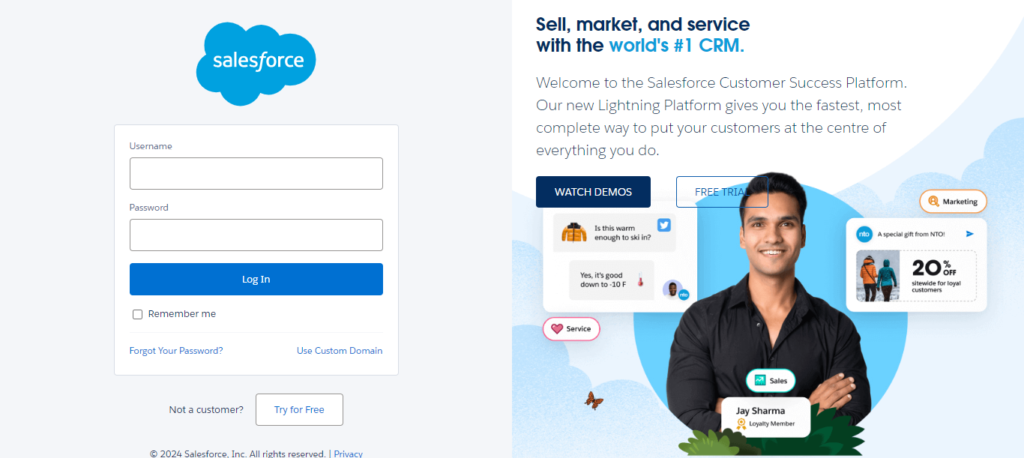
Step1: Login to Your Organizational Salesforce Platform

Access the administration account on the Salesforce platform to manage users.

image 2024 11 05T09 19 35 349Z

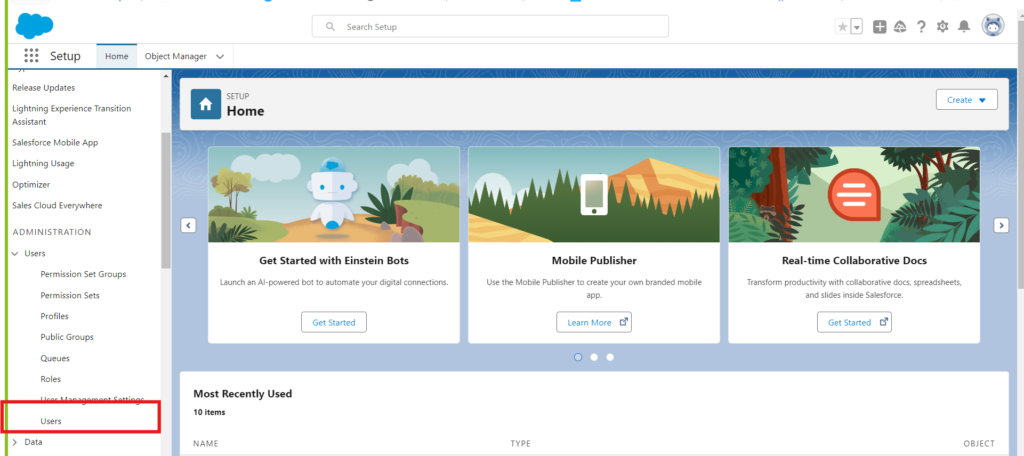
Step 2: Go setup -> Search-> Users

Click on the Gear icon, at the top-right corner of the page, to access the SetUp options. Then search users in the above search bar to access the complete list of users added to the system.

search user

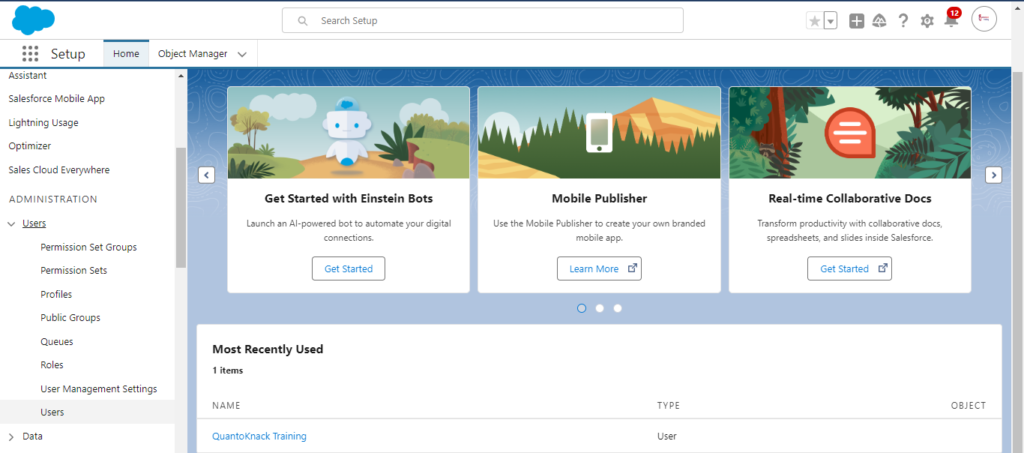
Step 3: Select the User You Want To Deactivate

Now, choose the user you want to freeze or deactivate from the system from the list of user names shown on the screen.

Select the User You Want To Deactivate

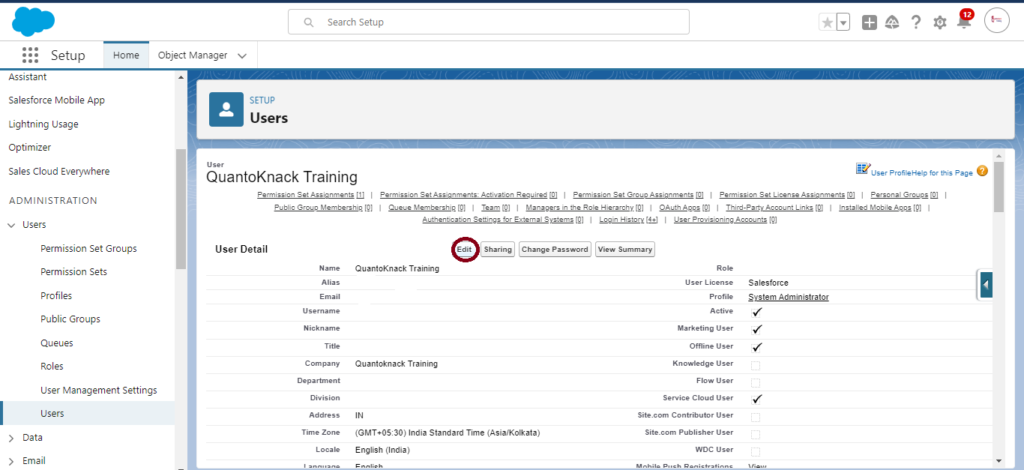
Step 4: Check the User Details

Click on the user name to access the complete information, related to all the roles and accessibilities provided within the system. You have to click the edit button to make any changes required in the user roles.

Check the User Details

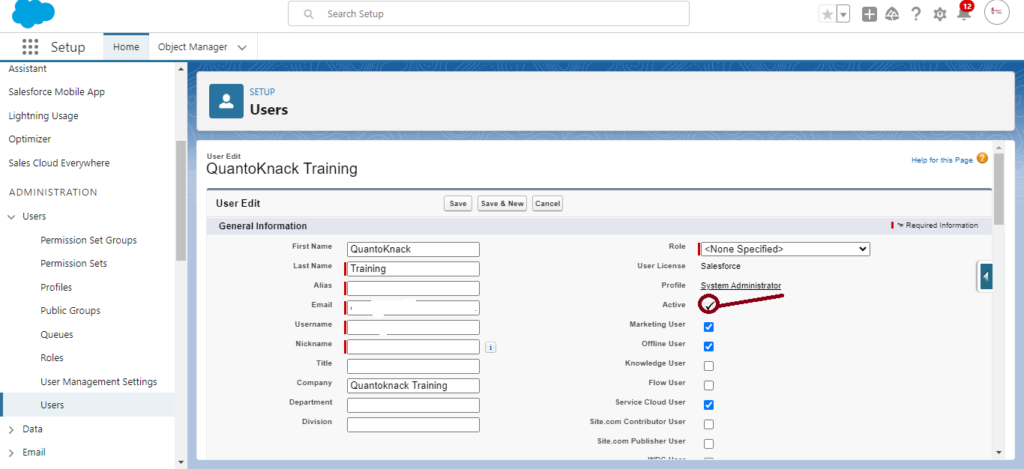
Step 5: Deactivate the User

The edition section highlights various features and functionalities accessed or restricted for the user with the check box next to every aspect. So, now you have to uncheck the box next to the Active option to temporarily deactivate the user account until the admin reactivates it again.

Deactivate the User

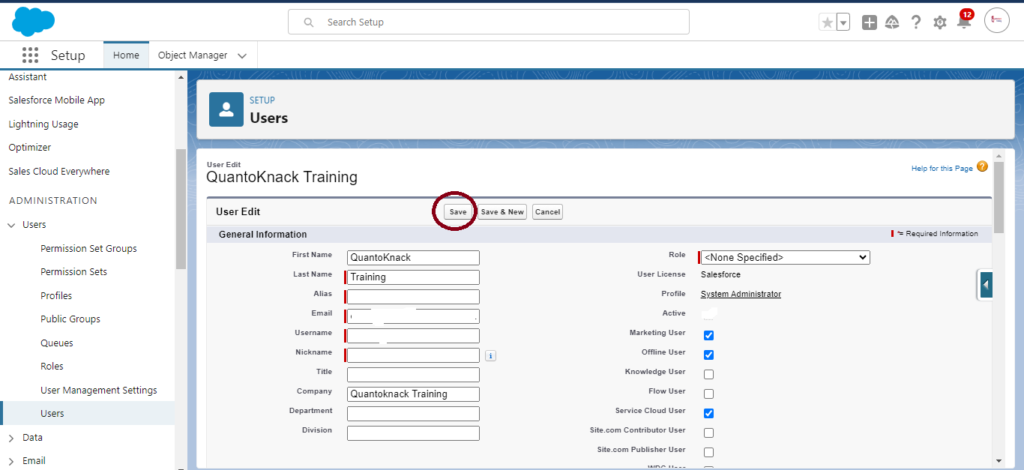
Step: 6 After Deactivating the User, Save It!

All these changes will be applicable only after you save it. So, don’t forget to click save.

After Deactivating the User Save It

Important Notes:

  • Deactivating the user account will restrict their access to the Salesforce platform. They will no longer be able to use it. However, it doesn’t affect the historical data and records of the user. The user data remains intact!
  • Salesforce maintains data integrity for every user. Hence, it restricts the direct deletion of any user account on the platform, instead, you can just deactivate or freeze that particular account you want.
  • This user license can be utilized for a new employee or member by deactivating it.
  • You must use various allocated Salesforce licenses efficiently. Review them regularly and deactivate the unused users promptly.

What to Do If You Can’t Deactivate a User

If you encounter issues deactivating a user, consider these points:

  • Check Role Assignments: Ensure that the user is not the owner of any active roles, which would prevent deactivation.
  • Active Processes: If the user is tied to active workflow rules, approval processes, or scheduled jobs, update these dependencies before proceeding.

How to Unfreeze a User

  • Simply navigate to the user’s detail page and click the Unfreeze button to restore their access.

Conclusion

User account management is one of the most vital aspects of the Salesforce environment for security maintenance and efficiency. So, it is important to learn to enable and disable a user account. The online Salesforce admin training programs proper class on user management to teach students when and how to freeze or deactivate a user to secure data and run the system smoothly. Our professionals suggest following the best practices for user management and disruption avoidance in the organization’s workflow and procedures.

Connect with our online Salesforce admin training support team for any questions or further assistance.

Frequently Asked Questions (FAQs)

Can I delete a user in Salesforce?

No, deleting a user account in Salesforce is not possible. It only allows freezing or deactivating the accounts to maintain data integrity.

What happens to the data of a deactivated user account?

Salesforce saves data, records, and activities of every user, even after the deactivation. It also allows ownership transfer of such records to other users actively working on the system.

Is it possible to reactivate a deactivated user?

Indeed, you can reactivate a user anytime that has been deactivated previously on the Salesforce platform. Just enable the user by clicking the checkbox next to Active on the user detail page.

READ MORE
TECHAvatar of adminadmin0 Comments
Share article:TwitterFacebookLinkedin
597 Views
11 Likes

Salesforce Consultant – Roles & Responsibilities – How to Get Certified?

The various Salesforce consultant roles and responsibilities have increased the demand in the market. From business analysis to handling the technical team, they get involved in all the steps of the process. An excellent and skillful Salesforce consultant attains business analysis, project management, and change management skills as you have to guide people in their organizations to solve critical problems during the process.

You need to boost your knowledge of pain points handling and opportunities for technology to support your organization better. You will be in a trusted position of authority as you have the power to transform the way a team works and design and/or implement solutions to enhance customer service and business performance.

Salesforce Consultant – Roles & Responsibilities

If you are curious about what Salesforce Consultants do, you are at the right place to get the answer to your question. Here are the core responsibilities that every Salesforce Consultant has to fulfill.

  1. Managing the Client Relationship

For a Salesforce Consultant, it is essential to handle the client from the start when they come with their requirement to the delivery of their system. Their role is to collect the requirements and understand the client’s perspective better to ensure that every step taken during the process of implementation is correct. Also, you can recommend them or share insight to optimize the Salesforce at its full.

  1. Create and Manage Project Plans

A Salesforce consultant takes the requirements from the client, so it is their responsibility to get involved in creating and managing the entire plan for that client. This way, you can save your Salesforce developer, architect, and other stakeholders involved in the team from making any mistakes or forgetting anything from the requirement list.

  1. Mapping out Business Processes 

You have to keep a knack for the various processes that a development team takes to complete a project successfully. A Salesforce consultant fixes a proper method that everyone in the team will follow to keep track of all the aspects and ensure fluent success. This way, you can get the knowledge of the task where anyone is stuck or facing any issue in resolving it.

  1. Supporting People Through Change

Getting changes in any technical product is evident. However, your role as a Salesforce consultant is to achieve the smooth adoption of new processes and systems. Address your client’s concerns and communicate the changes effectively with them. Also, you should recommend that they open an ongoing support window for the users while they transition to new systems and processes.

  1. Gathering Functional (Business) Requirements 

Salesforce consultants elicit business requirements in a proper meeting or workshop with the client, so don’t forget to document detailed and precise functional requirements. Evaluate all the requirements shared by the client and align them with their expectations and business needs.

  1. Managing a Team of Technical Staff

As a Salesforce consultant, you must manage the entire work on the same projects, from Salesforce developers to architects and admin. You have to understand their skills and knowledge in order to delegate the tasks and responsibilities of different chunks of projects to them. Throughout the process, you have to track their performance and share feedback from time to time in order to support them in their professional growth.

  1. Technical Product Configuration

A salesforce consultant has to configure the products and features to meet the requirements of your client. These system configurations include custom objects, workflows, and validation rules. Ensure integrity and accuracy, ignoring the data migration from legacy systems to Salesforce. Also, ensure the system is integrated with other systems and applications if needed.

  1. User Testing and Training

As a Salesforce consultant, I create extensive test plans that thoroughly test all the aspects of the system. Validate the system against business requirements by fostering user acceptance testing (UAT). You have to create ideas to educate users on how to effectively utilize Salesforce and also offer ongoing support and troubleshooting assistance post-implementation.

  1. Prepare a Proper Documentation

A Salesforce consultant creates proper documentation detailing the complete implementation process, features, functionalities, configuration API integrations, and other integrated systems. This can help the client easily make any future changes or updates in the Salesforce platform.

How to Become a Certified Salesforce Consultant?

Leave all your worries to Quantoknack Training! They have the best trainers who have attained years of knowledge in the Salesforce platform. Get answers to all your questions in live online sessions with proper explanations. You can get hands-on experience while attaining online Salesforce training by working on real-life use cases. This way, you can achieve expertise with all the obstacles you may have to work during a real job with live projects. Not just this, but you can also get complete assistance for placement with reputed companies and high pay.

So, enroll for a Salesforce certification with QuantoKnack training today!

READ MORE
TECHAvatar of adminadmin0 Comments
Share article:TwitterFacebookLinkedin
560 Views
8 Likes

What is a Salesforce Consultant & How to Become One with No Technical Knowledge?

Many people know the power of Salesforce but need the right guidance, so you must seek expert support. The most searched question on Google for Salesforce consultants is – “What is a Salesforce Consultant, and how can I become one.” You don’t have to attain any technical knowledge or experience in Salesforce beforehand, as you can also start as a beginner. If you have a curious mind and a dedication to technology and Salesforce implementation, a Salesforce consultant will be the best career choice for you. ,

This blog is the answer to all your questions related to Salesforce Consultant training and certification.

What is a Salesforce Consultant, and What Do They Do?

As a Salesforce consultant, you need to learn about the Salesforce platform end to end. Keep yourself up to date with all the updated features, functionalities, and processes to implement and update the application for an organization as per their requirement. As a Salesforce Consultant, you need to fulfill various responsibilities to manage the company.

Roles and Responsibilities of Salesforce Consultant

  • Create a proper project Plan for the company
  • Give your input on creating the needed Salesforce setup to make it compatible with your organization.
  • Build a project timeline to implement the Salesforce setup.
  • Gather requirements and manage relationships with the client.
  • Train and prepare clients for developing and deploying the core project’s capabilities.
  • Attain configuration and integration knowledge.
  • Ability to cooperate with your technical team and work on the specification changes and updates.

Core Skills to Polish as a Salesforce Consultant

Here are 5 key skills that can help you attain great heights in your Salesforce Consultant career.

  1. Understand Clients’ Perspective: You need to learn better listening skills to understand what your client seeks and how you and your company can make it possible. This way, you can attain a successful Salesforce platform planning and delivery.
  2. Requirements Gathering: Understand Salesforce on both the business and development side. This way, you can collect the information and align it with the development aspects, committing to only the possible work.
  3. Record Your Time Spent on Tasks:Keep track of what you do in your daily work time. Divide your tasks into small chunks and decide on a deadline based on priority. Try completing every task on time.
  4. Tackle the Challenges: You should know how to handle various problems as well as the pressure created throughout the process until the project is delivered successfully.
  5. Manage your client’s expectations: Ensure you do not make any fake commitments and fulfill your client’s expectations with the successful implementation of the Salesforce platform.

How to Become a Salesforce Consultant?

  • Start with the basic knowledge. Clear all the doubts and uncleared topics about the latest technologies and the Salesforce platform.
  • Stay up to date with all the latest updates and changes in the features and functionalities of the Salesforce platform using Trailhead and various available online resources.
  • Enhance your networking skills to grow as a Salesforce consultant and handle various customers.
  • Skill yourself in the present cloud computing market and industry experience to increase your value in the market and career growth.

The all-in-one solution to becoming a successful Salesforce consultant is to choose a reliable Salesforce Consultant Certification platform that offers curriculum-based study classes, mock tests, and practice tests with hands-on experience on live projects and placement assistance so that you don’t have to waste your time finding a job after the certification.

Why Is a Salesforce Consultant Career Rewarding?

You can get unlimited job opportunities in the Salesforce Consultant career as the Salesforce environment is enhancing day by day and creating higher demand in the market. From other small and medium-sized organizations to highly reputed companies like Google, Facebook, etc., everyone utilizes this customized CRM platform. You will get the chance to work with architects, developers, marketers, and account managers and learn more. Working with experts can increase your future career growth. You will get high payment with these technical and business skills. Increased skills and experience working on more complex projects with different organizations simultaneously.

Get Your Salesforce Consultant Certification Today!

You don’t have to hassle too much if you are seeking an online Salesforce consultant certification. QuantoKnack training has great expert teachers with years of experience who provide training with daily mock tests and practices. Also, you will get the chance to work on live projects and receive full assistance for your job placement after the certification is completed.

Frequently asked questions

Q1. Do You Need a Technical Background to Be a Salesforce Consultant?

Not at all! The Salesforce platform is a customizable CRM system that anyone can learn with proper expert training and attaining a certification in it. Even if you are a beginner with the dream of becoming a Salesforce Consultant, our guidance and training can help you achieve your dream without hassle.

Q2. How much is the average salary package of a Salesforce consultant?

As per the latest report by Ambitionbox or ZipRecruiter, a Salesforce consultant can earn up to $168,000 every year. More growth in their salary and position depends on their constant learning and adaptation of the latest technologies in Salesforce.

Q3. Why do businesses need Salesforce consultants in their companies?

A Salesforce consultant optimizes their operations, enhances customer interactions, and drives growth to the organization. That’s why the demand for a Salesforce consultant is high in the market.

Q4. What is my future after obtaining a Salesforce consultant certification?

After attaining certification as a Salesforce consultant, you can grow in your career by learning more about Salesforce admin, architect, developer, and other higher job posts. This will open your way to a myriad of opportunities and increase pay scale jobs in the vertical.

Q5. How do Salesforce consultants manage changes during implementation?

Salesforce consultants learn about the latest changes and record them step by step in documentation that they can share with the Salesforce developer teams to understand and make the changes. It also works as a point of reference for those who use it in the future. It clarifies the new features and how to use them.

READ MORE
TECHAvatar of adminadmin0 Comments
Share article:TwitterFacebookLinkedin
599 Views
22 Likes

Salesforce Admin Vs Consultant – What Is The Difference?

If executed successfully, Salesforce implementation can be one of the best decisions taken by your firm. The CRM platform allows you to manage your customer database with the help of a centralised and automated platform, allowing your team to offer personalised services to your respected customers.

For decades, Salesforce has been serving firms operating in all major industries around the globe. Despite being in the market for so long, firms baffle themselves when it comes to Salesforce VS Consultant.

Moreover, the roles of Salesforce Administrator and a Salesforce Consultant often mystify businesses when it comes to hiring between Administrators and Consultants. 

To make Salesforce Admin VS Consultant Clearer, let us initiate by understanding who is a Salesforce Administrator, and Salesforce Administrator, and a Consultant.

Main Difference Between A Salesforce Admin and a Consultant

Now that we have understood the role of Salesforce Consultant, an administrator we can dive a little deeper into Salesforce Administrator VS Consultant. Here are some of the main parameters that can be used to understand the differences between the two projections, such as:

  • Total Time Period Spent on Salesforce Projects

When it comes to the total time spent by a professional on a relevant project, the focus on time spent is more in the case of selecting between a Salesforce consultant and an administrator.

It is a common trend followed to hire a consultant as they are hired on the basis of contracts. Whereas, on the other hand, a salesforce administrator is usually ongoing and they are not hired on the basis of hours they have spent on a project. Their work is more regulative in nature and their services are available as and when it is required.

  • Time duration of Business Relationships

Comparing the relationship between a firm and a Salesforce consultant, the relationship between a firm and an administrator lasts longer. As mentioned in the preceding, making them stick around with their clients for an extended period of time. On the other side, after the implementation project is over, the work of consultants—who are primarily in charge of Salesforce implementation—is completed.

The job is done until and unless a firm is definitely seeking to stay related with a Salesforce consultant for a longer period of time, it’s a bond between them. This offers greater flexibility to Salesforce contractors offering consulting services to various firms.

  • CRM Platform

In opposition to a Salesforce consultant, a Salesforce Administrator often has more knowledge about the CRM Platform. This is basically because the job of the administrator is more relevant than a consultant.

A salesforce consultant widely plays an advisory for their specific clients. This might require in-depth knowledge about the various Salesforce offerings, tools and multiple features. The companies also hire professionals for implementing various offerings.

On the other hand, a Salesforce administrator is usually expected to have a way deeper and more relevant knowledge about salesforce as a whole. While consultants can extend their expertise in one or more aspects of the CRM platform, administrators usually do not have the liberty to do so.

  • Change of Scope halfway

Salesforce implementation and operation are dynamic processes and there may be various changes along the way. Although both Salesforce administrators and Consultants experience changes in the scope midway, admins are more likely to afford the changes as compared to consultants.

This is usually because of the limited time duration of Salesforce consultancy services. Mainly, in the case of implementing the CRM platform, Salesforce consultancy strictly follows the timeline project and can barely afford to take a diversion. In case, there is a change of scope halfway, they may not always be up for it. 

However, since Salesforce administrators’ services are not restricted by a timeframe, they are able to request such modifications. Even if it takes longer for them to get the work done, administrators can stretch to adapt to changing scope during the implementation of the project.

Conclusion:

These were some of the most necessary features to consider for understanding Salesforce Admin VS Consultant. Regardless of the professional you hire for assisting you in managing the CRM platform efficiently. Ensure that your decisions are accorded with the inherent objectives to be achieved by your firm.

Irrespective of their difference as a Salesforce Administrator VS consultant, both the professions are equally important and have their own roles and responsibilities. You can take your training from Quantoknack Training. 

READ MORE
Recent Posts
  • How Salesforce Data Integration Tools Simplify Real-Time Business Connectivity
    In a nutshell, businesses collect operational data to perform...
  • Design, Build, and Optimize Agents with Agentforce 360 Innovations
    In this fast-moving digital world, businesses also want smarter...
  • Salesforce Built-In Payment Processing: How to Handle Everything End-to-End
    In the current digital economy, where online payments have...
  • Explore Top Salesforce Integration Challenges and Ways to Fix Them
    Integrating any system can be a difficult task, as an...
  • Protecting Sensitive Data: A Complete Guide to Encryption in Salesforce
    In the current digital economy, data can easily rank at the top...
logotype

We cater to individuals and corporates and provide IT training and certification programs.

44679 Endicott Drive Suit 300 #1046 Ashburn, VA 20147 United States

Phone: +1-571 989 9489

Email: atul.deo@quantoknack.com

Useful links

About Us

Contact Us

Blog

Courses

  • Live Salesforce Admin Training
  • Business Analyst
  • QA Testing Course
  • Advance JAVA Training
  • SQL Server Training
  • Live Salesforce Developer Training Certification Course
  • Digital Marketing
  • Oracle DBA Training

Subscribe

    Instagram Pinterest Linkedin
    Facebook
    Logo star

     2024 Quantoknack. All Rights Reserved