Become a Instructor

Blogs

logotype
Menu
  • Courses
    • Salesforce Admin
    • Salesforce Developer
    • Advance Java Training
    • Buisness Analyst
    • Digital Marketing
    • Oracle DBA
    • QA Testing Course
    • SQL server Training
  • Register
+1-571 989 9489
logotype
  • Courses
    • Salesforce Admin
    • Salesforce Developer
    • Advance Java Training
    • Buisness Analyst
    • Digital Marketing
    • Oracle DBA
    • QA Testing Course
    • SQL server Training
  • Register
  • +1-571 989 9489

Become a Instructor

Blogs

logotype
Menu
  • Courses
    • Salesforce Admin
    • Salesforce Developer
    • Advance Java Training
    • Buisness Analyst
    • Digital Marketing
    • Oracle DBA
    • QA Testing Course
    • SQL server Training
  • Register
+1-571 989 9489
  • Courses
    • Salesforce Admin
    • Salesforce Developer
    • Advance Java Training
    • Buisness Analyst
    • Digital Marketing
    • Oracle DBA
    • QA Testing Course
    • SQL server Training
  • Register
  • +1-571 989 9489
logotype
logotype
  • Courses
    • Salesforce Admin
    • Salesforce Developer
    • Advance Java Training
    • Buisness Analyst
    • Digital Marketing
    • Oracle DBA
    • QA Testing Course
    • SQL server Training
  • Register
  • +1-571 989 9489
Learn Salesforce Administration Tag
Home Posts Tagged "Learn Salesforce Administration"

Tag: Learn Salesforce Administration

TECHAvatar of adminadmin0 Comments
Share article:TwitterFacebookLinkedin
1473 Views
38 Likes

How Can You Freeze Or Deactivate A User On Salesforce?

For many decades, organizations have relied on the powerful Salesforce CRM platform to fulfill all their sales, marketing, and customer service needs. With growing organizations, the need for security management and seamless Salesforce instance efficiency becomes essential for better user management. That’s why the online Salesforce admin training focuses on teaching various aspects of user management including how to freeze or deactivate users when needed. You must learn this aspect to complete your certification and work for the organization, fulfilling its requirements.

It is an easy process to freeze or deactivate a user on the Salesforce platform. Read this article until the end to understand the best practices for managing users effectively.

Here are 6 steps on How Can You Freeze Or Deactivate A User On Salesforce?

This process can help you deactivate the user profiles on the Salesforce platform without hassle.

Step1: Login to Your Organizational Salesforce Platform

Access the administration account on the Salesforce platform to manage users.
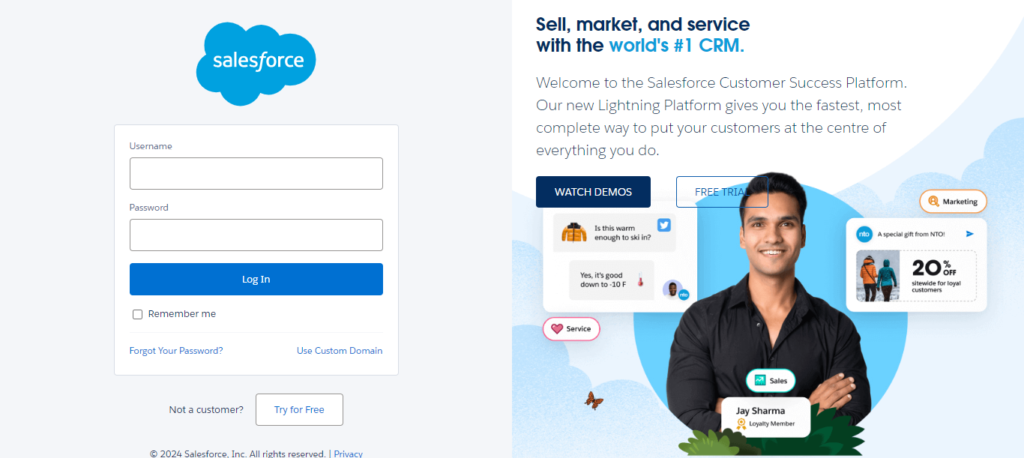
image 2024 11 05T09 19 35 349Z

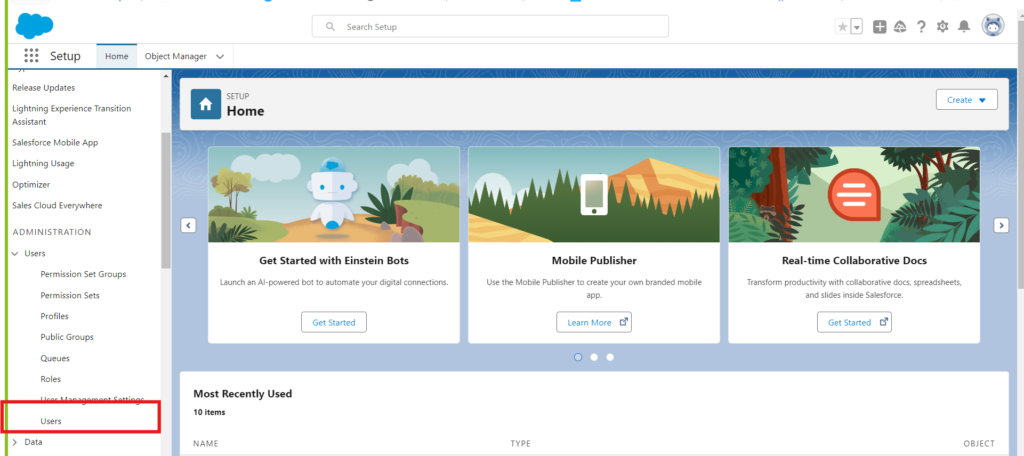
Step 2: Go setup -> Search-> Users

Click on the Gear icon, at the top-right corner of the page, to access the SetUp options. Then search users in the above search bar to access the complete list of users added to the system.
search user

Step 3: Select the User You Want To Deactivate

Now, choose the user you want to freeze or deactivate from the system from the list of user names shown on the screen.
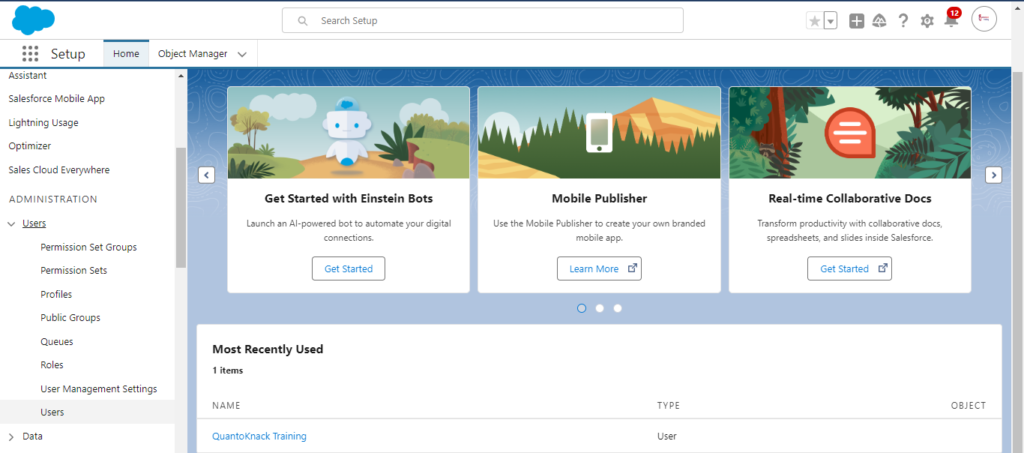
Select the User You Want To Deactivate

Step 4: Check the User Details

Click on the user name to access the complete information, related to all the roles and accessibilities provided within the system. You have to click the edit button to make any changes required in the user roles.
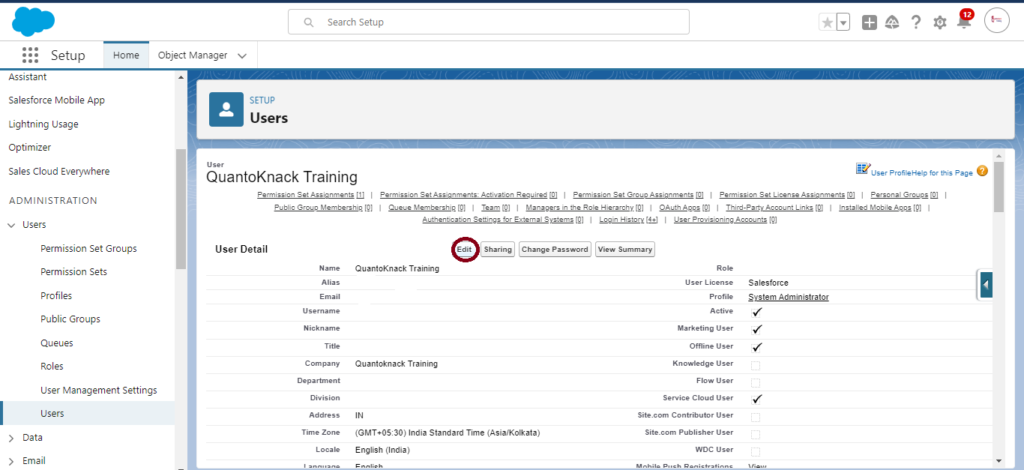
Check the User Details

Step 5: Deactivate the User

The edition section highlights various features and functionalities accessed or restricted for the user with the check box next to every aspect. So, now you have to uncheck the box next to the Active option to temporarily deactivate the user account until the admin reactivates it again.
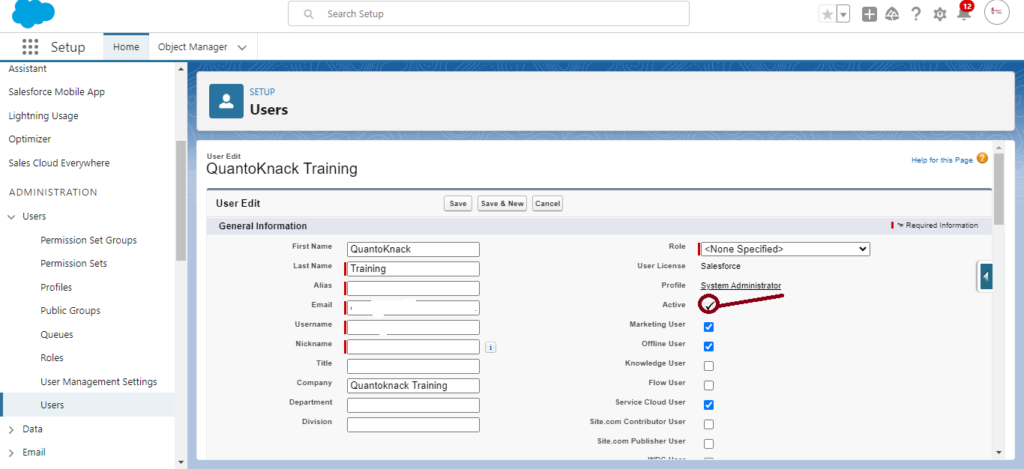
Deactivate the User

Step: 6 After Deactivating the User, Save It!

All these changes will be applicable only after you save it. So, don’t forget to click save.
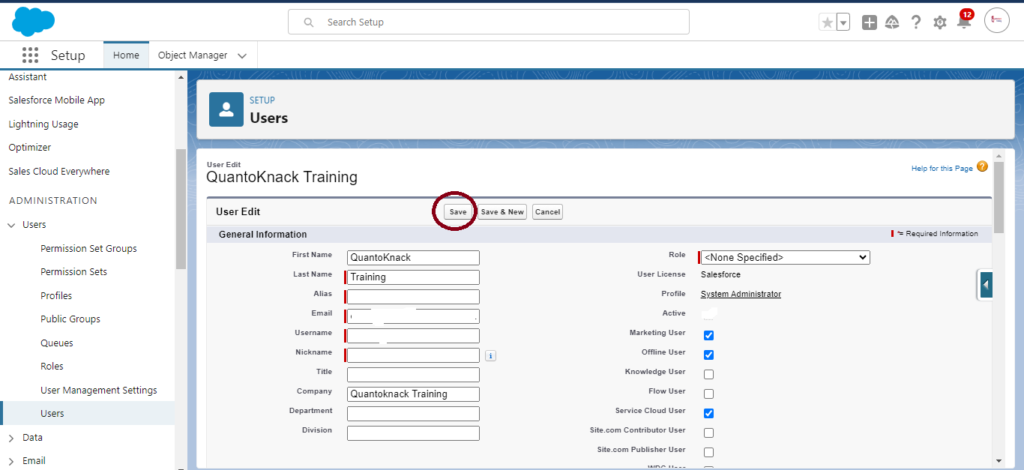
After Deactivating the User Save It

Important Notes:

  • Deactivating the user account will restrict their access to the Salesforce platform. They will no longer be able to use it. However, it doesn’t affect the historical data and records of the user. The user data remains intact!
  • Salesforce maintains data integrity for every user. Hence, it restricts the direct deletion of any user account on the platform, instead, you can just deactivate or freeze that particular account you want.
  • This user license can be utilized for a new employee or member by deactivating it.
  • You must use various allocated Salesforce licenses efficiently. Review them regularly and deactivate the unused users promptly.

What to Do If You Can’t Deactivate a User

If you encounter issues deactivating a user, consider these points:

  • Check Role Assignments: Ensure that the user is not the owner of any active roles, which would prevent deactivation.
  • Active Processes: If the user is tied to active workflow rules, approval processes, or scheduled jobs, update these dependencies before proceeding.

How to Unfreeze a User

  • Simply navigate to the user’s detail page and click the Unfreeze button to restore their access.

Conclusion

User account management is one of the most vital aspects of the Salesforce environment for security maintenance and efficiency. So, it is important to learn to enable and disable a user account. The online Salesforce admin training programs proper class on user management to teach students when and how to freeze or deactivate a user to secure data and run the system smoothly. Our professionals suggest following the best practices for user management and disruption avoidance in the organization’s workflow and procedures.

Connect with our online Salesforce admin training support team for any questions or further assistance.

Frequently Asked Questions (FAQs)

Can I delete a user in Salesforce?

No, deleting a user account in Salesforce is not possible. It only allows freezing or deactivating the accounts to maintain data integrity.

What happens to the data of a deactivated user account?

Salesforce saves data, records, and activities of every user, even after the deactivation. It also allows ownership transfer of such records to other users actively working on the system.

Is it possible to reactivate a deactivated user?

Indeed, you can reactivate a user anytime that has been deactivated previously on the Salesforce platform. Just enable the user by clicking the checkbox next to Active on the user detail page.
READ MORE
TECHAvatar of adminadmin0 Comments
Share article:TwitterFacebookLinkedin
1007 Views
25 Likes

Salesforce Admin Training & Certification Exam Syllabus – Key Topics

Learning for the Salesforce admin exam is not a cakewalk. It requires consistency and hard work. You have to understand a lot of concepts and learn various management tools. It is a highly demanding job role in the market that can help you earn more as well as achieve success with smooth growth and transitions. However, you need to attain complete Salesforce admin training and certification for better job placement with your desired payscale.

Yes, before you jump into the studies and prepare for your exam, it is important to understand the Salesforce admin certification exam syllabus. It will give you an idea of what you need to do and where to start.

Let’s dive deep into the complete overview of Salesforce Admin Certification and its prerequisites. 

About the Salesforce Certified Administrator Exam

Salesforce admin plays a vital role in the management and configuration of this CRM platform within a specific organization. They have to ensure smooth workflow, productivity, and overall efficiency, customizing the Salesforce platform to meet business requirements. They work as the backbone of Salesforce implementation by bridging the gaps between business processes and the Salesforce platform. It requires working with various departments within the organization, from sales and marketing to service and operations, understanding their processes, and tailoring Salesforce accordingly to support them. Also, they manage user permissions, ensure data quality, and offer ongoing support and training to users.

Who’s the Ideal Candidate for the Salesforce Admin Role?

There are no requirements for having an IT background or a tech geek if you really want to be a Salesforce administrator. All you need to have are some skills as well as the Salesforce admin training and certification. If you talk about basic skills, include technical expertise, business acumen, and communication skills.

Here is a list of major skills that, if you master these, will easily make you successful in your Salesforce admin career.

  • Master technical aptitude, such as managing large volumes of data, ensuring data accuracy, and implementing data validation rules. Be ready to work with process automation tools like Salesforce Flow, Process Builder, and Workflow Rules.
  • Work on analytical skills to spot small issues and inconsistencies within the organizational CRM platform and problem-solving skills to troubleshoot and resolve user issues comfortably.
  • Understand various business processes in different departments like sales, marketing, service, and operations. Help organizations drive growth and improve productivity, translating business goals into Salesforce solutions.
  • Enhance communication skills to explain technical concepts in a simple, non-technical manner. Attain training skills to train new users and support existing ones with the proper training and user guides. Collaboration can also help in working with cross-functional teams. 
  • Become more customer service-oriented to support users at all levels, answering questions, troubleshooting issues, and ensuring users feel comfortable with the platform. 
  • Always be eager to stay updated on new features, best practices, and industry trends and open to change, becoming adaptable, able to pivot quickly, and implement changes effectively.
  • Enhance strong project management skills to prioritize tasks and manage workload efficiently, manage deadlines, and coordinate with different departments to meet project goals.
  • Manage accurate and consistent data with the implementation of validation rules, duplicate management, and data cleansing strategies.
  • Ensure periodical data backup and secure data following the organizational data governance policies. 
  • Custom-create objects and fields based on business needs and even tailor the standard objects like Leads, Opportunities, accounts, etc.
  • Build dashboards with real-time visual business data representation and maintain them to help with better decision-making.
  • Stay up to date with annual releases that Salesforce shares three times a year for testing and rolling out the new features effectively.
  • Helped day-to-day operations by resolving bugs or any issues that arose. 
  • Update the existing users with the new updates and train the new users by conducting various sessions. 
  • Manage various user guides, technical documentation, as well as FAQs to help organizations use the Salesforce platform effectively.
  • Use AppExchange to download and manage any 3rd party apps to increase the capabilities of the platform.

Salesforce Administrator Certification Exam Topics

You will have to study 12 key areas for your Salesforce admin training and certification exam. These all are divided into some percentage that helps every student to understand the importance and weight of their study. Let’s explore all of these topics in detail and get you ready for your exam. 

  1. Organization Setup (3%)

You must attain an in-depth understanding of your organization, such as how it is set up, its profile, fiscal year, currency, and business hours. While working, you have to configure global settings and various features like search and layout or work.

2. Sales and Marketing Applications (14%)

You will have to use the Salesforce Sales Cloud tool for your organization that can help them with leads, contacts, opportunities, and accounts tracking. Secondly, handle leads, opportunities, and campaigns to manage the lead conversion process, opportunity stages, and sales processes, including marketing campaign setup, management, and analysis.

3. User Setup (6%)

You have to take care of the user creations like adding new users and setting up the roles and profiles as well as managing them like helping them reset passwords, etc. Salesforce Admins are responsible for granting access to all the users based on their roles and profiles. Hence, you must learn the complete functionality of profiles, roles, and permission sets.

4. Security and Access (13%)

You have to manage all types of security and access related to objects, records, and even fields. A Salesforce admin works with profiles and permission sets to control access to objects and manages organization-wide defaults (OWD), role hierarchy, sharing rules, manual sharing, and field visibility using field-level security settings and page layouts.

5. Standard & Custom Objects (14%)

You have to manage object creation, relationships, and even schema builder. That’s why online Salesforce Admin training programs include custom creation of objects and customization of standard objects, fields, and relationships. You need to learn lookup and master-detail relationship creation for data relation, utilizing Schema Builder for data model visualization and creation.

6. Service and Support Applications (13%)

You must learn case and knowledge management with a service console configuration to support case resolution workflows. It includes automation and assignment rules for customer service case management support case resolution and self-service portals for organizing and sharing knowledge articles.

7. Activity Management and Collaboration (3%)

You have to learn the Chatter tool, which can help you with internal communication and collaboration across various departments, as well as track various tasks and events to ensure visibility and cooperation.

8. Data Management (10%)

It’s your responsibility to handle data quality, import & export, as well as storage and backups. With Data Import Wizard and Data Loader, you can manage data easily. Cleanse the data by implementing data validation rules, duplicate management, and other tools. Always keep knowledge of data storage limits and backup the data for a better future.

9. Workflow/Process Automation (16%)

You can utilize Process Builder to automate tasks and business processes and create workflow rules to automate field updates, email alerts, and task creation. You can submit the record by setting up the workflows and implementing Flow for an advanced level of automation to perform complex data processing and record updates.

10. Analytics – Reports and Dashboards (10%)

Utilize filters and group data, and add charts to reports to create custom reports. You will require a custom dashboard for real-time data visualization that will help you set permissions to share reports and other dashboard features with defined role and profile users.

11. Desktop and Mobile Administration (1%)

You must learn to enable users to work from anywhere with the Salesforce mobile app configuration and optimize user experience using mobile devices with custom layouts.

12. AppExchange (2%)

You can start with AppExchange apps that help browse, evaluate, and install third-party applications within the organizations. This topic includes customization for app creations, configurations of different features as the organization requires, and integration of different APIs.

3 Study and Exam Strategy

  1. Distribute your study time that covers a higher percentage of areas in the Salesforce Admin exam, like Workflow/Process Automation and Standard & Custom Objects.
  2. You should try working on live projects in the Salesforce environment to get more experience and a better understanding.
  3. Use practice and mock tests to learn time management for your Salesforce admin exam.

5 Additional Study Resources

  1. Salesforce Trailhead: You can directly learn through some videos available at the Salesforce official learning platform – Trailhead.
  2. Go Through Exam Guide: Salesforce has uploaded a lot of official Salesforce admin guides online. You can use these resources as your study reference for better learning.
  3. Practice with Test Exam Papers: You can explore the previous year’s practice papers and various use cases. You can get a grip on various types of questions that may be included in your exam.
  4. Join the Salesforce Community: These online communities have a lot of Salesforce professionals who have years of experience in Salesforce. You can share various questions, advice, tips, strategies, and best practices on these forums and even share your resources with other participants.
  5. Online Salesforce Admin Training: Most USA students prefer to register for an online Salesforce admin training program that offers complete support with exams as well as placement. They create a proper curriculum for the students that includes online virtual classes, pre-recorded sessions, live project work, and practice and mock tests. Also, these program providers help their students to placement jobs with one of their associated organizations as a great payscale.

Tips and Strategy for the Salesforce Admin Certification Exam

These expert tips and strategies can help you do better in your Salesforce admin certification exam in 2024 and beyond.

  • Read every question carefully and pay extra attention to the difficulties, one that requires more attention than the other.
  • Utilize the pen and paper provided at the test center to draw data schemas, role hierarchies, or other diagrams and effectively solve various issues. 
  • If you are confused about any answer, just try eliminating the wrong options first and then try to solve the problem among the rest of the options.
  • Don’t forget to review your exam sheet at the end before submitting it. You can utilize your last 15 minutes, as Double-checking always helps!
  • You have to learn to differentiate between the answers that may sound correct but aren’t really the best practice. Take an example of triggers. You can update fields in Salesforce using triggers, however, Workflow Rules or Process Builder are the preferred standard best practices that you must choose from the options.
  • If you need double-thinking on any question, you can use the “Mark for Review” button and do it later when you are done with the entire exam. This way, you can think and resolve extremely complex questions at the end.

Conclusion

Hope you find this guide beneficial to make the Salesforce admin certification exam syllabus easy to understand. You can learn the online exam curriculum and various topics that attain some high-percentage weight in your exam preparation. However, if you still need any more guidance, you can always come to the experts at QuantoKnack training. They have years of experience in the Salesforce environment, which makes them the right resource to start your training and guidance today. You can learn various concepts in the easiest way and prepare for your exams with practice tests designed to give you a grasp on various key areas. Also, you can prepare for your job roles with live project work for hands-on experience in solving various kinds of use cases. This way, you can build great knowledge with experience that will help you in both your Salesforce admin certification exam and your job function.

READ MORE
TECHAvatar of adminadmin0 Comments
Share article:TwitterFacebookLinkedin
669 Views
10 Likes

What is Salesforce Sandbox and Types of Sandboxes?

The three major pillars of the software development process are the ability to test changes, conduct experiments with new features, and provide safe training sessions. When we talk about complex systems like Salesforce, it sounds more vital. The development errors or improper configurations can lead to data loss, business interruptions, or other operational risks. That is why Salesforce developers use Salesforce Sandbox. It is a safe, isolated environment that imitates production, allowing teams to work on production, testing, and training activities and, most importantly, to experiment with new features without the fear of impacting the live system.

What is a Salesforce Sandbox?

Salesforce developers need to develop, test, and train different functionalities, but making changes in a live system without disturbing production can be difficult. Hence, they utilize the Sandbox to create a safe replica place where they can test various applications, make required changes in the code, and even configure without affecting the actual production data. The Sandbox can be beneficial for avoiding errors and testing new customization safely.

Salesforce developers set up each Sandbox to contain only metadata, like configurations, code, and workflows. It also involves a combination of metadata and a subset or complete copy of production data. The best part of Salesforce is that it has different types of Sandboxes that every organization can utilize for a specific purpose. These range from simple development to full-scale testing with accurate data.

Types of Salesforce Sandboxes

Sandbox can help Salesforce developers develop and test new applications safely, experiment with Salesforce customizations, and conduct training or demos for teams without risking production data. There are 4 types of Salesforce Sandbox – Developer, Developer Pro, Partial Copy, and Full Copy. All of these have great functionalities. Let’s understand each of them in detail.

  1. Developer Sandbox

The Salesforce developers require a specific environment to code and test, and every individual developer utilizes Developer Sandbox as the lightest form of Salesforce Sandboxes.

  • A small storage capacity of 200MB is available.
  • You can refresh it every 24 hours to utilize an updated environment for testing.
  • Use Case: Ideal for lightweight development and testing.
  1. Developer Pro Sandbox

If your projects require more code validation and development facilitation, then Developer Pro Sandbox is the right choice. Salesforce developers can utilize more space to handle more prominent and complex development and testing activities.

  • A more extensive storage capacity of 1GB is available.
  • You can refresh it every 24 hours to utilize an updated environment for testing.
  • Use Case: Better suited for integrations and testing requiring more data.
  1. Partial Copy Sandbox

Most Salesforce developers utilize Partial Copy Sandbox when they are required to copy both metadata and a subset of production data. It helps them in data-based testing, QA environments, and UAT (User Acceptance Testing) when they need accurate data for these activities.

  • Salesforce developers can copy metadata and sample production data based on a defined template.
  • Storage Capacity: Up to 5GB of data storage is available.
  • You can refresh it every 5 days, allowing for a more realistic testing environment compared to the developer sandboxes.
  • Use Case: For environments that need a blend of metadata and data for testing without requiring a full production replica.
  1. Full Sandbox

Salesforce developer creates a complete replica of their production environment for complete testing, including performance and load testing. It is the most comprehensive Sandbox, and it includes all metadata and data.

  • Salesforce developers can copy all the production data and metadata.
  • You can utilize a full-scale model of your production environment.
  • You can refresh it every 29 days.
  • Use Case: Ideal for final pre-production testing, load testing, and performance testing, as it mirrors the production environment fully.

How to Choose the Right Sandbox?

Here are the key pointers to consider to choose the right one.

  1. Data Storage and Limits

Salesforce developers can focus on the storage capacities required for both metadata and production data. You can choose between isolated development with 200MB, testing that requires both configurations and actual production data in 1 GB or 5GB, or end-to-end testing, performance testing, and training sessions involving real production data with Full storage capacity.

  1. Data Sensitivity and Compliance

Salesforce developers always keep the data safe ahead of everything. You can mitigate risks and maintain regulatory compliance by checking and ensuring the user permissions are exactly the same as those in the live system. Also, the data masking tool can help safeguard sensitive data with CCPA, HIPAA, or GDPR regulations.

  1. Refresh Intervals

Salesforce developers should consider the refresh intervals of each Sandbox before choosing one of them. You can use a day-to-day refresh option to get frequent updates for ongoing development work without overwhelming the system and a monthly update for pre-production simulations or user acceptance testing (UAT).

  1. Integration Testing Requirements

You need a specific Sandbox type to help you with external system testing, such as marketing platforms, ERPs, or databases. Salesforce developers choose Developer Pro and Full Sandboxes as the more suitable integration testing Sandboxes. Their high storage capacities and data replication capabilities allow for end-to-end testing of data flows between Salesforce and other applications.

  1. Use Case and Testing Needs

Consider the different scenarios in which you can utilize different Sandboxes and what kind of testing you will need for your production. It’s essential to match your specific use case to the right Sandbox environment, such as for simple code development, data-driven testing, or full-scale testing, ensuring that development and testing scenarios are as close to real-world use as possible.

How to create a Salesforce Sandbox?

Step 1

Use your administrative privileges and log in to your Salesforce production account.

Step 2

Click on the gear icon (⚙️) that indicates the setup menu. You can find it in the upper right corner of the Salesforce interface. The dropdown menu will open, and you will have to select the Setup option.

Step 3

The step will open in the left sidebar. Now, you have to type “Sandbox” in the quick find box and click on the Sandboxes under the “environments” section.

Step 4

Now, click on the New Sandbox button. Give it a descriptive name. Choose the Sandbox type and you are all set.

Step 5

It’s time to complete the configuration of Sandbox settings. Choose the template that defines the data to be copied from production, and also, configure additional settings as per your needs, like access permissions to users, etc.

Step 6

After you are done with the settings configuration and entering all the information required, click on the Create button and get started! This process may take a bit of time as the data copying takes time. But no worries you can keep a check on the status through the Sandboxes page.

How to Refresh a Sandbox?

Salesforce developers need updates on the development and testing environment, which requires refreshing the latest production data. Here is the complete process to follow:

Step 1

Keep logging into your Salesforce production account.

Step 2

Click on the gear icon and go to Setup. Type “Sandbox” in the quick find box and select the option.

Step 3

All the existing Sandboxes are listed on the Sandboxes Page. All you need to do is click on the Refresh link next to the Sandbox you wish to refresh.

Step 4

You will get a pop-up on your screen confirming the refresh action. Just review the prompt and confirm. However, REMEMBER! You can undo this action, so once the refresh is done, all the existing data and customizations in the Sandbox will be lost.

Step 5

It will take a little time to complete the refresh process, depending on the amount of data. You will receive a notification as soon as the refresh is completed and Sandbox is ready to use. You can check the refresh status on the Sandbox page as well.

Salesforce Sandbox Best Practices

  1. Maintain an up-to-date production environment in the Sandbox by refreshing it regularly. Always keep your team members informed about the refresh schedule and the changes that occurred.
  2. You can track various changes in your Sandbox environment by implementing a version control system. Also, you can keep the changes documentation for sharing knowledge to roll back processes easily if required.
  3. Provide a specific role and permission to all your team members for proper responsibility distribution and avoid unauthorized access to sensitive data and configurations.
  4. Plan your testing activities with proper scenarios and edge cases, including both functional and non-functional testing aspects. Take feedback from stakeholders and functionalities validation.
  5. Keep a knowledge base in the Sandbox with best practices, guidelines, and previous learning for your teammates.

Final Thoughts

Hope you understand the Salesforce Sandbox, its type, how to create Sandbox, how to refresh, and best practices. But can you really do it by reading this article? Practical knowledge is very important to make this happen. No worries; our experts will train you for a better tomorrow. We train every talent with practice and mock tests, preparing them for exams as well as job placement. Every candidate at our QuantoKnack Training gets hands-on experience by working on one of our live projects to solve various use cases with the team experts. From getting trained and achieving Salesforce developer certification to working on live projects and getting job placement, we have covered you with all. So, what are you thinking now? This is the right time to get started with your online Salesforce developer training.

READ MORE
TECHAvatar of adminadmin0 Comments
Share article:TwitterFacebookLinkedin
637 Views
17 Likes

Your Guide to Become a Salesforce Tester

It’s not true that Salesforce is packaged software that doesn’t require testing or can run without continuous testing because it is an out-of-the-box solution – a common misconception. Then what about the Salesforce tester? But this perception is far from the truth.

Salesforce is just a system that offers applications to maintain CRM with unique features and functionalities. It requires updates three times a year, which calls for a skilled Salesforce tester who can check various errors to avoid any vulnerability to downtown, saving millions of businesses. The increasing demand for the job role makes candidates seek a guide to becoming a Salesforce Tester, which is why you should read this blog until the end.

Importance of Salesforce Testing

  1. Ensures Salesforce implementation adheres to the defined business processes and workflows, effectively supporting the organization’s requirements.
  2. Maintain trust and reliability in business operations with high-quality, defect-free, and optimal-performing Salesforce applications.
  3. Detect user interface or usability problems for a smoother user transition and higher system behavior satisfaction.
  4. Identify issues early in the development cycle to mitigate the associated risks.
  5. Reduce potential extra costs by detecting and fixing defects in the early development stages. (generally less costly than changing a fully deployed system)
  6. Ensure specific organizational customizations function correctly and do not break existing functionalities.
  7. Verifies the stability of legacy systems, other ERP systems, or third-party integrations and smooth data flow between systems without loss or corruption.

Roles and responsibilities of a Salesforce Tester

  1. Understanding Requirements

The Salesforce tester starts by understanding the specific organizational requirements and goals to create relevant test plans and cases. These principles are the guiding principles of any development work on Salesforce, translating these requirements into testable components.

  1. Test Cases Design

From the aspect details to test approach to result anticipation, the Salesforce tester has knowledge of everything. That’s why they require a proper test plan and cases covering different aspects of Salesforce functionalities.

  1. Tests Execution

Executing test cases involves manual testing, automated testing, or a combination of both. They follow a 3 step approach – each aspect checking the Salesforce functionalities, results in comparison with the expected result, and discrepancy documentation.

  1. Defects Identification

Salesforce testers check the behavior of every feature and functionality, and if that doesn’t behave accordingly, it comes under the defect category. Then, they must document all the defects detected in the Salesforce platform, including the reproduction process, and share them with the Salesforce developers working on it.

  1. Automation

Salesforce Testers attain knowledge of tools like Selenium to automate and improve testing efficiency and coverage. You must manage and update automated test scripts as the application evolves.

  1. Reporting

Salesforce testers create proper documentation highlighting all the testing phases, analysis, insights, and outcomes to share with the developer team for further development.

  1. Collaboration

Salesforce testers achieve desired quality standards and business needs by collaborating and sharing all their findings and required changes with developers, project managers, and other stakeholders.

  1. Continuous Learning and Updates

Salesforce testers get ready with continuous learning of the frequently released updates and new features to implement various updates.

How Can You Become a Salesforce Tester?

Checklist to Become a Successful Salesforce Tester

  1. Learn Salesforce Basics
  • Salesforce architecture, features, and functionalities
  • Read modules and trails over Trailhead or other resources
  1. Learn Technical Expertise
  • Different Salesforce products – Sales, service, or market cloud
  • Salesforce setup, customization, and data management
  1. Learn Software Testing Basics
  • Salesforce testing methodologies – manual testing, automated testing, functional testing, integration testing, and user acceptance testing (UAT).
  • Test case creation, bug lifecycle, and test reporting.
  1. Specialize in Salesforce Testing
  • Become a Salesforce-specific testing tool and technique expert.
  • Determine common issues and challenges, such as testing custom workflows, process builder flows, and Apex triggers.
  1. Obtain Certifications & Hands-On Practice
  • Take Salesforce Certified Administrator and Salesforce Certified Platform App Builder
  • Choose a Salesforce tester program that offers live project experience as well as learning of test cases, reporting bugs, and automating tests.
  1. Networking and Professional Development
  • Engage with the Salesforce community through forums, local user groups, and events.
  • Keep the latest Salesforce releases and updates and their effects.
  1. Apply for Jobs
  • Prepare with top-asked Salesforce tester interview questions and answer them with a unique approach to test and handle the troubleshooting you apply.
  • Get assistance from your chosen online Salesforce training program provider.

If you are looking for a Salesforce testing career opportunity, you must join a reputed Salesforce tester training online.

  1. You will receive proper training from experts who can lead you with end-to-end knowledge of different technologies for a successful future.
  2. The online Salesforce tester course must include practice sessions on live projects so that you can gain some hands-on experience with various use cases. This will help you achieve great success in your career growth and establish a better future.
  3. The next thing is placement! The Salesforce tester training program will completely assist you in getting placed in a reputed and high-paying organization to kickstart your career easily.

In short, you can make your future in the Salesforce environment with the right Salesforce tester program. 

Career Path and Progression

QuantoKnack Training offers a wide range of Salesforce certifications that can help you plan and attain growth in your career without hassle. Here are 3 Salesforce certifications that can take you from a beginner to an expert in your journey.

  • Salesforce Administrator Certification: Salesforce admin training is a good starting point, especially for beginners, as it teaches and trains you in the basic functionalities and administrative tasks in Salesforce.
  • Salesforce Platform App Builder Certification: You can then step forward in your career path with the Salesforce platform app builder training to understand the development aspects of Salesforce, which can be helpful for testing.
  • Certified Salesforce Test Engineer: Now, to progress in your career, it’s time to learn more skills that will take you towards Salesforce tester engineer training.

Future and Salary Prospects in Salesforce Testing

The need for Salesforce testers grows with the implementation of every Salesforce CRM platform. Every organization needs a team of proper QA to test and check every feature and functionality of their platform. Even in the future, organizations will need skillful Salesforce testers to adopt various newly launched features and updates using techniques like automated testing, AI testing, and performance testing. All these demands will open the constant opportunities to learn and grow.

Factors like experience level, job role, geographical location, specific industry, etc., help you attain a good salary and periodic appraisals. As per Glassdoor, a Salesforce tester can earn over $1,21,289 per year in the United States. You can expect an average additional cash compensation of $13,327, with a range from $9,995 to $18,658.

Summing Up

QuantoKnack Training is an extensive Salesforce developer and admin training provider for candidates who want to learn and make a successful career in Salesforce. From teaching with expert instructors and a detailed curriculum to practicing on live projects to assistance with placement, you can get all aspects of your service. Get complete guidance and resources whether you are a beginner or an experienced individual.

READ MORE
TECHAvatar of adminadmin0 Comments
Share article:TwitterFacebookLinkedin
659 Views
26 Likes

7 Best Ways to Learn Salesforce Administration

Many organizations rely on Salesforce as one of the biggest CRM platforms to run and grow their businesses. This has increased the demand for Salesforce Admins in the market. However, you need proper Salesforce training and certification to kickstart your career, and eventually, you can complete more advanced certifications for continuous growth.

You will be responsible for various tasks essential to customize the Salesforce instance for your company. You need to align your knowledge with the company’s objectives to contribute to the company’s overall success. The Salesforce Admin Training and Certification can testify to your learning and show commitment to your company’s success. A Salesforce certified admin role can be a career transformation leading to promotions and successful career growth.

Now, the question that may come to your mind is how to prepare. Here are seven steps to learn Salesforce administration, whether you are a beginner or have been earning your credentials for a while.

  1. Learn the Basics of Salesforce Admin

If you have a question about how to learn Salesforce admin, you can start with the basics. Create a list of Salesforce concepts and topics that you already know, want to know, and need to make it more clear, like Salesforce object model , various types of relationships, Security Setting, Data Validation, Automation tool, Report and Dashboard. It can help you start with the basics, leading to advanced learning and skills upgrading. Clearing the basics can help you easily reach the advanced level and upgrade your career in the future by attaining more knowledge and advanced-level certifications.

  1. Attend the Salesforce Admin Training Course

You can register for an online salesforce admin training program through a proper training center like Quantoknack that will assist you with the following:

  • Proper Curriculum: You will get an adequate curriculum with topics and concepts covered in the Salesforce admin training and certification. This includes Salesforce Admin + App Builder Training and Salesforce Administration Capstone with Q&A Session.
  • Mock Tests: Test all your knowledge easily with daily mock tests. They can help you know where you stand and how much more you need to learn to succeed in your Salesforce admin journey.  
  • Hands-on Experience with Live Projects: With various live projects, you can learn how to implement multiple concepts, flows, policies, settings, and more. This will enable you to attain hands-on experience for better learning in the future.
  • Placements: You can get various opportunities in big companies and a significant pay scale—the training and certification obtained through this training center.
  • Certification Completion Support: Great mentors with years of experience will help you complete your certification through various use case solutions and assist you with multiple requirements throughout the training program.

Such training can enhance your knowledge and your performance during your career start and help you grow better and reach new heights.

  1. Study with Friends or Join Different Salesforce Community

You can learn the basics of Salesforce Admin by joining friend groups or the Salesforce community, Trailhead. There, you can share your questions and problems in order to get solutions from experts connected to that group or community. Various Salesforce developers and admin experts share a lot of solutions and informative content with such groups and communities.  

  1. Get Hands-on Practice

While attaining theoretical knowledge, you also need practical salesforce admin training online. It can help you solve various problems during your job role in an organization. Working on live projects during your learning can be beneficial for understanding multiple concepts better and becoming efficient in managing the Salesforce platform for your client or organization.

  1. Know About Exam & Schedule Your Certification Exam

Attain complete knowledge of the salesforce administrator training exam. This multiple-choice test includes 60 Questions that assess your understanding of Salesforce Administration Fundamentals, Configuration and Customization, Security and Data Management, and User Management. The Salesforce admin exam duration is 90 minutes, with the requirement of a 65% passing score. The recommended criteria to attempt this Salesforce Administrator exam is 6-12 months. Attain knowledge of Salesforce features, functionalities, and best practices.

6. Excel During and After the Exam

Now, you have completed the Salesforce admin certification classes, attained great hands-on experience, and prepared for the examinations through various mock tests. Finally, it is time for the examination! Make sure you revise and practice multiple topics and the entire curriculum. Don’t rush for the exam; ensure that you are ready to excel in the exam.

7. Celebrate Your Salesforce Admin Certification Success!

As soon as you get the certification and placement in a reputed company, it’s time to celebrate and work hard in your career to grow more and increase your pay. After completing the beginner Salesforce Admin Certification, you get a wide range of advanced certifications that you can attain next.

  • Salesforce Certified Administrator
  • Salesforce Certified Advanced Administrator
  • Salesforce Certified sales cloud consultant
  • Salesforce Certified service cloud consultant
  • Salesforce Certified experience cloud consultant
  • Salesforce Certified platform app builder
  • Salesforce Certified platform developer I 
  • Salesforce Certified platform developer II
  • Salesforce Certified technical architect

Conclusion

It’s time to cue the confetti! Congratulations on passing the certification exam; you have done an excellent job. Post the good news on Linkedin and step forward in developing your Salesforce knowledge, establishing above and beyond expertise to become the go-to resource for Salesforce at your organization. You can show your seriousness to your organization by boosting your career and being a leader for all things Salesforce. You will reap loads of benefits for years to come in your role by becoming Salesforce-certified, as it is a valuable investment. You can feel one step closer to unlocking the world of possibilities for your career as you get so many resources available to help you on your path toward Salesforce Admin Certification.

So, don’t wait anymore! Register at QuantoKnack Training and start your journey of success today.

READ MORE
Recent Posts
  • How Salesforce Data Integration Tools Simplify Real-Time Business Connectivity
    In a nutshell, businesses collect operational data to perform...
  • Design, Build, and Optimize Agents with Agentforce 360 Innovations
    In this fast-moving digital world, businesses also want smarter...
  • Salesforce Built-In Payment Processing: How to Handle Everything End-to-End
    In the current digital economy, where online payments have...
  • Explore Top Salesforce Integration Challenges and Ways to Fix Them
    Integrating any system can be a difficult task, as an...
  • Protecting Sensitive Data: A Complete Guide to Encryption in Salesforce
    In the current digital economy, data can easily rank at the top...
logotype

We cater to individuals and corporates and provide IT training and certification programs.

44679 Endicott Drive Suit 300 #1046 Ashburn, VA 20147 United States

Phone: +1-571 989 9489

Email: atul.deo@quantoknack.com

Useful links

About Us

Contact Us

Blog

Courses

  • Live Salesforce Admin Training
  • Business Analyst
  • QA Testing Course
  • Advance JAVA Training
  • SQL Server Training
  • Live Salesforce Developer Training Certification Course
  • Digital Marketing
  • Oracle DBA Training

Subscribe

    Instagram Pinterest Linkedin
    Facebook
    Logo star

     2024 Quantoknack. All Rights Reserved