Become a Instructor

Blogs

logotype
Menu
  • Courses
    • Salesforce Admin
    • Salesforce Developer
    • Advance Java Training
    • Buisness Analyst
    • Digital Marketing
    • Oracle DBA
    • QA Testing Course
    • SQL server Training
  • Register
+1-571 989 9489
logotype
  • Courses
    • Salesforce Admin
    • Salesforce Developer
    • Advance Java Training
    • Buisness Analyst
    • Digital Marketing
    • Oracle DBA
    • QA Testing Course
    • SQL server Training
  • Register
  • +1-571 989 9489

Become a Instructor

Blogs

logotype
Menu
  • Courses
    • Salesforce Admin
    • Salesforce Developer
    • Advance Java Training
    • Buisness Analyst
    • Digital Marketing
    • Oracle DBA
    • QA Testing Course
    • SQL server Training
  • Register
+1-571 989 9489
  • Courses
    • Salesforce Admin
    • Salesforce Developer
    • Advance Java Training
    • Buisness Analyst
    • Digital Marketing
    • Oracle DBA
    • QA Testing Course
    • SQL server Training
  • Register
  • +1-571 989 9489
logotype
logotype
  • Courses
    • Salesforce Admin
    • Salesforce Developer
    • Advance Java Training
    • Buisness Analyst
    • Digital Marketing
    • Oracle DBA
    • QA Testing Course
    • SQL server Training
  • Register
  • +1-571 989 9489
information technology
Home Archive by Category "information technology"

Category: information technology

information technologyTECHAvatar of adminadmin0 Comments
Share article:TwitterFacebookLinkedin
29 Views
0 Likes

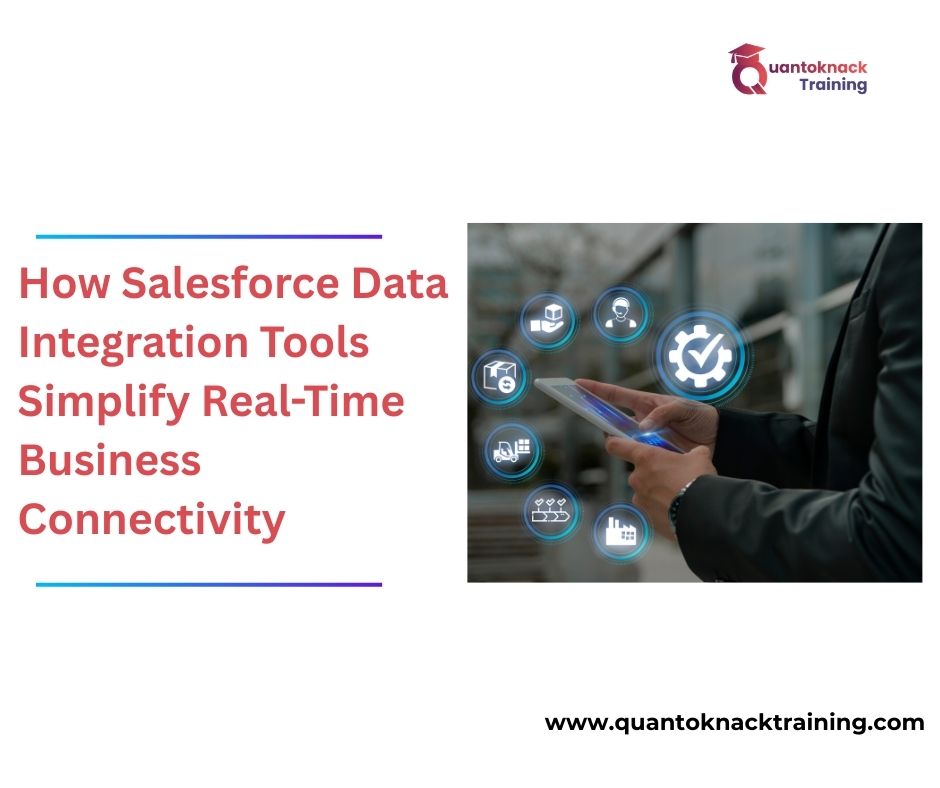
How Salesforce Data Integration Tools Simplify Real-Time Business Connectivity

In a nutshell, businesses collect operational data to perform set tasks optimally. Organisations’ systems must be interoperable in managing customer relationships, analysing operating sales and tracking market trends. That said, many firms rely on unconnected software platforms that hinder data exchange and communication. 

This is where Salesforce data integration tools become relevant. These tools are transformative given that they allow for a free flow of data between systems, thus allowing for real-time connectivity, efficiency, and customer improvements. Let’s explore these popular tools in more detail. 

What is Salesforce Data Integration? 

Integrating Salesforce means connecting the Salesforce application with another application (such as an ERP, marketing automation, accounting, customer service, etc.). This allows data to be exchanged between different systems in an automated and accurate way.

Understanding how powerful Salesforce is in the context of other business technology can provide additional benefits. When a sales team enters a customer order into Salesforce, the same order information will be available to billing and inventory systems without any manual data entry by the sales team.

If there is no data integration focus between teams, then teams will have to perform tedious, time-consuming and error-prone data entry, which is not efficient. Data integration solutions provide a way for businesses to have their data constantly and automatically transferred, exchanged, and synchronized across systems in real-time to eliminate the tediousness of entering data in different systems multiple times.

Key Salesforce Data Integration Tools 

Salesforce offers some integration solutions that are meant to assist different business needs. Their features vary according to the Salesforce integration solution, which was created to support various business needs. 

  1. Salesforce Data Loader: Data Loader is mostly used for importing, exporting, and updating a huge amount of data. It is most effective during system migrations, bulk-updates, and to clean data. 
  1. MuleSoft Integration Platform: MuleSoft helps organisations to integrate Salesforce with other applications using APIs. It also supports real-time data synchronization, making it the best choice for businesses that need to ensure instant data updates across their systems. 
  1. Salesforce Connect: Salesforce Connect helps users connect to external data in real-time without the need to store it inside Salesforce. Therefore, this reduces the cost of storing data, yet provides first-hand information on valuable data. 
  1. AppExchange Integration Solutions: The AppExchange Marketplace has connectivity applications to aid users with Business Integration (such as Email Marketing Apps, Finance Apps & Customer Service Apps) to provide pre-built Integration Solutions for users that utilize Salesforce as well.

Benefits of Real-Time Business Connectivity


There are many advantages to using tools that are created for the integration between companies within the Salesforce ecosystem, the benefits are clearly related to how successful the company is.

Data Accuracy Improvement – Because all teams have access to the latest data, there’s much less chance for inconsistencies and errors due to real-time sync.

Boosting Productivity – When repetitive manual tasks, like data entry, are taken care of through automation, this creates a situation where employees have more time to focus on their high-value strategic tasks.

Greatly Enhancing Customer Experience – Having an integrated system allows you to see all interactions with your customers; therefore you are able to respond more quickly to them and provide more tailored communication.

Speed of Making Decisions – By having access to real-time data, managers will be able to identify trends much quicker, resolve problems sooner, and make educated decisions more quickly.

The Role of Salesforce Administrators in Integration – Salesforce administrators play a key role in integration management. They configure connections, maintain desirable data quality, monitor system performance, and smooth workflow between platforms. 

The number of qualified personnel required within integrated systems will continue to expand, as more and more companies are using integrated systems. Through the best Salesforce Admin Training, participants learn the competencies necessary to use Integration Tools, Automated Processes, and Data Management Policies to add value to their organizations.

The Importance of Training for Successful Integration

Data Integration with Salesforce consists of many technical concepts, including APIs (Application Programming Interfaces), Data Mapping, Automation Workflows, and System Configuration. Given the complexity and potential difficulty associated with the integration process, it is vital that those responsible for integrating know how to do so properly.

By completing online Salesforce Admin Training, participants receive a comprehensive understanding of the realm of Integration and can apply their newfound skills to connect systems securely, ensure that all data is correct and take appropriate corrective actions to fix any integration problems that may arise.

For those who are exploring career opportunities in this field, reading about Salesforce admin skills and responsibilities can also be beneficial. Also, for those who seek career opportunities in this field, it is worth reading more about the skills and responsibilities of Salesforce administrators.

Future Trends in Salesforce Integration 

Therefore, as Digital transformation continues, Salesforce integration is becoming more advanced and smart. Some of these emerging trends are: 

• AI-automation solutions for predictive insights 

• API-based connectivity is also on the rise

• Cloud-native integrations platforms for rapid integrations.

• Analytics in real-time based on data ecosystems” 

It is at this point that integration skills are relevant in the modern business world. 

Conclusion

The Salesforce platforms help companies build connections that allow them to communicate with other platforms to automate their processes, improve quality, increase productivity, enhance customer relations, etc. Companies need to provide a pathway for individuals wishing to enter this rapidly growing career path through higher education and specialized Salesforce admin training programs, as careers in Salesforce administration continue to grow. As more
READ MORE
TECHArtificial Intelligenceinformation technologyAvatar of adminadmin0 Comments
Share article:TwitterFacebookLinkedin
72 Views
0 Likes

Design, Build, and Optimize Agents with Agentforce 360 Innovations

In this fast-moving digital world, businesses also want smarter systems for faster work, instant responses, and less manual effort. That’s why they rely on Salesforce Agentforce 360! This tool helps organizations automate workflows, utilize artificial intelligence, and provide seamless workflows, creating powerful digital agents to manage tasks, answer various user questions, and enhance the customer experience.

Students interested in starting their career journey in Salesforce CRM, AI automation, or cloud technology can get a big advantage by learning Salesforce Agentforce skills. Even better, you can enroll in an online Salesforce Agentforce training course where you can learn at your own pace, get hands-on experience with live projects, and even prepare for the Salesforce Agentforce Specialistcertification with full focus on your current job work or studies.

Let’s understand Agentforce, how it works, how to design & build agents, how to optimize them, and why certification can boost your career through this blog.

What Is Salesforce Agentforce?

Organizations use Salesforce Agentforce as an advanced platform to create intelligent agents that work as digital assistants. Not only do the employees get benefits with Agentforce as it automates a lot of tasks for them, but also the customers get live support. This works as an easy way to guide employees and customers towards the various processes and even streamline business processes.

Agentforce agent is a smart helper that works on:

  1. Customer queries answering
  2. Support tickets routing
  3. Products recommendation
  4. Workflows triggering
  5. Data analysis
  6. Real-time insights

Agentforce is more upgraded than those simple chatbots as it better understands the context, learns from interactions, and improves performance over time.

How Agentforce Can Change the Game?

Employees have to manage a lot of repetitive work manually using traditional systems. That’s where Agentforce comes in, as it enables the work with automation powered by artificial intelligence. Agentforce helps organizations in –

  1. Operational workload reduction
  2. Response time improvement
  3. Tailored user experiences delivered
  4. Productivity enhancement
  5. Human error minimization
  6. Faster operations scaling

Salesforce agentforce skills are in high demand across industries, from IT and finance to retail and healthcare. Professionals can gain a great future by learning these skills.

Designing Intelligent Agents

You have to design an agent as the first and most important step to get started. Making a well-designed agent can help with user needs and task performance smoothly.

1. Define the Agent’s Purpose

You have to first decide what the agent should do. It can help you assist users and even automate internal work for employees. Make your agent’s purpose clear, as you have to build the logic and responses accordingly.

2. Map User Interactions

Next comes the user interaction with the agents. You can decide whether to add a question to type in chat, options to click and choose from a list, or even you can make it speak commands. This way, you can create a natural and easy experience for your audience.

3. Choose Data Sources

Next comes the information from where agents will choose and respond. You can make it more accurate by connecting agents to CRM records, knowledge bases, APIs, or databases.

4. Create Decision Logic

Finally, creating the agent brain – Decision logic. It will help to determine how it will respond to different queries. You can do this in Salesforce Agentforce simply through workflows, automation rules, and AI models.

Building Agents with Agentforce Tools

Now, the design is completed, so the next step is to build the agent. Using the no-coding tools with Salesforce can help you create agents easily.

Low-Code Development

Agentforce has very easy drag-and-drop tools to create agents, as Salesforce is a low-code CRM instead of a complex coding tool. This even makes it accessible to non-IT background learners.

Workflow Automation

To automate the workflows, you need to define triggers and actions. Agents will respond to these actions automatically, which includes email sending, record updates, and even lead assignment.

AI Integration

Agents can even use the integrated AI capabilities like understanding natural languages, predicting outputs, and even making smart recommendations. Users feel interaction is more human-like and efficient.

Testing and Simulation

Check accuracy and reliability before deployment by testing the agent’s responses for different situations in the simulated environment.

Optimizing Agents for Better Performance

After building an agent, start optimization to ensure improvement and valuable deliveries from agents.

Monitor Performance Metrics

Check metrics like response accuracy, resolution time, and user satisfaction to identify areas for improvement.

Train with Real Data

Make your agents smarter by feeding real interaction data so that they can learn and adapt more data for smarter results.

Update Workflows

Keep your agents updated with the new workflow processes and user expectations so that it evolves with business.

Improve Conversation Flow

You must keep improving the language to make responses clearer and more natural. It significantly enhances user experience.

Real-World Use Cases of Salesforce Agentforce

You can only see the true power of this tool by understanding and working on practical applications.

  1. Customer Support: Users can ask questions to agents and get instant answers, common issue resolutions, and even complex query escalation to human representatives.
  2. Sales Assistance: Now easily schedule client meetings, qualify the leads, and even recommend your products to users as their preferences.
  3. HR Automation: Keep common queries related to leaves, payroll, benefits, and other policies for instant reply to employees.
  4. IT Helpdesk: Keep a troubleshooting guide ready for common technical issues for instant resolution.

Skills You Gain by Learning Agentforce

No matter whether you are from an IT or non-IT background, or a beginner or professional looking for career enhancement, Salesforce Agentforce training can help you  with both technical and business skills.

  1. Designing Automation
  2. Configuring Workflow
  3. Integrating Basic AI
  4. Handling CRM Data
  5. Problem-solving skills
  6. Optimizing Processes
  7. System thinking

These skills are valuable for roles such as:

  1. Salesforce Developer
  2. Salesforce Admin
  3. Salesforce Business Analyst
  4. Salesforce Architect

Importance of Salesforce Agentforce Specialist Certification

Organizations need a certified Salesforce agent, as it validates your platform capabilities to design, develop, and optimize agent competence, knowledge, and experience to handle real-world scenarios. The industry needs intelligent automation as it can help provide 24/7 assistance for users, manage thousands of requests automatically, and enhance user experiences with better personalization.

How Online Training Helps You Prepare

Our online Salesforce Agentforce training course follows a structured learning curriculum with the opportunity to work on live project experiences. This is the most-effective way to prepare for your certification as well as kick-start your career journey with good pay while working as a professional or completing your studies.

Advantages include:
  • 30+ live Sessions
  • Watch from anywhere
  • Study anytime with recorded sessions
  • Work on practical assignments
  • Get expert guidance
  • Mock and practice tests 
  • Job Assistance with our partnered companies

Final Thoughts

Agentforce can help businesses to transform how businesses use to operate. They hire specialized Salesforce Agentforce experts to design, build, and optimize the service for them. You can simply complete your Salesforce Agentforce training and validate it with a certification, and open doors to exciting career opportunities with your expertise.

Thanks to our online training program! You can learn, attend experts’ sessions, work on live projects to gain experience, and even prepare for certification with mock and practice tests. Mastering Salesforce Agentforce is the best choice to future-proof your career.  So, enroll today and get started!

READ MORE
TECHinformation technologyAvatar of adminadmin0 Comments
Share article:TwitterFacebookLinkedin
144 Views
0 Likes

Protecting Sensitive Data: A Complete Guide to Encryption in Salesforce

In the current digital economy, data can easily rank at the top of the list of most valuable assets owned by any organization. Customer data, financial data, sensitive medical data, and business data all have to be safeguarded at all costs. This has made the right data security a must-have for companies working on Salesforce. Joining Salesforce developer training and getting Salesforce developer certification can help you master all basics, including the topic of encryption in Salesforce, which will be explained below in detail.

What Is Encryption?

The encryption process involves encoding text into a form that cannot be accessed without the required decryption key. Even if unauthorized users are able to access the encrypted information, this information will not make any sense.

Salesforce allows data to be encrypted both when it is at-rest ((database) form) as well as when it is in transit (from system to system). This is even more important when businesses are involved in personal data or have compliance necessities like GDPR (General Data Protection Regulation) or HIPAA (Health Insurance Portability and Accountability Act). This is because data encryption saves businesses from data breaches and helps businesses in meeting overall legal compliance.

Understanding Salesforce Encryption Options

Salesforce has built various levels of encryption to ensure data is safe without impacting functionality.

1. Standard Platform Encryption

Certain types of data are automatically encrypted by Salesforce at the infrastructure level. These include data storage on the Salesforce server, backups, and replication environments. This type of encryption is enabled by default and runs in the background.

2. Salesforce Shield Platform Encryption

Organizations that need more control have the ability to have advanced encryption using Salesforce Shield. This allows administrators to encrypt fields, files, and even attachments while still having all the functionalities of the core platform. This encryption utilizes tenant-specific keys, providing businesses with the ability to have control over data security.

3. Encrypting in Transit

Salesforce practices safe communications through HTTPS and TLS. The result is the assurance that communications between the browser and the API or systems cannot be intercepted and modified in the middle of the transmissions.

Key Components of Salesforce Encryption

The idea is that, to understand encryption fully, especially from the developer’s perspective, it is important to understand how the underlying components work.

Encryption Keys

Salesforce encrypts and decrypts your data with the use of strong cryptographic keys. With Salesforce Shield, organizations have the chance to rotate their keys routinely in order to reduce the risk of long-term key exposure.

Key Management

Salesforce secures encryption keys in a proper way, but allows administrators to manage key lifecycle actions like rotation and suspension. Such a balance provides very high security with no excessive operational overhead.

Deterministic vs. Probabilistic Encryption

Deterministic encryption provides searching and filtering for some Salesforce encrypted fields, while some others are probabilistic encryption that supports maximum security. Understanding this distinction is central to designing applications in a way that provides security but does not sacrifice functionality.

How Encryption Affects Salesforce Development

Encryption directly affects the development of Salesforce applications. Developers must take into consideration the impact of encryption when working with the Apex code, SOQL, API, and integration.

There may also be some restrictions on search, sorting, or filter capabilities on encrypted fields. Salesforce developers should carefully consider their data models, as this may result in performance degradation or undesired functionality. This is one reason why comprehensive Salesforce developer training is emphasized heavily for secure programming, encryption-friendly architecture, and application scenarios.

In the context of professionals who are preparing for Salesforce developer certification, the topic of encryption has become pragmatic. The challenges of certification exams in the area of data security and compliance-driven software development make encryption a fundamental topic to understand.

Best Practices for Implementing Encryption in Salesforce

In order to get the best out of the encryption features in the Salesforce system, the following best practices should be followed by organisations:

  • Sensitive data needs to be identified as well as categorized before it is encrypted
  • Encrypt only what is needed to achieve the balance between the two factors
  • Regular rotation of encryption keys and access logs
  • Test encrypted fields thoroughly in sandboxes before production deployment.
  • Train developers and administrators to understand the limitations of encryption

A skilled Salesforce developer can easily incorporate all these methods with ease and ensure that everything is secure without any disruption of business activities.

Why Encryption Knowledge Is Essential for Salesforce Professionals

As advanced threats evolve, there is an increasing need for Salesforce talent with more comprehensive knowledge about security as well. Knowledge of encryption also indicates technical intricacy, awareness, and architectural knowledge.

If you are starting out or looking to further develop your career, investing in some top-quality Salesforce developer training will not only give you the skills to build secure, highly scalable solutions, but also further reinforces the skills and expertise to deal with confidential information responsibly.

Final Thoughts

Encryption is more than a technical capability, it is a strategic asset used as a protective mechanism for organizations and their reputation. Salesforce offers strong tools for performing encryption; however, their efficiency is based on their usage and understanding.

By understanding the principles and best practices in encryption, Salesforce developers can establish themselves as professionals with integrity and the expertise to develop secure and complaint systems. For both learners and professionals in the industry, the key to future success in the Salesforce environment lies in gaining practical experience through quality training and certifications.

READ MORE
Artificial Intelligenceinformation technologyAvatar of adminadmin0 Comments
Share article:TwitterFacebookLinkedin
203 Views
0 Likes

The Rise of AI Agents: Transforming the Future of Enterprise Intelligence

The corporate world is currently experiencing a major shift in how work gets done. While 2024 was the year of “Generative AI” and simple chatbots, 2026 has become the era of the AI Agent. Not like their predecessor chatbots, which merely summarized text or answered questions, AI agents are autonomous, reasoning, planning, and executing complex multi-step workflows.

For companies, most of which are based on the Salesforce ecosystem, this is the next level of intelligence. The demand for Salesforce AI training and, more importantly, Salesforce developer training has dynamically increased to unlock this power. 

Now, let’s explore the topic in detail.

What are AI agents?

An AI Agent is an autonomous system that observes data, reasons over situations, decides on courses of action, and executes them with minimal human intervention. As opposed to any other traditional model of artificial intelligence that reacts only upon stimulation, AI Agents will work constantly, adapting to changing conditions and optimizing outcomes.

In business environments, AI Agents can:

  • Track real-time business data
  • Predict risks or opportunities
  • Automate workflows across departments
  • Interact with users and systems or APIs using artificial intelligence

This capability marks a fundamental shift from “AI as a tool” to “AI as a digital workforce.”

Why Enterprises Are Rapidly Adopting AI Agents

Today, businesses generate enormous amounts of data from their CRM systems, marketing software, customer service tools, as well as their financial systems. Human analysis is not able to process such data at the speed at which businesses require in respect of competition.

AI Agents are working to address the problem of the need for constant intelligence layers by achieving pattern recognition, action execution, and even AI Agent collaboration in other systems.

For instance, inside a Salesforce environment, an AI Agent can:

  • Analyzing customer behavior and adjusting sales strategies accordingly
  • Flag a potentially troubled transaction
  • Provide next best actions for salespeople
  • Automate tasks related to customer support processes

This explains why there are heavy investments by organizations in the area of Salesforce AI training. This ensures that the employees are able to develop, manage, and maximize such intelligent systems.

AI Agents and Salesforce: A Powerful Combination

Salesforce has been placed right at the forefront of corporate AI innovation through its use of Einstein AI, Flow, as well as Data Cloud. AI Agents are fully integrated into all these systems, turning a CRM into a decision engine through the use of Salesforce.

For Salesforce developers, such a paradigm shift alters the way developers start their tasks. Today, declarative settings alone are insufficient for developers; they must know AI-based automation logic, data modeling for intelligent agents, correct engineering, and context-related inferences and ethical and secure AI deployment. Therefore, the trend in Salesforce developer training is rapidly shifting to AI inclination and preparing Salesforce developers to develop agent-based scalable solutions.

How AI Agents Are Redefining Enterprise Roles

Not a replacement of the employees, AI Agents are just redefining the roles. Be it routine decision-making, monitoring of data, or repetitive actions, the AI Agents are relieving the human teams, which can now concentrate on strategy, creativity, and relationship building.

Some of the essential uses of AI agents in businesses are:

  • AI Agents are used in sales to act as intelligent assistants.
  • They serve as proactive problem solvers in customer support.
  • They become optimization engines in operations.

This transformation is not just increasing the demand for AI-ready Salesforce professionals but also needs enterprises to skill up their workforce. Professionals trained in Salesforce AI capabilities are becoming critical assets since they can help bridge the gap between business needs and intelligent automation.

What the Future Holds

Continuously evolving from task-focused systems, AI agents will increasingly develop into collaborating digital entities alongside humans. Early enterprise adopters will develop speed, accuracy, and strategic clarity.

The future is clear: CRM platforms will think, act, and adapt, not just store data, for Salesforce ecosystems.

In fact, professionals who invest in Salesforce AI training today are preparing for a future in which intelligence will be embedded in each business process. Similarly, modern Salesforce developer training is not about writing code in isolation; rather, it’s all about architecting intelligent systems that will assure enterprise success.

Final Thoughts

The emergence of AI Agents is a turning point in enterprise intelligence. Those enterprises that adopt this change will prove more successful than those that use human decision-making processes and static automations.

With AI Agents becoming an essential part of the popular platforms like Salesforce, the requirement for professionals is bound to rise in the coming days. It is high time that skills and strategies get amalgamated with technology because the future of enterprise intelligence is not only automated but also intelligent.

READ MORE
Artificial Intelligenceinformation technologyTECHAvatar of adminadmin0 Comments
Share article:TwitterFacebookLinkedin
222 Views
13 Likes

Salesforce Unveils Agentforce Vibes — Powerful New Tools for Salesforce Developers

Salesforce Agentforce Vibes is one of the tools launched that can help developers to automate most of the work in 2026. They can simply get help to write code, check code written, deploy, and even test for any error. Students take online Salesforce developer training to learn all these tools and features within the system. It makes it easy for both beginner and professional, and even IT or Non IT students, to work for organizations interested in implementing automation.

Completing a Salesforce developer certification validates the knowledge of students, which helps them land a high pay job in firms. But for that, it is important that you understand various powerful uses of Agentforce Vibes and its benefits in the Salesforce system. So, let’s have a better look at all the powerful new tools.

13 Powerful New Tools for Salesforce Developers to Unveil Agentforce!

  1. Natural language–to–code generation (Apex, LWC, HTML, JS)

Salesforce is a low-code/no-code software that has its own simple language called Apex that makes it easy for the developer to generate code or write a script if required. Most of Salesforce is no-code so most developers just don’t have to worry about it. That’s why in the Salesforce developer training curriculums you will find topics like – Apex, LWC, HTML, a little bit of JS etc. You have to gain basic knowledge of programming languages and complete practice of Apex and LWC kind of Salesforce’s tools. 

  1. Context-aware “Plan Mode” that understands your org’s metadata and schema

Salesforce has its own tool called Vibes that helps and supports developers to create an accurate plan and a step-by-step process to write accurate code. Vibes understands your Salesforce org – objects, fields, flows, triggers, and recommends the right code accordingly.

Plan Mode understands your Salesforce org’s real metadata—objects, fields, validation rules, automations—and then generates an accurate plan before writing any code. This ensures the solution is aligned with your current setup, prevents conflicts, and avoids unnecessary rework. Developers get a clear blueprint of what will be created or changed, making the entire development process smoother, smarter, and more predictable from the very beginning.

  1. Model Context Protocol (MCP) support with 20+ built-in developer tools

Using third-party systems and software can be dangerous for your company’s information security. Hence, Salesforce has developed more than 20 built in developer tools that will guide you for example, file editors, code runners, data explorers, etc. All these tools can be used with AI which results in automatic task performance, helping teams with tasks and workflow maintenance.

  1. Checkpoints to track and roll back changes

Making a small mistake sometimes can get you to a rework and to save you from this issue, you can use the checkpoint and roll back option. This tool helps you to go back to a previous version of your work instantly if you made a mistake. It works like an undo button, supporting you in your entire dev process. So, nothing can stop you from trial and testing any code or syntax that you want to imply and check in the instance.

  1. Agentic rules to enforce coding standards and governance

As a Salesforce agent, you can set rules following the coding standards and governance for example, naming conventions, limits, security standards, etc. You can take help from vibes to make sure all generated code follows them as it helps to set custom rules and guardrails that all AI-generated code must follow. Salesforce developers get consistency across the projects to prevent bad coding habits and violations of organizational policies. A large team can work easily across multiple Salesforce environments, maintaining a clean, standardized codebase and easier collaboration.

  1. Automated test-class and test-case generation

Salesforce Agents can use Vibes to write the necessary test classes and test methods. This way, you can help with the seamless deployment and even save hours of manual effort. You can use Agentforce Vibes to automate the test class creation completely, which can often consume time and is repetitive for developers. It can help you meet the Salesforce deployment rules by writing full test classes, test methods and even set up the required data, validating your code. This way, Salesforce developers are free manually crafting the complex test data and scenarios. Enjoy the automated deployment speeding and improving code coverage and ensuring higher software quality at every development stage.

  1. Integrated code analyzer for security, performance, and best practices

The AI technology of Salesforce Agentforce Vibes helps to review the code and highlight issues, potential bugs, security risks, or ways to optimize performance automatically. This built in code analyzer feature reviews the security vulnerabilities, performance bottlenecks, risk patterns, and best practice violations by just reviewing your code. You can get clear explanations of what’s wrong and improvement suggestions so you can ensure code is efficient, secure, and stable before deployment. You will get immediate feedback beneficial in the continuous improvement of coding practices while avoiding problems that could cause system failures or compliance breaches.

  1. Agentic debugging and bug-resolution assistance

Developers can even utilize the full AI power by just telling what’s not working and it will analyze the problem, explain it, and even fix the bug for you. This makes the process easy as when something breaks or behaves unexpectedly, all you need to do is simply describe the issue to Agentforce Vibes. After the analysis of the problem, it shares the step-by-step procedure that you need to follow and fix the problem right away. If it is a very small issue, the tool can also repair the code automatically. This tool makes troubleshooting far more efficient by eliminating hours of trial and error debugging. Hence, developer can concentrate on developing more features instead of getting stuck or wasting time in hunting for bugs.

  1. Natural-language DevOps for build, deployment, and automation

Developers can now control the complete process from development to deployment and even pipelines using simple text commands with the Agentforce Vibes automation feature. You can just deploy or run developments using simple instructions like “deploy this to UAT,” “Create a deployment plan,” “Generate a release summary,” or “Create a new branch” without touching complex devOps tools. The command will come into action right away. It increases the overall team agility by streamlining the release process, reducing errors, and making deployment accessible even for team members, even if you don’t have deep DevOps experience.

  1. Intelligent inline autocomplete in VS Code and other IDEs

Salesforce agentforce Vibes can even help in suggesting accurate code completions based on organization context and best practices while typing in the IDE. This AI autocomplete in the IDE has the capabilities to understand any companies’ metadata and coding context so that it can provide highly relevant code suggestions as one type. Also, you can use it to predict the next line of code you are typing, complete methods, fill parameters and suggest best practices. This reduces the chance of mistakes and even speeds up the development process significantly. With Salesforce Agentforce Vibes, you can reduce the cognitive load of remembering syntax and get a smoother coding experience, whether you are new or an experienced developer in the field.

  1. Code explanation and refactoring suggestions inside the IDE

Developers can use Salesforce Agentforce Vibes to highlight any part of the code, explain what it does in simple words, and suggest cleaner, more efficient versions. It can help in understanding legacy code, new teammate onboarding, and even reviewing someone else’s work. AI can provide a cleaner, faster, and more maintainable version of the same logic for continuous improvement and manage long-term code quality across the organization.

  1. Web-based Vibes IDE with Git integration, SOQL builder, and CLI

Developers do not need any heavy local setup with Salesforce Vibes as it is a powerful development environment in the browser that includes Git integration, a built-in SOQL query builder, a Salesforce CLI, and an interactive code editor. The org-aware features automate the metadata and configuration understanding. This way, it supports collaboration and simplifies development from any device with a unified, fast and accessible workspace. 

  1. Built-in trust, security, and compliance controls for safe development

Salesforce agentforce Vibes helps companies to follow strict security measures to protect their sensitive data while ensuring compliance. It helps in generating AI code and actions that follow various organizational policies and Salesforce’s trusted guidelines. We can utilize it in creating a more safe system to reduce the chance of exposing user data and even violating governance rules. Teams within the organization can use AI with even more confidence, as it can help in developing and managing the apps without compromising the security or regulatory requirements. 

Final Thoughts

Salesforce developers can utilize the ultimate power they get with Agetenforce Vibes. It automates the complete development and deployment process. Such low-code features make it easy even for the non IT talents to take Salesforce developer training and become an expert. Many companies pay high to get a developer who can work with all the Agentforce power tools to develop and deploy the complete system for various departments. It even makes the testing, problem detection and resolution easy with automation. 

However, it requires a Salesforce developer certification to land the best job with a high pay scale. Hence, most of the students choose Quantoknack training as we offer practical training with mock test and interview preparation guidance and placement assistance with one of our partnered companies. It can be difficult for any student to find such great perks anywhere else. Raise your query today and contact us for online Salesforce training today!

READ MORE
TECHinformation technologyAvatar of adminadmin0 Comments
Share article:TwitterFacebookLinkedin
183 Views
0 Likes

Explore Salesforce Security Checklist for Enterprises and Startups

Data security is no longer optional in today’s digital-first business environments. Protecting customer data, internal records, and business intelligence within Salesforce is key if you are a fast-growing startup or large enterprise. Of course, Salesforce is an impactful CRM, but its security heavily depends on its configuration, monitoring, and maintenance. This, therefore, calls for following a structured Salesforce security checklist that no business can afford to disregard.

Salesforce operates on a shared responsibility model. While the platform manages infrastructure-level security, organisations are responsible for managing user access, data visibility, configurations and compliance. One small misconfiguration can lead to serious data exposure, regulatory penalties, and loss of customer trust.

Speaking of Salesforce for enterprises and startups, let’s explore its importance and key points to be considered. 

Why Salesforce Security Matters to Enterprises and Startups

Large volumes of sensitive data are usually dealt with in enterprises, and this involves complex user hierarchies; thus, security governance is a priority. They also need to be compliant with regulations such as GDPR and industry-specific standards. 

Startups are a lot smaller, although they most often move very fast, and may not have formal security processes in place, which increases the risk of internal errors or unauthorized access.

A well-defined Salesforce security checklist keeps an organization proactive. It embeds security in daily operations and does not make it an afterthought.

Key elements of a Salesforce security checklist for Enterprises and Startups

1. User Authentication and Login Controls

Strong authentication is the first layer of defense. MFA (Multi-Factor Authentication) should be turned on for all end-users, including administrators. Password policies should enforce complexity, expiration, and reuse restrictions. One can also restrict login IP and configure trusted devices so as to reduce the possibility of unauthorized access.

Single Sign-On can also be implemented for central authentication, improving not only the security but also the user experience.

2. Profiles, Roles and Permission Management

The principle of least privilege shall be the basis for access at all times. Base permissions are defined by profiles, and permission sets should be granted in addition to profiles only when required. This helps to minimize overpermissioning and makes access management more scalable and auditable.

3. Data Sharing and Visibility settings

Salesforce also provides flexible controls over data sharing, however, it is very important to configure it mindfully. Other than this, it is necessary to set the Organisation-Wide Defaults (OWD) to the most restrictive level possible. As per the requirements of the business and startups one must use the role hierarchies, sharing rules, and manual sharing along with the borderline access.

Improper sharing settings are among the most common reasons for data disclosure.

4. Field-Level Security and Sensitive Data Protection 

Another essential element of Salesforce security for startups and enterprises is sensitive data protection, which can be achieved by field-level security. One would not want every user to view each of the fields. Field-Level Security ensures that sensitive information, including financial data, personal identifiers, and internal notes, is kept from unauthorized users. Advanced requirements might also rely on encryption and activity tracking utilities when it comes to advanced protection of critical data.

5. Secure Custom Development Practices

The fun part of the custom development for both the startups and the big businesses is it adds flexibility and can also introduces security risks if not handled correctly. All Apex code should enforce object- and field-level permissions. One must secure API integrations using authentication best practices. Along with this, the user inputs should always be validated to prevent vulnerabilities.

Secure development ensures that programmatic access does not bypass the existing security controls.

6. Monitoring, Auditing and Alerts

Detection of unusual behavior normally requires ongoing monitoring. Additionally, one cannot deny the importance of periodic review of login history, audit trails, and configuration changes. Another best thing you can do is set up alerts to notify administrators about suspicious activity, such as repeated failed attempts to log in or unexpected data access.

7. Data Backup and Recovery Planning

Backing the data up and planning the recovery is one of the most critical aspects of Salesforce security. Data losses can occur because of user errors or faulty integrations. Regular backups and tested recovery processes provide business continuity. This is particularly important for start-up businesses that are reliant on Salesforce as their system of record.

You can learn the same by joining the popular Salesforce Admin or Salesforce Developer Training offered by QuantoKnack Trainings and start a rewarding career.

Final Thoughts 

A comprehensive security checklist from Salesforce enables companies to grow without worrying, and provides Startups with a strong foundation, but does not involve risks that are just unnecessary. Security is not something which is completed once and ignored; instead, it is something on which experienced people consistently work and have shown their interest. Understanding what the platform offers and what kind of threats it is actually exposed to is crucial for every business, whether it is small or big. 

READ MORE
Artificial Intelligenceinformation technologyAvatar of adminadmin0 Comments
Share article:TwitterFacebookLinkedin
152 Views
1 Like

Getting Started with Agentforce Models AI API: A Complete Beginner’s Guide

Artificial intelligence is one of the major trends of business in recent times, and Salesforce is the company to follow the change with its Agentforce ecosystem. For new users, Agentforce Models AI API, is easy to use. Its aim is to help you create intelligent automation and conversational capabilities right inside Salesforce. 

This beginner’s guide is just what you need if you want to learn about the different features of the Salesforce Agentforce or are just curious about how to start building a Salesforce agent. Let’s start!

What Is Agentforce Models AI API? 

Agentforce Models AI API is Salesforce’s specially designed interface that enables developers and administrators to give a prompt to AI models and get back well-organised, CRM-aware answers. In contrast to standard AI platforms, Agentforce models are developed particularly to understand Salesforce objects, workflows, and terminologies. 

Since it is a part of the automated Salesforce tool, you can rest assured that there won’t be any external data transfers or that you’ll have to deal with compliance issues. Everything is accomplished within a secure and regulated environment that is perfect for companies that are looking for a safe, yet efficient way, to adopt AI. 

For beginners, the benefit couldn’t be more obvious: the API offers a straightforward method through which one can inject intelligence into the workflows without the need for profound technical knowledge.

Why Agentforce Matters for Beginners 

Using AI for the first time is usually intimidating. However, Agentforce makes the process easy. The API is built in such a way that it is user-friendly; hence, even a person with a very basic knowledge of how REST calls work can make his/her first request. In case you have utilised tools similar to Postman or you have written a simple Apex callout, you are good to go with your trial.

Another great benefit is that it is able to grasp the CRM context. The tasks of summarising a case, rewriting a follow-up email, and recommending next steps for a lead are examples of situations where the AI can figure out how to do these within the Salesforce framework. This, in turn, makes the result better and the prompt shorter. 

Moreover, the platform will not outgrow you. You may initiate a small project, say, by implementing automated email drafting and then proceed to more complicated features such as conversation memory, CRM-integrated reasoning, and fully autonomous Salesforce agents.

How the API Works 

The operation of the Agentforce Models AI API is remarkably simple. You draft a prompt (working, questions, a piece of writing) and send it to the API endpoint. The model goes through your input and comes up with a detailed answer. It is up to you to decide the manner and the place where you want to implement that answer in Salesforce. 

This answer can be made visible in a Flow, be the input for a Lightning Web Component, get stored in a field, or be further processed by Apex. Due to the fact that Salesforce is compatible with several integration methods, you have the freedom to customise the experience in accordance with your organisation’s requirements. 

Many beginners are impressed with how fast they can get what they have been aiming for. An extremely simple command, such as “Summarise this customer email and suggest an action plan”, serves as proof of the API’s power even in the first few trials.

Setting Up Agentforce for the First Time 

  • To start setting up your Agentforce, first of all, make sure that AI Cloud or Agentforce features are turned on in your org. 
  • You must be provided with the right licences and allowed the correct permissions to be able to access the models. 
  • Afterwards, the creation of a connected app with OAuth enabled is your next step. This is what will allow the authentication needed to make API calls in a safe way. 
  • To boost the convenience of the whole process, Salesforce provides activation and authentication guided wizards that even people with minimal technical background can easily follow. 
  • The step after the configuration is the selection of the model to be used. 
  • Normally, Salesforce offers a variety of model choices – from general to CRM specialised ones – thus, you can decide which one suits your work the best. 
  • When you and everything are set, you can approach your very first API call. 

The time when you get your initial AI-generated output is the time when the power of Agentforce becomes evident.

Final Thoughts 

The Agentforce Models AI API is among the easiest to use and access tools in the world of Salesforce. This tool gives beginner-level users the liberty to learn and generate low-complexity and value-driven automations. Thanks to its security, CRM integration, and great flexibility, you can gradually shift from a very simple, prompt-based interactions to highly complex AI-driven workflows. 

As organisations increasingly adopt Salesforce Agentforce, having the ability to build and leverage AI-powered Salesforce agents will become a critical skill. With this API, you have everything you need to begin your journey confidently and creatively.

READ MORE
Artificial Intelligenceinformation technologyAvatar of adminadmin0 Comments
Share article:TwitterFacebookLinkedin
173 Views
0 Likes

Start​‍​‌‍​‍‌​‍​‌‍​‍‌ Your Automation Journey in Financial Services with Salesforce

Automation is the engine that drives modern financial services in the fastest and smoothest manner. With increasing customer expectations and tightening regulations, financial institutions require systems that not only facilitate their operations but also lower risks and allow decision-making on the basis of data. As a result of automation, an organization reassures itself against trouble by optimizing the flow of tasks, communication, and decision-making in the office. Salesforce is the most important part of this transition, as it equips financial institutions with a potent blend of automation features and intelligent workflows. For the people working in the field and willing to keep up with the pace, it has now become essential to get proficient in these tools through a targeted Salesforce AI training program, and we will learn about the same in detail.

Why Automation Matters in Financial Services

Each day, financial service companies are bombarded with numerous documents and data. These include loan applications, KYC documents, claims forms, customer queries, compliance reviews, and the list goes on. If these were handled by human workers, the whole process would be slow, with a high probability of mistakes. Automation is the savior that eliminates the hurdles caused by manual work and takes data handling, teamwork, and decision-making to the next level. Consequently, organizations accelerate the time to market, bring down the costs, and increase the customer satisfaction rate.

What makes Salesforce unique is the fact that the automation functionalities it delivers are integrated with the CRM platform. The procedures of customer onboarding, case management, underwriting, service requests, financial planning, as well as compliance could be automated in one integrated platform.

How Salesforce Powers Automation

Salesforce offers a selection of automation tools that the employees of financial institutions may implement irrespective of their technological proficiency. Some of the most significant are:

  1. Salesforce Flow

Flow helps organizations to get rid of repetitive work through automation and to establish entire workflows without coding. It can be used for verifying customer information, routing customer service inquiries, or even compliance alerts that are sent automatically. Flow is a great way to get a hold of consistency and accuracy in your daily operations.

  1. Financial Services Cloud (FSC)

FSC is one of the best CRM solutions for banks, insurers, and wealth management firms. It delivers ready-to-go automation templates for onboarding, risk assessments, client management, policy servicing, and financial goals tracking. This implementation is very quick and efficient, and it is always up to the industry standards regarding the workflows.

  1. Integrations and APIs

Banks and other financial companies have been using their traditional systems for a long time, and they cannot just dispose of them overnight. Salesforce solves this problem by providing reliable integrations and APIs that allow data to be exchanged smoothly between different platforms. This, in turn, makes it feasible to execute business-wide automation.

Future with Salesforce Einstein AI

The next step of automation in financial services will be intelligence, and with Salesforce Einstein AI, everyday users will find AI more accessible than ever.

Einstein AI support organizations in:

  • Predicting customer demands that may also include the probability of accepting a loan, buying a policy, or closing the account.
  • Identifying variances that help compliance officers in locating the source of the most suspicious or riskiest activities.
  • Making customer interaction easier through personalized recommendations.
  • Knowing the documents’ content in order to be able to help the underwriting or claims departments.
  • Providing brief but very useful information to advisors, bankers, and ​‍​‌‍​‍‌​‍​‌‍​‍‌analysts.

What is particularly effective about Salesforce Einstein AI is that it can be embedded directly in the routines that people use on a daily basis. So, instead of requiring data scientists or difficult models, it helps professionals in finance to make better decisions right away.

Why Salesforce AI Training Is Becoming Essential

As the breakthrough of automation and AI in financial services issues, professionals who are skilled in implementing these technologies, have become highly sought after. Participating in Salesforce AI training will enable learners to:

  • Understand​‍​‌‍​‍‌​‍​‌‍​‍‌ how AI and automation are used in the Salesforce setting.
  • Construct and upgrade flows, automated workflows, and data-driven processes.
  • Use Einstein AI to drive predictions, insights, and deliver personalized customer experiences.
  • Focus on customer service by implementing measures that will lessen the manual workload.

Financial institutions with automation tools upskill their employees and enjoy higher productivity, better compliance, and increased customer engagement. Meanwhile, for individuals, it will serve as a stepping stone towards the positions of Salesforce Administrator, Business Analyst, Financial Services Specialist, or AI-enabled CRM Consultant.

Conclusion

As well all know, the financial services industry is rapidly moving towards automation. Those who are adapting it will be the ones creating the next generation of customer experiences and financial innovations. For the same you must start your automation journey with Salesforce to achieve the technological change and make your entire system cleverer. You can do this by joining the best and most popular Salesforce Developer Training offered by QuantoKnack Training. So what are you waiting for start smart now!

READ MORE
information technologyArtificial IntelligenceTECHAvatar of adminadmin0 Comments
Share article:TwitterFacebookLinkedin
187 Views
3 Likes

Why​‍​‌‍​‍‌​‍​‌‍​‍‌ Built-In Payment Processing Makes Salesforce More Powerful

In a world where business operations must be fast, accurate, and seamless, an integrated payment system within a customer relationship platform can have a major impact. Built-in payment processing is a handy and strategic step used by companies that use Salesforce. 

Anyone seeking Salesforce developer training needs to understand how payment integration works in Salesforce. This knowledge shows how modern Salesforce-based systems are built for scalability, efficiency, and strong data integrity, which is also essential for those aiming for Salesforce developer certification.

So hang on, because in this article we will explore all the possibilities of built-in payment processing that makes Salesforce extremely powerful.

Real-time Integration with Reduced Manual Work

Perhaps the most significant advantage of built-in payment processing is that the customer’s payment can be recorded against their invoice or account in Salesforce and that too in real time. This totally eliminates the need for data to be taken out and re-entered from different systems, thus reducing human errors and saving the finance teams a lot of time and effort in the reconciliation process. 

From a developer’s point of view, this situation allows solutions to revolve around a single canonical data source, thus lowering the level of complexity and elevating maintainability.

Streamlined Quote-to-Cash Workflow

Embedding payment processing in Salesforce gives the company the advantage of having the whole sales lifecycle, which includes lead, quote, invoice, and payment, in a single integrated platform. This “quote-to-cash” process gets much more efficient with features like, sales reps can create a quote, email it to the customer, and enable the customer to pay immediately through a secure payment link all without leaving the Salesforce environment.

Stronger Data Accuracy and Unified Records

Data consistency increases when several functions like payments, invoices, customer records, and transaction histories all comes under one roof, Salesforce. This approach also ensures that mismatches won’t occur between external payment systems and CRM records. ‘One data model’ means finance, sales, and support teams all coming from the same source. This further leads to better forecasting and reporting, eventually making processes like renewals and upsells a lot easier. For certified Salesforce developers, that solid foundation of data lets them create powerful dashboards, reports, and analytics.

Automated Subscription and Recurring Billing

The key to most businesses nowadays is a subscription or membership model, making recurring billing the backbone of their operations. Native Salesforce payment solutions support recurring billing, auto-renewals, retries in case of failed payments, and all the related billing logic. Best of all, this is managed within the Salesforce billing platform. This also reduces the risks of missed payments and revenue streams are kept stable.

Built-in Security, Compliance and Lower Maintenance Overhead

Web payment processing deals with sensitive financial information, with regulatory requirements on security standards such as PCI compliance. Payment processing natively in Salesforce includes tokenization, secure data handling, and adherence to payment industry security standards. The entire process becomes a lot easier when you find all these activities within Salesforce, avoiding complex middleware or custom connectors being required. This minimizes efforts from the IT department and also reduces maintenance burdens. Developers who successfully complete their Salesforce developer training know how to apply these built-in security features correctly and safely to avoid compliance risk.

Better Customer Experience and Operational Efficiency

Including a payment link in an invoice or quote that customers can use immediately helps eliminate hassle and delays. Embedded payment processing creates a win-win for the users. It accelerates cash flow, reduces admin work, and prevents delays caused by disjointed payment systems.

The developer to whom it is possible to provide such a smooth, integrated experience thereby gains a competitive advantage, and this is often the case in the real-world scenarios of Salesforce developer certification.

Why This Matters for Salesforce Developers

As companies demand more and more end-to-end digital processes, the need for developers who are capable of creating seamless payment workflows in Salesforce also increases. A developer proficient in Salesforce will recognize that integrating payment-processing features such as real-time posting, secure tokenization, automation of recurring billing, and creating a seamless quote-to-cash cycle. Such professionals are in huge demand. Those who have perfected these integrations and scenarios as part of their Salesforce developer training or Salesforce developer certification are the ones who attract employers the most. 

READ MORE
information technologyTECHAvatar of adminadmin0 Comments
Share article:TwitterFacebookLinkedin
184 Views
3 Likes

A Complete Guide: What Is a Record-Triggered Flow in Salesforce?

Salesforce has brought dramatic changes in how businesses handle automation, efficiency, and customer engagement, and has taken it to the bright side. Among its many intelligent tools, one stands out because of its power and effortless usability, and that is the Record-Triggered Flow. Loaded with these astounding features, everyone’s willing to get hold of it, whether it’s an aspiring professional enrolled in a Salesforce developer course or an experienced administrator refining their automation skills. Understanding how a record-triggered flow works is essential in today’s Salesforce ecosystem.

What is Record-Triggered Flow?

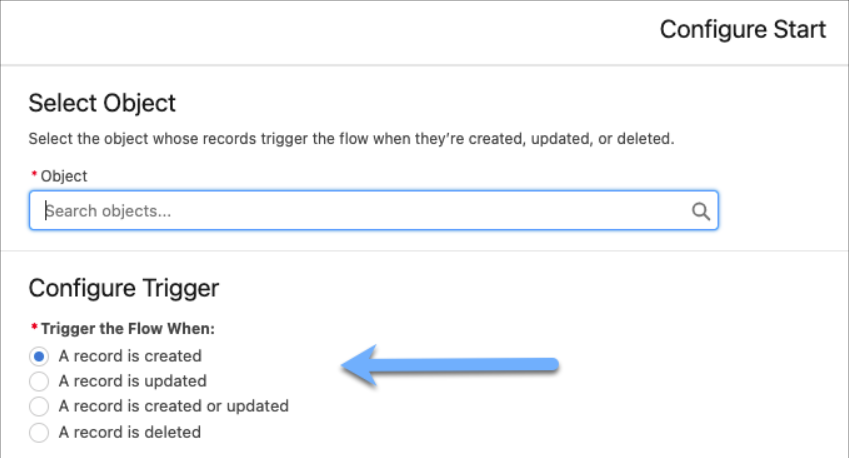
Record-Triggered Flow is one of the most powerful types of automation in Salesforce that a user does not have to manually start as it is always running in the background and reacts to the addition, modification, or deletion of a record in the system by itself. Another way of looking at it is that it is a set of commands that direct Salesforce to execute particular operations only when certain criteria are satisfied. 

For example, if a new Lead is created, Salesforce can instantly assign a new lead to a sales professional, send a welcome email, or update a linked record, and that too without a blink. The system handles all these operations immediately in the background instead of manually, which is time-saving and also ensures that the work is done correctly, consistently, and ​‍​‌‍​‍‌​‍​‌‍​‍‌efficiently.

salesforce developer classess
A Complete Guide: What Is a Record-Triggered Flow in Salesforce? 3

Source: Salesforce blogs

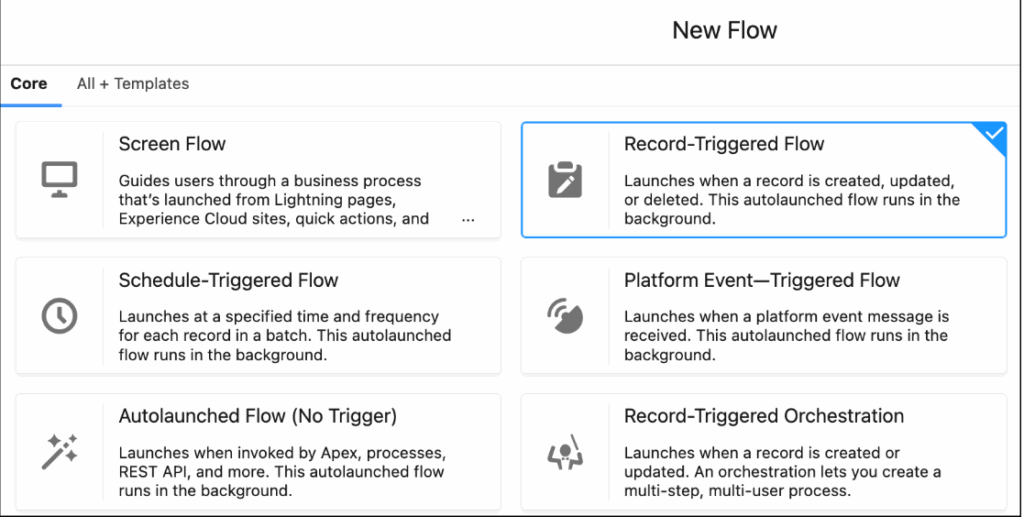
The​‍​‌‍​‍‌​‍​‌‍​‍‌ flow was built via Flow Builder, which is a no-code automation tool of Salesforce that is based on a simple drag-and-drop interface and may be used effectively by developers and administrators for the creation of complex processes. By removing the requirement for traditional Apex coding in numerous business cases, it is accessible even to those with minimal programming ‍​‌‍​‍‌​‍​‌‍​‍‌skills.

salesforce developer cerrification
A Complete Guide: What Is a Record-Triggered Flow in Salesforce? 4

Source: Salesforce blogs 

How Record-Triggered Flow Works?

Changes to a record affect how a record-triggered flow works. The process starts with a trigger event, such as adding and changing a record. Salesforce then checks to see if the record meets certain requirements. If the conditions are met, the flow will do a series of tasks that you have set.

Think about a chance that moves on to the “Closed Won” stage. A record-triggered flow can create a task for the customer success team, update the revenue total, and send an email to the finance department without any human involvement. Making the whole process faster and more accurate without any help from people

Types of Record-Triggered Flow?

Salesforce has two main types of record-triggered flows. It is very important to know when to use each type of flow in order to design efficient automation. One can easily learn these skills in the Salesforce developer training programs. 

In the automation sequence, each of these flows is assigned a particular task: 

  • Before-Save Flows (Fast Field Updates): These flows are initiated before the record is saved in the database, making them perfect for assembling quick changes to the same record. While doing so, it accelerates performance and consumes fewer system resources. 
  • After-Save Flows (Actions and Related Records): These flows are executed after the record is saved and are therefore utilized for actions that require the record to be in the database first, such as sending notifications, creating related records, or updating multiple records.

What is the Importance of Record-Triggered Flow?

Gradually, Salesforce is replacing the old automation tools, such as Process Builder and Workflow Rules, with Flow Builder. This switch means that record-triggered flows are not just another feature; they represent the future of Salesforce automation. 

Here are some of the reasons that show the importance of the Record-Triggered Flow: 

  • Help you with the automation of complex tasks without the need for coding. 
  • With the advent of before-save flows, you can see a great improvement in performance. 
  • It also provides developers and admins with more alternatives for handling logic in one place. 
  • It further guarantees that data is accurate by reducing the number of errors that are made manually. 
  • The best feature of the record-triggered flow is its compatibility with the roadmap of Salesforce.

In case you want to be an automation expert, mastering the use of flows is a crucial step for anyone enrolled in a Salesforce developer ‍​‌‍​‍‌​‍​‌‍​‍‌course.

How to Learn Record-Triggered Flow

If you are a developer in a Salesforce ecosystem and you want to raise your knowledge, you can learn to optimize record-triggered flows. You can get the finest understanding of it by joining the professional Salesforce developer training course. This program will help you understand how to:

  • Create flows with Flow Builder. 
  • Using Apex to connect flows and get more advanced features. 
  • Design triggers and conditions easily and effectively.

Conclusion

I hope the article has helped you understand that Record-Triggered Flow is one of the major upgrading and transformative factors for Salesforce automation processes. By decreasing human intervention and ensuring that all operations run smoothly in the background, they become more efficient. 

So, if you want to boost your knowledge in Salesforce, then you should check out Salesforce developer courses at Quantoknack Training. They offer the best Salesforce developer training programs, which will help you become an automation expert by gaining a deeper understanding of flow design and start a rewarding career. 

READ MORE
  • 1
  • 2
Recent Posts
  • How Salesforce Data Integration Tools Simplify Real-Time Business Connectivity
    In a nutshell, businesses collect operational data to perform...
  • Design, Build, and Optimize Agents with Agentforce 360 Innovations
    In this fast-moving digital world, businesses also want smarter...
  • Salesforce Built-In Payment Processing: How to Handle Everything End-to-End
    In the current digital economy, where online payments have...
  • Explore Top Salesforce Integration Challenges and Ways to Fix Them
    Integrating any system can be a difficult task, as an...
  • Protecting Sensitive Data: A Complete Guide to Encryption in Salesforce
    In the current digital economy, data can easily rank at the top...
logotype

We cater to individuals and corporates and provide IT training and certification programs.

44679 Endicott Drive Suit 300 #1046 Ashburn, VA 20147 United States

Phone: +1-571 989 9489

Email: atul.deo@quantoknack.com

Useful links

About Us

Contact Us

Blog

Courses

  • Live Salesforce Admin Training
  • Business Analyst
  • QA Testing Course
  • Advance JAVA Training
  • SQL Server Training
  • Live Salesforce Developer Training Certification Course
  • Digital Marketing
  • Oracle DBA Training

Subscribe

    Instagram Pinterest Linkedin
    Facebook
    Logo star

     2024 Quantoknack. All Rights Reserved