Become a Instructor

Blogs

logotype
Menu
  • Courses
    • Salesforce Admin
    • Salesforce Developer
    • Advance Java Training
    • Buisness Analyst
    • Digital Marketing
    • Oracle DBA
    • QA Testing Course
    • SQL server Training
  • Register
+1-571 989 9489
logotype
  • Courses
    • Salesforce Admin
    • Salesforce Developer
    • Advance Java Training
    • Buisness Analyst
    • Digital Marketing
    • Oracle DBA
    • QA Testing Course
    • SQL server Training
  • Register
  • +1-571 989 9489

Become a Instructor

Blogs

logotype
Menu
  • Courses
    • Salesforce Admin
    • Salesforce Developer
    • Advance Java Training
    • Buisness Analyst
    • Digital Marketing
    • Oracle DBA
    • QA Testing Course
    • SQL server Training
  • Register
+1-571 989 9489
  • Courses
    • Salesforce Admin
    • Salesforce Developer
    • Advance Java Training
    • Buisness Analyst
    • Digital Marketing
    • Oracle DBA
    • QA Testing Course
    • SQL server Training
  • Register
  • +1-571 989 9489
logotype
logotype
  • Courses
    • Salesforce Admin
    • Salesforce Developer
    • Advance Java Training
    • Buisness Analyst
    • Digital Marketing
    • Oracle DBA
    • QA Testing Course
    • SQL server Training
  • Register
  • +1-571 989 9489
TECH
Home TECH Page 4

Category: TECH

TECHAvatar of adminadmin0 Comments
Share article:TwitterFacebookLinkedin
676 Views
12 Likes

How Agentforce Enhances the Salesforce Ecosystem: Boosting Efficiency and Expertise

How Agentforce Enhances the Salesforce Ecosystem: Boosting Efficiency and Expertise

salesforce developer online training

Every business looks forward to finding the fastest way to improve its customer experience, engagement, and efficiency. And Salesforce is no different. The online Salesforce developer training includes Agentoforce for the students. It automates tasks and provides AI insights to make Salesforce operations more seamless. There are a lot of aspects of Agentforce that help enhance the Salesforce Ecosystem and boost workforce efficiency in departments within the organization. This article will help you understand and learn more about all of these key factors.


9 Key Factors of Agentforce, How It Amplifies Salesforce Ecosystem

Many factors contribute to the overall success of making the Salesforce ecosystem smooth. Here are a few breakdowns of how.


1.Streamlining Salesforce Operations

Flexibility is the second name for Salesforce, as it also offers a wide range of functionalities. But as any business grows, the requirement also changes with time, and optimizing Salesforce to those needs is crucial. Optimization of features in Salesforce sometimes becomes very tough; that is where Agentforce comes into play. This automates mundane tasks and provides an easy way to integrate with third-party tools. The ability to ease the workflows makes sure that their businesses maintain an advanced and scalable system.


2.Key Processes

The most important characteristic of Agent Force is the automatic processing of routine tasks: from data entry to the assignment of leads and case tracking to others. Reduced time spent on manual handling minimizes the risk associated with human error. This increases the productivity of a Salesforce environment, which works without incessant supervision. This lets businesses manage customer relationships more effectively, their data, and workflows; thereby making Agent Force extremely essential for developers and admins too.


3.Integrating with Third-Party Tools

One of the best things and a considerable key strength of Agentforce is its capabilities with third-party apps. This integration can potentially include marketing automation, customer support tools, or analytics platforms. Via this, it can be ensured that everything will work perfectly. Such integration eliminates most of the technical complexity involved in any Salesforce implementation and keeps the organization focused on core objectives and customer satisfaction.


4.Enhancing Skill Development for Salesforce Professionals

As Salesforce progresses, so will the requirements for highly trained professionals to optimize the immense range of features that the product possesses. Agentforce indirectly adds to skill-building through the provision of tools and means with which professionals will enhance their skills. You might either want to gain Salesforce developer certification or know more about integrations of Salesforce; however, the support that will be there with Agentforce through efficient workflow automation and smooth system management is indispensable.


5.Training Programs for Aspiring Salesforce Professionals

Given the increasing complexity of Salesforce, training for a developer in Salesforce has never been more important. To remain one step ahead, professionals can take advantage of Salesforce development courses that will equip them to manage, customize, and integrate their Salesforce solutions.


Online Salesforce developer training allows flexibility in learning for all who need to balance professional commitments with career development. Apart from preparing professionals for certification in the Salesforce developer exam, online training ensures that users obtain hands-on experience in developing a custom application on Salesforce.


6.Simplifying System Integration

The process of integration in Salesforce can often be complex and cumbersome. However, Agent Force provides pre-built integration templates, thereby making it easier and followable. Whether the issue is linking external applications or streamlining internal processes, Agentforce lets developers and admins implement changes very easily without worrying about any roadblocks on the technical end. With Agentforce, the admin and developers can easily work together, improving their bandwidth to deliver scalable, efficient Salesforce solutions.


7.Empowering Admins and Developers

Admins will appreciate Salesforce development training, especially as they learn how to interpret complicated custom code and integrations. Further, this can be made into a better task to manage and optimize Salesforce environments. At the same time, Salesforce developers can take advantage of Agentforce for the development of more efficient, maintainable solutions, leading to overall system performance.


8.Continuous Improvement with Salesforce Development Training

In short, Salesforce is a dynamic platform. It requires professionals to dedicate time to stay in touch with all the fresh features and tools that spring up from it. Agent force also helps companies optimize the Salesforce environment continuously, which they can utilize, always prepared to conquer new challenges.


9.Investing in Professional Development

Serious professionals who want to improve their skills in Salesforce should go through Salesforce developer certification and pursue Salesforce development training courses. Continuous learning ensures that recent and experienced workers are always prepared to take good advantage of the new offerings of Salesforce. With appropriate Salesforce developer courses and certification in Salesforce developer training and certification, individuals can beat the clock and be significant contributors toward the long-term success of their organizations as well.


Summing Up

This would be highly relevant in the fast-evolving Salesforce world; Agentforce, as it stands for the transformation solution towards efficiency boosts, customer experience enrichment, and the development of skills that enable businesses to optimize their environment in Salesforce and leads towards success by streamlining operations, integrating, and automating some key processes of Salesforce.


For professionals, there are courses on becoming a Salesforce developer and development training through which they can access all the tools needed to make Agentforce work for them. As an admin, whether optimizing workflows or a developer who thrives on custom solutions, Agentforce is the ticket to maximizing your Salesforce investment and staying ahead in today’s competitive marketplace.

READ MORE
TECHAvatar of adminadmin0 Comments
Share article:TwitterFacebookLinkedin
1473 Views
38 Likes

How Can You Freeze Or Deactivate A User On Salesforce?

For many decades, organizations have relied on the powerful Salesforce CRM platform to fulfill all their sales, marketing, and customer service needs. With growing organizations, the need for security management and seamless Salesforce instance efficiency becomes essential for better user management. That’s why the online Salesforce admin training focuses on teaching various aspects of user management including how to freeze or deactivate users when needed. You must learn this aspect to complete your certification and work for the organization, fulfilling its requirements.

It is an easy process to freeze or deactivate a user on the Salesforce platform. Read this article until the end to understand the best practices for managing users effectively.

Here are 6 steps on How Can You Freeze Or Deactivate A User On Salesforce?

This process can help you deactivate the user profiles on the Salesforce platform without hassle.

Step1: Login to Your Organizational Salesforce Platform

Access the administration account on the Salesforce platform to manage users.

image 2024 11 05T09 19 35 349Z

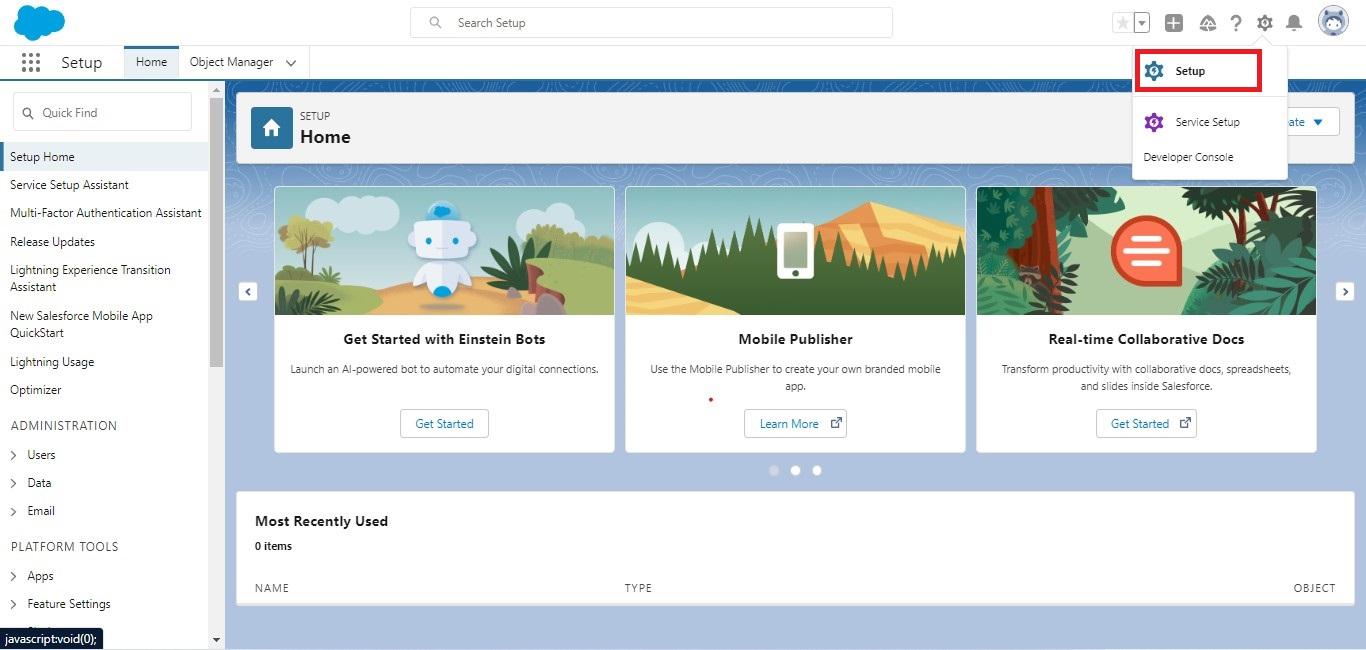
Step 2: Go setup -> Search-> Users

Click on the Gear icon, at the top-right corner of the page, to access the SetUp options. Then search users in the above search bar to access the complete list of users added to the system.

search user

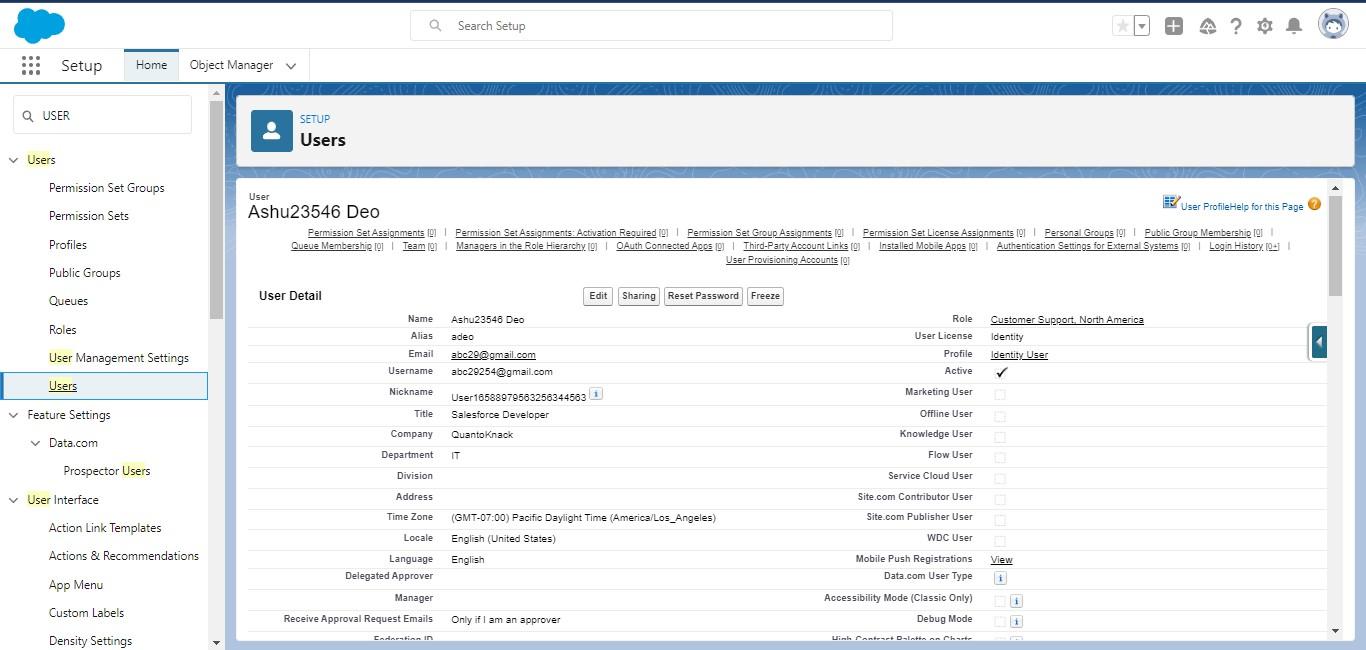
Step 3: Select the User You Want To Deactivate

Now, choose the user you want to freeze or deactivate from the system from the list of user names shown on the screen.

Select the User You Want To Deactivate

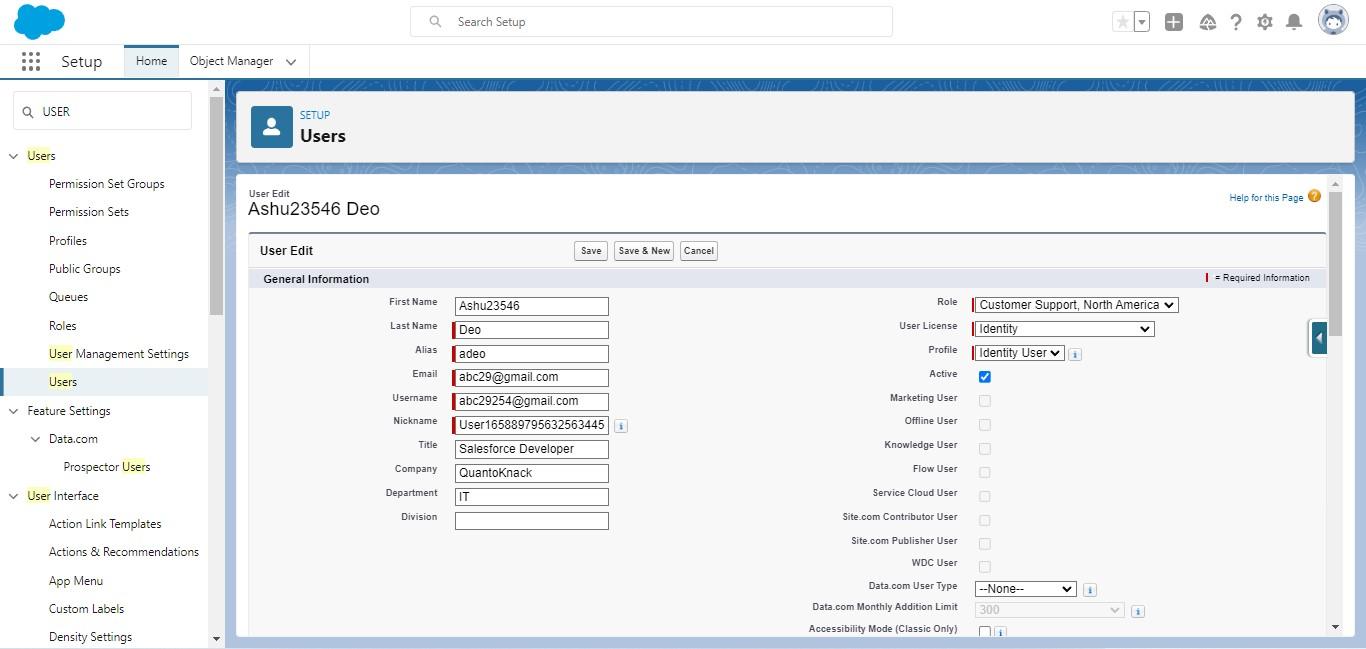
Step 4: Check the User Details

Click on the user name to access the complete information, related to all the roles and accessibilities provided within the system. You have to click the edit button to make any changes required in the user roles.

Check the User Details

Step 5: Deactivate the User

The edition section highlights various features and functionalities accessed or restricted for the user with the check box next to every aspect. So, now you have to uncheck the box next to the Active option to temporarily deactivate the user account until the admin reactivates it again.

Deactivate the User

Step: 6 After Deactivating the User, Save It!

All these changes will be applicable only after you save it. So, don’t forget to click save.

After Deactivating the User Save It

Important Notes:

  • Deactivating the user account will restrict their access to the Salesforce platform. They will no longer be able to use it. However, it doesn’t affect the historical data and records of the user. The user data remains intact!
  • Salesforce maintains data integrity for every user. Hence, it restricts the direct deletion of any user account on the platform, instead, you can just deactivate or freeze that particular account you want.
  • This user license can be utilized for a new employee or member by deactivating it.
  • You must use various allocated Salesforce licenses efficiently. Review them regularly and deactivate the unused users promptly.

What to Do If You Can’t Deactivate a User

If you encounter issues deactivating a user, consider these points:

  • Check Role Assignments: Ensure that the user is not the owner of any active roles, which would prevent deactivation.
  • Active Processes: If the user is tied to active workflow rules, approval processes, or scheduled jobs, update these dependencies before proceeding.

How to Unfreeze a User

  • Simply navigate to the user’s detail page and click the Unfreeze button to restore their access.

Conclusion

User account management is one of the most vital aspects of the Salesforce environment for security maintenance and efficiency. So, it is important to learn to enable and disable a user account. The online Salesforce admin training programs proper class on user management to teach students when and how to freeze or deactivate a user to secure data and run the system smoothly. Our professionals suggest following the best practices for user management and disruption avoidance in the organization’s workflow and procedures.

Connect with our online Salesforce admin training support team for any questions or further assistance.

Frequently Asked Questions (FAQs)

Can I delete a user in Salesforce?

No, deleting a user account in Salesforce is not possible. It only allows freezing or deactivating the accounts to maintain data integrity.

What happens to the data of a deactivated user account?

Salesforce saves data, records, and activities of every user, even after the deactivation. It also allows ownership transfer of such records to other users actively working on the system.

Is it possible to reactivate a deactivated user?

Indeed, you can reactivate a user anytime that has been deactivated previously on the Salesforce platform. Just enable the user by clicking the checkbox next to Active on the user detail page.

READ MORE
TECHAvatar of adminadmin0 Comments
Share article:TwitterFacebookLinkedin
826 Views
32 Likes

Salesforce Platform Developer Certification Guide and Tips

The increasing demand for the Salesforce platform in the market can be your career change and future success. Candidates with an interest in custom app development can get a great career opportunity with online Salesforce developer training and certification. This certified recognition will help you build better opportunities for the future and success in your career path. However, before you step into this path, it is important to get complete information on what, when, where, why, and how these certification and training programs are available. Let’s dive deep to know about Salesforce Platform Developer Certification Guide and Tips.

What is Salesforce Platform Developer Certification?

Salesforce is a well-known CRM platform in the market as many mid- to high-level organizations, like Google and Spotify, utilize it for better management. That’s why many candidates train and prepare for the Salesforce developer job role, as it pays well and has great success in future career growth. Anyone from a non-tech or tech background can start and create a great career in Salesforce as it has its own programming language called Apex, which doesn’t require pre-knowledge of any programming language. Anyone can simply get started with the basics and get the knack of this platform with the right Salesforce developer training and certification. 

Why Should You Get Certified?

A well-recognized candidate with proper Salesforce developer training has a higher chance of getting seen in tons of applications. It not only gives your skills the stamp that you are doing well but also increases your demand in the market compared to non-certified ones. You can get great benefits like below:

  • Career Advancement: Yes, if you want a raise in your pay scale or want to climb a more progressive and growing career path, the Salesforce developer training and certification can help you get both.
  • Competitive Edge: You will shine among all the applicants as a certified Salesforce developer who attains great knowledge with which you passed the exam and attained this certification. High-level companies require proper certification to prove your knowledge and command over what you are doing.
  • Networking: It’s a great way to network among different companies and with different students and experts in the Salesforce environment. You can create your own place above all with your work and connection with professionals in the field, helping you in your career and future growth.

Exam Structure and Key Areas

Before you just jump into something, it is imperative that you understand it completely. That’s why it is very essential to know the complete exam pattern and key points to get yourself prepared better. 

  • This exam includes 60 Multiple-Choice Questions. 
  • You will be allotted 105 minutes for this exam.
  • Everyone’s passing score on the exam is 65%.
  • It will cost you around $200 (plus applicable taxes).
  • You have two options for the exam, either you can give it at the center nearby or you can also choose to give an online exam under the supervision of a proctor.
  • As a prerequisite, you can go through the complete Salesforce Developer course syllabus.

Prerequisites for the Exam

You have to focus on various prerequisites to prepare 100% for your exam and get a better score for a successful career. So, you need to create a list of everything that you want to learn and attain for this Salesforce developer exam.

  • Familiarity with Object-Oriented Programming (OOP).
  • Hands-on experience with Salesforce development, especially on Apex, Visualforce, and the declarative tools.
  • Get a better understanding of basic web technologies like HTML, CSS, and JavaScript, especially for UI components (Lightning Web Components).

Some of the Vital Key Areas Are Highlighted Below:

The exam includes a lot of topics and concepts from the Salesforce development processes. The division of all the key areas is as follows:  

  • Salesforce Fundamentals (7%): Understand the Salesforce data model and architecture.
  • Data Modeling and Management (13%): Concepts related to objects, fields, relationships, and data management.
  • Logic and Process Automation (40%): Core focus on Apex, triggers, batch Apex, and declarative automation tools like flows and workflows.
  • User Interface (23%): Visualforce, Lightning Components, and Lightning Web Components (LWC).
  • Testing, Debugging, and Deployment (17%): Apex testing framework and deployment best practices.

These are the key areas that you need to study and prepare with online Salesforce developer training. But what are these concepts actually, and what should you focus on? Here is a comprehensive list of topics that you need to focus on in order to get ready for your exam.

  1. Apex Programming

As you may already know, Salesforce has its own programming language – Apex. You have to learn the basics of it that includes the data types, collections, control flow, SOQL and SOSL. These processes in Apex help you create various custom functionalities to build an app as per the specific requirement of an organization. 

  1. Visualforce Pages

To give a better visual experience to your users, you need an effective UI/UX builder, which is Visualforce in the Salesforce platform. Hence, it is vital to learn its use in order to build the desired UI for every application.

  1. Lightning Web Components (LWC)

LWC is the framemaker that empowers developers to leverage standard web development technologies like JavaScript, HTML, and CSS to create dynamic web applications without relying on proprietary frameworks. It results in faster and more efficient performance, easily adaptable, reused across applications, and adheres closely to those standards. So, it makes the components reusable and responsive. While LWC and Aura are both component-based frameworks, LWC provides a more modern approach to development.

FeaturesLWCAura
Framework SizeLightweight and optimizedHeavier and slower
Browser StandardsBuilt using modern web standardsProprietary framework
PerformanceFaster due to less overheadSlower due to custom code
Component LifecycleSimplified lifecycle hooksComplex lifecycle hooks
Code ReusabilityHigh reusability with native web componentsReusability but limited by Aura concepts
JavaScript SupportFull ECMAScript 6+ supportLimited support for modern JS
Ease of LearningEasier for web developersSteer learning curve
  1. Triggers

With Triggers, you can perform custom actions before and after changes occur in Salesforce records. From inserting and updating to deleting or undeleting data, this Apex code block gives you the power to execute automatically when certain database events occur. Here’s the basic structure of a trigger:

image
  1. SOQL vs. SOSL

SOQL (Salesforce Object Query Language) and SOSL (Salesforce Object Search Language) are both query languages used in Salesforce to retrieve data from the platform, but they serve different purposes and have distinct syntax and use cases. Key Differences Between SOQL and SOSL.

FeatureSOQLSOSL
PurposeQuery specific records from one or more related objectsFull-text search based on keywords
Search typeStructured queries on fields of objectsFull-text search based on keywords
Returns Records from specified objects and fieldsResults from multiple objects
Search scopeSearches within specific fields and objectsSearches across multiple objects in indexed fields
Use caseFetching records with known object structureSearching for keywords across salesforce records
FiltersUse WHERE clause for filteringNo complex filtering (searchers keywords only)
  1. Security and Sharing

Developers utilize the Security and Sharing feature to control data access at various levels. This way, the admin can restrict or give access to various functionalities to authorized users based on their roles, permissions, and sharing rules. Salesforce offers multiple security layers to protect data, from the organization level to individual records.

  1. Test Classes

Developers utilize test classes to check and ensure the quality and reliability of Apex code. This is the easiest way to validate your code and ensure it works as expected. Salesforce has mandated to test at least 75% of Apex code with tests before deploying it to production.

How Do You Prepare for Salesforce Platform Developer Certification and Job?

The next step after knowing everything about a task is to plan and prepare for it. Just like that, you need to get the proper Salesforce developer training online to take the exam and attain your certification without hassle. But the question is HOW? Here are three of the best and most suggested ways to speed up your journey and help you achieve success in the end.

  1. Trailhead

The free online learning platform of Salesforce, Trailhead, is the best place to get started with your online Salesforce developer training. It has fun, specific learning paths, called trails, to build skills and knowledge in various Salesforce-related topics. Each trail includes hands-on challenges, quizzes, and modules, making it an engaging and practical way to learn. These trails align with the exam objectives, offering a comprehensive and structured learning approach.

  1. Salesforce Documentation

If you want to look for more detailed explanations of key concepts, APIs, and development guidelines, Salesforce developer documentation is what you need. It is the official and in-depth resource provided by Salesforce that includes finer details of the Salesforce platform, Apex, Visualforce, Lightning components, and more. You “MUST READ” these documents to deepen your knowledge of Salesforce, as they provide authoritative insights into the functionality, best practices, and implementation techniques required to master the platform and excel in Salesforce developer training and certifications.

  1. Online Salesforce Developer Training Provider

You can also register with the best online Salesforce developer training course in the USA, like QuantoKnack. We have expert mentors who have years of experience in the Salesforce environment and are keen to share their knowledge with the students. From various concepts to practicing time management for your exam, we will guide you all with the help of our practice tests. The live sessions will help you learn with interactions where you can ask your questions and get solutions from the professionals. Also, you can utilize the recorded sessions to revise all the concepts from the classes. This way, you can prepare better for the written exam. 
A lot of students ask, but what about practical knowledge? Yes, we have live projects for you to work on as well. Solve various use cases and become an expert in the Salesforce environment, getting extra skills for better placement assistance with one of our partnered organizations. So, from learning for exams to getting hands-on experience for job placement, our online Salesforce developer training and placement program covers all for you.

Tips for Exam Preparation

Ready for some extra tips from our experts? Here are the 5 major tips that will lead you to the path of success in your Salesforce journey. 

  1. Get Hands-on Experience

Experiencing how things actually work and what actions are required to solve various hurdles in the path of Salesforce development and implementation is very important. Hence, make sure that you work around Salesforce and attain at least some practical knowledge of how things are done. Look for opportunities where you can work with the Salesforce environment, whether through a job or a Salesforce Developer training program.

  1. Set and Follow a Study Schedule Strictly

Whether you are studying for your senior secondary or college or Salesforce developer certification, it is very important to create a proper plan and follow it strictly. Our professionals suggest that the key to success is in your consistency towards the work. If you study a little bit daily, it will definitely give you great results after a while.

  1. Join Online Communities

You can join the Trailhead and other Salesforce online communities. A lot of experts and students like you are already there, some with the questions and some with the solutions. Join them in order to learn about the various use cases that everyone has to face while using the Salesforce platform development and implementation. You can even post your questions as well if you have any, and the experts will share the solution with some resources where you can study it in depth.

  1. Understand the Exam Question Format

You have to learn the exam structure in order to crack it. Above are all the key areas with the percentage of questions they cover in the exam, so focus on them. Also, I solved various practice tests, studied question papers from previous years, and watched some videos related to them. This way, you can understand the pattern of your Salesforce developer certification exam better and get a knack for it.

  1. Focus on Weak Areas

It is very good to know what you are good at, but it is really helpful to know your weaknesses. Hence, you need to focus on the topic areas that you are weak at. Yes, start by making your basics strong and then revise the concepts you are good at, but practice the problems that stop you or take more time. Ask for easy ways to solve those problems with the professionals at online Salesforce developer training or the community people. Guidance can take you to your destination faster than doing it all by yourself.

Conclusion

This blog includes everything that you need to win and complete your Salesforce developer certification. This guide can help you score better in your exam as well as gain some practical knowledge while preparing for it to get started with your job easily. QuantoKnack training can be a good choice if you are interested in learning, training, and getting job assistance with highly reputed organizations in the USA. If you are interested or have any questions, reach out today, and our experts will guide you better.

READ MORE
TECHAvatar of adminadmin0 Comments
Share article:TwitterFacebookLinkedin
1007 Views
25 Likes

Salesforce Admin Training & Certification Exam Syllabus – Key Topics

Learning for the Salesforce admin exam is not a cakewalk. It requires consistency and hard work. You have to understand a lot of concepts and learn various management tools. It is a highly demanding job role in the market that can help you earn more as well as achieve success with smooth growth and transitions. However, you need to attain complete Salesforce admin training and certification for better job placement with your desired payscale.

Yes, before you jump into the studies and prepare for your exam, it is important to understand the Salesforce admin certification exam syllabus. It will give you an idea of what you need to do and where to start.

Let’s dive deep into the complete overview of Salesforce Admin Certification and its prerequisites. 

About the Salesforce Certified Administrator Exam

Salesforce admin plays a vital role in the management and configuration of this CRM platform within a specific organization. They have to ensure smooth workflow, productivity, and overall efficiency, customizing the Salesforce platform to meet business requirements. They work as the backbone of Salesforce implementation by bridging the gaps between business processes and the Salesforce platform. It requires working with various departments within the organization, from sales and marketing to service and operations, understanding their processes, and tailoring Salesforce accordingly to support them. Also, they manage user permissions, ensure data quality, and offer ongoing support and training to users.

Who’s the Ideal Candidate for the Salesforce Admin Role?

There are no requirements for having an IT background or a tech geek if you really want to be a Salesforce administrator. All you need to have are some skills as well as the Salesforce admin training and certification. If you talk about basic skills, include technical expertise, business acumen, and communication skills.

Here is a list of major skills that, if you master these, will easily make you successful in your Salesforce admin career.

  • Master technical aptitude, such as managing large volumes of data, ensuring data accuracy, and implementing data validation rules. Be ready to work with process automation tools like Salesforce Flow, Process Builder, and Workflow Rules.
  • Work on analytical skills to spot small issues and inconsistencies within the organizational CRM platform and problem-solving skills to troubleshoot and resolve user issues comfortably.
  • Understand various business processes in different departments like sales, marketing, service, and operations. Help organizations drive growth and improve productivity, translating business goals into Salesforce solutions.
  • Enhance communication skills to explain technical concepts in a simple, non-technical manner. Attain training skills to train new users and support existing ones with the proper training and user guides. Collaboration can also help in working with cross-functional teams. 
  • Become more customer service-oriented to support users at all levels, answering questions, troubleshooting issues, and ensuring users feel comfortable with the platform. 
  • Always be eager to stay updated on new features, best practices, and industry trends and open to change, becoming adaptable, able to pivot quickly, and implement changes effectively.
  • Enhance strong project management skills to prioritize tasks and manage workload efficiently, manage deadlines, and coordinate with different departments to meet project goals.
  • Manage accurate and consistent data with the implementation of validation rules, duplicate management, and data cleansing strategies.
  • Ensure periodical data backup and secure data following the organizational data governance policies. 
  • Custom-create objects and fields based on business needs and even tailor the standard objects like Leads, Opportunities, accounts, etc.
  • Build dashboards with real-time visual business data representation and maintain them to help with better decision-making.
  • Stay up to date with annual releases that Salesforce shares three times a year for testing and rolling out the new features effectively.
  • Helped day-to-day operations by resolving bugs or any issues that arose. 
  • Update the existing users with the new updates and train the new users by conducting various sessions. 
  • Manage various user guides, technical documentation, as well as FAQs to help organizations use the Salesforce platform effectively.
  • Use AppExchange to download and manage any 3rd party apps to increase the capabilities of the platform.

Salesforce Administrator Certification Exam Topics

You will have to study 12 key areas for your Salesforce admin training and certification exam. These all are divided into some percentage that helps every student to understand the importance and weight of their study. Let’s explore all of these topics in detail and get you ready for your exam. 

  1. Organization Setup (3%)

You must attain an in-depth understanding of your organization, such as how it is set up, its profile, fiscal year, currency, and business hours. While working, you have to configure global settings and various features like search and layout or work.

2. Sales and Marketing Applications (14%)

You will have to use the Salesforce Sales Cloud tool for your organization that can help them with leads, contacts, opportunities, and accounts tracking. Secondly, handle leads, opportunities, and campaigns to manage the lead conversion process, opportunity stages, and sales processes, including marketing campaign setup, management, and analysis.

3. User Setup (6%)

You have to take care of the user creations like adding new users and setting up the roles and profiles as well as managing them like helping them reset passwords, etc. Salesforce Admins are responsible for granting access to all the users based on their roles and profiles. Hence, you must learn the complete functionality of profiles, roles, and permission sets.

4. Security and Access (13%)

You have to manage all types of security and access related to objects, records, and even fields. A Salesforce admin works with profiles and permission sets to control access to objects and manages organization-wide defaults (OWD), role hierarchy, sharing rules, manual sharing, and field visibility using field-level security settings and page layouts.

5. Standard & Custom Objects (14%)

You have to manage object creation, relationships, and even schema builder. That’s why online Salesforce Admin training programs include custom creation of objects and customization of standard objects, fields, and relationships. You need to learn lookup and master-detail relationship creation for data relation, utilizing Schema Builder for data model visualization and creation.

6. Service and Support Applications (13%)

You must learn case and knowledge management with a service console configuration to support case resolution workflows. It includes automation and assignment rules for customer service case management support case resolution and self-service portals for organizing and sharing knowledge articles.

7. Activity Management and Collaboration (3%)

You have to learn the Chatter tool, which can help you with internal communication and collaboration across various departments, as well as track various tasks and events to ensure visibility and cooperation.

8. Data Management (10%)

It’s your responsibility to handle data quality, import & export, as well as storage and backups. With Data Import Wizard and Data Loader, you can manage data easily. Cleanse the data by implementing data validation rules, duplicate management, and other tools. Always keep knowledge of data storage limits and backup the data for a better future.

9. Workflow/Process Automation (16%)

You can utilize Process Builder to automate tasks and business processes and create workflow rules to automate field updates, email alerts, and task creation. You can submit the record by setting up the workflows and implementing Flow for an advanced level of automation to perform complex data processing and record updates.

10. Analytics – Reports and Dashboards (10%)

Utilize filters and group data, and add charts to reports to create custom reports. You will require a custom dashboard for real-time data visualization that will help you set permissions to share reports and other dashboard features with defined role and profile users.

11. Desktop and Mobile Administration (1%)

You must learn to enable users to work from anywhere with the Salesforce mobile app configuration and optimize user experience using mobile devices with custom layouts.

12. AppExchange (2%)

You can start with AppExchange apps that help browse, evaluate, and install third-party applications within the organizations. This topic includes customization for app creations, configurations of different features as the organization requires, and integration of different APIs.

3 Study and Exam Strategy

  1. Distribute your study time that covers a higher percentage of areas in the Salesforce Admin exam, like Workflow/Process Automation and Standard & Custom Objects.
  2. You should try working on live projects in the Salesforce environment to get more experience and a better understanding.
  3. Use practice and mock tests to learn time management for your Salesforce admin exam.

5 Additional Study Resources

  1. Salesforce Trailhead: You can directly learn through some videos available at the Salesforce official learning platform – Trailhead.
  2. Go Through Exam Guide: Salesforce has uploaded a lot of official Salesforce admin guides online. You can use these resources as your study reference for better learning.
  3. Practice with Test Exam Papers: You can explore the previous year’s practice papers and various use cases. You can get a grip on various types of questions that may be included in your exam.
  4. Join the Salesforce Community: These online communities have a lot of Salesforce professionals who have years of experience in Salesforce. You can share various questions, advice, tips, strategies, and best practices on these forums and even share your resources with other participants.
  5. Online Salesforce Admin Training: Most USA students prefer to register for an online Salesforce admin training program that offers complete support with exams as well as placement. They create a proper curriculum for the students that includes online virtual classes, pre-recorded sessions, live project work, and practice and mock tests. Also, these program providers help their students to placement jobs with one of their associated organizations as a great payscale.

Tips and Strategy for the Salesforce Admin Certification Exam

These expert tips and strategies can help you do better in your Salesforce admin certification exam in 2024 and beyond.

  • Read every question carefully and pay extra attention to the difficulties, one that requires more attention than the other.
  • Utilize the pen and paper provided at the test center to draw data schemas, role hierarchies, or other diagrams and effectively solve various issues. 
  • If you are confused about any answer, just try eliminating the wrong options first and then try to solve the problem among the rest of the options.
  • Don’t forget to review your exam sheet at the end before submitting it. You can utilize your last 15 minutes, as Double-checking always helps!
  • You have to learn to differentiate between the answers that may sound correct but aren’t really the best practice. Take an example of triggers. You can update fields in Salesforce using triggers, however, Workflow Rules or Process Builder are the preferred standard best practices that you must choose from the options.
  • If you need double-thinking on any question, you can use the “Mark for Review” button and do it later when you are done with the entire exam. This way, you can think and resolve extremely complex questions at the end.

Conclusion

Hope you find this guide beneficial to make the Salesforce admin certification exam syllabus easy to understand. You can learn the online exam curriculum and various topics that attain some high-percentage weight in your exam preparation. However, if you still need any more guidance, you can always come to the experts at QuantoKnack training. They have years of experience in the Salesforce environment, which makes them the right resource to start your training and guidance today. You can learn various concepts in the easiest way and prepare for your exams with practice tests designed to give you a grasp on various key areas. Also, you can prepare for your job roles with live project work for hands-on experience in solving various kinds of use cases. This way, you can build great knowledge with experience that will help you in both your Salesforce admin certification exam and your job function.

READ MORE
TECHAvatar of adminadmin0 Comments
Share article:TwitterFacebookLinkedin
768 Views
21 Likes

How Can You Add Permission Sets To A Salesforce User?

One of the essential skills you will master through your online Salesforce training is user access and permissions management. You can maintain a secure and efficient environment within the Salesforce platform by controlling various accesses, like who can access data, what kind of data they can access, and what actions they perform. Here comes the Permission Sets handy.

Permission sets enhance the flexibility of user access management and allow you to tailor user access to meet specific business needs. The Salesforce admins are required to manage user permission sets, a collection of settings and permissions, that offer extended functional access to various tools and features without individual user profile alteration. They utilize permission sets frequently to provide users with the right tools, functionalities, and data access for effective role accomplishment. Online Salesforce admin training programs teach the students to give special access to specific users temporarily or permanently without impacting other users through the live projects.

This technical guide will walk you through the step-by-step instructions for adding a permission set to a Salesforce user. 

Know How Can You Add Permission Sets To A Salesforce User?

Step: 1

Login salesforce org

  • As a Salesforce admin, you get administrator privileges in the platform account so log in with it. Your role includes the power to manage Permission Sets and assign them to other users.

Step: 2

Click setting in the right corner

  • You will see a gear icon called settings in the upper-right corner of the screen. Click on it. 
  • You will get the dropdown menu so select the Setup option.
step 2

Step: 3

Search permissions in the left search bar and see the permission set

  • Now, in the left sidebar, the quick find box is available. You have to type Permission Sets to search for it and click on it.
  • Setup – > Quick Find Box -> Permissions Set 
  • Here you can assign a Permission set for specific users by clicking on a specific Permission Set. 
Step 3

Step: 4

Select the user

  • A list will appear on the screen with all user names from your organizations. You have to simply tick on the boxes of Permission Set that appear next to the user names to activate their access.
  • After setting up all the configurations, click on the Next Button to move forward.
Step 4 1

Step: 5

Go to Manage Assignments

  • There is a Manage Assignment Button on the Permission Set details page. It helps in checking the comprehensive list of users already assigned to a specific Permission Set.
step 5

Step: 6

Add assignments to the user

  • Recheck and ensure you have chosen the correct users and click on the Add Assignments Button. It will start assigning the Permission sets to new users.
  • Then click on the Assign button to complete the assignment.

Another Easy Method to Add a Permission Set to a Salesforce User

There is another simplified way to complete the process of assigning a Permission set to a Salesforce user within your organization. Let’s learn the quickest approach:

Step 1: Search User in the Search Bar

  • At the top of the Salesforce page, you will see the search bar.
  • Here you have to enter the user name for the Permission Set assignment. Click on their name. It will open a new page with an overview of User Details.

Step 2: Click Permission Set Managements

  • You will find the Permission Set Assignments section on the user detail page.
  • Directly reach the page where you can manage all the Permission Sets for that particular user by clicking on the Permission Set Management Button.

Step 3: Add Permission Sets

  • Now add the Permission Set by clicking on the Add Button. The list of available Permission sets will appear with the Enabled Permission Sets.

Step 4: Add Assignment and Save It

  • Check the boxes next to the user name to enable the desired Permission Set. 
  • Finalize the Assignment by clicking on the Save button above.

And you are done!

This method provides a quick and straightforward way to add Permission Sets directly from the user’s profile page without navigating through the Setup menu.

Best Practices for Using Permission Sets

Following the right strategy and best practices are crucial to succeed in your tasks. That’s why here are the 3 vital best practices that you must keep in mind while using Permission Sets in Salesforce are as follows:

  1. Use Permission Sets to Grant Additional Access: Permission Sets are ideal for providing temporary or specific access to users. Always use Permission Sets instead of creating new profiles.
  2. Create Permission Set Groups: If you have multiple Permission Sets that you often assign together, create a Permission Set Group to streamline the process.
  3. Regularly Review Permission Sets: Periodically review user Permission Set assignments to ensure they have the appropriate level of access.

Final Thoughts

If you are preparing for the Salesforce admin certification exam, you must learn the Permission set topic. This concept is very important for every organization as it helps to assign specific roles with limited access depending on their requirements for the work. It is a flexible and efficient way to manage user permissions and control access in Salesforce. This guide with step-by-step instructions will make it easier for you to perform the complete process in your Salesforce CRM platform. If you have any further questions or need any guidance, we have experts with years of experience who can provide you with answers. Also, you can start with online Salesforce admin training to achieve success in your certification exam. Don’t wait for too long! Just join the classes today and start 2025 with certified skills in Salesforce admin.

READ MORE
TECHAvatar of adminadmin0 Comments
Share article:TwitterFacebookLinkedin
669 Views
10 Likes

What is Salesforce Sandbox and Types of Sandboxes?

The three major pillars of the software development process are the ability to test changes, conduct experiments with new features, and provide safe training sessions. When we talk about complex systems like Salesforce, it sounds more vital. The development errors or improper configurations can lead to data loss, business interruptions, or other operational risks. That is why Salesforce developers use Salesforce Sandbox. It is a safe, isolated environment that imitates production, allowing teams to work on production, testing, and training activities and, most importantly, to experiment with new features without the fear of impacting the live system.

What is a Salesforce Sandbox?

Salesforce developers need to develop, test, and train different functionalities, but making changes in a live system without disturbing production can be difficult. Hence, they utilize the Sandbox to create a safe replica place where they can test various applications, make required changes in the code, and even configure without affecting the actual production data. The Sandbox can be beneficial for avoiding errors and testing new customization safely.

Salesforce developers set up each Sandbox to contain only metadata, like configurations, code, and workflows. It also involves a combination of metadata and a subset or complete copy of production data. The best part of Salesforce is that it has different types of Sandboxes that every organization can utilize for a specific purpose. These range from simple development to full-scale testing with accurate data.

Types of Salesforce Sandboxes

Sandbox can help Salesforce developers develop and test new applications safely, experiment with Salesforce customizations, and conduct training or demos for teams without risking production data. There are 4 types of Salesforce Sandbox – Developer, Developer Pro, Partial Copy, and Full Copy. All of these have great functionalities. Let’s understand each of them in detail.

  1. Developer Sandbox

The Salesforce developers require a specific environment to code and test, and every individual developer utilizes Developer Sandbox as the lightest form of Salesforce Sandboxes.

  • A small storage capacity of 200MB is available.
  • You can refresh it every 24 hours to utilize an updated environment for testing.
  • Use Case: Ideal for lightweight development and testing.
  1. Developer Pro Sandbox

If your projects require more code validation and development facilitation, then Developer Pro Sandbox is the right choice. Salesforce developers can utilize more space to handle more prominent and complex development and testing activities.

  • A more extensive storage capacity of 1GB is available.
  • You can refresh it every 24 hours to utilize an updated environment for testing.
  • Use Case: Better suited for integrations and testing requiring more data.
  1. Partial Copy Sandbox

Most Salesforce developers utilize Partial Copy Sandbox when they are required to copy both metadata and a subset of production data. It helps them in data-based testing, QA environments, and UAT (User Acceptance Testing) when they need accurate data for these activities.

  • Salesforce developers can copy metadata and sample production data based on a defined template.
  • Storage Capacity: Up to 5GB of data storage is available.
  • You can refresh it every 5 days, allowing for a more realistic testing environment compared to the developer sandboxes.
  • Use Case: For environments that need a blend of metadata and data for testing without requiring a full production replica.
  1. Full Sandbox

Salesforce developer creates a complete replica of their production environment for complete testing, including performance and load testing. It is the most comprehensive Sandbox, and it includes all metadata and data.

  • Salesforce developers can copy all the production data and metadata.
  • You can utilize a full-scale model of your production environment.
  • You can refresh it every 29 days.
  • Use Case: Ideal for final pre-production testing, load testing, and performance testing, as it mirrors the production environment fully.

How to Choose the Right Sandbox?

Here are the key pointers to consider to choose the right one.

  1. Data Storage and Limits

Salesforce developers can focus on the storage capacities required for both metadata and production data. You can choose between isolated development with 200MB, testing that requires both configurations and actual production data in 1 GB or 5GB, or end-to-end testing, performance testing, and training sessions involving real production data with Full storage capacity.

  1. Data Sensitivity and Compliance

Salesforce developers always keep the data safe ahead of everything. You can mitigate risks and maintain regulatory compliance by checking and ensuring the user permissions are exactly the same as those in the live system. Also, the data masking tool can help safeguard sensitive data with CCPA, HIPAA, or GDPR regulations.

  1. Refresh Intervals

Salesforce developers should consider the refresh intervals of each Sandbox before choosing one of them. You can use a day-to-day refresh option to get frequent updates for ongoing development work without overwhelming the system and a monthly update for pre-production simulations or user acceptance testing (UAT).

  1. Integration Testing Requirements

You need a specific Sandbox type to help you with external system testing, such as marketing platforms, ERPs, or databases. Salesforce developers choose Developer Pro and Full Sandboxes as the more suitable integration testing Sandboxes. Their high storage capacities and data replication capabilities allow for end-to-end testing of data flows between Salesforce and other applications.

  1. Use Case and Testing Needs

Consider the different scenarios in which you can utilize different Sandboxes and what kind of testing you will need for your production. It’s essential to match your specific use case to the right Sandbox environment, such as for simple code development, data-driven testing, or full-scale testing, ensuring that development and testing scenarios are as close to real-world use as possible.

How to create a Salesforce Sandbox?

Step 1

Use your administrative privileges and log in to your Salesforce production account.

Step 2

Click on the gear icon (⚙️) that indicates the setup menu. You can find it in the upper right corner of the Salesforce interface. The dropdown menu will open, and you will have to select the Setup option.

Step 3

The step will open in the left sidebar. Now, you have to type “Sandbox” in the quick find box and click on the Sandboxes under the “environments” section.

Step 4

Now, click on the New Sandbox button. Give it a descriptive name. Choose the Sandbox type and you are all set.

Step 5

It’s time to complete the configuration of Sandbox settings. Choose the template that defines the data to be copied from production, and also, configure additional settings as per your needs, like access permissions to users, etc.

Step 6

After you are done with the settings configuration and entering all the information required, click on the Create button and get started! This process may take a bit of time as the data copying takes time. But no worries you can keep a check on the status through the Sandboxes page.

How to Refresh a Sandbox?

Salesforce developers need updates on the development and testing environment, which requires refreshing the latest production data. Here is the complete process to follow:

Step 1

Keep logging into your Salesforce production account.

Step 2

Click on the gear icon and go to Setup. Type “Sandbox” in the quick find box and select the option.

Step 3

All the existing Sandboxes are listed on the Sandboxes Page. All you need to do is click on the Refresh link next to the Sandbox you wish to refresh.

Step 4

You will get a pop-up on your screen confirming the refresh action. Just review the prompt and confirm. However, REMEMBER! You can undo this action, so once the refresh is done, all the existing data and customizations in the Sandbox will be lost.

Step 5

It will take a little time to complete the refresh process, depending on the amount of data. You will receive a notification as soon as the refresh is completed and Sandbox is ready to use. You can check the refresh status on the Sandbox page as well.

Salesforce Sandbox Best Practices

  1. Maintain an up-to-date production environment in the Sandbox by refreshing it regularly. Always keep your team members informed about the refresh schedule and the changes that occurred.
  2. You can track various changes in your Sandbox environment by implementing a version control system. Also, you can keep the changes documentation for sharing knowledge to roll back processes easily if required.
  3. Provide a specific role and permission to all your team members for proper responsibility distribution and avoid unauthorized access to sensitive data and configurations.
  4. Plan your testing activities with proper scenarios and edge cases, including both functional and non-functional testing aspects. Take feedback from stakeholders and functionalities validation.
  5. Keep a knowledge base in the Sandbox with best practices, guidelines, and previous learning for your teammates.

Final Thoughts

Hope you understand the Salesforce Sandbox, its type, how to create Sandbox, how to refresh, and best practices. But can you really do it by reading this article? Practical knowledge is very important to make this happen. No worries; our experts will train you for a better tomorrow. We train every talent with practice and mock tests, preparing them for exams as well as job placement. Every candidate at our QuantoKnack Training gets hands-on experience by working on one of our live projects to solve various use cases with the team experts. From getting trained and achieving Salesforce developer certification to working on live projects and getting job placement, we have covered you with all. So, what are you thinking now? This is the right time to get started with your online Salesforce developer training.

READ MORE
TECHAvatar of adminadmin0 Comments
Share article:TwitterFacebookLinkedin
796 Views
17 Likes

Different Types of Reports in Salesforce

Today’s world revolves around data, and that’s why every business needs accurate reporting to make better decisions and enhance performance. Many organizations that use the Salesforce CRM platform have a complete reporting toolset within them, powering the visualization, analysis, and interpretation of data. Salesforce admins keep track of KPIs, recognize the trends, and streamline various operations by collecting activity data from different departments, like sales, marketing, operations, and services. This process is a vital part of business intelligence.

Different businesses have different needs that require different types of data, like basic listings or complex analyses and Salesforce provides all these for multiple dimensions to meet every business need easily. Salesforce admin understands these different report types to tailor the data in the most suitable form as per the requirements. They master analyzing day-to-day operational tracking to more complex performance analytics.

  1. Tabular Reports

The simplest type of report in Salesforce is a Tabular report. Mostly Salesforce admins utilize it for maintaining data in a spreadsheet form, displaying all the data in the rows and listing form. Yeah, so whenever you need to share contacts, leads, and opportunities with the stakeholders in a listicle way, this report is best. The best quality of this report is that it does not require any complex groupings or calculations as it is the most basic style report.

Features:

However, as they say, every technology has its own limitations and so does the tabular report. 

  • Row limits: Tabular reports can only be used in dashboards if they have a row limit.
  • Dashboard settings: To use a tabular report in a dashboard, you need to specify the dashboard settings in the report.
  1. Summary Reports

The summary report can be defined as a more complex data analysis report than a tabular one. Salesforce admin uses this report format to group rows of data and perform subtotals for the analysis of various data across different categories. It makes it easier than ever. You can benefit from this report form for grouping various data by specifying the field or creating data reports that require subtotals. The best example is opportunities by salespersons or sales by regions, which you can easily specify with the summary report.

Features:

  • It can be used in dashboards.
  • Grouping by rows and columns.
  • Subtotals for each group.
  1. Matrix Reports

If you need a more advanced level of data reporting, then you can go with the matrix report. It allows a Salesforce admin to group various data by both rows and columns, which results in the best fit for analyzing large data sets across two dimensions. It can be utilized while comparing the related totals across both rows and columns or analyzing complex data with cross-tabular views. You can take sales by region and product category as the best example for Matrix reports.

Features:

  • Grouping both horizontally and vertically.
  • Summarizes data across two axes.
  • It can be used in dashboards.
  1. Joined Reports

Salesforce admin finds the joined report to be the most complex as it is a variety of data from multiple report types combined into one. You can use this one when you are required to analyze data across different types or objects. Most organizations require the comparison of data across different sources and the extraction of information from multiple objects. For such high-level reports or sources, like combining sales data with customer support cases, it can be the most needed situation to use Joined reports.

Features:

  • Displays multiple report blocks together.
  • Allows you to view data from multiple perspectives within a single report.
  • It can be used for multi-object comparisons.
  1. Custom Reports

Sometimes Salesforce admins are even required to choose specific objects, fields, and filters and create a custom report which is easy with this CRM platform. Such custom reports offer flexibility that helps in meeting unique business needs without hassle. If your organization needs highly tailored data analysis and specialized KPIs, which is difficult to achieve with out-of-the-box reports, then you are all good to choose custom report creation.

Features:

  • Create your own report type to control over data filtering and grouping.
  • It can be saved for future use or shared with team members.
  • Provides maximum customization.
  1. Standard Reports

The Salesforce CRM platform is built for the ease of the users and admins. That’s why they offer these pre-built reports that cover common business metrics, such as top accounts, leads, and opportunities. Organizations make the most use of these standard reports for common use cases as well as quick insights without the need for customization.

Features:

  • Ready to use without any setup.
  • Easily customizable if minor changes are required.
  • It provides quick access to essential business data.

Key Considerations for Choosing the Right Report

When selecting the appropriate report type in Salesforce, it’s important to consider specific factors that influence how your data should be displayed and analyzed. Here are the key considerations:

  1. Data Complexity
  • Simple Data: A tabular report will suffice if you only need to display a basic list of records, such as contact or opportunity lists.
  • Complex Data: Summary or matrix reports are better options for more detailed analysis, such as grouping by multiple categories or including calculations.
  1. Grouping Requirements
  • No Grouping: Tabular Reports will work fine if your report doesn’t need any grouping or categorization.
  • Grouped Data: Use summary reports when you need to break down data by categories (e.g., opportunities grouped by sales reps or regions).
  • Multi-Dimensional Grouping: If your data analysis requires grouping by both rows and columns (e.g., comparing sales by both product and region), opt for a Matrix Report.
  1. Cross-Object Data
  • Single Object Data: For data sourced from a single Salesforce object (e.g., leads or opportunities), use Tabular, Summary, or Matrix Reports.
  • Multiple Object Data: When comparing or analyzing data from different objects (e.g., opportunities and support cases), a Joined Report is the best choice for cross-object comparisons.
  1. Dashboard Requirements
  • Dashboard Compatibility: If you plan to display the report data in a dashboard, avoid using Tabular Reports, as they cannot be displayed as dashboard components. Summary and Matrix Reports are compatible with dashboards and are more suitable for visual representations.
  • Advanced Analytics: Joined Reports can be a valuable asset in your dashboard setup for detailed comparisons that require multi-block visualizations.

Final Thoughts

As a Salesforce admin, you have a lot of roles and responsibilities for which you need practice and experience. Choosing the right online Salesforce admin training and certification program can be beneficial. They have experts with years of experience who train every student with practice and mock tests and polish their skills by making them work on live projects. You can get full exposure to various kinds of use cases where you can utilize different types of reports available in Salesforce. Not only this, but you can also start your job in a reputed organization partnered with Salesforce admin training course providers, like QuantoKnack Training. So, don’t wait for long! Just get your planning done and get started with the online classes today!

READ MORE
TECHAvatar of adminadmin0 Comments
Share article:TwitterFacebookLinkedin
605 Views
11 Likes

Top 10 Salesforce Admin Tools to Know

Are you ready to improve your salesforce admin skills? If yes, it’s necessary to support the best Salesforce Administrator tools to increase your work life. These tools can diminish your efforts and enhance your productivity, whether you are aspiring to be one of the best Salesforce admin or to enter the salesforce industry.

In this blog, we have completed a list of the top ten salesforce admin tools to allow them to customize organization, manage data, and create the best UX experience.

Top 10 Salesforce Admin Tools 2024, you should know!

As a Salesforce Admin, you can utilise various tools to clarify your work process, but these top ten salesforce admin tools are usually used by administrative professionals in the Salesforce industry.

  1. Lightning App Builder

Lightning App Builder is a useful tool for creating custom applications in the Salesforce ecosystem without adding any code.

How does it work?

Its readily available interface offers you to add notable components such as charts, reports, and lists to create strong customised software applications.

Uses: 

Whether you want to build a new application or make changes to an existing one, this tool can therefore fulfil all your needs.

  1. Flow

It is one of the most effective tools that administrative professionals utilise in the salesforce ecosystem because it allows automation in complex business processes efficiently.

How does it work?

The interface of Flow can allow you to create a workflow that updates records, helps users with their tasks, and integrates with external systems.

Uses:

It is useful to automate tasks, decrease errors, save time, and make sure consistency in firms.

  1. Einstein

Einstein is an AI-powered assistant that allows Salesforce Admins make intelligent decisions by offering guidance and prognostic decisions.

How does it Work?

As a Salesforce Administrator, you must monarch this tool because it is useful for suggesting further steps, predicting outcomes, and analysing data.

Uses:

To increase capabilities by turning your salesforce data into operative results by taking help from this tool.

  1. WorkBench

It is a web-based tool for working Salesforce data and metadata. 

How does Workbench work?

It can be utilised to perform various operations like maintaining metadata components, modifying records, and querying data.

Uses:

It is extremely helpful for administrators and developers who are required to solve problems instantly or carry out intricate tasks efficiently.

  1. Data Loader

It is considered to be one of the effective tools for handling data in Salesforce is known as data loader.

How Does It Work?

It permits for bulk insertion, updating, deletion, and exporting of records. Data Loader is perfect for operating massive amounts of data with accuracy and efficiency because it supports CSV and database connections.

Usage

The data loader tool is ideal for data migrations and large-scale updates.

  1. Mass Transfer Records

Salesforce Mass Transfer Records tool permits you to reallocate ownership of various records at once.

How does Mass records work?

It promotes data continuity and guarantees that records are controlled by the proper users. 

Uses:

This is very convenient when a person leaves your business or you are required to reassign records due to changes in the team structure.

  1. Salesforce Navigator

It is a useful chrome extension because it makes some complex processes easy.

How does Salesforce navigator work?

With its instant search bar option, this tool allows you to instantly locate and access any page, record, or setup menu in your firm.

Uses:

It makes your Salesforce exposure more smooth and effective, making it best possible for users who desire to save time and enhance their navigation efficiency.

  1. Salesforce DevTools

It offers a browser extension for chrome, safari, and Firefox. If you mention your exposure in your CV about using this plugin, it will mark an impersonation in front of the employers.

How Does Salesforce DevTools Work?

It offers a variety of tools to make application development, testing, and debugging easier. It’s simple to monitor logs, run anonymous Apex, and examine performance. 

Uses:

Any Salesforce admin who wants to increase productivity and enhance their development process can use this extension.

  1. Salesforce Inspector

It helps in enhancing your capacity to examine and work with salesforce data.

How does the Salesforce Inspector work?

This tool gives you accomplished information about records and fields, lets you easily update data, and even lets you export data to excel.

Uses:

For Salesforce admin and developers who need a quick and effective method to understand and manage their salesforce data, this tool is perfect for use.

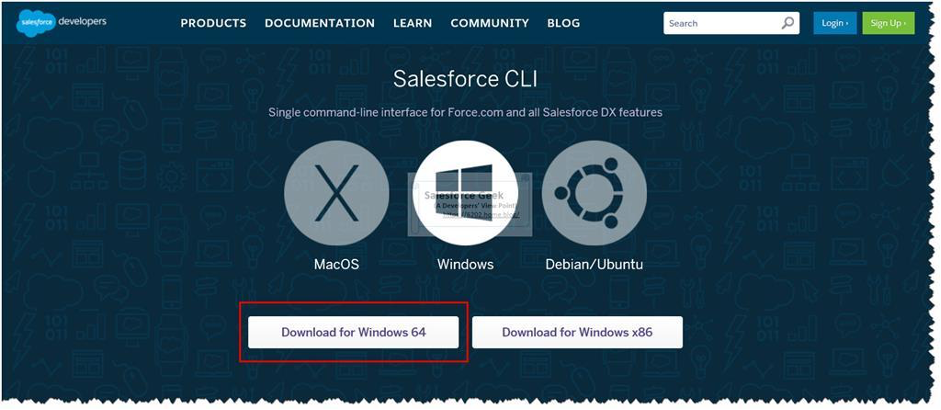
  1. Salesforce CLI

It is an advanced tool that allows Salesforce administrators and developers to communicate with salesforce directly.

How Does Salesforce CTI Work?

It allows you to manage organisations, synchronise source code, build and install packages, and run tests from the command prompt.

Conclusion:

At last, it is better to summarise that it is necessary to master these salesforce admin tools to avoid difficulty in your salesforce journey. The above mentioned every tool is designed in such a way as to optimise the workflow, simplify your tasks, and increase your productivity. By utilising these tools in your daily work life, you can manage your salesforce environment better and deliver the expected outcomes for your company.

Undoubtedly, these administrator tools also help you to get better returns on Salesforce investments due to its adaptable approach and various features. In case you are an IT working professional who desires to become a Salesforce admin, you can get certified salesforce admin training from Quantoknack Training.

READ MORE
TECHAvatar of adminadmin0 Comments
Share article:TwitterFacebookLinkedin
740 Views
11 Likes

5 Key Factors Impacting Salesforce Developer Salary

Salary is a very crucial topic for every employee as they work their heart out and expect the same pay from their employer. However, it is very important to understand the job and its value before you choose your career. The Salesforce developer salary is high because of the increased demand in the market. Various big companies like Amazon Web Services, The New York Post, U.S. Bank, Walmart, Macy’s, T-Mobile, L’Oreal Americas, American Express, Spotify, Toyota, Aldo, and even the U.S. federal government use Salesforce because of its customization capabilities.

This high demand in the market for the Salesforce CRM platform is the reason for the high salaries of jobs in various roles, like Salesforce Admin, Developer, Architect, etc. Would you like to know how much you can get paid? Let’s explore the various pay ranges and aspects that affect a Salesforce developer salary in the U.S. market.

Average Salesforce Developer Salary in the U.S. (2024)

The average Salesforce developer salary in the U.S. in 2024 is between $113,422 and $124,996, according to data from various sources.

  • Junior level: $111,103
  • Mid-level: $141,201
  • Senior level: $159,299
  • Freelance: $79,000–$138,000
  • Remote: $123,273 

5 Key Factors Influencing Salesforce Developer Salaries

The salary is not fixed for anyone in any field! You can achieve more success and earn more salary and hikes in your career with these aspects shared below.

Experience

If you have years of experience, you can attain a great salary and opportunities in the Salesforce developer training certification exam. How much have you worked? How many projects have you delivered successfully? What kind of problems have you faced and resolved during your work? All these things matter the most for your Salesforce development salary.

Skillset

What have you learned in the last few years, and what level of apex coding , LWC, SOQL and SOSL queries can you write matter in these areas? The Salesforce developer salary can be higher, depending on their knowledge and skills in the Salesforce environment. Hence, you are required to attain the best online Salesforce developer training from reputed centers. Their professionals can help you attain more and more knowledge and polish your skills by working on live projects during your training to get real-time experience.

Location

Where you work is the biggest aspect of the Salesforce developer salary. You can earn more if you choose the metro city as your work location. Yes, the average salary that a Salesforce developer can earn in the USA is $90,000 to $100,000. QuantoKnack Training offers end-to-end Salesforce developer placement assistance so that you can get a job in a reputed company with higher pay.

Industry

Depending on the industry of your company, you also get a salary. Salesforce developer salaries are higher in the finance, IT, and healthcare industries. But even in other industries, you can earn more depending on the offers and your skills. You can earn more as a Salesforce developer in any industry if you get the right training and placement options.

Company Size

The size of your company that you work for matters a lot. Large companies with higher ROI and employee numbers will always offer the right Salesforce developer salary based on market value. MNCs and similar big companies not only offer you a good salary but also provide you with a lot of perks, including financial and work culture ease for your career.

Remote Work

If you work from home or go to the site for work daily, it also affects your salary. Most companies offer less Salesforce developer salary to candidates who work from home as they reimburse or offer them extra allowances. However, keeping the efforts and traveling allowance in mind, most of the salesforce developers who work from the office get a higher salary and more appreciation from their seniors than the remote employees.

Additional Compensation and Benefits

Everything is not just the salary that you get as a Salesforce developer. There are a lot more other perks that companies offer to their employees in order to maintain a good work-life balance and happy work culture.

Bonuses

You can get quarterly, half-yearly, or even yearly bonuses from your company, depending on their policies. Many companies offer special bonuses yearly near the new year times. So, you can get a bonus every year that is separate from your monthly salary.

Health Insurance

You will get health insurance entirely covered by your company that you can use anytime in an emergency. Even with good, highly reputed companies, you can get health insurance coverage for your family as well. This insurance can be used in any nearby or listed hospitals by the insurance company.

Paid Time Off (PTO)

You can get different holidays offered by your company, such as fixed national holidays, casual leaves, sick leaves, planned leaves, com offs, and other complimentary leaves. All these leaves can be availed throughout the year whenever you need them by getting approvals from your managers and H.R. Also, pregnant ladies or to-be-fathers can get paid time off for their maternity and paternity time periods.

Conclusion

The Salesforce developer salary depends on a lot of aspects like their skills, location, level of experience, certification, and more. You can get help with this with the right Salesforce training and certification program provider like QuantoKnack Training. They have experienced professionals who help you learn all the required skills with mock tests and practice tests during the training.

Secondly, you can earn great experience with the roles and responsibilities of a Salesforce developer with live project hands-on experiences. They offer their students the opportunity to work on projects to gain real-world experience in solving various use cases and getting a better understanding. The best part is the salesforce developer training and placement assistance that help students get into a reputed company after completing their certification and learning. This way, you can save time when finding jobs. All you need to do is prepare your best and perform the best!

READ MORE
TECHAvatar of adminadmin0 Comments
Share article:TwitterFacebookLinkedin
1122 Views
10 Likes

Salesforce Administrator Salary Guide: Earn Higher in 2024 and Beyond

An increase in the number of Salesforce customers will increase the demand for Salesforce admins.

This is what ensures that the Salesforce admin salary has increased significantly and will not stop even in the future. According to the Salesforce Talent Ecosystem Report 2022, 10000 examines the trends and statistics impacting the increasing number of people around the world who offer or need Salesforce-related skills.

But what about the salary? Every candidate wants to earn a good amount of pay. So, here is a comprehensive guide to learn about the wages you can earn as a Salesforce admin in Global countries. 

Global Salaries Survey for Salesforce Admins

In the US, Salesforce admins can earn up to $103,375 for entry-level, $131,750 for senior level, and $105.50 p/h for contract-based job roles.

In Virginia, Salesforce admins can earn up to $65,000 – $85,000 for entry-level, $90,000 – $120,000 for senior level, and $40 – $65 p/h for contract-based job roles.

In Dallas, Salesforce admins can earn up to $70,000 – $90,000 for entry-level, $95,000 – $130,000 for senior level, and $45 – $70 p/h for contract-based job roles.

In San Francisco, Salesforce admins can earn up to $80,000 – $105,000 for entry-level, $120,000 – $160,000 for senior level, and $60 – $85 p/h for contract-based job roles.

In New York City, Salesforce admins can earn up to $75,000 – $100,000 for entry-level, $110,000 – $150,000 for senior level, and $55 – $80 p/h for contract-based job roles.

In Chicago, Salesforce admins can earn up to $70,000 – $90,000 for entry-level, $100,000 – $135,000 for senior level, and $45 – $70 p/h for contract-based job roles.

In Los Angeles, Salesforce admins can earn up to $75,000 – $95,000 for entry-level, $105,000 – $140,000 for senior level, and $50 – $75 p/h for contract-based job roles.

In Las Vegas, Salesforce admins can earn up to $60,000 – $80,000 for entry-level, $85,000 – $115,000 for senior level, and $35 – $60 p/h for contract-based job roles.

You have to understand the four factors: work experience, certifications, specialist and generalist, and your job location, as they play a vital role in your salary hikes.

Tips to Improve Your Salesforce Admin Salary

You must increase your knowledge and upskill yourself in order to grow more in the Salesforce admin salary. Here are five tips that you can implement in your path to success.

Specialize

You must read and practice as much as you can in order to become a specialist in your Salesforce admin sector. Revise various concepts again and again, and keep proper notes on multiple topics that you read. This way, you can quickly revisit the various concepts whenever you need to so that you don’t have to research things all the time.

Take Certifications

Completing your certification in Salesforce can help you attain proper validation for your skills and learnings. Platforms like QuantoKnack training can help you prepare for the Salesforce admin training and certification with expert classes from professionals with years of experience and hands-on experience on live projects. This way, you can attain both theoretical and practical knowledge to showcase in your job interview. Also, you do not have to worry about the job search as you will get complete assistance with placement after your course completion and certification.  

Nurture “On-demand” Skills

You must learn soft skills as you may never know when you will need them in a complex situation such as communication, attention to detail, and business analysis. It can give you value and respect in the organization through the higher-ups, outshining you for the better. Try to achieve success with user management, security management, and process automation, as these skills are usually required by Salesforce admins. 

Work in the Right Role and Team

Whether you start from a small or a large company, it is imperative that you work in the same niche. Practicing and solving various use cases during your Salesforce admin training and job role can help you polish your skills and improve your work. So, it’s better if you stick to the right job role and work with the right team to learn and grow more in your career.

Become Self-sufficient

You must try solving more and more complex scenarios in order to sharpen your skills in Salesforce administration. It’s essential that you work on various projects that need less help from anyone so that you can increase your problem-solving abilities, which is vital as a Salesforce admin. 

Reaching Beyond

Never stop learning! Salesforce administration training experts always advise candidates to learn more and more and take various certifications to grow more. 3 Major certifications are as follows:

Salesforce Solution Architect Certificate: Take your next step by completing Salesforce solution architect certification. It can help you boost your career and salary, leading to a successful career path. 

Solutions Consultant Certificate: The other option for Salesforce admin is to become a Salesforce solution consultant. By completing certification, you can get a promotion easily in your job role. 

Business Analyst Certificate: You can be a business analyst as many organizations require someone to gather the information, plan the strategies, and ensure all the requirements of their clients are met.

Summing Up

You can earn an excellent Salesforce admin salary with constant growth in your career, as Salesforce is a highly demanding platform all around the world. With Salesforce administration certification, you can earn a great salary and increase your job roles with continuous learning of various platform updates and attaining more certifications in the future. All you need is to get into the right Salesforce admin training program and become an expert with QuantoKnack training. We have great perks for you, like professionals with years of experience, live project hands-on experience, mock and practice tests, and placement assistance.

FAQs

What Average Salary Does Salesforce Admin Get?

You can earn between $92,250 and $114,500 annually in the USA as a Salesforce Certified Administrator. It depends on your work experience, the location of your work, and the specific industry.

Is Salesforce Admin A Good Career?

Yes, Salesforce Admin is considered a promising career path in 2024. The increasing demand for the Salesforce CRM platform creates a lot of job opportunities for candidates interested in Salesforce, making it a good career and offering job security and good earning potential.

Does Salesforce Certification Increase Salary?

Yes, you can get the required income with Salesforce admin certification. Also, you can increase your pay by attaining more Salesforce certifications as a business analyst, consultant, architect, etc.

Why Is The Salesforce Salary So High?

Big companies like Microsoft, Google, and various other companies are adopting Salesforce very quickly, which increases the demand as well as the Salesforce admin salary.

What Is The Salary Of A Salesforce Admin With 3 Years Of Experience?

You can quickly expect a salary of between $100,000 or more annually, based on your location and skill set. 

Is A Career In Salesforce Administration Worth It?

Yes, you can get a great career path as a Salesforce Admin with the right Salesforce administration training course, high earning potential, job security, and unlimited opportunities.

READ MORE
  • 1
  • 2
  • 3
  • 4
  • 5
  • 6
  • …
  • 10
Recent Posts
  • How Salesforce Data Integration Tools Simplify Real-Time Business Connectivity
    In a nutshell, businesses collect operational data to perform...
  • Design, Build, and Optimize Agents with Agentforce 360 Innovations
    In this fast-moving digital world, businesses also want smarter...
  • Salesforce Built-In Payment Processing: How to Handle Everything End-to-End
    In the current digital economy, where online payments have...
  • Explore Top Salesforce Integration Challenges and Ways to Fix Them
    Integrating any system can be a difficult task, as an...
  • Protecting Sensitive Data: A Complete Guide to Encryption in Salesforce
    In the current digital economy, data can easily rank at the top...
logotype

We cater to individuals and corporates and provide IT training and certification programs.

44679 Endicott Drive Suit 300 #1046 Ashburn, VA 20147 United States

Phone: +1-571 989 9489

Email: atul.deo@quantoknack.com

Useful links

About Us

Contact Us

Blog

Courses

  • Live Salesforce Admin Training
  • Business Analyst
  • QA Testing Course
  • Advance JAVA Training
  • SQL Server Training
  • Live Salesforce Developer Training Certification Course
  • Digital Marketing
  • Oracle DBA Training

Subscribe

    Instagram Pinterest Linkedin
    Facebook
    Logo star

     2024 Quantoknack. All Rights Reserved