
Become a Instructor

Blogs

logotype
Menu
  • Courses
    • Salesforce Admin
    • Salesforce Developer
    • Salesforce Business Analyst
    • Advance Java Training
    • Buisness Analyst
    • Digital Marketing
    • Oracle DBA
    • QA Testing Course
    • SQL server Training
  • Register
+1-571 989 9489
logotype
  • Courses
    • Salesforce Admin
    • Salesforce Developer
    • Advance Java Training
    • Buisness Analyst
    • Digital Marketing
    • Oracle DBA
    • QA Testing Course
    • SQL server Training
  • Register
  • +1-571 989 9489

Become a Instructor

Blogs

logotype
Menu
  • Courses
    • Salesforce Admin
    • Salesforce Developer
    • Salesforce Business Analyst
    • Advance Java Training
    • Buisness Analyst
    • Digital Marketing
    • Oracle DBA
    • QA Testing Course
    • SQL server Training
  • Register
+1-571 989 9489
  • Courses
    • Salesforce Admin
    • Salesforce Developer
    • Advance Java Training
    • Buisness Analyst
    • Digital Marketing
    • Oracle DBA
    • QA Testing Course
    • SQL server Training
  • Register
  • +1-571 989 9489
logotype
logotype
  • Courses
    • Salesforce Admin
    • Salesforce Developer
    • Advance Java Training
    • Buisness Analyst
    • Digital Marketing
    • Oracle DBA
    • QA Testing Course
    • SQL server Training
  • Register
  • +1-571 989 9489
TECH
Home TECH Page 10

Category: TECH

TECHAvatar of adminadmin0 Comments
Share article:TwitterFacebookLinkedin
1505 Views
132 Likes

Process Builder

Process Builder is basically an Automated tool that allows you to control the order of actions or evaluate the criteria for a record.

Process Builder has Eight actions associated with it:

  • Creating records
  • Posting on Chatter
  • Quick action
  • Launching/triggering the flow
  • Submitting the record automatically for approval
  • Calling/triggering Apex code
  • Invoking another process

What is the need of Process Builder in Salesforce?

  • Process Builder is used for automating your business processes without writing even a single line of code. And its presentation view is very attractive which makes easy to use.
  • Child records can be updated in Process Builder.
  • Chatter groups and email alerts, both can be notified using Process Builder.
  • Multiple actions can be associated with each criterion.

Steps to Create a Process Builder in Salesforce

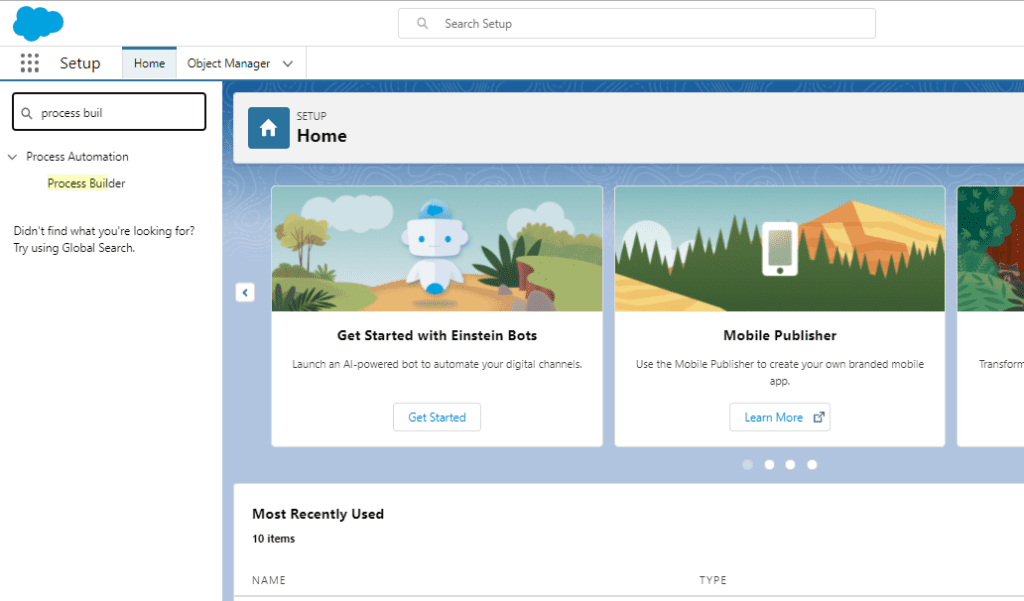
Step1: Log in to your Salesforce Org > Go to Setup > Search for Process Builder.


Screenshot 2021 09 16 202044

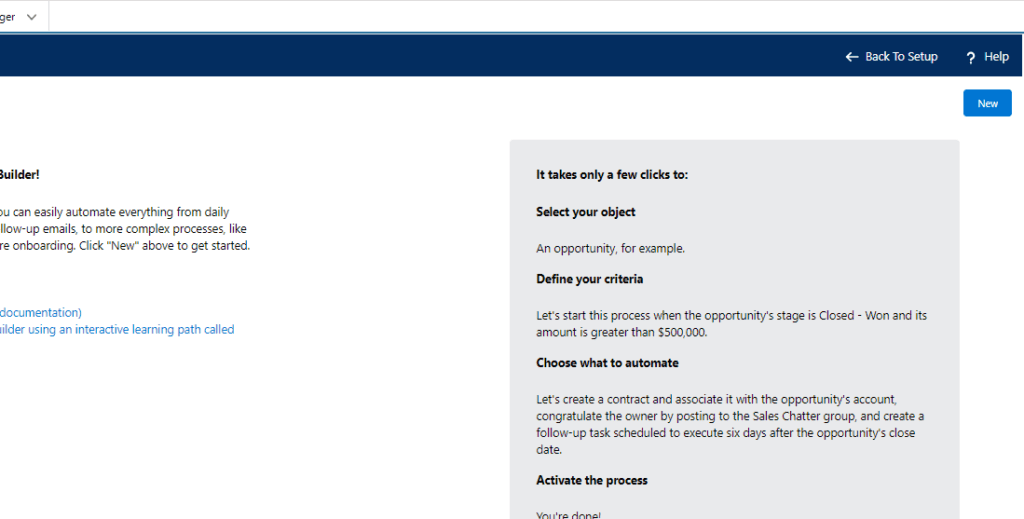
Step 2: Click on New to create a new Process Builder

Screenshot 2021 09 16 202608

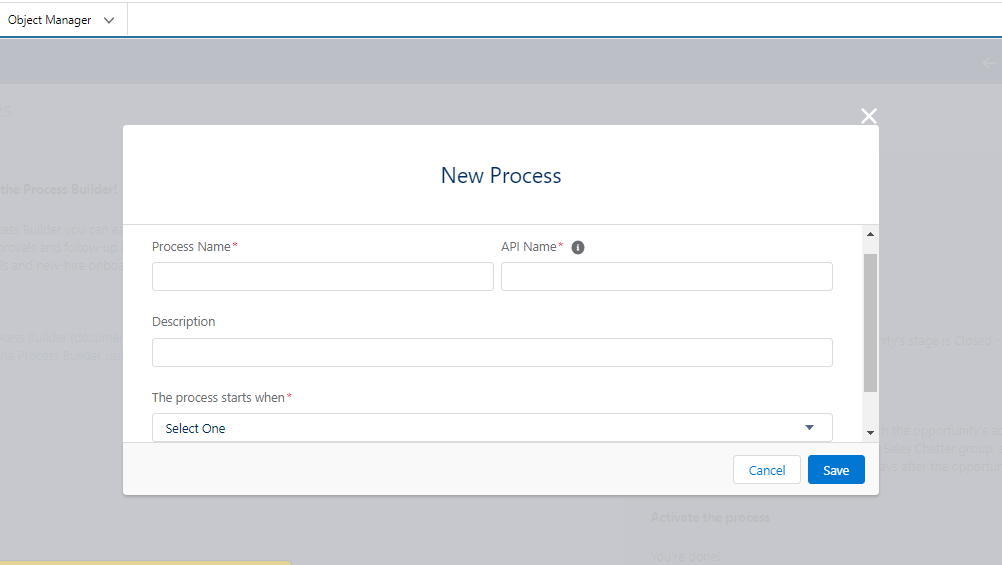
Step 3: Here we need to give our Process Name and Description, and decide on how to start process. For this, we will get three options as shown in the image below.

Screenshot 2021 09 16 203011


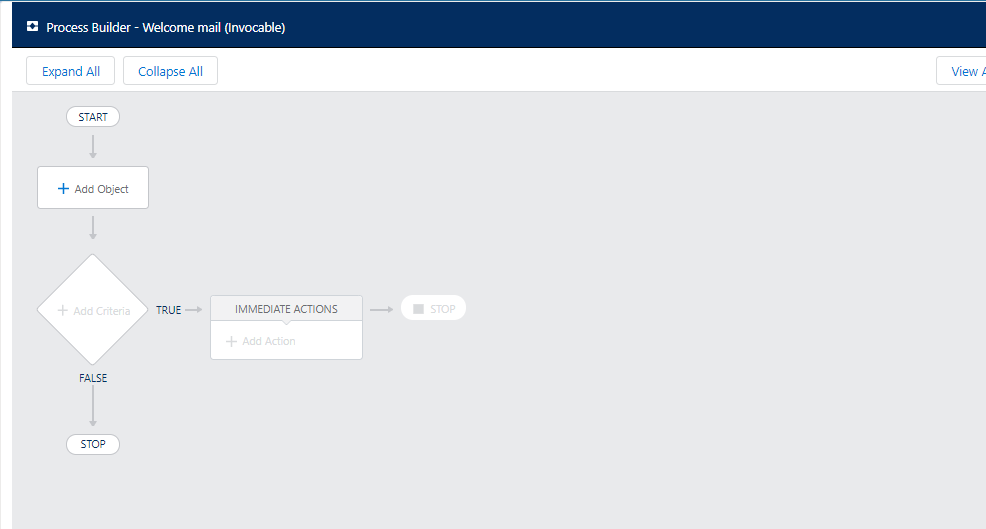
Step 4: Here we have to design a Flowchart based on what data is asked and if the criteria gets fulfilled the condition get Implemented.

  1. For The process starts when, select A record changes, and click Save.
  2. Click + Add Object.
  3. In the right window, select Account from the Object drop-down list.
  4. For Start the process select when a record is created or edited.
  5. Click Save. As shown in the screenshot.
Screenshot 2021 09 16 210058

Here we have Seen how to create a Process builder. In further blog we will be taking a use case to understand more about Process Builder.

Thank You

Happy Learning:)

READ MORE
Art & Illustration
TECHAvatar of adminadmin0 Comments
Share article:TwitterFacebookLinkedin
1606 Views
149 Likes

Workflow Rule in Salesforce

Workflow rules is one of the automated process in Salesforce that offers time-saving solutions to automate various business processes.

READ MORE
TECHAvatar of adminadmin0 Comments
Share article:TwitterFacebookLinkedin
1481 Views
138 Likes

Change Data Capture in Trigger

A salesforce app is a set or group of tabs that are used to create certain functionalities.
READ MORE
TECHAvatar of adminadmin0 Comments
Share article:TwitterFacebookLinkedin
1494 Views
148 Likes

How to create validation rule

Validation rules validate if the user entered data in a record meets the standards you define before the user can save or update the record.

READ MORE
TECHAvatar of adminadmin0 Comments
Share article:TwitterFacebookLinkedin
1469 Views
147 Likes

Creation of text email template

Email Templates are designed for consistent mails so as to increase productivity of the respective organization or company.

READ MORE
TECHAvatar of adminadmin0 Comments
Share article:TwitterFacebookLinkedin
1617 Views
121 Likes

Creation of app in salesforce

A salesforce app is a set or group of tabs that are used to create certain functionalities.

READ MORE
  • 1
  • …
  • 8
  • 9
  • 10
Recent Posts
  • How Salesforce Data Integration Tools Simplify Real-Time Business Connectivity
    In a nutshell, businesses collect operational data to perform...
  • Design, Build, and Optimize Agents with Agentforce 360 Innovations
    In this fast-moving digital world, businesses also want smarter...
  • Salesforce Built-In Payment Processing: How to Handle Everything End-to-End
    In the current digital economy, where online payments have...
  • Explore Top Salesforce Integration Challenges and Ways to Fix Them
    Integrating any system can be a difficult task, as an...
  • Protecting Sensitive Data: A Complete Guide to Encryption in Salesforce
    In the current digital economy, data can easily rank at the top...
logotype

We cater to individuals and corporates and provide IT training and certification programs.

44679 Endicott Drive Suit 300 #1046 Ashburn, VA 20147 United States

Phone: +1-571 989 9489

Email: atul.deo@quantoknack.com

Useful links

About Us

Contact Us

Blog

Courses

  • Live Salesforce Admin Training
  • Business Analyst
  • QA Testing Course
  • Advance JAVA Training
  • SQL Server Training
  • Live Salesforce Developer Training Certification Course
  • Digital Marketing
  • Oracle DBA Training

Subscribe

    Instagram Pinterest Linkedin
    Facebook
    Logo star
    2026 Quantoknack. All Rights Reserved