Become a Instructor

Blogs

logotype
Menu
  • Courses
    • Salesforce Admin
    • Salesforce Developer
    • Salesforce Business Analyst
    • Advance Java Training
    • Buisness Analyst
    • Digital Marketing
    • Oracle DBA
    • QA Testing Course
    • SQL server Training
  • Register
+1-571 989 9489
logotype
  • Courses
    • Salesforce Admin
    • Salesforce Developer
    • Advance Java Training
    • Buisness Analyst
    • Digital Marketing
    • Oracle DBA
    • QA Testing Course
    • SQL server Training
  • Register
  • +1-571 989 9489

Become a Instructor

Blogs

logotype
Menu
  • Courses
    • Salesforce Admin
    • Salesforce Developer
    • Salesforce Business Analyst
    • Advance Java Training
    • Buisness Analyst
    • Digital Marketing
    • Oracle DBA
    • QA Testing Course
    • SQL server Training
  • Register
+1-571 989 9489
  • Courses
    • Salesforce Admin
    • Salesforce Developer
    • Advance Java Training
    • Buisness Analyst
    • Digital Marketing
    • Oracle DBA
    • QA Testing Course
    • SQL server Training
  • Register
  • +1-571 989 9489
logotype
logotype
  • Courses
    • Salesforce Admin
    • Salesforce Developer
    • Advance Java Training
    • Buisness Analyst
    • Digital Marketing
    • Oracle DBA
    • QA Testing Course
    • SQL server Training
  • Register
  • +1-571 989 9489
TECH
Home TECH Page 9

Category: TECH

TECHAvatar of Abhinav KumarAbhinav Kumar0 Comments
Share article:TwitterFacebookLinkedin
1513 Views
63 Likes

Roll-Up Summary Fields in Salesforce for (MIN) Function

Min -: In Roll -Up Summary we use Min function to calculate the field’s minimum value in all child records.

Steps To Create Roll-Up Summary Fields in Salesforce for (MIN) Function

Step 1 Login to your org.

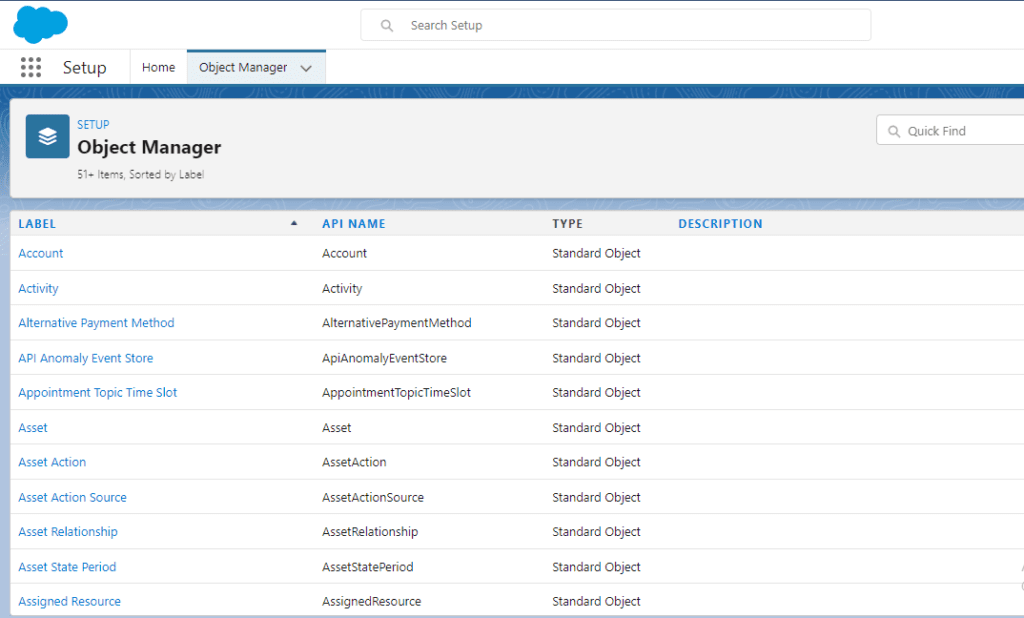
Step 2 Setup > Object Manager. 

Capture

Step 3 Click on Account > field & Relationship > New.

2

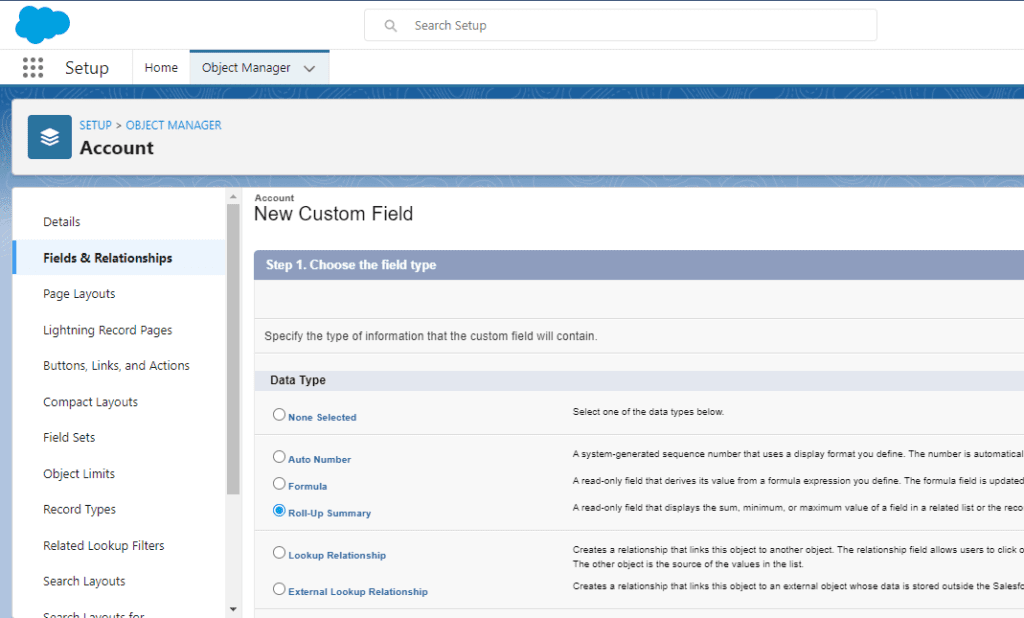
Step 4 Select Roll – Up Summary > Next.

3

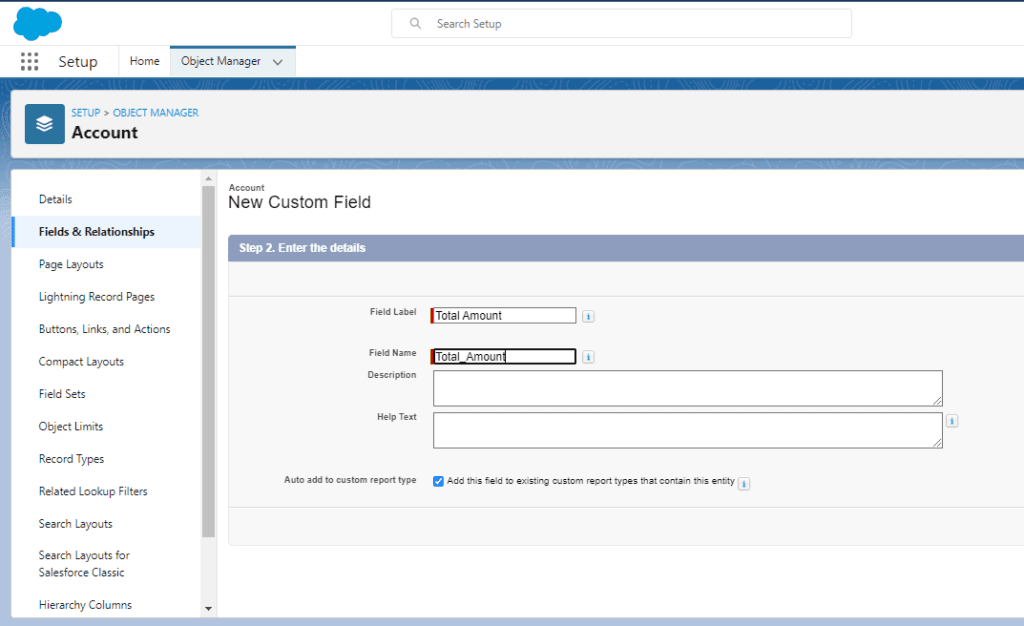
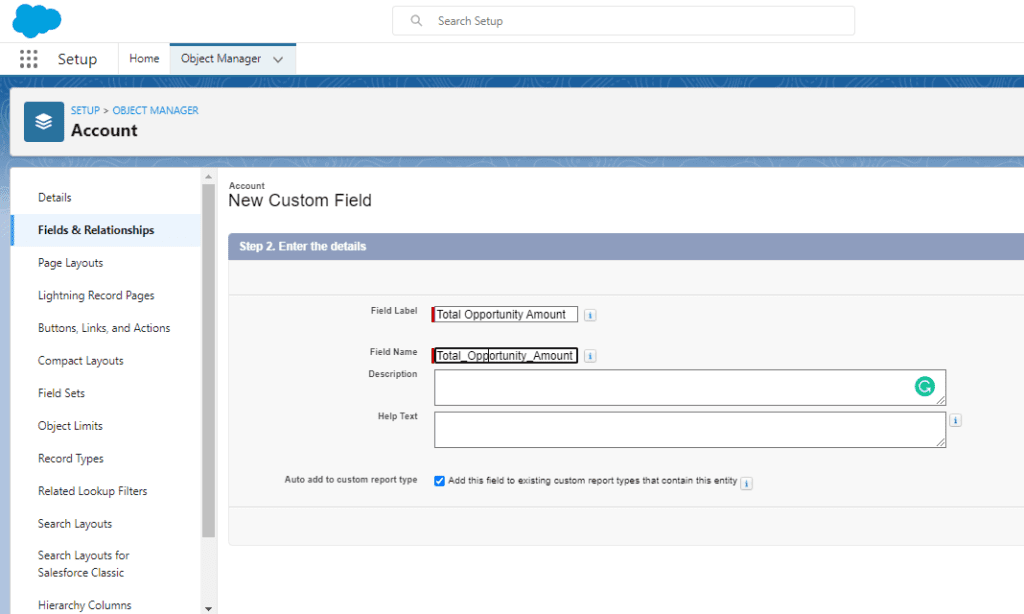
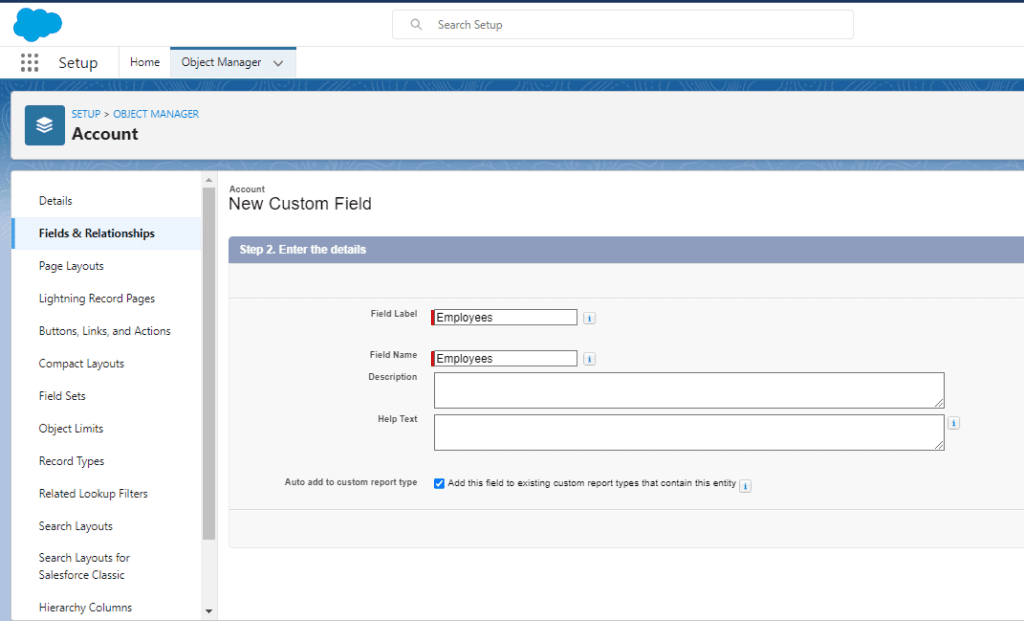
Step 5 Complete all the Steps and fill the details which are required.
12

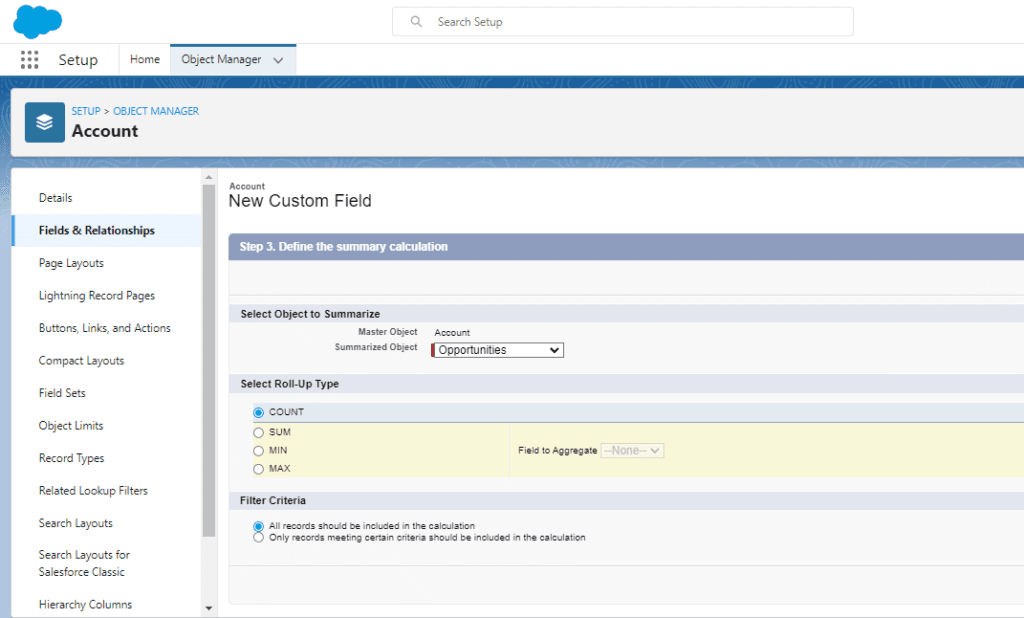
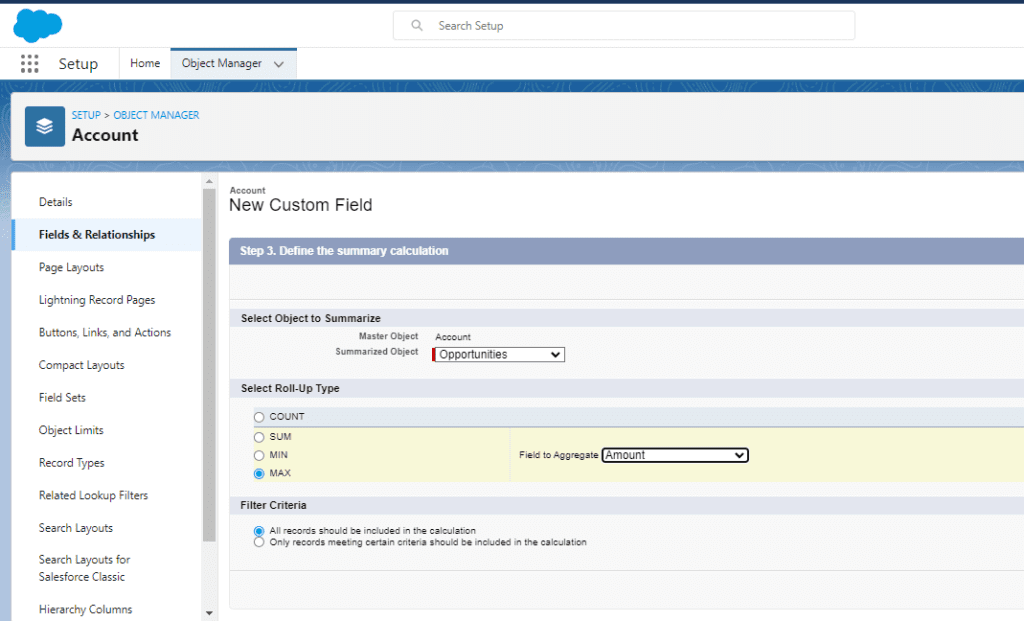
Step 6 Next Steps to Define the Summary and provide the function as shown in figure.
9

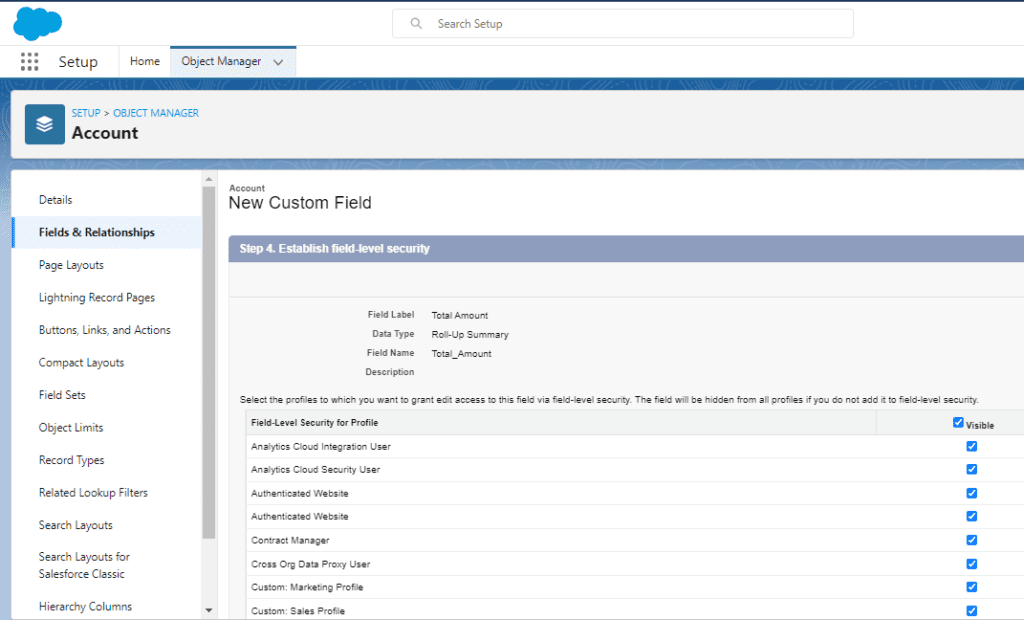
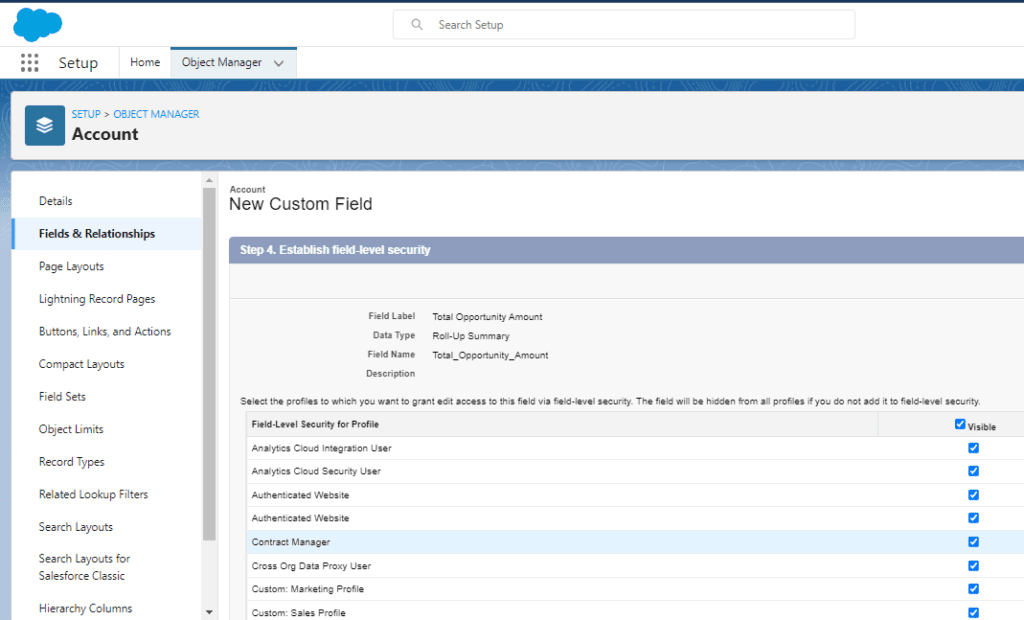
Step 7 Another Steps is to define the Field Security level. Here the permissions are given. 
10

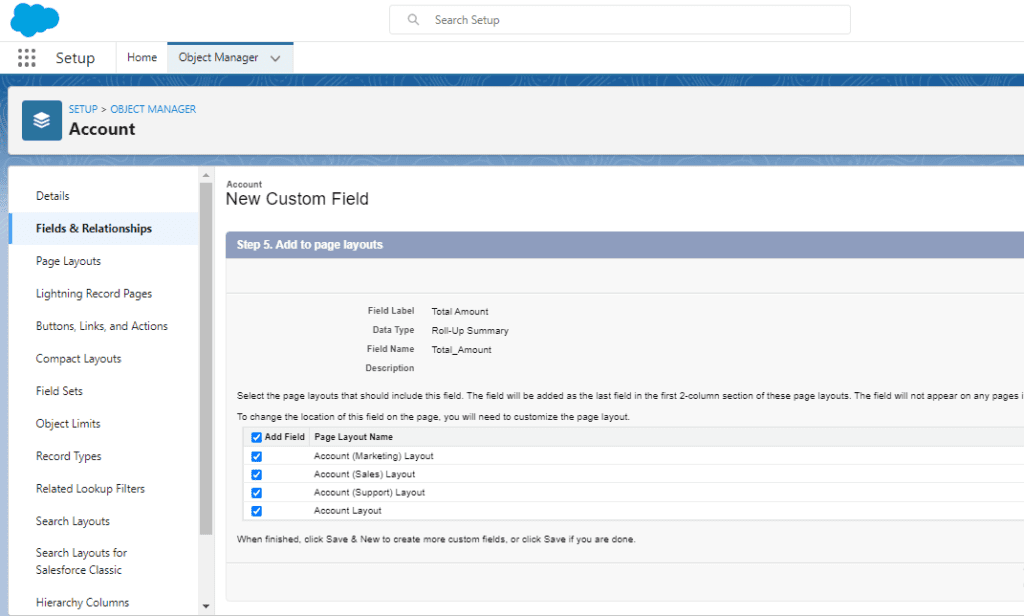
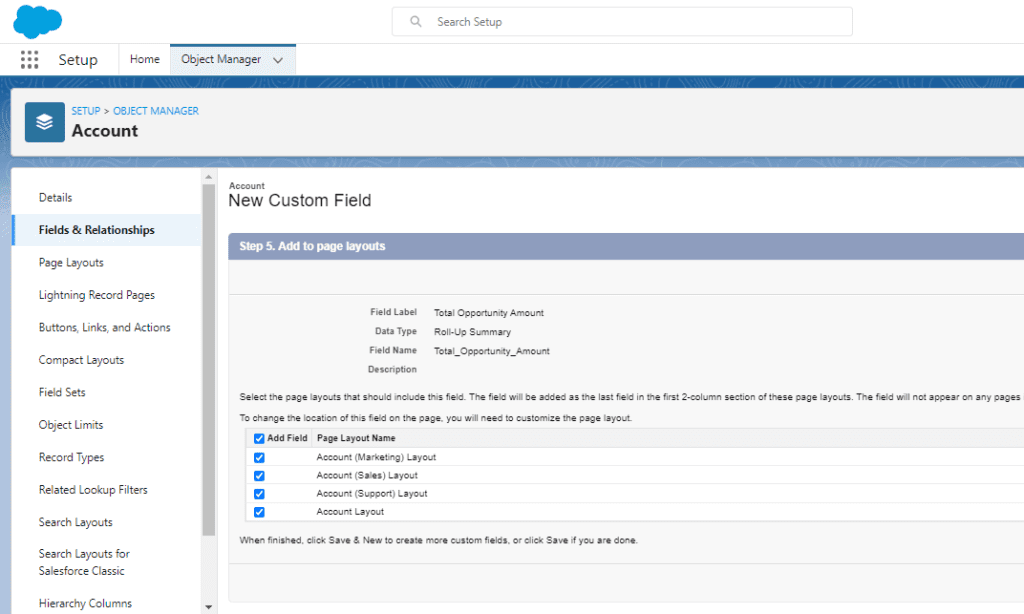
Step 8 Next Steps is to Provide the Page Layout Setting. As where the Output of desired function will be shown.

12 1

Our Roll-Up Summary Field for the Min function has been established. Now we can get a total Minimum of the value present in the Record.

Happy Learning!

READ MORE
TECHAvatar of Abhinav KumarAbhinav Kumar0 Comments
Share article:TwitterFacebookLinkedin
1434 Views
62 Likes

Roll-Up Summary Fields in Salesforce for (COUNT) Function

Count -: In Roll -Up Summary we use Count function for counting the number of child records that exist for the parent record

Steps To Create Roll-Up Summary Fields in Salesforce for (COUNT) Function

Step 1 Login to your org.

Step 2 Setup > Object Manager.

Capture 1024x618 1

Step 3 Click on Account > field & Relationship > New.

2 1024x623 1

Step 4 Select Roll – Up Summary > Next.

3 1024x618 1

Step 5 Complete All the Steps And fill the details which are required.

Capture 1 1024x626 1

Step 6 Next Steps to Define the Summary And provide the function as shown in figure.

2 1 1024x618 1

Step 7 Another Steps is to define the Field Security level. Here the permissions are given.

3 1 1024x620 1

Step 8 Next Steps is to Provide the Page Layout Setting. As where the Output of desired function will be shown.

4 1 1024x616 1

Our Roll-Up Summary Field for the count has been established. Now We can get a count of the value present in the Record.

Happy Learning!
READ MORE
TECHAvatar of Abhinav KumarAbhinav Kumar0 Comments
Share article:TwitterFacebookLinkedin
1401 Views
62 Likes

How to Create Roll-Up Summary Fields in Salesforce

Roll-up summary is a tool in Salesforce that we can use to analyse our data without running summary reports. Roll-up summary fields are used to calculate related record values and to display master records. We can perform different types of calculations with a roll-up summary field such as count, sum, minimum value, or maximum value of a field in the detail records.

The functions which are used in Roll Up Summary -:
1. Count
2. Min
3. Max
4. Sum

Detail Description of each Functions -:
Count -: In Roll -Up Summary we use Count function for counting the number of child records that exist for the parent record.
Min -: In Roll -Up Summary we use Min function to calculate the field’s minimum value in all child records.
Max -: In Roll -Up Summary we use Max function to calculate the field’s maximum value in all child records.
Sum -: In Roll -Up Summary we use Sum function to calculate the Summation of the values of a specified field on a child record.

Steps To Create Roll-Up Summary Fields in Salesforce

Step 1 Login to your org.

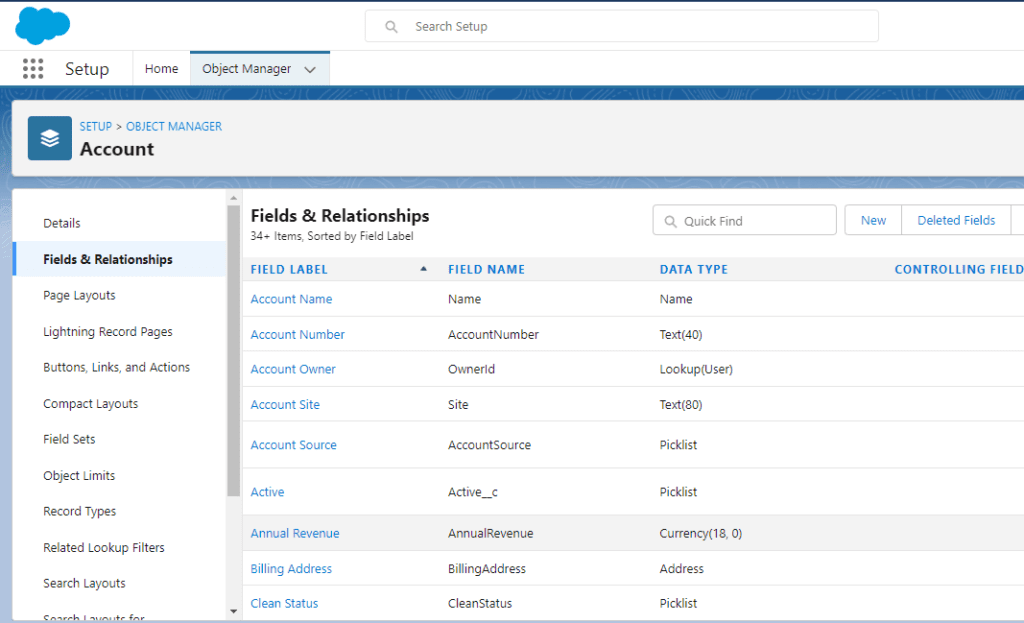
Step 2 Setup > Object Manager. 

Capture

Step 3 Click on Account > field & Relationship > New.

2

Step 4 Select Roll – Up Summary > Next.

3

Step 5 Complete All the Steps And fill the details which are required.

4

Step 6 Next Steps to Define the Summary And provide the function as shown in figure.

5

Step 7 Another Steps is to define the Field Security level. Here the permissions are given. 

6

Step 8 Next Steps is to Provide the Page Layout Setting. As where the Output of desired function will be shown.

7

Our Roll-Up Summary Field has been established. Now We can get a maximum value present in the Record.

Happy Learning!
 

READ MORE
TECHAvatar of adminadmin0 Comments
Share article:TwitterFacebookLinkedin
1657 Views
168 Likes

What is a Salesforce Admin?

Salesforce admin course 3
What is a Salesforce Admin? 24

For the past 20 years, Salesforce has been adopted by more than 150,000 world’s largest
organizations, including Amazon, Toyota, American Express, Spotify, NBC Universal, The Red
Cross, and United Healthcare. These companies use Salesforce to manage customer and
sales processes. Thus, the demand for qualified administrators to help manage Salesforce
has increased dramatically.

The majority of these organizations need certified Salesforce Admin Course people to help
them manage the platform and keep things running smoothly. Salesforce recently estimated
a 400% annual increase in demand for Salesforce administrators, so demand for qualified
admins appears to continue to grow.

In this blog post, we will take a look at the details of Salesforce Administrator roles and
responsibilities and how you can become Salesforce Admin Training certified.

Who is a Salesforce Administrator?

A Salesforce Admin or Administrator is a Salesforce-certified expert with hands-on
experience in the Salesforce environment or ecosystem. They have a better understanding
of varying system requirements, stakeholders, and client interests, with the end goal of
assisting users in getting the best out of the Salesforce technology. They are additionally
experienced in using the features of Salesforce to accomplish the goals and targets of an
organization.

A Salesforce admin spends their time making the environment easy for Salesforce users of
all levels, maintaining the platform, and staying updated with the new tools, methods, and
updates in and related to Salesforce.

Think of Salesforce Administrators as a company’s trusted advisors on all things related to
Salesforce. They are the crucial bridge between business and technology.

What does a Salesforce Administrator do?

Since Salesforce can be utilized in many ways, the role of a Salesforce admin can vary from
industry to industry and from organization to organization. However, there are many roles a
typical Salesforce admin fills in their work. They include:

Import new leads, data, and contacts

Since users add leads and other essential data to Salesforce, administrators can design
standards for these processes to ensure data consistency across the organization.

Oversee user profiles and access levels

Salesforce admins have responsibility for the organization’s data, including critical data
about sales and marketing, products and services, purchases, customer demographics, and
other activities. They create user accounts and assign access levels based on roles and

responsibilities within the company. This generally includes onboarding new hires who
want to get access to Salesforce. Further, they handle off-boarding and revoking access for
former employees and others who no longer use Salesforce.

Setup and run deduplication tools

Over time, user behavior and contact data can be duplicated by users, imported lists, and
webform submissions, so it falls to the Salesforce Admin to run deduplication mechanisms
to scrub the data and remove duplicates

The frequency of different organizations running this process will vary depending on their
tools. Some operate automatically in real-time, while others are begun at a regular interval
(generally at least once a week) to run Salesforce at its full speed

Testing system updates in the sandbox

Salesforce is designed to update on a regular basis automatically. Still, the best admins
proactively test and install these updates in a sandbox to understand changes and find new
capabilities prior to going live. This ensures that the organization’s data stays as secure as
possible and Salesforce runs at full capacity.

Create processes for reporting

What is a Salesforce Admin? report

Salesforce Admins are the experts in CRM data management. Organizations rely on them to
keep data clean and organized and pull data as required to help support training efforts and
make business decisions.

Run database maintenance reports

Salesforce administrators keep doing all kinds of tests and reports to ensure the database
stays in great condition. These tests and reports might include APEX tests, field utilization
reports, role and profile reports, and other industry-specific reports.

The admin’s system knowledge and access to data make them the go-to resource for this
sort of activity, and they frequently automate processes for the tests and reports.

Other responsibilities of Salesforce Admin include:
● Solving new issues and challenges as they arise
● Process setup and optimization
● Create and maintain record archives
● Specialized responsibilities

What Are the Benefits of Becoming Salesforce Certified Administrators?

There are four basic certifications intended for Salesforce Administrators. Getting each one
shows mastery of certain skills, knowledge, and expertise within the Salesforce platform.
Further, obtaining one or more of these Salesforce certifications signals to employers that
you have the required skills and knowledge to support the organization’s Salesforce
installation. Here, briefly, is what each one covers:

More career opportunities

The research demonstrates a 400% annual growth rate for admins and the average USA
starting salary of $79,000. It is actually a career path for people who love to learn and
professionals who enjoy using the latest technology.

Some people have their Salesforce Administrator Training Certificate to supplement their current
role in a company – and potentially get a higher salary. Others utilize it to enrich their
resume and find a new position.

Better salary and growth opportunities

As per the Indeed report, the average salary of a Salesforce admin training certified
professionals in the US is $123,000 per annum. Organizations invest a lot to define a
Salesforce administrator’s responsibilities; a six-figure salary is a fantastic start to a career as a Salesforce administrator.

More attractive to hiring managers

As per the recent Salesforce Salary Survey, nearly 77% of the experts who administer the
Salesforce applications for their organization has at least one certification. Thus, if you’re
competing with others for a position, then having a certificate can look attractive to hiring
managers when you’re compared with those who do.

More confidence working with Salesforce

Obtaining a Salesforce Admin Training certification will help give you the knowledge you
need to support your organization better. You’ll better know what your system can and
cannot do and how users get the most from Salesforce. In a survey done by Mason Frank,
about 37% of respondents reported an increased ability to perform complex tasks in
Salesforce with more confidence after obtaining certification.

What does it really take to become a Certified Salesforce Admin?

So, does obtaining a Salesforce Admin Training certification make sense for your career
path? Well, if you want to work with the Salesforce-platform-based organizations that are
creative and detail-oriented, and like to solve complex business challenges, then earning a
certification from QuantoKnack will be a great start. With our Salesforce Admin course, you
will get all the required certificate materials, a number of mock tests to help you gain
confidence, and some real-time project-based assignments. All of this will help you crack
your admin exam in one shot.

How to become a Salesforce Admin?

You don’t need a technical background or knowledge of Salesforce technology to get
started. Anyone with an internet connection and a computer anywhere in the world can get
trained via QuantoKnack Training.

Our one-stop online learning platform is designed to teach new students and seasoned
professionals a wide variety of business skills. Best of all, our courses are designed to help
you establish your credentials in the Salesforce domain, giving a solid boost to your career.

How QuantoKnack’s Salesforce Admin Training Course can help you?

At QuantoKnack Training, we help professionals to level up their future. With our live Salesforce
The administrator Training course, you’ll be able to enhance your skills and get hands-on
knowledge in overseeing and making applications for a standout amongst the most popular
CRM across the globe.

Our Salesforce courses will help you pass the multiple Salesforce exams and guide you
through the significant highlights of CRM. You’ll learn Salesforce functionalities and
customization abilities to tailor the framework to meet the project-wise needs of business
and ace the decisive capacities of Salesforce to make new applications.

This course is prepared for professionals who seek to learn to boost their career in IT and
move you up on the ladder of a Salesforce consulting career. Further, we offer 24/7 support
through email, chat, and calls and have a dedicated team that offers on-demand assistance
through our community platform.

What You’ll Learn?

  • Hands-on involvement in end-to-end application planning.
  • Plan Data Model for cloud-based applications and prepare designs.
  • Develop cloud-based applications using Salesforce’s out-of-the-box features.
  • Automate the business process using Salesforce automation tools such as Flow,
  • Process Builder, and Dynamic action.
  • Create a set of reusable components to build Lightning Application faster.

Blaze new trails in your career with QuantoKnack

Once you get more clarity about the courses and steps on QuantoKnack to learn and study
for the certification, it’s time to prepare yourself.

Simply sign up for the exam. The test comes with live sessions.  It includes 25 sessions and
can be completed in 5 weeks. Once you pass the test, you will be a certified Salesforce
administrator, and your career opportunities will be expanded.

However, don’t stop your learning there. 

Acquire the skills you want to make an impact and launch a new career in business and
technology with QuantoKnack Training.

Register yourself today to get Salesforce Admin Training Certified!

READ MORE
TECHAvatar of adminadmin0 Comments
Share article:TwitterFacebookLinkedin
1784 Views
198 Likes

Information about Salesforce administrator certification with QuantoKnack

salesforce admin certification
Information about Salesforce administrator certification with QuantoKnack 26

Introduction: Before applying for a job in Salesforce Admin, you need to know what skills you want to master. Hiring managers will keep lists of these skills, and they will separate applicants who understand the subject from those who have not. As a result, Salesforce has created several certifications that measure how knowledgeable an Administrator is. Although you will have to study to acquire these skills, a certification will prove the most valuable asset in your career.

Salesforce admin certification:

Taking a Salesforce admin certification is a great way to give yourself an edge over your competitors. If you are looking to make your career in the IT field, having this credential will give you an edge over the competition. It can increase your salary by 159% and give you a competitive edge in the job market. Besides that, the certification is a sign of dedication and commitment to the job, and it also looks good on your resume.

A Salesforce administrator certification can be very valuable to a company. You can make your job more efficient and profitable with the right skills. However, you will need to ensure that you are getting your feet wet in the field. You should also choose a certification that shows you are an expert at the specific skills you need.

  • If you’re looking for a career in Salesforce Admin, you may want to look into Salesforce Admin (201) certification. Admin certification can make you look more desirable to employers, and a good course will allow you to distinguish yourself from others. The more you learn, the better.
  • The certification course is typically 5 weeks in length. The salesforce training includes a review of the salesforce platform, configuration, customization, and user management. It includes real-life business scenarios that you’ll have to solve and a review of the training and the certification exam. The exam consists of multiple-choice questions, so you’ll need to take a thorough test before moving on to the next step.

Salesforce admin course:

A Salesforce certified administrator course is an essential part of the Salesforce ecosystem. This certification enables users to extend the system’s functionality through a few clicks. Additionally, it helps employees train other users. A certified administrator is a vital piece of an organization’s IT team. The job is also rewarding, so you’ll be happy to receive certification in your chosen field. It can be a lifesaver.

Despite the complication of the exam, you don’t have to worry. The course will teach you how to apply the latest features of the CRM platform. It will also provide you with the knowledge to work effectively as a Salesforce Admin. Lastly, the course will prepare you for the certification exam. You can take the test either online or at the test center.

Besides helping you prepare for the exam, the course also includes a mentor who will help you gain confidence and knowledge in the field. Your mentor will meet with you weekly to check your homework and answer any questions you may have. Additionally, your mentor will guide the actual exam and ensure that you pass the Salesforce admin certification. QuantoKnack Training has  great mentors for any job and can provide you with valuable guidance and reference material.

  • To pass the exam, you should take a Salesforce admin course. A certification shows that you have mastered the skills required to administer the program. The certification is important because it helps you work with the platform efficiently. The course can help if you are looking for a career in this field. Many people have already achieved this qualification. You can also find many books and articles online that teach you more about the product and how it works.
  • Once you’ve completed the Salesforce admin course, you should consider getting the Salesforce Certified Administrator certification. The certification is highly sought after by employers and is essential for anyone who works with Salesforce. With a certification in hand, you can build applications and manage data from any device in the world.

Why Salesforce Certification is Best for everyone?

Salesforce is one of the most popular CRM software systems on the planet, and its wide range of certifications reflects this. The administrator certification is the most widely recognized among them. This exam measures practical knowledge and includes hands-on practical questions.

Start  career as a Salesforce administrator:

As Salesforce continues to expand, it’s important to develop your knowledge. You can become a Salesforce administrator by learning about the platform’s many components, or you can work as an internal employee. If you’re considering becoming an internal administrator, you’ll need to have great technical skills and an understanding of business analysis. You may also work for a consulting company, where you’ll be paid for your expertise and time. While this profession may have a higher barrier to entry, it’s a good career choice for those with a background in it.

You can start your career as a Salesforce administrator. This position is crucial for companies because you’ll need to work with businesspeople and tech specialists to optimize the software for their needs. You’ll be responsible for training other users and sharing best practices, as well as developing reports and dashboards for clients. You can begin your career in this role with a certificate from Salesforce and work your way up.

  • A Salesforce Career is a lucrative job with high job growth. It is an IT professional that’s growing faster than any other. The average salary for a Salesforce administrator is around $74,000, and the job market is expected to continue growing for the next five years. With the right training, you can expect to enjoy a rewarding and fulfilling career in this field. And, the pay is also decent. There is no reason to wait until you’ve finished college to start a Salesforce career.
  • Our program of Salesforce admin training gives you a promising career with lots of options. It is a highly sought-after career for techies who have a passion for technology. As the world’s number one CRM provider, Salesforce jobs are rising. There are currently more than 3,000 people working for the company, so you can be sure that it will always be busy. The economy of Salesforce is booming right now, so it’s a great time to find a job in this field. Once you’ve finished your certification and have the skills to back it up, you’re on your way to success.

Conclsuion: While there are plenty of opportunities in salesforce admininstraor training, a career in this industry will require a proven knowledge base. If you have the skills, it’s probably the best career choice for you. And as a bonus, you’ll enjoy a competitive salary. This is why it’s so important to find a job in Salesforce if you are passionate about the IT industry.

READ MORE
TECHAvatar of Abhinav KumarAbhinav Kumar0 Comments
Share article:TwitterFacebookLinkedin
1565 Views
55 Likes

Master-Detail Relationship

Master-Detail relationship is a type of relationship, one object acts as a master, and the other acts as a detail object. In other words, this relationship acts as a parent-child relationship. We use this type of relationship when we want to bound two objects tightly or closely dependent on each other.

Important Points Regarding Master-Detail relationship (MDR)

  • In Master-Detail Relationship the “child object” or “detail object” must have a parent.
  • Roll-up Summary fields can be established.
  • Records can be re-parented.
  • Standard objects can not be a detailed object
  • Maximum 2 Master-Detail Relationships can be created for an Object.

Steps to create a Master-Detail Relationship(MDR).
Assuming a situation that any Company is there and we have to create Master-Detail Relationship on the contact of Employee’s who’s working in Company.

Step1-:Login to your org.

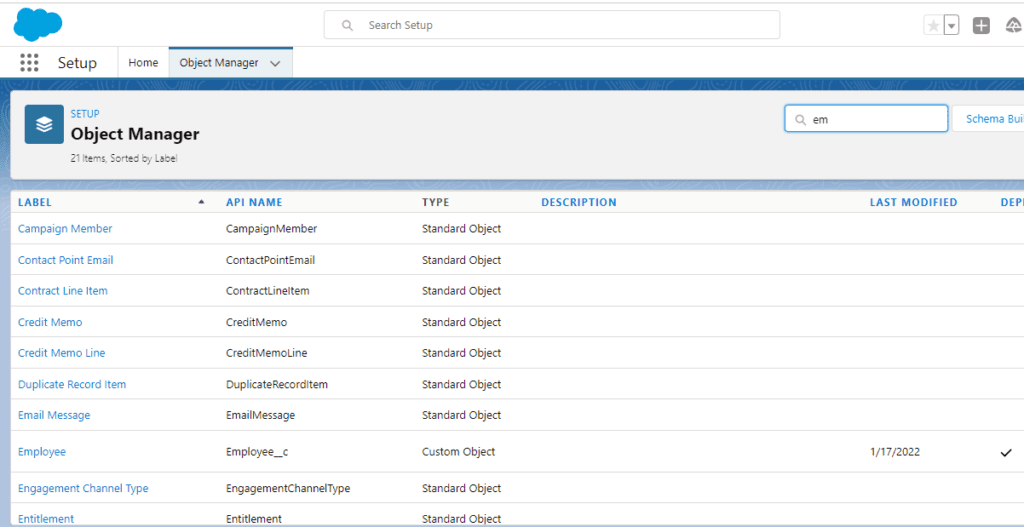
Step 2-:Setup > Object Manager > Employee

Screenshot 2022 01 17 220926 1024x527 1

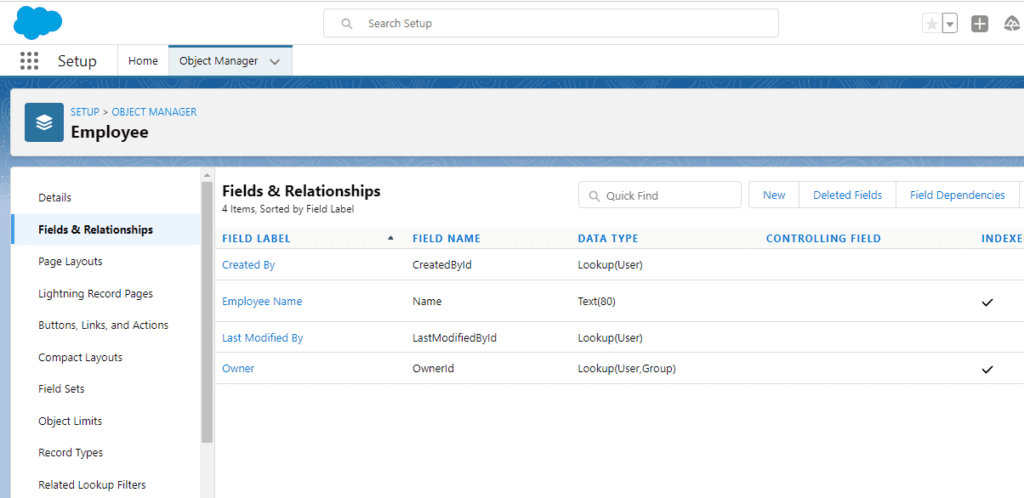
Step3-: Click on field & Relationship > New 

Screenshot 2022 01 17 221338 1024x498 1
Master-Detail Relationship 35

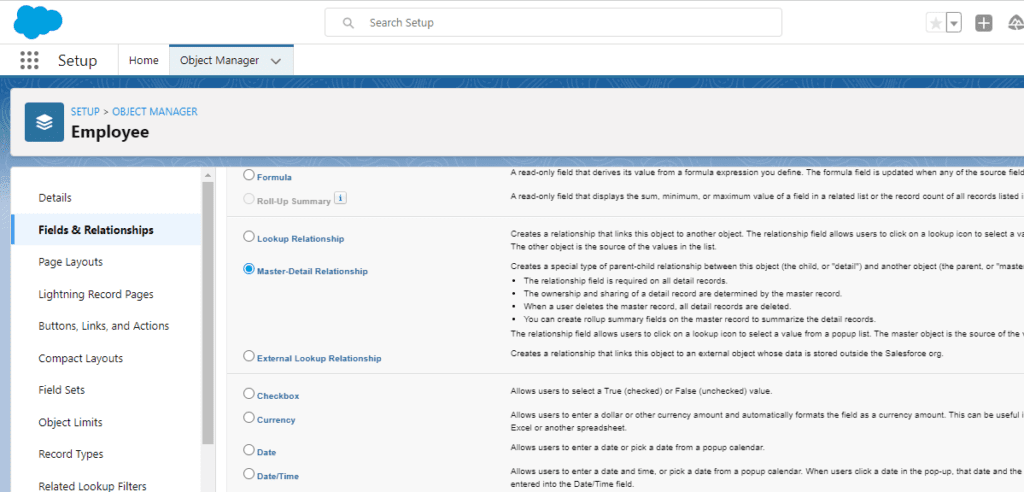
Step 4-: Select Master Detail Relationship >Next.

Screenshot 2022 01 17 221637

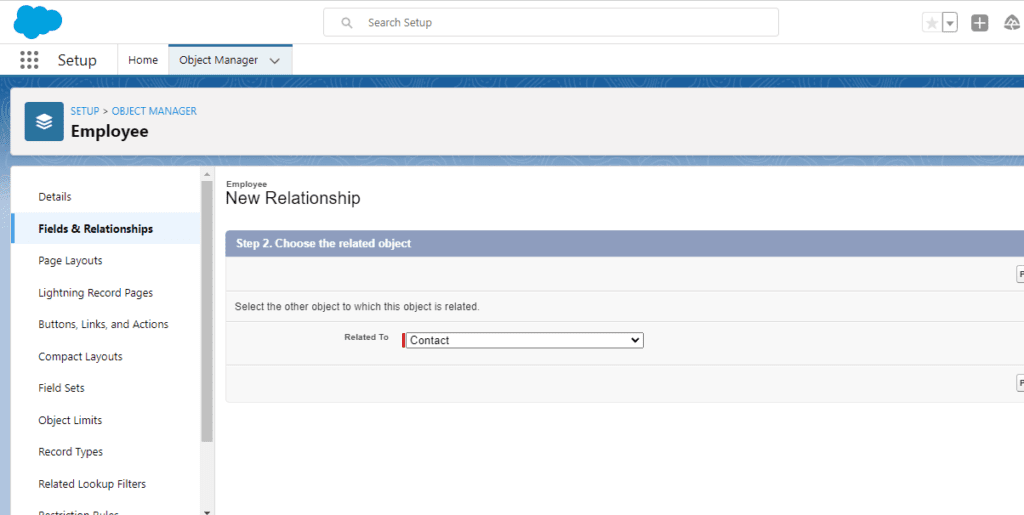
Step 6-: Select Contact from the drop-down > Next.

Screenshot 2022 01 17 221637 1024x492 1

Step 6-: The next page will be containing Child Relationship with a parent.

Screenshot 2022 01 17 223844 1024x515 1

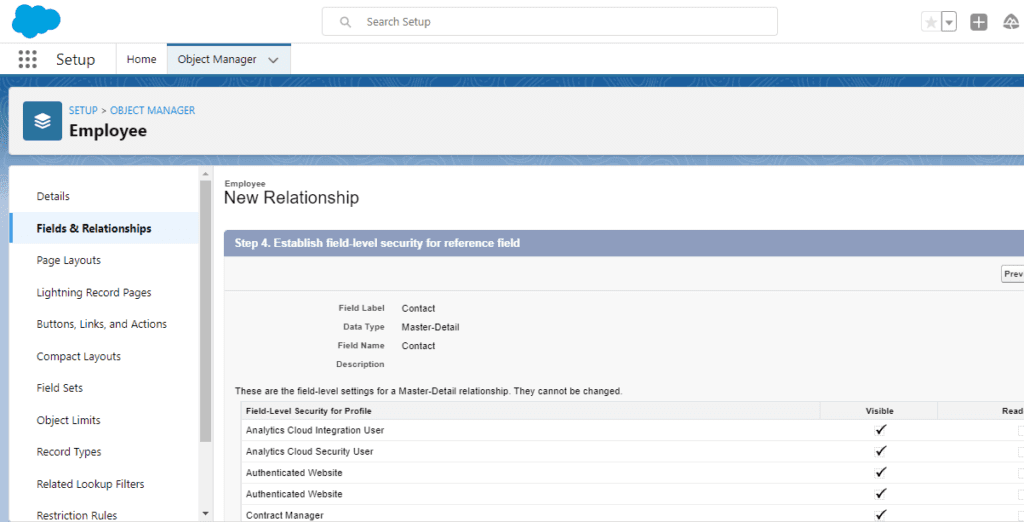
Step 7 -: Next step is Field-level Security.

sd 1024x522 1

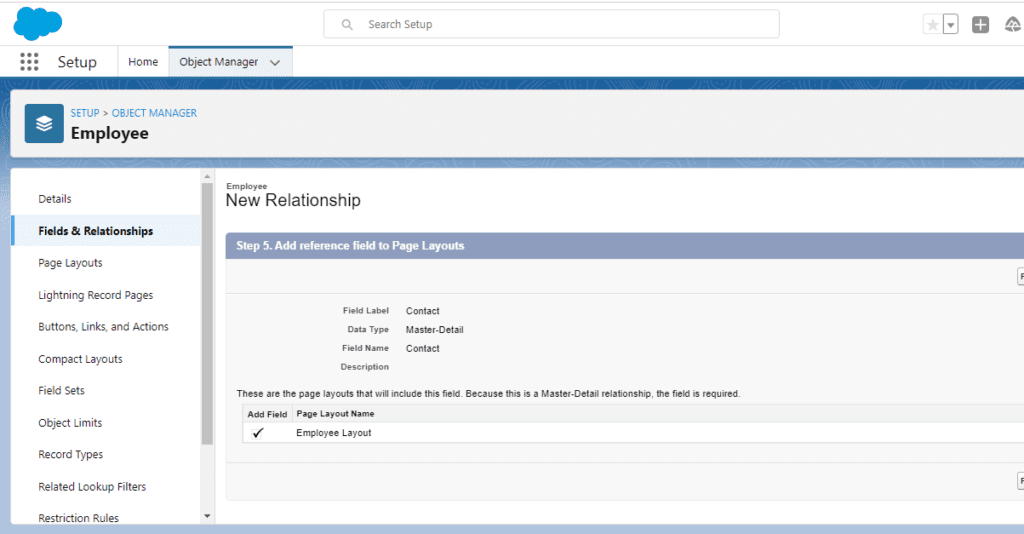
Step 8-: Another Step is for the Page Layout Reference

Screenshot 2022 01 17 224207 1024x534 1

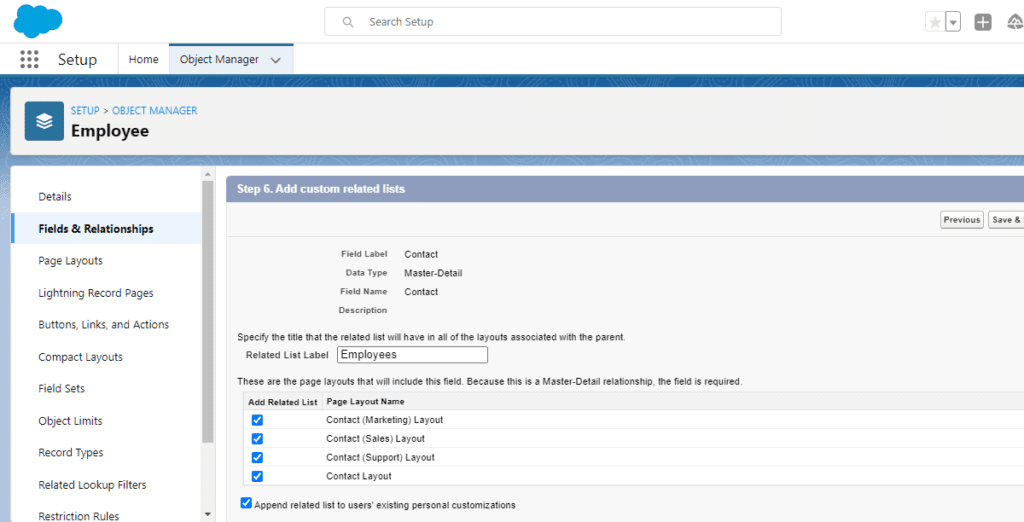
Step 9 -: Last step is the Addition of a Related list and Saving the Master-Detail Relationship.

Screenshot 2022 01 17 224314 1024x522 1

Conclusion: Here we have got a detailed Step by Step understanding of how to create a Master-Detail Relationship.

Happy learning

Written By: Ashutosh Tiwari

READ MORE
TECHAvatar of Abhinav KumarAbhinav Kumar0 Comments
Share article:TwitterFacebookLinkedin
1789 Views
91 Likes

How to register for the Salesforce Developer Certification Exam

To Register for the salesforce Developer Certification Exam Follow the following steps which are-

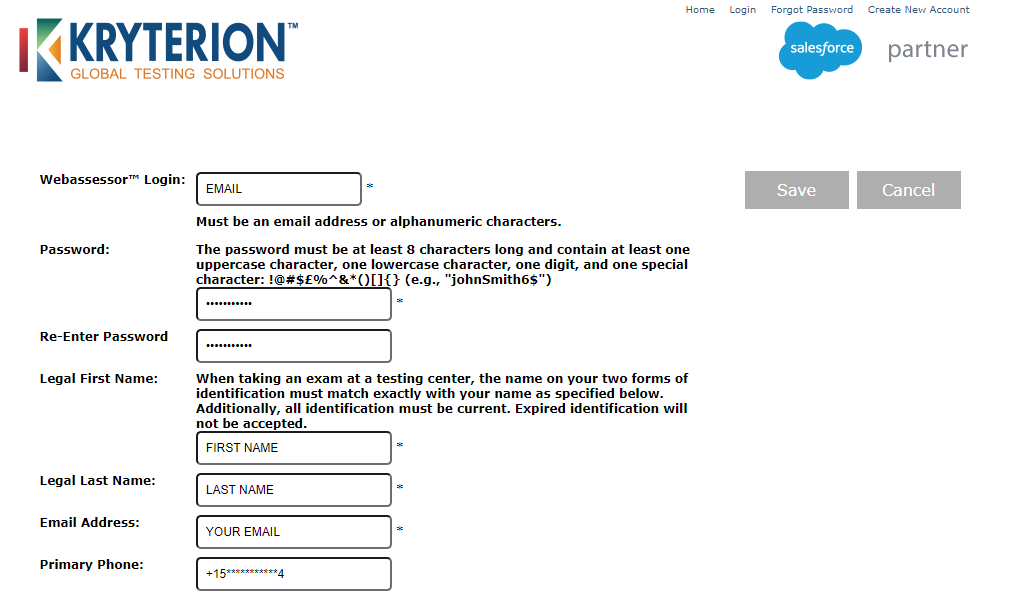
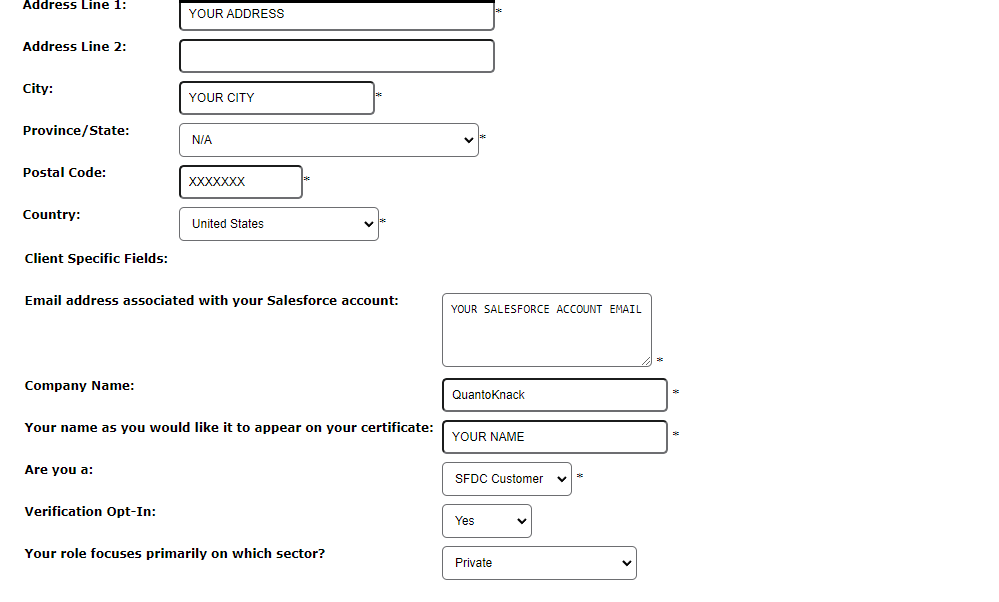
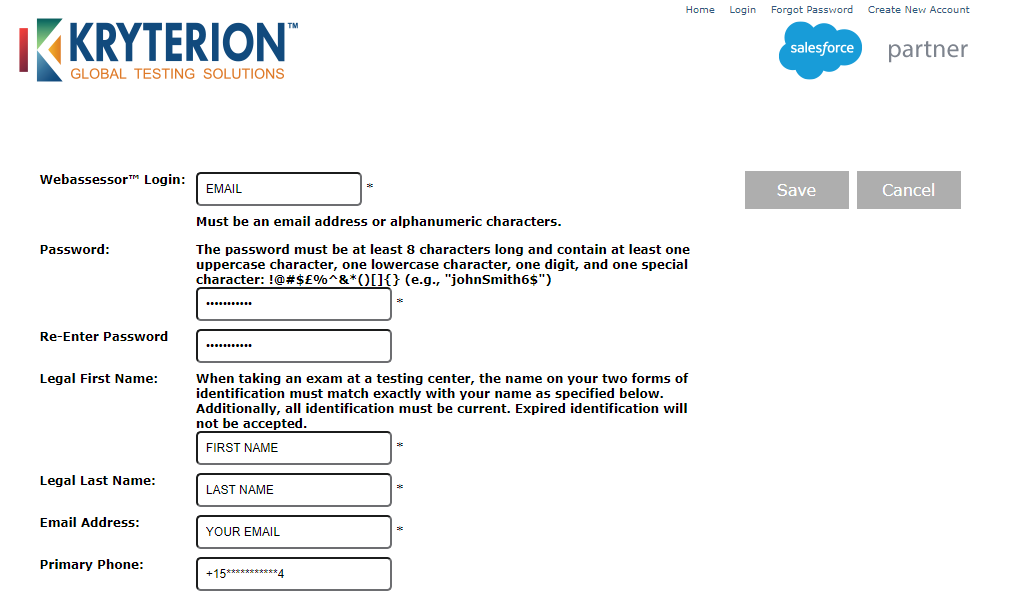
Step 1-: Signup and create the account from the link given below and add the required Personal Information.

https://www.webassessor.com/wa.do?page=createAccount&branding=SALESFORCE

5 1
3 2
4


Step 2 -:
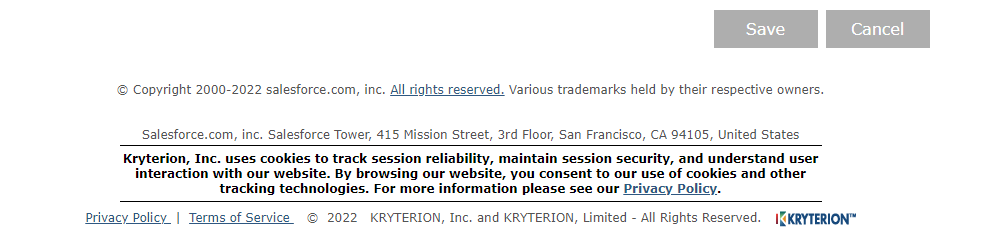
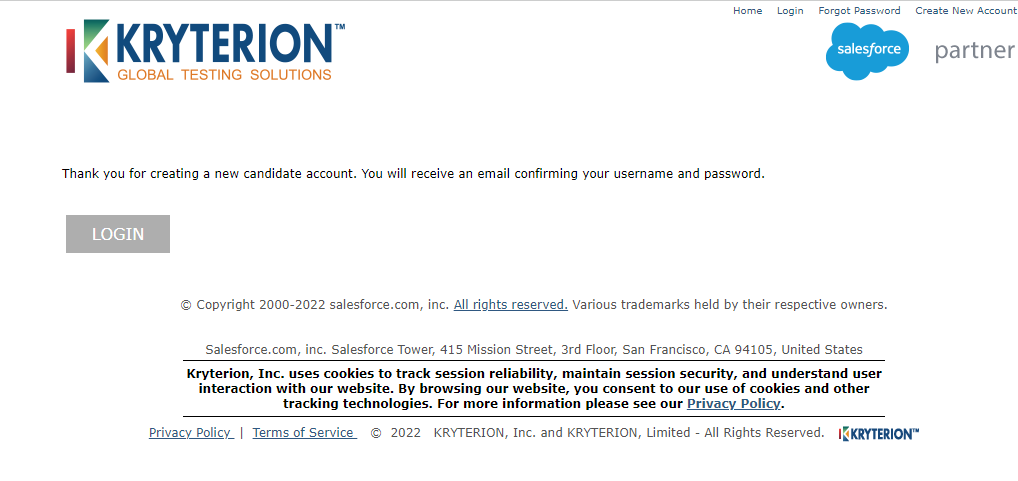
Click Save to get a verification email on your registered email address.

Step 3 -: Now Login into the page by giving your credentials.

6

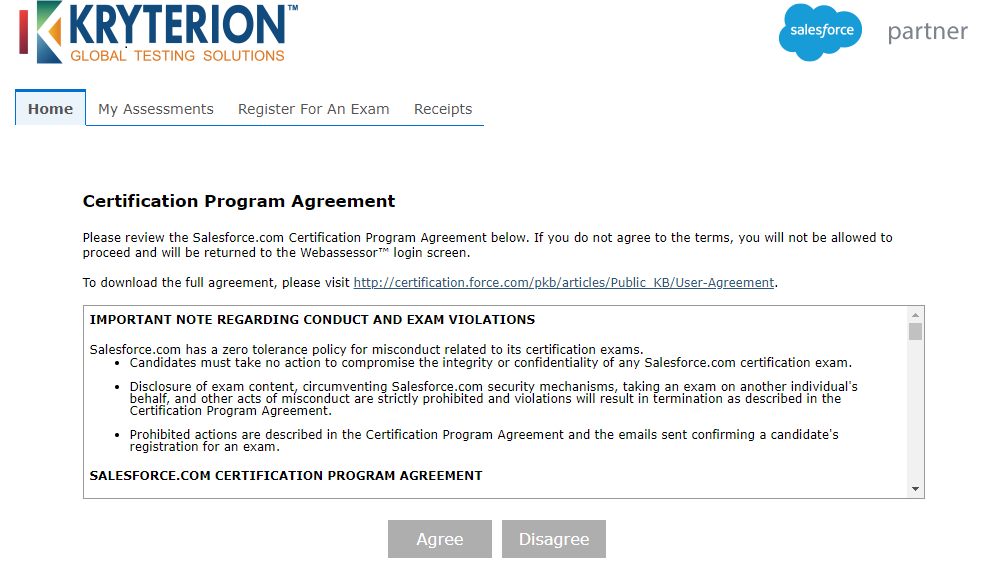
Step 4-: Read the general agreement and then click on the agree button to move to next steps.

7 1

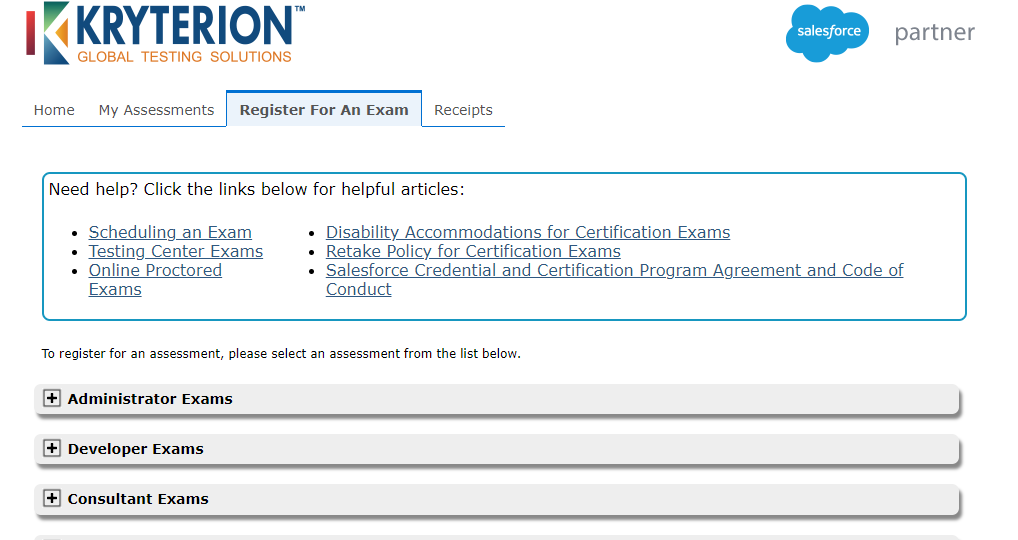
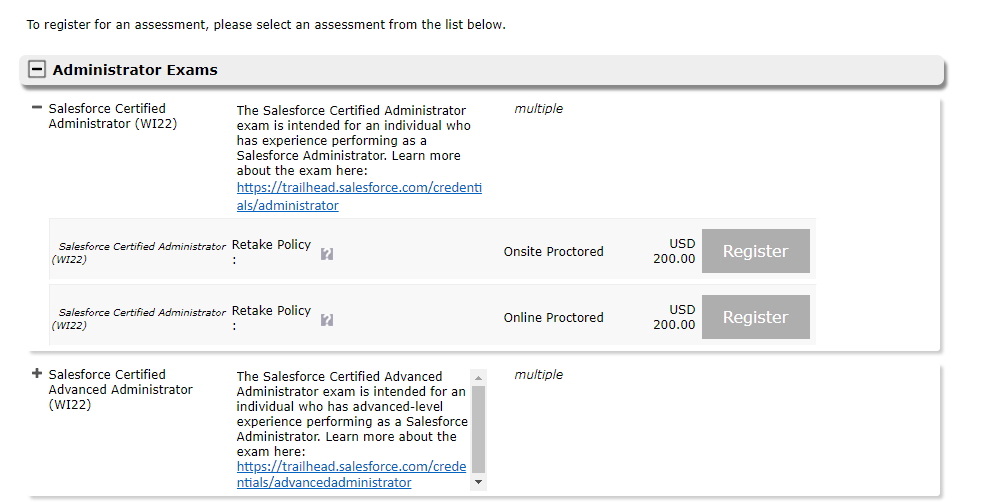
Step 5-: Click on Register for An Exam .You will notice an several option such as Administrator Exam, Developer Exam, Consultant Exam.

8

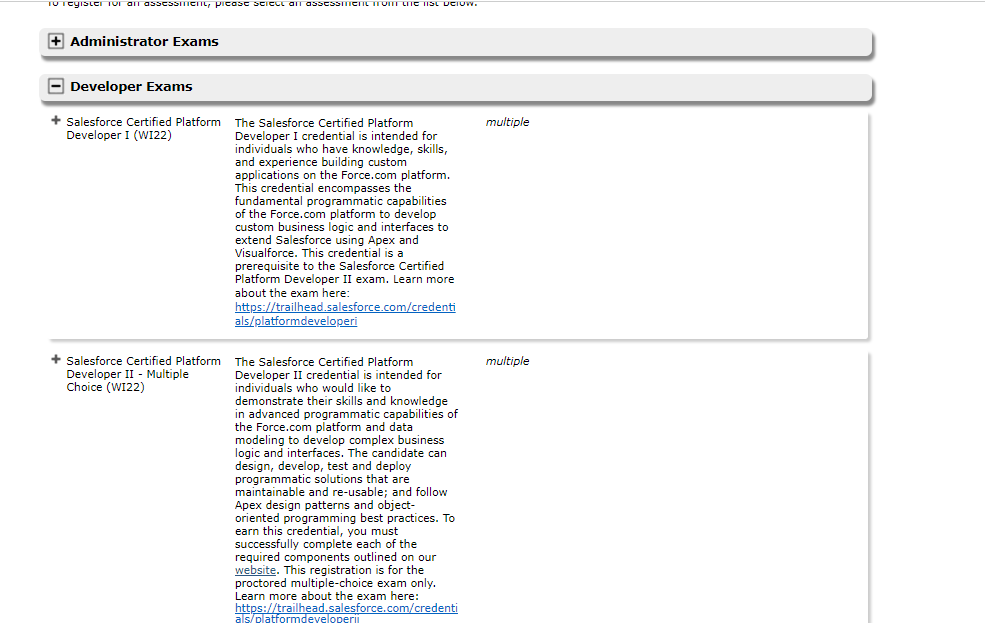
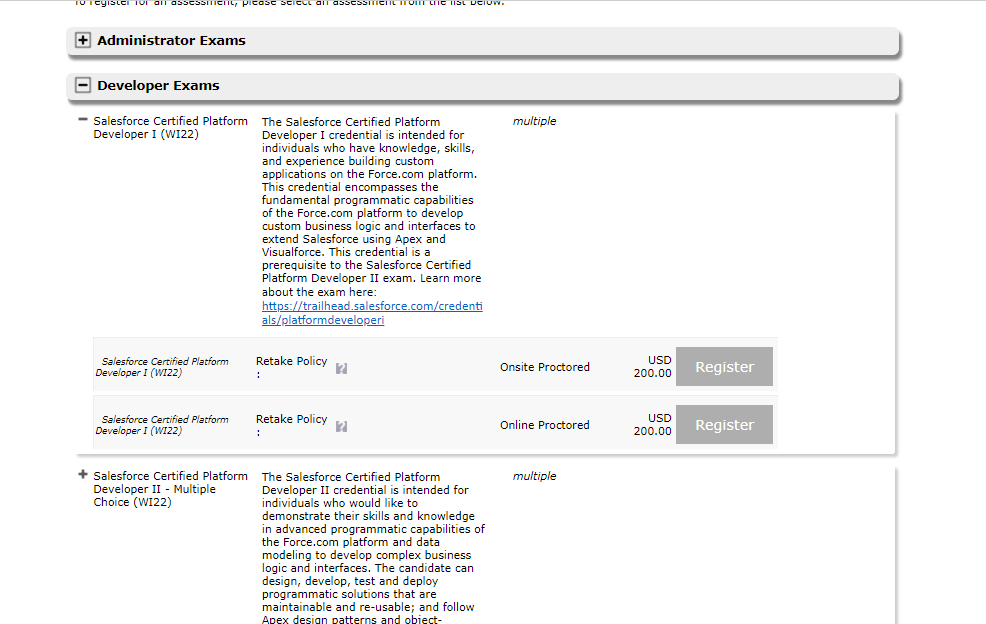
Step 6-: Since we are scheduling the Developer Exam, click on the Developer Exams accordion. Select the Salesforce Certified Platform Developer (WI22) Exam and click on Register.

23
25

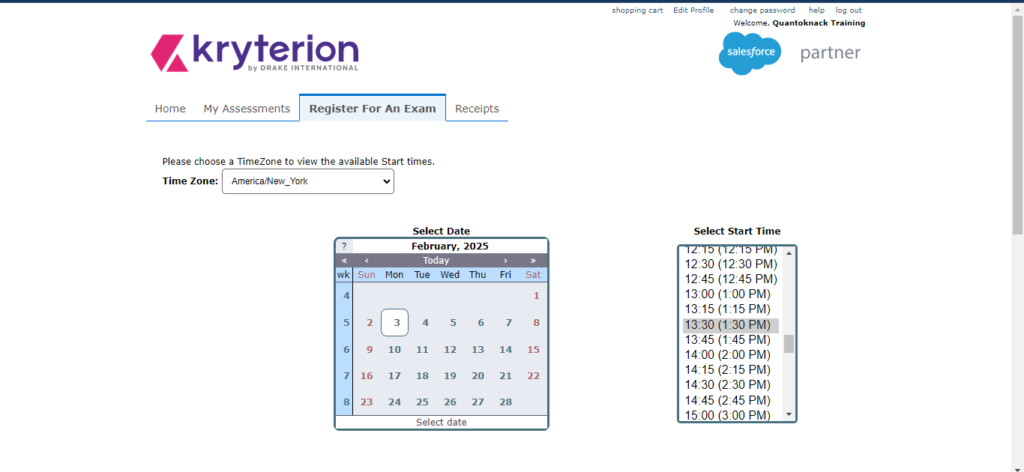
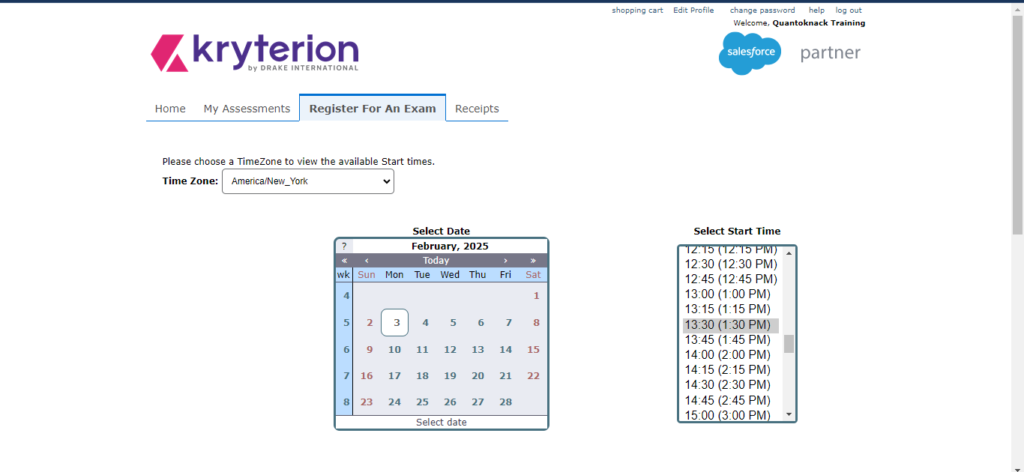
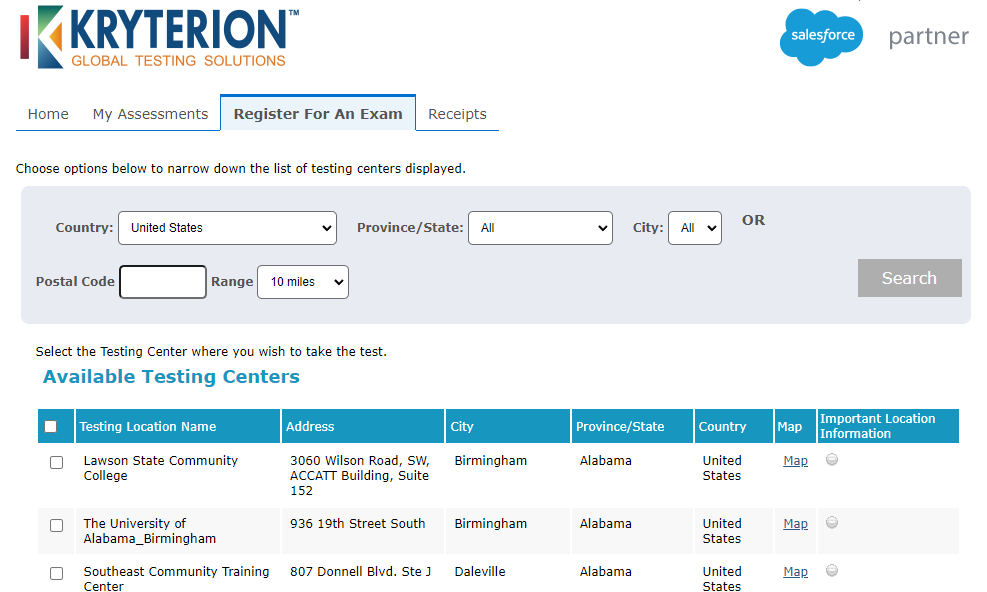
Step 7-: You will be Asked to select the available test Center, Date and Time Then click on Next.

register for exam

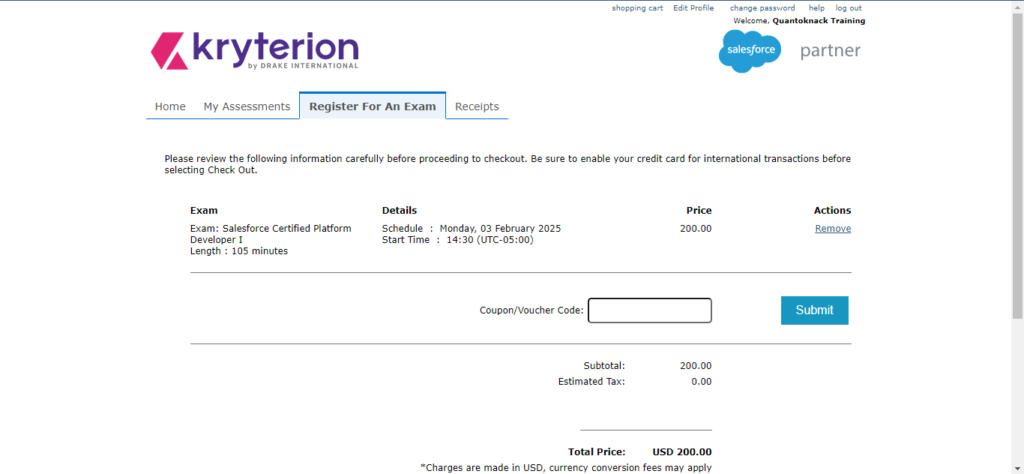
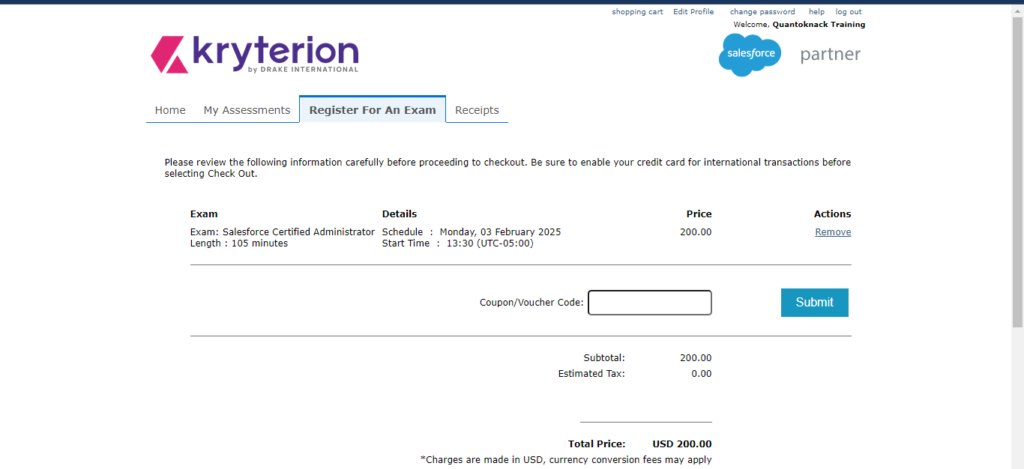
Step 8-: The last step is Checkout process. If you are having any Coupon/Voucher Code please enter it and complete the transection process.

register for dev exam

At last you are done with the registration process. Now you have to give the Exam on the Allotted Date and Time.

All the Best!

READ MORE
TECHAvatar of Abhinav KumarAbhinav Kumar0 Comments
Share article:TwitterFacebookLinkedin
1878 Views
77 Likes

How to register for the Salesforce Administrator Certification Exam

To Register for the salesforce Administrator Certification Exam Follow the following steps which are-

Step 1-: Signup and create the account from the link given below and add the required Personal Information.

https://www.webassessor.com/wa.do?page=createAccount&branding=SALESFORCE

5
3 2
4


Step 2 -:
Click Save to get a verification email on your registered email address.

Step 3 -: Now Login into the page by giving your credentials.

6

Step 4-: Read the general agreement and then click on the agree button to move to next steps.

7 1

Step 5-: Click on Register for An Exam .You will notice an several option such as Administrator Exam, Developer Exam, Consultant Exam.

8

Step 6-: Since we are scheduling the Administrator Exam, click on the Administrator Exams accordion. Select the Salesforce Certified Administrator (WI22) Exam and click on Register.

9

Step 7-: You will be Asked to select the available test Center, Date and Time Then click on Next.

registration

Step 8-: The last step is Checkout process. If you are having any Coupon/Voucher Code please enter it and make a transection process.

register for exam

At last you are done with the registration process. Now you have to give the Exam on the Allotted Date and Time.

All the Best!

READ MORE
TECHAvatar of Abhinav KumarAbhinav Kumar0 Comments
Share article:TwitterFacebookLinkedin
1415 Views
52 Likes

Lookup Relationship

Lookup relationship is a type of relationship in which that if one gets deleted then the related object will not get deleted.

Important Points Regarding look Up Relationship

  • When a parent’s record gets deleted, the child remains in existence.
  • We cannot create a roll-up summary field in a lookup relationship.
  • The relationship is optional.
  • No impact on Security.
Steps to create a Lookup Relationship.
Assuming a situation that any Company is there and they are having Account section Teams They want to have the Account records of Employee’s who’s working in Company.

Step1-:Login to your org

Step 2-:Setup > Object Manager > Employee

Screenshot 2022 01 17 220926

Step3-: Click on field & Relationship > New 

Screenshot 2022 01 17 221338

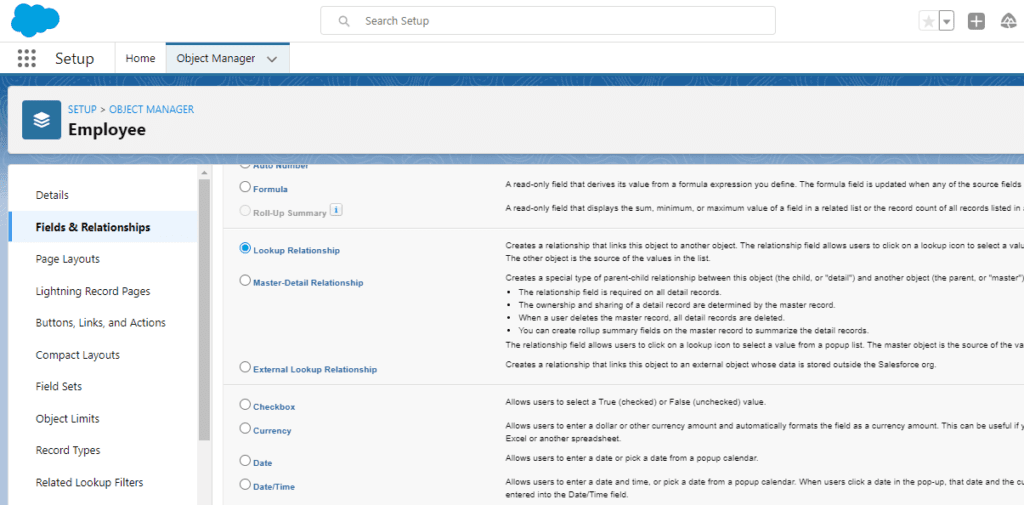
Step 4-: Select Lookup Relationship >Next.

Screenshot 2022 01 17 221502

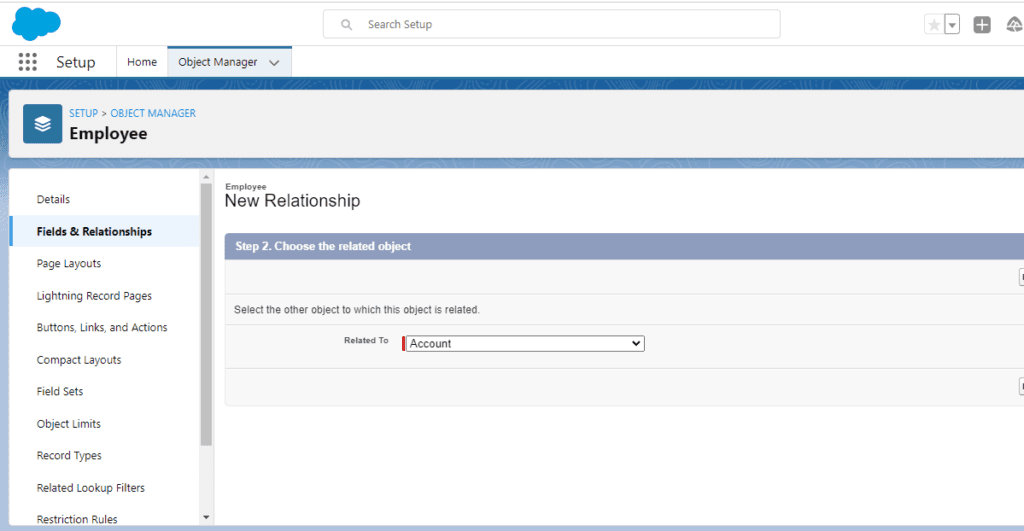
Step 5-: Select Account from the drop-down > Next.

Screenshot 2022 01 17 221738

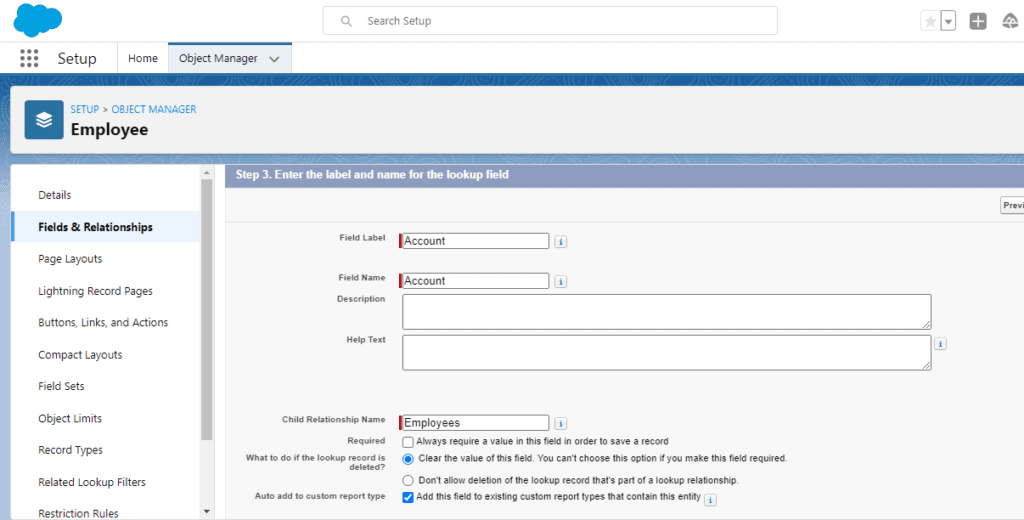
Step 6-: The next page will be containing Child Relationship with a parent.

Screenshot 2022 01 17 221930

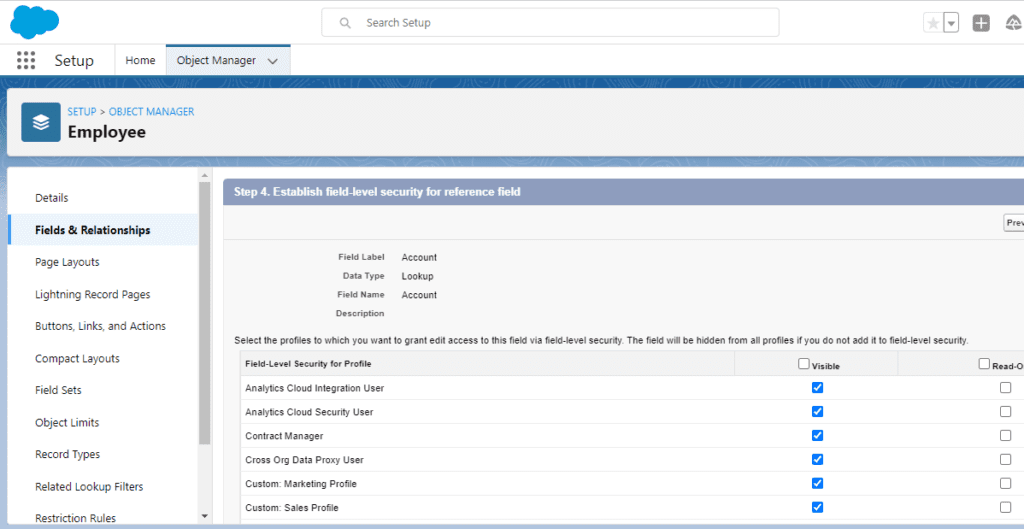
Step 7 -: Next step is Field-level Security.

Screenshot 2022 01 17 222029

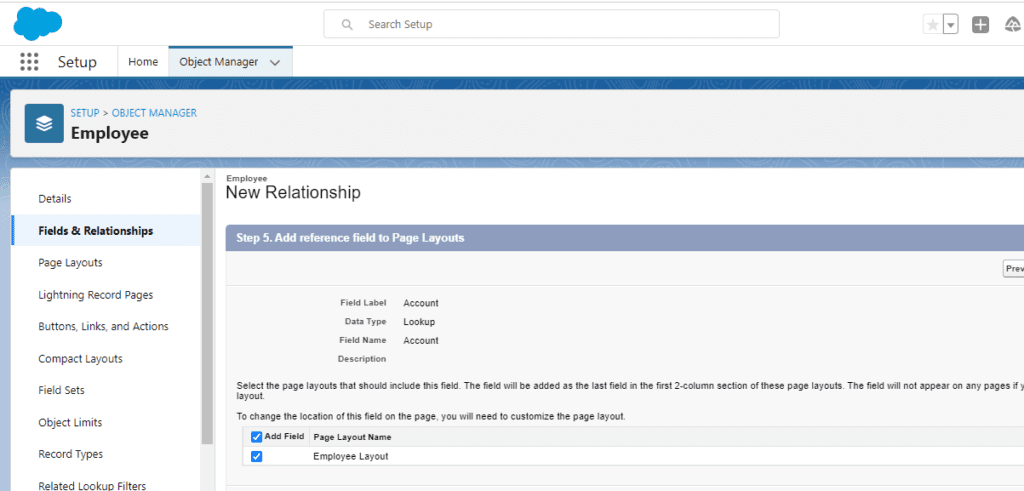
Step 8-: Another Step is for the Page Layout Reference

Screenshot 2022 01 17 222213

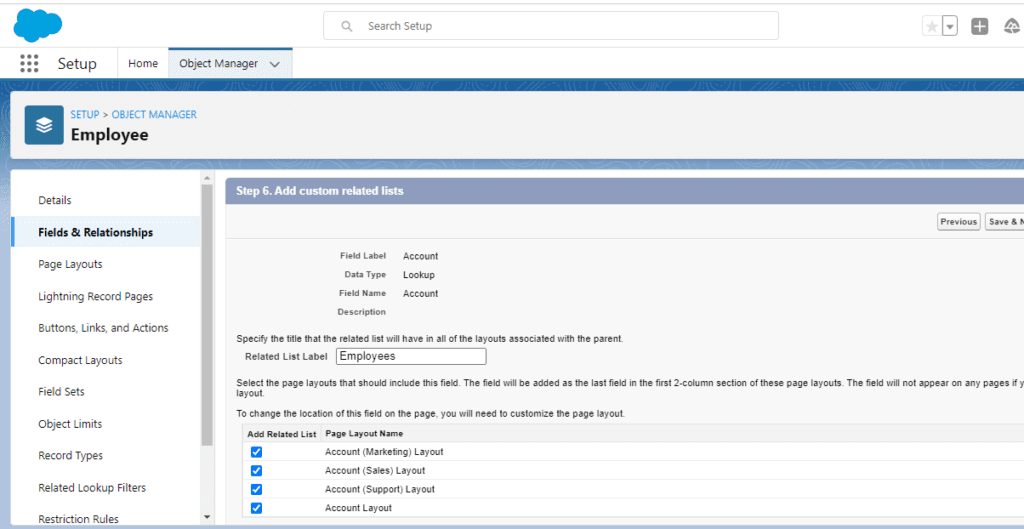
Step 9 -: Last step is the Addition of a Related list and Saving the Lookup Relationship.

Screenshot 2022 01 17 222345

Conclusion: Here we have got a detailed Step by Step understanding of how to create a Lookup Relationship.

Happy learning

Written By: Ashutosh Tiwari

READ MORE
TECHAvatar of adminadmin0 Comments
Share article:TwitterFacebookLinkedin
1593 Views
140 Likes

Relationship in Salesforce

A Relationship is a way in which two or more people or things are connected with each other. The way they connected will be of different types likewise in salesforce there are 6 different types of relationships in salesforce.

  • Master-Detail relationship
  • Look Up relationship
  • Many-to-Many relationship
  • Self-relationship
  • External relationship
  • Hierarchical relationship 

Master-Detail relationship :

Master-Detail relationship is a type of relationship, one object acts as a master and the other acts as a detail object. In other words, this relationship acts as a parent-child relationship. We use this type of relationship when we want to bound two objects tightly or closely dependent on each other.

Important Points Regarding Master-Detail relationship

  • In Master-Detail Relationship the “child object” or “detail object” must have a parent.
  • Roll-up Summary fields can be established.
  • Records can be re-parented.
  • Standard objects can not be a detailed object
  • Maximum 2 Master-Detail Relationships can be created for an Object.

Look Up relationship :

Look Up relationship is a type of relationship in which that if one gets deleted then the related object will not get deleted.

Important Points Regarding look Up Relationship

  • When a parent’s record gets deleted, the child remains in existence.
  • We cannot create a roll-up summary field in a lookup relationship.
  • The relationship is optional.
  • No impact on Security.

Many-to-Many relationships:

In Many-to-Many relationships, records of particular objects are linked to multiple records of different objects and vice versa. There is no such field as a many-to-many relationship in Salesforce, we can create a many-to-many relationship by creating two master-detail relationships with a common object. 

Important Points Regarding Many-to-Many relationships Relationship

  • A Junction Object is used to create Many-Many Relationships.
  • A junction object can also be called a Join Object.

Self-relationship:

Self-relationship simply means creating a relationship with itself. In this, we can relate an object with itself by look-up. 

External relationship:

In External lookup relationships, it allows a relationship to be formed between two external objects. It supports standard look-up relationships that use 18 characters Salesforce Id for the association.

Hierarchical relationship:

This unique relationship can only be used on the user object and is designed to create a hierarchy of users.

READ MORE
  • 1
  • …
  • 7
  • 8
  • 9
  • 10
Recent Posts
  • How Salesforce Data Integration Tools Simplify Real-Time Business Connectivity
    In a nutshell, businesses collect operational data to perform...
  • Design, Build, and Optimize Agents with Agentforce 360 Innovations
    In this fast-moving digital world, businesses also want smarter...
  • Salesforce Built-In Payment Processing: How to Handle Everything End-to-End
    In the current digital economy, where online payments have...
  • Explore Top Salesforce Integration Challenges and Ways to Fix Them
    Integrating any system can be a difficult task, as an...
  • Protecting Sensitive Data: A Complete Guide to Encryption in Salesforce
    In the current digital economy, data can easily rank at the top...
logotype

We cater to individuals and corporates and provide IT training and certification programs.

44679 Endicott Drive Suit 300 #1046 Ashburn, VA 20147 United States

Phone: +1-571 989 9489

Email: atul.deo@quantoknack.com

Useful links

About Us

Contact Us

Blog

Courses

  • Live Salesforce Admin Training
  • Business Analyst
  • QA Testing Course
  • Advance JAVA Training
  • SQL Server Training
  • Live Salesforce Developer Training Certification Course
  • Digital Marketing
  • Oracle DBA Training

Subscribe

    Instagram Pinterest Linkedin
    Facebook
    Logo star

     2024 Quantoknack. All Rights Reserved