Become a Instructor

Blogs

logotype
Menu
  • Courses
    • Salesforce Admin
    • Salesforce Developer
    • Salesforce Business Analyst
    • Advance Java Training
    • Buisness Analyst
    • Digital Marketing
    • Oracle DBA
    • QA Testing Course
    • SQL server Training
  • Register
+1-571 989 9489
logotype
  • Courses
    • Salesforce Admin
    • Salesforce Developer
    • Advance Java Training
    • Buisness Analyst
    • Digital Marketing
    • Oracle DBA
    • QA Testing Course
    • SQL server Training
  • Register
  • +1-571 989 9489

Become a Instructor

Blogs

logotype
Menu
  • Courses
    • Salesforce Admin
    • Salesforce Developer
    • Salesforce Business Analyst
    • Advance Java Training
    • Buisness Analyst
    • Digital Marketing
    • Oracle DBA
    • QA Testing Course
    • SQL server Training
  • Register
+1-571 989 9489
  • Courses
    • Salesforce Admin
    • Salesforce Developer
    • Advance Java Training
    • Buisness Analyst
    • Digital Marketing
    • Oracle DBA
    • QA Testing Course
    • SQL server Training
  • Register
  • +1-571 989 9489
logotype
logotype
  • Courses
    • Salesforce Admin
    • Salesforce Developer
    • Advance Java Training
    • Buisness Analyst
    • Digital Marketing
    • Oracle DBA
    • QA Testing Course
    • SQL server Training
  • Register
  • +1-571 989 9489
Author: admin
Home admin Page 7
TECHAvatar of adminadmin0 Comments
Share article:TwitterFacebookLinkedin
849 Views
78 Likes

Tips For Passing The Salesforce Admin Certification Exam

The Salesforce Administrator Certification is examined to be the basic credential of any admin. Passing this exam will showcase your knowledge of Salesforce basics and best practices configuration. It is known as the foundation level qualification for professionals as it covers the simple details of the CRM platform, including the sales and service cloud products.


In Case, you are preparing for your Salesforce Administrator Certification exam, you should know that to be a Salesforce professional you should focus on establishing your expertise in managing and optimising Salesforce environments.


This certification will strengthen your skills in handling user requirements, assigning sales personnel and ensuring system compliance with business requirements. The blog will help you understand the exam pattern, and tips for passing the salesforce admin certifications exam fluently.

Salesforce Admin Certification Exam Pattern:

The Salesforce Admin Exam pattern includes 60 multiple-choice questions that allows you to test your knowledge of Salesforce Administration Fundamentals, Configuration, and customization. The exam lasts 90 minutes, and a passing score of 65% is needed to achieve certification efficiently.

Salesforce commends having at least 6-12 months of hands-on exposure as a Salesforce Administrator to be qualified for the exam. Knowing salesforce features, functionalities, and the best practices is important for success.

Tips to Succeed Salesforce Admin Certification Exam:

As the demand for qualified Salesforce admins continues to grow, taking Salesforce Admin Training Online can greatly improve your career prospects. Whether you are a professional or a fresher this blog will offer you valuable tips to help you ace the certification exam.

  • Exam Format – Before taking the Salesforce Admin Certification exam, it is very important to familiarise yourself with the exam structure, including the total number of questions, time limits and various question types. This will allow you to manage your time easily during the exam. You can get all the information related to the certification exam on the Salesforce Admin Exam Guide.
  • Hands-On Practice – Incase, you have not participated in any projects or real-world scenarios to check your Salesforce knowledge efficiently. In that case, you will not be able to handle any projects on your own in your sales. This is why you need to go to the depth of the Salesforce Platform and enhance hands-on exposure, as the practical application of your knowledge is the key to understanding the complexity of Salesforce Administration.
  • Join Study groups to increase your knowledge – Connecting with different students aspiring to be an admin will help you enhance your knowledge. And by joining Salesforce Community or forums will increase your motivation. You can easily discuss your concepts with people who can offer various perspectives and increase your overall comprehension. You can also network with them to grasp any opportunity they might share.
  • Analyse Exam guide – Salesforce Admin certification study Guide will help you understand the exam pattern efficiently. Ensure that you go through it thoroughly as it outlines the relevant topics and percentage weight each area carries in the exam.
  • Preparation for the Exam – Inspect the Customization of Salesforce, comprising creating custom objects, fields, and page layouts. You will get to understand the importance of record types and how they affect user experience. To be a professional you should learn to generate various custom reports and dashboards successfully so that you can learn to present your data.
  • Stay Updated with the new Launches – Being a Salesforce professional, you must know that Salesforce releases its updates three times a year. Try to read books or blogs related to the latest features and enhancements launched in each release. Salesforce continuously includes new functionalities that may be specific to the exam.
  • Practice with various Sample Questions – Use practice exams and sample questions to evaluate your knowledge and identify areas for improvement. Salesforce offers official practice exams that closely favour the actual certification test. This not only helps you scale your readiness but also acquaints you with the exam environment.

Important Salesforce Topics to Focus:

There are few important topics based on which you are going to get most of the questions. With the help of that, you ‘ll be able to ace the certification exam, in the first attempt. Whereas, joining salesforce admin certification classes will help you achieve your goals efficiently.

  • Configuration and Setup – 20%

The security of the sales organisation is very important to ensure that there is no unauthorised access internally and externally. In terms of external security, this means understanding security password management, IP restrictions and network settings. Additionally, for internal security, it means understanding how user profiles, roles and sharing settings limit access to records for specific users.

  • Learn about Object Manager and Lightning App Builder – 20%

Salesforce is a cloud based database that runs in a similar fashion to any other, with tables, fields, and links between tables to create a relational database. It is very important to understand how they interact with each other and the difference between standard extraordinary objects such as accounts, contacts and custom objects.

  • Data and Analytics Management – 14%

Salesforce is only as efficient as the data gets in. You will require to understand how to import, update, delete and extract data, as well as make sure proper data validation. Reports and Dashboards in Salesforce can then be utilised by businesses to monitor performance and answer key questions that reflect issues and support business growth.

  • Workflow/Process Automation – 16%

Salesforce can be utilised to automate monotonous, repetitive work, decreasing the requirement for manual tasks. This allows users to be more productive and can significantly contribute to platform adoption. Moreover, salesforce has various automation tools, and part of your role as the Salesforce administrator will be to choose the best tool depending on your business needs and the features of each tool.

In addition to these, the Salesforce Admin certification exam includes sales and marketing applications at 12%, service and support applications at 11%, and productivity and collaboration at 7%.

Conclusion:

The Salesforce Certified Administrator Exam is a qualification that all Salesforce professionals should have. It is an expectation of almost every professional and will give the confidence that you can successfully and responsibly maintain and customise Salesforce.

In case you have achieved this certification efficiently, it will open multiple job roles in your career. Its simply choosing the path you want to go down!
READ MORE
TECHAvatar of adminadmin0 Comments
Share article:TwitterFacebookLinkedin
961 Views
102 Likes

Is Salesforce Administration a Good Career Path?

Getting doubts on the way to choosing the right career path is obvious, but not with Salesforce. Do you wonder, “Is Salesforce admin a good career?” Do you have any doubts or questions regarding the Salesforce admin role?

Then you are at the right place. This blog will help you find all the answers to all your questions regarding the demand for skilled Salesforce administrators. Salesforce itself is the leading CRM platform, and as more businesses rely on it, the need for experts to manage and customize it grows, too. This translates to high job security and competitive salaries (around $85,000 annually in the US!).

You can achieve excellent growth opportunities by choosing the Salesforce admin career path in 2024. This journey starts with the role of an admin, and with experience and certifications, you can progress to roles like Salesforce Developer, Consultant, or Architect. As an evolving technology, Salesforce provides a career path engaged in continuous learning and development. You can employ numerous training resources and certifications available, like Salesforce Certified Administrator and Salesforce Advanced Administrator, to help you stay ahead.

Understanding the Role of a Salesforce Administrator

As a Salesforce administrator, you will be responsible for managing and customizing an organization’s Salesforce platform to ensure it runs smoothly and efficiently. Their tasks include:

  1. Adding new users, managing permissions, and maintaining security settings.
  2. Importing, exporting, and updating data records.
  3. Modifying Salesforce to meet the precise needs of the business, including creating custom objects, fields, and layouts.
  4. Setting up workflows, processing approvals, and enhancing productivity using other automation tools
  5. Providing training and ongoing support to users within the organization.

Why Salesforce Administration is a Good Career Path

There are many reasons why thousands of students attain knowledge in salesforce admin and become valuable candidates for this position. Here are key benefits why you can prefer attaining knowledge, certification, and a career as a Salesforce Admin.

  • High Demand and Job Security

Every job seeker looks for a sense of security in their jobs, a critical factor in career satisfaction. As the demand for Salesforce administrators is on the rise, it is undoubtedly the first choice for many people. According to the latest IDC report, the Salesforce ecosystem is projected to create 4.2 million new jobs by 2024. Organizations across various industries rely on Salesforce for skilled administrators as it remains a firm companion in the market.

  • Competitive Salaries

You can get excellent wages from Salesforce administrators. As per the career reports, a Salesforce administrator can get around $85,000 per year on average salary in the United States, with experienced professionals earning significantly more. Candidates can analyze this competitive pay depending on their specialized skills and knowledge required for the role.

  • Career Growth Opportunities

Candidates can take the beginning as a Salesforce administrator as a stepping stone to various advanced roles within the Salesforce ecosystem. You can progress to roles such as Salesforce Developer, Salesforce Consultant, or Salesforce Architect with experience and additional certifications. Professionals can acquire an attractive option for long-term career growth, this clear path for career advancement.

  • Continuous Learning and Development

Professionals will regularly get new features and updates on the dynamic platform, Salesforce. You will get to learn and adapt to these changes constantly, keeping your skills sharp and relevant as a Salesforce administrator. Additionally, you can acquire numerous training resources and certifications to stay ahead in your career, such as Salesforce Certified Administrator and Salesforce Advanced Administrator.

  • Flexibility and Remote Work Opportunities

The nature of Salesforce administration allows for a high degree of flexibility. It is an ideal career for professionals who prefer or require a flexible working environment, as many tasks can be performed remotely. Remote work has been adopted since the COVID-19 pandemic, and Salesforce administrators have been well-positioned to take advantage of this shift.

Roadmap to Kickstart Your Salesforce Admin Career?

Here’s your roadmap to kickstart a Salesforce admin career:

Develop and Grow in Your Career with Salesforce:

  • Salesforce Admin Training: You can learn and get salesforce admin training through free resources like Trailhead, Salesforce’s online learning platform.
  • Salesforce Admin Certification: Obtain the Certified Administrator credential to validate your skills and strengthen your resume.
  • Gain experience: Get hands-on practice by looking for internships, volunteering opportunities, or positioning entry-level.
  • Salesforce admin training & placement: Look for programs that blend training with placement assistance.

Salesforce administration offers flexibility, too! Many tasks can be done remotely, making it ideal for professionals who prefer a work-life balance.

Here are some skills you’ll need to succeed:

  • Technical understanding of Salesforce, including customization and automation.
  • Boost your analytical skills to make informed conclusions based on data and business processes.
  • Communication skills to understand user needs and provide support and training.
  • Problem-solving skills to troubleshoot issues and implement solutions effectively.

Challenges in Salesforce Administration

While Salesforce administration is a promising career path, it’s essential to acknowledge some of the challenges:

  1. Constant Learning: The rapid evolution of the Salesforce platform requires continuous learning and adaptation, which can be demanding.
  2. Complexity: Managing a complex system like Salesforce requires meticulous attention to attributes and robust problem-solving skills.
  3. User Management: Dealing with a diverse user base and addressing their varying needs can be challenging and requires excellent communication skills.

But the rewards outweigh the challenges!

Is Salesforce administration a good career option?

If you’re technically inclined, enjoy problem-solving, and are committed to learning, then yes, Salesforce administration is a great career choice! It’s a lucrative and dynamic field with a bright future. With the right skills, certifications, and experience, you can achieve a successful career in this dynamic and growing field. It is well-suited for technically inclined individuals who enjoy problem-solving and are committed to ongoing learning and development.

READ MORE
TECHAvatar of adminadmin0 Comments
Share article:TwitterFacebookLinkedin
1189 Views
146 Likes

Salesforce Administrator Roles And Responsibilities – A Learning Guide

Salesforce Admins are known to be the bridge between business and Salesforce Technology. But when it comes to interpreting their core responsibilities and roles, some lack of clarity occurs. Moreover, Salesforce is one of the most well-known CRM tools available in the market. There has been rapid growth in Salesforce technology in the past years, and hence new job opportunities are also knocking at the doors.

The Salesforce Administrator role is one of the most demanding job roles under Salesforce. In case, you are desiring to pursue Salesforce Administrator training to get the role then you are at the right place. The blog will lead you to know the roles and responsibilities of a Salesforce administrator.

Let’s dig into the blog to understand Salesforce admin roles and responsibilities.

Salesforce Administrator Roles:

The Salesforce Administrator’s work is to cooperate with various stakeholders to efficiently understand their requirements to deliver the best outcome. They are known as the bridge between business and technology as they connect them.

Moreover, a Salesforce Administrator’s responsibility includes multiple duties that are listed here for beginners to understand their role efficiently:

  • Data- Management – Salesforce admins are supposed to check for the restrictions on user accounts for important data accessibility. They are also responsible for unlocking user accounts and resetting their passwords. Along with this, the Salesforce admin is responsible for generating data records and maintaining reports on Salesforce.com.
  • Technological and Executive Role – Admins handle all the technological resources related to sales and available tools at Salesforce effectively. Along with that, they deal with all the executive functions, like maintenance of user accounts, and dashboards, and supplementary conventional tasks like two-factor verification, and certificate problems respectively.
  • General Management Duties – Salesforce Admins maintain a bridge connecting users, business people, and application developers efficiently. In addition, they also help users generate reports that offer meaningful metrics. A Salesforce Admin’s roles and responsibilities include organizing the assessment and extension of new requests for development.

Along with this, Salesforce Admins are responsible for handling the work environment effectively with various users by taking care of excess and duplicity of user accounts in the data.

Therefore, a Salesforce Admin usually deals with multiple duties but in a nutshell, it is all about maintaining the platform, making it simple for the users to use Salesforce, and staying  up-to-date on the new advanced tools and requirements. In case you aspire to be a Salesforce Administrator then you can achieve all these roles and responsibilities by gaining the right skills and Salesforce admin training online.

Salesforce Administrator Responsibilities:

The Salesforce Administrator’s roles and responsibilities can vary depending on the firm’s requirements and the complexity of the Salesforce execution. Moreover, here are some common responsibilities that Salesforce Administrators usually perform:

  • Assuring the best performance of Salesforce systems and products. And upgrading and configuring Salesforce systems for consistent integration.
  • Administering Salesforce roles, profiles, sharing rules, workflows, and groups.
  • Allowing user access to relevant data, reports, and dashboards
  • Being a Salesforce admin, you will be responsible for importing and exporting data, maintaining data quality, and creating backups.
  • Personalizing Salesforce application and features using tools like the object manager, process builder, and Lightning App Builder.
  • Generating and Maintaining automated workflows, approval processes, and process builder flows efficiently.
  • Creating reports and dashboards to offer insights into sales and marketing performance.
  • One of the roles and responsibilities of a Salesforce Administrator is to set up and manage communication channels like Chatter groups and email templates effectively.
  • Offering training and support to end-users, fixing issues, and maintaining system documentation
  • Accessing and installing third-party applications from the Salesforce AppExchange to improve system functionality.
  • Last but not least, a Salesforce administrator’s roles and responsibilities include developing and enforcing data governance policies to preserve data quality and consistency across the firms.

Skills Required to be a Salesforce Administrator

Salesforce admins skills are the capabilities that enable an administration expert to utilize Salesforce to execute multiple CRM tasks efficiently. Salesforce administrators require a variety of technical skills, which comprise specialized knowledge of and expertise in Salesforce and its multiple abilities.

Other than this, they also require a few soft skills, which allow them to engage with and manage the sales team and other individuals efficiently. Whereas, your skillset to be a Salesforce administrator should include Dashboard, Salesforce lightning, Apex, Workflow rules, data manipulation, and many more.

Aspiring to a salesforce admin you should be aware of the skillset and understand how to improve and highlight them to respective employers. Moreover, to know how to be a Salesforce administrator you can go through Salesforce Admin Training thoroughly.

Conclusion:

To accomplish the Salesforce Administrators responsibilities, some precise skills are required. With this in mind, one must go for the Salesforce Certified Administrator Exam efficiently to grab the opportunity. 

A good Salesforce admin training online will help you become ready to start your certification exam and get certified. One of the biggest benefits of selecting the field of salesforce is that it has a bright future ahead of itself. This is clear from the amazing enhancement it has shown in the past decades and continues to possess.

If you are aspiring to become a Salesforce admin, then get started now. Enroll in the best Salesforce Certification program today!

READ MORE
TECHAvatar of adminadmin0 Comments
Share article:TwitterFacebookLinkedin
801 Views
111 Likes

Top 20 Advanced Salesforce Admin Interview Questions

The Salesforce Admin industry is expected to enhance US$5 billion by 2023 from a sum of about US$180 million. Hence, a lot of crucial organizations are seeking certified Salesforce admin professionals.

This comprehensive guide on Advanced Salesforce admin interview questions include the list of top 20 questions that are asked during Salesforce Admin job interviews.

Following is the list of admin interview questions salesforce (Advanced) that you need to get through thoroughly before appearing for a Salesforce interview in 2024:

Question 1 – What is a sandbox environment in Salesforce, and what is it used for?

Answer – A sandbox is usually a copy of your organization in a specific environment that you can use for multiple purposes, such as testing and training. The operations you perform in your sandboxes don’t impact your organization’s production.

Question 2 – What is a custom object in Salesforce, and how is it used?

Answer – It is considered to be one of the most important admin interview questions in Salesforce. Custom objects are containers that you build yourself to suit your own desired requirements. Once it is created, you will be able to associate it with any record you want. It allows organizations to capture information that is not covered by standard Salesforce objects, like products, Account or events. This data is used to create custom applications and dashboards that offer a thorough overview of all relevant data in one location.

Question 3 – Can you explain the difference between a Role and a Profile in Salesforce?

Answer – Roles means the ranked structure within an organization and dominates record-level access. Whereas, Profiles govern the functional permissions that users own within the Salesforce platform. It rules object-level access. Roles and profiles work arm in arm to create a robust system that ensures appropriate data visibility and functional abilities for each other.

Roles in Salesforce

Roles are instrumental in administering data access and establishing a clear reporting hierarchy. Describing the roles efficiently, organizations can eventually regulate who can view, edit, and report on relevant sets of data.

Profiles in Salesforce

Profiles are different from roles, it focuses on the functional permissions rather than data assessment. A profile defines what a user can do within the Salesforce platform, consisting of the objects they can access, the actions they can perform, and the system-level permissions they possess. 

Question 4 – What is a Record Type in Salesforce?
Answer – A record type permits you to have multiple versions of an opportunity record for various sales processes. Every record type can have its own set of fields, page layouts, and logic, tailored to the particular requirements of your business processes.

Question 5 -How does Salesforce handle data management?

Answer – It is considered to be one of the most important Salesforce admin interview questions. Salesforce allows customers with the option to manually backup their relevant data once a week. As a result of which, users should also manually backup data before going through any significant data project. Users can also manually restore their specific data with specific tools such as Data Loader.

Question 6 – Can you explain the distinction between a Salesforce custom object and a standard object?

Answer – Standard objects are pre-built objects that comprise Salesforce out-of-the box, like Accounts, contacts, and opportunities. Moreover, custom objects are created by administrators/developers to store information unique to their business needs that are not met by standard objects.

Question 7 – What is a junction object in Salesforce, and what is it used for?

Answer – A custom object that constitutes a many-to-many relationship between two other objects is known as a junction object. It is used to  link two objects in a single record and to establish relationships between two objects efficiently.

Question 8 – In Salesforce, what is the difference between a lookup relationship and a master-detail relationship?

Answer – A lookup relationship type in Salesforce allows you to create a link between two objects, but the child object is not dependent on the parent object. In case the parent object is deleted, the child object remains unchanged. Moreover, a master-detail relationship creates a parent-child relationship between two objects where the child object is dependent on the parent object. If the parent object is deleted, simultaneously the child object is also deleted. Master-detail relationships offer stronger data relationships and can be utilized to master-detail relationships offer stronger data relationships and can be used to impose data integrity and security.

Question 9 – Can you explain the use of Salesforce Custom Metadata Types and how it differs from Custom Settings?

Answer – Custom settings have their own explosion controls and can be visible to relevant profiles and users. Custom Metadata records can be acquired by all users, but you can control the visibility of custom metadata types utilizing permissions. Moreover, custom settings have specific limitations on the number of records and field types.

Definition of Custom Setting and Custom Metadata

Custom setting – It is a type of object in Salesforce that permits you to create more custom data storage at the firm, profile, or user level. It is stored in the application hoard and can be accessed through the Apex code efficiently.

Custom Metadata – It is also a type of object in Salesforce that allows you to create data storage, but it is custom- made at the metadata level and can be arranged between multiple environments.

Question 10 – How would you ensure data quality in a Salesforce implementation?

Answer – Data quality can be secured by executing validation and duplicate rules and using the Data Loader to check data before importing it. Regular data audits can also be performed to find and correct variability. Also, offering user training to ensure they understand the importance of data quality and how to input data efficiently can help you maintain data quality.

Question 11 – Can we stop users from deleting the record using a validation rule?

Answer – Unfortunately verification rules do not work in delete contexts, so a solution utilizing just RH and validation rules would not be possible. Moreover, the delete operation will go through, and the verification rule won’t be able to hold it.

Question 12 – Is it possible to fire a validation rule only when a record is being inserted and not being updated?

Answer – Yes it is possible to fire a validation rule only when a record is being inserted and not being inserted. Check out the ISNEW () and ISCHANGED () functions. Rule entries that comprises ISNEW() says if there is a new record created, it will fire. Those which include ISCHANGED() says if there is a change in the subsisting record, the rule will fire.

Question 13 – What is the difference between ISNULL and ISBLANK?

Answer – It is considered to be one of the most important admin interview questions in Salesforce. ISBLANK has the same practicality as ISNULL, but also holds up text fields. Salesforce will continue to support ISNULL, so you do not require to change any existing formulas. 

Question 14 – What is the page layout in Salesforce?

Answer – Page layouts control the layout and firms of buttons fields, s-controls, visualforce, custom links, and related lists on object record pages. They also help understand which fields are visible, read only, and needed. Use different page layouts to customize the content of record pages for your users. 

Question 15 – What is the difference between a public group and a Queue?

Answer – Huge difference between Queue and the public group is queues are utilized as owners of records to share load while groups are used for security, i.e., to open up an outbreak for a set of users.

Question 16 – What is public read-write transfer available on specific objects in OWD?

Answer – Public read-write transfer available on relevant objects in OWD is usually available only for the case and lead objects, along with users being able to read and write the record. They can also transfer ownership of the record based on whether they have an appropriate approach to the profile. Moreover, to know more about Salesforce admin interview questions then you can join Salesforce admin training at any renowned training institute.

Question 17 – What will happen to child records if we delete a parent record in Lookup Relationship?

Answer – When you define a lookup relationship within two objects, you choose a result for if the main record is deleted what should happen with lookup value will be cleared, or we will regulate the user from deleting the main record itself.

Question 18 – What are the different types of sandboxes available in Salesforce, and what are their uses?

Answer – To help multiple organizations with their unique development needs, there are 4 different types of Sandbox in Salesforce that you need to know:

  • Developer Sandbox – It is meant for development and testing in an isolated environment. A developer Sandbox comprises a copy of your production organization’s configuration.
  • Developer Pro Sandbox – It is usually used to handle more development and quality assurance assignments and for integration testing or user training.
  • Partial Copy – It is used for quality assurance tasks like user acceptance testing, integration testing, and training.
  • Full Copy Sandbox – It supports performance testing, load testing and staging at the same time.

This is the most commonly asked Salesforce admin interview questions that you should go through.

Question 19 – Can you mark standard fields as Dependent fields?

Answer – No

Question 20 – What is the search layout, and how do we see it?

Answer – Search layouts let you control what users see when search returns outcomes. You can also generate layouts for standard and custom objects, making sure the layout shows users what’s most specific to them. Layouts are applied on a per-object basis. The moderations you make for an object’s layout applies to all users.If you are interested in enhancing your software development skills further, we recommend you to check Quantoknack Training Salesforce admin courses online. This course can help you learn the right skills and make you ready to grab a better Salesforce admin job role.

READ MORE
TECHAvatar of adminadmin0 Comments
Share article:TwitterFacebookLinkedin
698 Views
124 Likes

Top 10 Fundamental Salesforce Admin Interview Questions

Salesforce is currently a popular job despite the significant setbacks in the job market. Furthermore, salesforce is expected to create around 3.4 million jobs in the coming years. This is considered higher than the average job growth rate.

Among the most profitable salesforce job roles that can be pursued, the salesforce administrator job is considered to be one of the most important choices for individuals seeking a career in this field. A salesforce administrator’s responsibilities consist of multitasking, which includes a combination of technical and people skills.

According to the U.S. Bureau of Labor Statistics, by 2026, the demand for database administrators, specifically Salesforce administrators, is predicted to increase by 11%. Becoming a Salesforce admin will be a good choice if you want to begin on a career path that offers stability and rapid growth.

This article consists of all the top Salesforce admin Interview questions that usually come up during job interviews for Salesforce Admin job roles.

Let’s dig into some of the interview questions usually asked during Salesforce admin interviews.

Fundamental Salesforce Admin Interview Questions

Question 1 – Explain Cloud Computing and its different forms

Answer – It is considered to be one of the most important admin interview questions in Salesforce. Cloud computing is an on-demand networked system of remote servers that are hosted on the internet that allows users to store, retrieve, manage, and process information remotely by replacing on-site infrastructure efficiently.

Cloud Computing has three main forms:

  • Infrastructure as a Service (IaaS)
  • Software as a service (SaaS)
  • Platform as a service (PaaS)

Question 2 – What do you understand about CRM?

Answer – It is considered to be one of the most important admin interview questions for salesforce. CRM is also known as Customer Relationship Management. It is a set of strategies, practices, and technologies that are utilized by firms for managing and analyzing interactions and data with customers over the period. Moreover, the main aim of CRM is to increase relationships with customers, support retention, and enhance sales growth.

CRM systems collect information from multiple communication channels like the company’s website, phone, email, live chat, marketing materials, and multiple social media platforms.

Question 3 – Explain SaaS, PaaS and IaaS

Answer – SaaS: It is the most common of the three core cloud-based computing services. SaaS offers software available over the internet that allows you to connect users via the web or via an API.

PaaS: PaaS products give firms and developers the ability to create and deploy consumer-facing applications, all hosted in the cloud.

IaaS: IaaS also known as Infrastructure as a service. It is considered to be the first piece of the cloud computing puzzle. It commonly allows users to manage their business resources via the cloud.

Question 4 – Advantages and Disadvantages of SaaS, PaaS, IaaS

Answer – 

Advantages of SaaS

There are multiple advantages of SaaS:

  • Easy set up
  • No local hosting required
  • No time for space invaders
  • Less time-consuming.

Advantages of PaaS

There are multiple advantages of PaaS:

  • More control
  • Instant growth
  • Easy going
  • Instant set-up
  • Create and deploy new applications easily

Advantages of IaaS

There are multiple advantages of IaaS:

  • Cost-effective
  • Multiple people can access the resource
  • Enhanced flexibility
  • Save on resources

Disadvantages of SaaS, PaaS, and IaaS

Disadvantages of SaaS

With advantages, SaaS also has some disadvantages, such as:

  • Hard to customize
  • Lack of control
  • Data portability issues
  • Lack of compatibility

Disadvantages of PaaS

With advantages, PaaS also has some disadvantages, such as:

  • Complex integration
  • Runtime errors
  • Migration issues
  • Lack of control over infrastructure and much more

Disadvantages of IaaS

With advantages, IaaS also has some disadvantages, such as:

  • Potential security risks
  • Huge responsibilities
  • Few integration issues

This is the most commonly asked Salesforce admin interview questions that you should go through.

Question 5 What are the multiple types of report formats in Salesforce?

Answer Salesforce report can be classified into four various types as follows:

  • Tabular Reports – This is the first basic of all report formats and it usually displays the records in a table without a total. Tabular reports are ideal for when you require a simple list or a list of items without a total.
  • Summary reports – The summary report displays a listing of data with groupings and subtotals at the bottom.
  • Matrix reports – Unlike other reports, this one gives you the option to group records both by row and column. Moreover, this report allows us to generate dashboards.
  • Joined Reports – These types of reports allow us to create various views of the data from the various types of reports. Specifically, in a joined report, the data are organized into blocks. Each block is a sub-report containing its columns, own fields, sorting, and filtering. Moreover, to know more about Salesforce admin interview questions then you can join Salesforce admin training at any renowned training institute.

Question 6 – What is Salesforce workflow?

Answer – Workflow is a great way to automate relevant business processes in Salesforce. To do so, you are required to define certain rules and regulations to automate different tasks like sending an email, updating a field, creating a task and outbound message.

Question 7 – What is an object in Salesforce?

Answer – An object is a database table that allows users to store data relevant to the firms in Salesforce. There are two types of objects Standard and Custom. The Salesforce official website provides standard objects, while users create custom objects.

Question 9 – Can you freeze a user on Salesforce? If yes, then can you delete them?

Answer – Salesforce Admins can freeze or deactivate a user by following certain steps:

Step 1 – Setup

Step 2 -Administration 

Step 3 -Users

Step 4 -Select the user to Freeze

Step 5 -Click on Freeze button 

As for the second part it’s a tricky part, as users cannot be deleted

Question 10 – What is Salesforce Chatter?

Answer – Chatter is a Salesforce application that makes it hassle-free for users to communicate, collaborate, and share information in real-time. Chatter can be used by individuals of all roles and locations in the firms to connect, engage, and motivate them to work successfully.

The Salesforce administrator certification training course allows you to master Salesforce core administration, which empowers you to implement, configure, and manage Sales and Service Clouds. This course is aligned with the Salesforce administrator certification guide, which helps you understand various Salesforce credentials.In case you are interested in increasing your software development skills further, we recommend you to check Quantoknack Training Salesforce admin courses online. This course can help you gain the right skills and make you ready to grab a better Salesforce admin job role.

READ MORE
TECHAvatar of adminadmin0 Comments
Share article:TwitterFacebookLinkedin
909 Views
124 Likes

Salesforce Admin Certification Cost Analysis Guide

Most of the Salesforce professionals love pursuing certifications. They are a career milestone that demonstrates the individual knows what they are talking about. Salesforce certifications can efficiently be used as leverage when seeking for a more senior position or seeking for a job in another organisation.

Not only do gaining certification need time and energy dedication, but they also come at a monetary cost. So, how much does a Salesforce Certification Cost?

While cost is the first consideration that comes to our mind, how you can get the most out of your investment is necessary to address. This article will cover Salesforce Admin Certification Cost.

Salesforce Certification Cost

There are various salesforce certifications available in the market to pursue. The cost of salesforce certification usually is $200, and for some advanced architects exams cost $400. The Salesforce Certified Technical Architect (CTA) certification is the most expensive exam in Salesforce which costs you $6000. To get more information about salesforce admin training courses are curated by industry professionals to help you pass the salesforce admin training and certification Exam efficiently.

Salesforce has divided most of its certification exam into below categories, such as:

  • Salesforce Developers

Salesforce Developers build custom applications and integrations utilising Apex, Visualforce, and Lightning technologies. Usually the developers write code to create custom business logic, combine salesforce with other systems efficiently. They also work attentively with other stakeholders, like administrators and consultants, to design and execute solutions that meet the business needs. Here is the Salesforce Developer Certification cost you should know;

  • Java Script Developer Cost – 200 USD
  • Salesforce PD1 certification cost – 200 USD
  • PD 2 certification cost – 200 USD
  • Salesforce Designers

Salesforce Designers are responsible for designing and configuring relevant aspects of the Salesforce instance, like data architecture and sharing rules. If you are seeking to focus on Online salesforce admin training for this relevant job role, here are the salesforce courses you will require to undertake.

  • Salesforce UX Designer Certification Cost – 200 USD
  • Salesforce Strategy Designer Certification Cost – 200 USD
  • Salesforce Architect

Salesforce Architects are responsible for designing and supervising the implementation of complex salesforce solutions. They work closely with potential clients to understand their business requirements and design solutions that meet those requirements.

They also offer technical leadership to other stakeholders, like developers and administrators, to ensure the solution is implemented rightly and meets the best practices. Here is the related Salesforce Certification Cost for different courses related to the role.

  • Salesforce Identity and Access Management Architect Certification Cost – 400 USD
  • Salesforce sharing and visibility architect certification Cost – 400 USD
  • Salesforce Development Lifecycle and Deployment Architect certification Cost – 400 USD
  • Salesforce Heroku Architect Certification cost – 400 USD
  • Salesforce Integration Architect Certification Cost – 400 USD
  • Salesforce Data Architect Certification Cost – 400 USD
  • Salesforce Application Architect Certification Cost – 400 USD
  • Salesforce System Architect Certification Cost – 400 USD
  • Salesforce B2C solution Architect Certification Cost – 400 USD
  • Salesforce B2B solution Architect Certification Cost – 400 USD
  • Salesforce Technical Architect Certification Cost – 6000 USD
  • Salesforce Marketers

Salesforce marketers use Salesforce to manage and track sales and marketing activities efficiently. They create and manage campaigns, track leads and opportunities, and analyse marketing performance successfully. The firms also use Salesforce to enhance customer engagement, such as email marketing campaigns and customer surveys.

  • Pardot specialist certification cost – 200 USD
  • Pardot consultant certification cost – 200 USD
  • Marketing Cloud Administrator certification cost – 200 USD
  • Marketing Cloud Email Specialist certification cost – 200 USD
  • Marketing Cloud Consultant certification cost – 200 USD
  • Marketing Cloud Developer certification cost – 200 USD
  • Salesforce Consultants

They work with clients to understand their business requirements and implement new and advanced Salesforce solutions to meet those requirements. They advise clients on improving their Salesforce instance, identifying process improvements, and configuring the system to support their business needs.

Salesforce consultants also offer training and support to users, and if you are seeking to progress up the ladder in this role, here are the certifications for you.

  • Service Cloud Consultant – 200 USD
  • CPQ specialist Certification Cost – 200 USD
  • Sales Cloud Consultant Certification Cost – 200 USD
  • Field Service Consultant Certification Cost – 200 USD
  • Experience Cloud Consultant Certification Cost – 200 USD
  • Tableau CRM & Einstein Discovery Consultant Certification Cost – 200 USD
  • Non-Profit Cloud Consultant Certification Cost – 200 USD
  • Education Cloud consultant Certification Cost – 200 USD
  • Omnistudio Consultant Certification Cost – 200 USD
  • Business Analyst Certification Cost – 200 USD
  • Salesforce Administrators

Salesforce Administrators are responsible for managing and maintaining the Salesforce instance. They build the system, create and manage users, set up security and approach, and maintain data quality. If you are looking to focus on Online salesforce admin training for this relevant job role, here are the salesforce courses you will require to undertake.

  • Administrator Certification Cost – 200 USD
  • Advanced Administrator Certification Cost – 200 USD
  • Platform Developer Certification Cost – 200 USD

Summary

Pursuing any Salesforce Certification Course will add value to validate your expertise and advance your career in the salesforce ecosystem. When you get a certification, you are investing in yourself and displaying to employers and clients that you have the skills and expertise to deliver high-quality solutions on various Salesforce platforms.

In case you are just starting your career or seeking to advance to the next level, earning a Salesforce Admin Training Certification Online is a great move that can open up new opportunities and allow you to achieve your professional goals successfully.

QuantoKnack Training can help you achieve your dream Salesforce job by helping you get the Salesforce Certification efficiently under the supervision of Professionals.

READ MORE
TECHAvatar of adminadmin0 Comments
Share article:TwitterFacebookLinkedin
903 Views
167 Likes

Salesforce Administration Course- A Journey to Certification Success

Salesforce Administration Certification is known as the standard credential for any admin. Passing the Salesforce admin exam will display your knowledge about Salesforce features and best practice configuration.

It is also considered as the foundation level qualification for any Salesforce professional as it covers the core Salesforce CRM platform, counting the Sales and Service Cloud products. While multiple customer relationship management (CRM) tools are accessible, one of them is Salesforce.

Firms that use this platform usually look to hire employees who can leverage it to optimise workflows efficiently. Being a certified Salesforce Administrator can help you enhance your job expectations and enhance your earning potential.

The article will further help you know,

  • What is Salesforce Administrator?
  • Types of Salesforce Administration Certification
  • What are the benefits of Salesforce administration certification?
  • How to get a Salesforce Administration Certification?
  • Salesforce Certification: Is it Worth it?

Let’s begin with understanding What does being a Salesforce Administrator mean,

What is Salesforce Administrator?

A Salesforce Administrator, is a professional who helps a firm maximise its use of the CRM platform efficiently. Salesforce Admins team up with stakeholders to define system needs and design the software for a firm. These professionals may perform different administrative duties or specifically focus on streamlining a firm’s utilisation of the Salesforce platform. Whenever, a person gets certified in Salesforce administrative role, they exhibit their proficiency in:

  • Personalizing Service Cloud and Sales Cloud Applications
  • Building Dashboards
  • Smooth workflows for sales team
  • Producing Performance reports
  • Regenerating user login credentials
  • Maintaining data quality and training users 

Types of Salesforce Administration Certification
There are various sought-after Salesforce Certifications, some of them are:

  • BEGINNER-LEVEL CERTIFICATION
    • Certified Associate
    • Platform Application Builder
    • Platform Developer
    • Certified Administrator
    • Marketing Cloud Administrator
  • INTERMEDIATE-LEVEL CERTIFICATION
    • UX Designer
    • Advanced Administrator
    • Senior Cloud Consultant
    • Sales Cloud Consultant
    • Experience Cloud Consultant
  • ADVANCED-LEVEL CERTIFICATION
    • Identity and Access Management Architect
    • Sharing and Visibility Architect
    • Data Architect
    • Integration Architect
    • Strategy Designer

But selecting a suitable Salesforce Certification Course Online can be domineering.

What are the benefits of Salesforce administration certification?

Salesforce Certification, undoubtedly, is much desirable and in demand. But is it worth it? Why would anyone choose to gain a Salesforce Certification Online which is already from a technical background and has an idea related to the functionality of Salesforce?

Well, to give all the answers, let’s focus on the benefits of Salesforce Certification.

  • Demonstrate your Expertise

Gaining Salesforce Certification, you can prove to potential employers that you understand how to grasp Salesforce’s powerful tools and features to construct great business solutions for their firm. Salesforce certified administrator certification individuals have access to complete content and community resources, like forums, blogs, webcasts to help the firms get them updated with changes and new developments.

  • Network with similar professionals

By becoming Salesforce admin certified, you can join an elite group of professionals who understand and seize Salesforce best practices. This can offer valuable connections for career advancement and professional development opportunities, like participating in online discussions or networking events related to your specific field of expertise.

  • Huge Earning Potential

Organisations know that hiring certified individuals will decrease training costs since they don’t require additional enlistment or training resources. Therefore, they might be willing to pay higher remuneration for these candidates than their non-certified counterparts. Pursuing Salesforce admin Certification classes, you could expect more recognition and more money for your hard work.

  • Offers New Job Opportunities

By becoming a Salesforce administrator Certified professional, you can enhance your visibility in job searches and obtain access to different roles you might not have been able to before such as a Project manager role or a Systems Analyst position efficiently. Multiple organisations usually consider certified candidates when searching for new talent, so having this certification on your CV can make you stand out from other candidates.

How to get a Salesforce Administration Certification?

Here are some step to know to get a Salesforce Administration Certification:

  • Complete the Salesforce Administration Course

QuantoKnack is Salesforce’s free online learning academy. By visiting the website, you can create an account by creating login credentials or by using an existing google account. We have a Salesforce Administration Certification Course Online available for you.

  • Study Guide

After pursuing the Trailhead course, you can use our study guide to review the key concepts and prepare for the Salesforce exam efficiently. The Salesforce Administration study guide also broadcast key details about the Salesforce administrator exam.

  • Use Different Resources

While the course and study guide suitably prepare candidates for Salesforce Certification. Moreover, you can use various additional resources if you require extra review for the exam. Consider registering your name in any course you like under the supervision of experts.

  • Attempt for Salesforce Exam

Once you feel ready to appear for the exam, schedule your invigilate exam online or offline at a test centre. Try practising for your exam by allocating enough time to answer every question.

  • Maintain your certification

After passing the Salesforce administration certification exam, your certification remains valid for a year. You can renew it in the spring by entirely one maintaining module through your trailhead account. Whereas, maintaining your Salesforce certification prevents you from having to retake the entire exam and make certain you have the appropriate credentials for your professional role.

Salesforce Certification: Is it Worth it?

Salesforce is an immeasurable CRM platform that needs a lot of dedication to learn. Multiple users find it easier to pursue formal certification from the provider instead of demanding to learn the platform via scattered online resources. Moreover, being certified via Salesforce offers you with a structured learning environment that you can approach anytime.
Certification courses and exposure are beneficial for increasing your professional career graph. It also increases the promotion aspect. It not only justifies your Curriculum resume but also enhances your credibility.
Let’s Read Why Salesforce Certification is Beneficial in 2025

  • Being professionals, we know that any certification is a proof of your capabilities. It is the same for Salesforce admin certification. Gaining any salesforce certification allows you to have a technical understanding of the field. Your employers or the firm will consider your knowledge and ability based on your certifications. It adds value to your exposure and brings you into the limelight.
  • Gaining the Salesforce credential will enhance your confidence as it is a perfect opportunity to climb the success ladder. It will also allow you to solve CRM issues and communicate efficiently.
  • By pursuing a Salesforce admin course free, you will get exposed to an in-depth understanding of Salesforce Software. This knowledge will enhance your career growth. Sometimes even exposure and an in-depth understanding of the Salesforce products still requires to be accomplished. But by following a proper structured learning program, you can get practical guidance from the experts.
  • One of the most necessary aspects of Salesforce certification is that you will stay up-to-date about current CRM developments.

Conclusion:
Being a Salesforce Certified Candidate is a great way to stand out in the competitive job market and showcase your professional exposure with salesforce products. The Certifications show that you are dedicated to enhance your skill set and committed to best practices for growing customer-centric applications and data solutions.
Certifications also offer credibility when talking to customers and peers about Salesforce, which in turn can lead to career enhancement and development opportunities.
Start your Salesforce journey towards a successful career by knowing yourself with the platform and dedicating yourself to studying for the Salesforce Certification Exam. With the proper approach and effort, you can effortlessly pass the exam and experience the benefits of being a Salesforce Certified Candidate.
Enrol in our Salesforce Training Program with great projects and get 3X certified.

Sign up with Quantoknack Training to start your Salesforce Certification Exam Preparation.

READ MORE
TECHAvatar of adminadmin0 Comments
Share article:TwitterFacebookLinkedin
1447 Views
211 Likes

How To Prepare For A Salesforce Developer Interview

Did you know that in North America, an average of 390 new Salesforce Developer
opportunities are generated each month?

As a Salesforce Developer in Dallas, you’re at a stage in your career where your work and
actions may significantly influence a company’s success. As a result, it’s no surprise that the
recruiting process for developers is frequently extensive and rather aggressive as businesses
compete for the best talent on the market.

Interviews may be challenging, but this does not have to be the case. As with everything,
preparation is key, so as long as you know what to plan before your next Salesforce
developer interview, you can be certain that you are presenting the best version of yourself
to a possible employer.

Here are some key points to keep in mind as you prepare for your next Salesforce developer
interview.

Research the company

We’re quite sure everyone looks at a company’s website before going to an interview, but
that’s not enough these days.

We suggest you check the company’s social channels (Instagram, Twitter, Facebook, etc.) to
get a sense of the company’s culture. You should also look at LinkedIn corporate sites,
hashtags, Google news, and everywhere else that information about a company is
maintained online.

Consider Glassdoor, but as with any review-based platform, be prepared to build your own
impression rather than being deceived by unhappy former workers who may have worked
in entirely other sectors of the organization.

Research the hiring manager

Maybe not as extensively as you stalked the company (or, at the very least, don’t tell the
recruiting manager), but you must go into the interview knowing:

  • The hiring manager’s job, how long they have been with the company, and who is on
  • their team.
  • Where they have previously worked and whether they have worked with anybody
  • you know.
  • Professional organizations that they are a member of or where they may publish
  • work-related information.

Update your portfolio and highlight it during the interview

A Salesforce Developer position is one of the most technical professions available via
Salesforce, and you’ll be required to have a solid understanding of Salesforce’s architecture.
You must be able to execute the work at hand, but employers are more interested in what
you’ve accomplished in the past than what you can accomplish now.

With demand for Salesforce skills increasing, it is your experience as a Salesforce Developer
that distinguishes you as a valuable candidate, and the only way to highlight this is to fill out
your portfolio with all of the projects you’ve worked on, your role in those projects, and
what you learned as a result. Whenever you are asked a technical question, linking it to
something you have worked on in the past is a fantastic way to demonstrate expertise and
experience.

Organize your portfolio so that you can go back and extract which Salesforce version you
worked on, which technologies you used, how long the project lasted, what your learning
outcomes were, and how you would enhance the process if you did it again.

Be Ready For Programming

Though Salesforce developers are not expected to be experts in programming, an ideal
Salesforce developer should be able to design triggers, visualforce pages, and make
configuration modifications. Programming questions such as build a trigger, bulkify a trigger,
develop Lightning Web Components, implement a batch class, and so on might all be part of
the interview.

Salesforce governor restrictions might be a difficult interview subject as well. A question
with numerous answers may lead you to a programmable solution, such as a trigger or Flow,
rather than a solution that can be found in Salesforce’s out-of-the-box capabilities. The
following Programming questions might serve as a good starting point.

  • What programming languages have you worked with?
  • Tell me about your Apex experience.
  • What exactly is a lightning component?
  • What is the Cycle hooks in LWC?
  • What are the different ways to bind data in LWC?
  • How can we pass data from child component to parent component and vice versa?
  • How to generate application level event in Lightning Web Component?
  • What is the Pub -Sub model in LWC?
  • What are the public property in LWC
  • How would you handle unit testing?
  • Please describe your experience using a developer console.
  • On what platform would you build a Salesforce app?
  • What exactly is SOQL?
  • What is the best practice of an apex class?
  • What are the apex design patterns you have used?
  • Differentiate between List and Map?
  • What is Batch class and what are the interfaces available in the Batch class?
  • How do you chain a batch job?
  • When can we use the Future method vs Batch apex?
  • Have you worked on the Streaming API? If yes, explain how it works?
  • Can you tell me about your experience creating Salesforce for mobile apps?
  • What exactly is Development Mode, and when would you use it?
  • Tell me about an instance when you experienced data loss. How did you fix it?


Be a Puzzle Solver

It’s an excellent habit to solve puzzles. Solving puzzles connected to programming will
provide you insight into many other areas. Going through many requirements and solutions
is the greatest technique to becoming a proficient puzzle solver.

It is prudent to choose brief needs and envisage how they may be solved while performing a
requirement analysis. Puzzles can be both technical and non-technical, and they test your
logic and technical knowledge.


Show Your Passion

  • What drives you? Why does Salesforce exist? Interviews are your opportunity to create a
    good first impression. Be prepared to express your enthusiasm for the part – and, most
    importantly, be yourself! Authenticity contributes to developing trust.
    Be Self-Assured: No one understands your history better than you! Spend some time
    ahead of time organizing your thoughts and practicing your answers. Share your
    background and skills casually and genuinely throughout the interview. This will
    improve your speech and show your confidence in your abilities.
  • Share Your Interests: Be open and honest about your likes and dislikes, areas where
    you believe you can contribute value, and long-term aspirations. The Hiring Team
    can assure a good fit when you’re open about who you are.
  • Be Prepared to Explain “Why Salesforce”: What drew you to this role? This will assist
    hiring staff in understanding your beliefs and how you want to contribute to the
    company’s success.

Prepare the Basics

  • Some of these may seem simple, yet they are so crucial that they must be mentioned. It is
    normal to be apprehensive before an interview. Consider this your checklist for calming last-
    minute anxiety.
  • Practice Your Setup: Most sessions will be placed via MS Team, but your recruiting partner will offer specific instructions for your interview. Get help from a friend or family member to confirm that your equipment is operational and that you are comfortable with the settings. Consider using a headset or noise-canceling headphones to ensure your audio is clearly heard.
  • Check for full power and/or that your PC is connected.
  • Be Visible: Always keep your camera turned on unless it causes delays. If this happens, try connecting directly to your router or sitting near your device. Another possibility is to talk about shutting off the camera to build your relationship with your interviewer. Keep in mind that some people, particularly those with hearing issues, may prefer to keep the camera on so they can interpret speech.
  • Join on Time: Just like you would for an on-site interview, arrive early.
  • Be Present: Give the interviewer your undivided attention. Turn off all other gadgets
    to avoid multitasking, such as checking email, phone, and so on.
  • Choose Your Location Deliberately: Portray your personal brand by choosing a quiet corner that allows you to focus, has soft lighting, and minimizes distractions. Your “home office” might be a bedroom, a shared area, or perhaps you have a dedicated office. In any case, interviewers aren’t bothered with the opulence of your surroundings. Simply control the components of your surroundings over which you
    have control.

Conclusion

The need for salesforce developers is growing rapidly. As per IDC, company income from
Salesforce Cloud Services will total $1.2 trillion in the Salesforce economy from 2019 to

This data is sufficient to predict that the recruiter will employ three times as many
Salesforce developers in the future.

Don’t be concerned about the Salesforce Developer interview. You’ve got this. All you have
to do is focus on the questions and not get distracted if you don’t know the answer. It’s all right!

Want to ace your Salesforce developer interview and land your dream job?

Enroll in QuantoKnack’s Salesforce Developer Training course to learn how to use the
Salesforce CRM platform. We provide the finest online training sessions for Salesforce Apex,
triggers, MVC architecture, data validation,  Developer Console, controllers, and much more.

Our Salesforce Developer Training course strives to provide high-quality learning that
combines a foundational understanding of essential ideas with a hands-on approach.
Exposure to real-life use-cases and scenarios will assist learners in scaling up their abilities
and doing real-time projects using best practices.

Register for Our Salesforce Developer training now and pass the Salesforce
Developer Certification. We will assist you in shining throughout the interview process!

READ MORE
TECHAvatar of adminadmin0 Comments
Share article:TwitterFacebookLinkedin
1692 Views
216 Likes

How To Find Duplicate Records In Your Salesforce ORG

For keeping your business running smoothly requires a clean and consistent database. But, several factors can jeopardize the quality of your data.

This blog post will assist you in finding duplicate records in your Salesforce organization. Let’s get started.

What are Duplicate Records?

A duplicate record consists of incorrect information, invalid data, redundant data, or inconsistent data type. These records can impact an organization’s reports, workflow, campaigns, automated processes, etc. CRM implementation efforts, time, and money are all completely useless if the system encounters bad data.

There may be consequences if the duplicates are not resolved. It can not only frustrate and confuse system users, but it can also harm your company’s reputation.

Duplicates can result in 

  • Varied sales reps calling the same prospect or customer 
  • The business appearing unorganized to prospects and customers 
  • Incorrect data reporting 
  • Users losing trust in the system.

These aspects can have a direct impact on a company’s bottom line. You must implement a duplication management approach for your Salesforce instance to avoid future issues.

What is Salesforce Duplicate Management?

Matching Rules and Duplicate Rules comprise the Salesforce Duplicate Management feature.

  • Matching rule: A set of criteria used to detect duplicate records. Salesforce includes three standard rules: business accounts, contacts, leads, and individual accounts.
  • Duplicate rule: Specifies when the matching rule is used and what should happen when a duplicate is discovered using the matching rule.

Duplicate rules can result in one of two outcomes:

  • an alert to the user who is creating a duplicate record; 
  • the blocking of the creation of a duplicate record
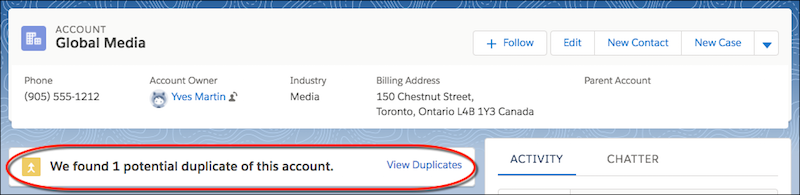
On a record detail page, duplicate alert in a card: We found 1 potential duplicate of this account. (link) View Duplicates

image 3

Salesforce recently improved Duplicate Management with a batch process – mainly, the ability to run the deduplication frequently to detect duplicates in your existing data in bulk. A batch process runs one matching rule simultaneously and is available to Salesforce users on the ‘Performance’ and ‘Unlimited’ editions.

Learn How to find and manage duplicate records in Salesforce

Salesforce identifies and manages duplicates by combining matching and duplicate rules. Duplicate rules and duplicate jobs define matching rules for identifying duplicates. Duplicate sets and reports contain a list of the duplicates discovered.

Required Editions And User Permissions

Lightning Experience and Salesforce Classic are both available (not available in all orgs)

Essentials, Professional, Enterprise, Performance, Unlimited, and Developer Editions are all available.

User Permissions Needed

To see duplicate and matching rules: View Configuration and Setup

To create, edit, delete, activate, and deactivate duplicate and matching rules, follow these steps:

A matching rule compares data and detects duplicates.

A duplicate or matching rule can compare records on the same object, such as leads or objects. A matching rule is an equation that specifies how to compare the fields in two records.

The fields’ criteria determine how widely a match is defined. Indexing and algorithms help to accelerate the matching process. When you activate a matching rule, one or more match keys are applied to existing records. 

The matching rule only searches for duplicates among records with the same match key. If two records do not share match keys, they are not considered duplicates and are not subjected to matching algorithms. This indexing process boosts performance and yields a more accurate set of match candidates.

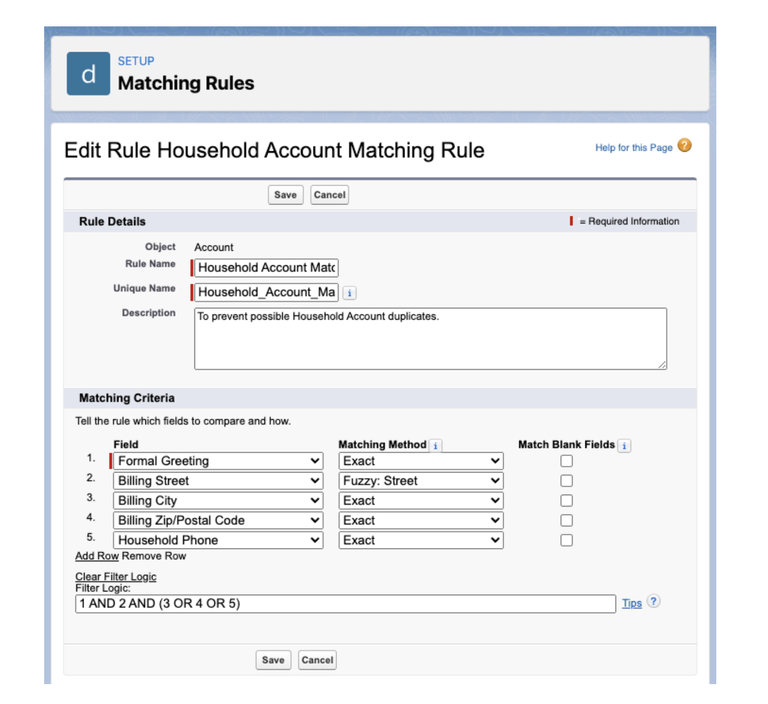
To configure your Matching Rules, follow these steps:

  1. In Salesforce Setup, on the left menu, look for Matching Rules.
  2. Select New Rule to establish a new rule, or Edit to modify an existing rule. To update currently active rules, disable the Duplicate rule and the Matching Rule. Standard rules are not editable.
  3. Select the object for which the matching rule is intended.
  4. Give each rule a name and pick the fields and matching method. Check out the Salesforce support for more information on the matching techniques.
  5. If you have complex logic (for example, a match on Name and Address OR Email), click Add Filter Logic to input it.
  6. Save and enable your rule. The activation may take some time to produce keys for all of the records, based on the amount of data and Salesforce’s existing server load.
  7. That’s all there is to it; you now have a matching rule to utilize in your duplicate rules.
image 1 1

Things to Consider Before Customizing Matching Rules

Considerations for tailoring matching rules

  • A maximum of five matching rules can be activated or deleted simultaneously. 
  • Each item may have up to five active matching rules. 
  • A total of 25 active matching rules are permitted. 
  • A total of 100 matching rules are permitted (both active and inactive). 
  • Each matching rule can only have one lookup relationship field.

Lookup Fields 

The matching rule is ignored if a lookup field’s value is a person account and the matching rule contains a contact lookup field. Except for “Reports To” in the Contact object, all contact lookup fields contain both contacts and person accounts. You can exclude personal accounts by using a lookup filter. Instead of matching on person account data, utilize an account lookup field.

Fields That Become Unavailable 

If an object’s field is no longer available in your organization, matching rules with mappings to that field may be disregarded. Verify all duplicate rule field mappings for an item when the fields in your org change. Customers having a Data.com license, for instance, have access to the Clean Status column. This clean status filed is no longer available if your organization no longer has a Data.com license. This field’s mappings are disregarded by matching rules.

Records in Hierarchies 

You can’t finish merging if the master record is underneath another specified duplicate in a hierarchy. For record hierarchies, change the master or the Parent Account or “Reports To” value on one of the records.

Shield Platform Encryption

Standard matching rules that contain Shield Platform Encryption fields do not identify duplication. On the other hand, custom matching criteria can relate to encrypted fields as long as they are encrypted algorithmically. Probabilistic encryption is not available.

You should update custom matching rules that reference encrypted fields when you rotate your key material. Deactivate and then reactivate the impacted matching rules after rotating your key material. Then, contact Salesforce and request that the background encryption process be initiated. When the background encryption procedure is complete, your matching rules will be able to access the data that has been encrypted using your active key material.

Service safeguards guarantee that loads are distributed evenly across the system. The matching service looks for match candidates until all matches, or up to 200 matches, are found. The Shield Platform Encryption service search has a maximum of 100 possibilities. You may see fewer or no duplicate records if you use encryption.

Duplicate jobs aren’t supported.

A Duplicate Rule or Job Handles Duplicates 

When a sales rep creates, duplicates, or updates a record, a duplicate rule is triggered or when you execute a duplicate task. A duplication rule notifies a sales representative and identifies potential duplicates. Duplicate job results in list duplicates within an organization. They can also be recognized during other procedures, such as importing or using an API.

To configure a Duplicate Rule, please follow these steps:

  1. In Salesforce Setup, on the left menu, look for Duplicate Rules.
  2. Select an item, click New Rule, or update an existing rule. To change a rule, you must first disable it.
  3. Name the rule – If you want many rules, consider using a naming convention to make it easier to discover the rule you need to update.
  4. Bypass sharing rules if necessary – alter Record-Level Security to Bypass sharing rules if you wish to match on all records.
  5. Select what occurs when you click Create and Edit. Choose Block if you wish to avoid duplication. Otherwise, select whether to Alert the user or Report the duplication. If necessary, enter your Alert message.
  1. Determine your matching rules. You may use several matching criteria and even compare records with distinct objects (for example, Contacts with Person Accounts).
  2. If applicable, clearly state your conditions. This is an ideal area to filter out any automated procedures, such as avoiding preventing web-to-lead data by adding a constraint for Lead Source not equal to “Website.”
  3. Save and activate your work.

That’s all there is to it. Now test your new rule and see whether it works properly.

How To Find Duplicate Records In Your Salesforce ORG

Conditions in which Duplicate Rules Do Not Apply

  • Quick Create or Community Self-Registration are used to create records. 
  • Leads are turned to accounts or contacts, although Use Apex Lead Convert is disabled. 
  • The Undelete button restores deleted records. 
  • Lightning Sync is used to add records. 
  • Each record is carefully combined. 
  • A Self-Service user generates records, and the rules contain User object-based criteria. 
  • Duplicate rule conditions have been specified for lookup relationship fields and records, but no value has been stored for these fields. For instance, suppose you have a condition that states that a duplicate rule is executed when a campaign does not contain the word “Salesforce.” If you then add a record with no Campaign field value, the duplicate rule is bypassed.

Conditions Under Which Duplicate Rule Settings Are Disallow 

  • In the following cases, no notification is displayed, and users cannot save entries.
  • The data import tools are used to add records. 
  • A person’s account is transformed into a business account, and the newly generated business account corresponds to an existing business account. 
  • Salesforce APIs are used to add or change records.

Reports and Sets List Duplicates discovered

Duplicate record sets are lists of duplicates discovered when duplicate rules or tasks are executed. Duplicate reports are produced from these groups.

Viewing Duplicates on Reports:

To report on duplicates, you must first establish a new report type and then a report.

  1. In setup, find Report Types.
  2. Create a new Report Type.
  3. Select the duplicate item as the main object (i.e., Leads, Contacts, Your Custom Object) and click on the next.
  4. Relate Duplicate Record Items to the primary object you selected.
  5. Save the report type and start creating reports.

Tips for keeping your Salesforce org clean

  • Consider all of the methods in which customer data enters your CRM system: manual data entry by sales reps, bulk data upload, automated lead sources such as web to lead, and so on, and make sure that you have them all covered to avoid duplicates entering your CRM system.
  • Maintain a necessary field on each Object that holds client data that is important to your company activity, such as a phone number or an email address on Lead. For custom fields, check does not allow duplicates so that Salesforce does not accept duplicity against that field on the Object, and sales reps do not create duplicate records. Have your tech team activate Duplicate Rules and Matching Rules for standard fields to prevent duplicates from forming.
  • If your required field is a picklist field, be sure you activate a restricted picklist for that field since Salesforce enables values other than the field picklist values to get in.
  • Monitor the data your CRM system receives from numerous sources to see if anything unusual is happening with your data so that you can deal with it as soon as possible. Typically, businesses do not recognize this until they have a large amount of dirty data in their CRM systems and attempt to recover from the damage.
  • Clearly identify your lead sources; this will prevent confusion when leads begin to stream in from numerous channels.
  • Instruct your Sales Reps not to save a half-filled form until all relevant client information has been entered.
  • You may even remove the Clone button from the layout if you like. 
  • Cloning records should not be a team-wide practice since it leads to human error in saving cloned data without making essential modifications, resulting in duplicates.
  • Use regular Salesforce Reports to track whether or not duplicates entering your system (if any) are critical to your organization.
  • With huge amounts of data entering your system, some duplicates are sure to enter your database in some form. Utilize a deduplication tool to make your life easier by keeping your Salesforce org free of duplicates.

Conclusion

Cleaning up your Salesforce Org is not a one-person job or a one-time exercise. It requires a team effort and is a constant process in which you work to keep your database clean and faultless, which finally pays off in terms of smooth operations and profits.

Do you want to hone your administrative skills? Enroll in our Salesforce Admin Training. Learn the administrative skills you’ll need to advance your career or reskill in your current job.

With skill-based super badges and role-based Salesforce Certifications, you will get hands-on experience with QuantoKnack’s Salesforce Admin course and Salesforce Developer training and gain a competitive advantage that can lead to new opportunities.
Register now to obtain globally recognized certificates from QuantoKnack!

READ MORE
TECHAvatar of adminadmin0 Comments
Share article:TwitterFacebookLinkedin
1307 Views
197 Likes

How to Secure Your Salesforce Organization

As the costs and risks of data breaches keep rising, cybersecurity should be a major focus for any B2B SaaS organization. As per IBM, the average cost of a data breach is $3.86 million. Organizations cannot afford to neglect security best practices when so much is at risk.

Salesforce is the major center of information for many SaaS firms, so it’s no wonder that organizations are concerned about the security of their Salesforce instance and interfaces. The good news is that Salesforce is a very secure platform.

Salesforce was designed from the ground up to safeguard your data and applications. However, there are several fundamental actions that all businesses must take in order to reduce external risks and breaches caused by human error or malicious intent.

In this blog, we will give you some essential tips and tricks to make your Salesforce organization more secure. Enroll with QuantoKnack’s Salesforce Admin Course, and you will be able to learn many more important aspects of the Salesforce platform.

5 Security Tips for How to Secure Your Salesforce Organization

Without further ado, let’s look at the five simple steps you can take to make your Salesforce org safer and more robust.

Start With A Salesforce Health Check

Salesforce’s native Health Check is a no-brainer if you need immediate wins. This useful feature compares your organization to Salesforce’s Security Baseline Standard and recommends resolving any vulnerabilities it identifies.

You may also upload your own security baseline standard and perform periodic checks against it. However, keep in mind that Salesforce has had 20 years to create theirs – and it is always being upgraded!

To do a health check on your organization, navigate to Setup > Security > Health Check.

image 1140x546 1

Implement Two-Factor Authentication

Another effective method of data security is two-factor authentication. Every time a person logs in, they must go through two stages of authentication. 

  • Interfaces Logins 
    • Setting up two-factor authentication is a common approach to boost your instance’s security. In Salesforce, two-factor authentication may be used in two ways. The most fundamental method is to activate two-factor authentication for logins. 
  • This provides additional protection by requiring each user to authenticate their identity through an authentication App or text message/call every time they log in to your Org.
  • For two-factor authentication, use the Salesforce Authenticator App.
  • Two-Factor Authentication for Reports
    • Salesforce may also use two-factor authentication to safeguard report access. Users attempting to view reports will be prompted to authenticate their identity using two-factor authentication. To enable two-factor authentication for users viewing reports, the Admin(s) can “Raise the session level to High Assurance” in Setup.
image 1 1

Controlling Report Printing and Exporting Access

image 2 1

Salesforce may also be established to simply ask users to authenticate their identity when exporting or printing reports. To do this, under Setup, enter “Identity Verification” and activate “Raise the Session to High Assurance” under “Security Level Policies,” which will require users to log in when attempting to export data or view particular reports.

Ensure your Org is classified appropriately

Salesforce has advanced from a SaaS contact management solution to a much more powerful PaaS capable of supporting or delivering core business applications. While many businesses already understand how to manage the availability and security of these apps, we’ve seen that they frequently misclassify their Org, resulting in serious oversights. If a Salesforce Org is classified as “Type 1” or “Class A,” it should be regarded as such in terms of business continuity, disaster recovery, enterprise monitoring, security, and compliance.

Evaluate Your Custom Code Against OWASP Top 10

If you implement your own Salesforce code, you risk exposing a security hole that might eventually disclose critical information or allow malicious users to penetrate your system.

If you’re unsure where to begin assessing your code’s risk, check the OWASP Top 10. 

The Open Web Application Security Project is committed to assisting in the creation of safe internet. Their list of top risks is based on real-world observations and is contributed by their large developer and system administrator community. As you integrate custom code into your environment, consider how it interacts with Salesforce and whether it exposes itself to vulnerabilities.

For example, “injection” is number three on the OWASP list of vulnerabilities. As a browser-based application, Salesforce must secure the attack surface from application code to the user interface. Cross-Site Scripting and SOSL/SOQL injection attacks are both OWASP Top 10 code vulnerabilities in the Salesforce environment.

This is an excellent place to start when examining and evaluating every line of code against a comprehensive and up-to-date list of vulnerabilities that may be prohibitive. More information about OWASP is available here.

Set Up Trusted IP Ranges

Employees are increasingly signing into Salesforce from more places than ever before, which might expose them to risks. To address this, configure Trusted IP Ranges, which inform Salesforce which login locations are normal and which are suspect. 

You may instruct Salesforce, for example, to trust your company’s office IP address and other specified workplace locations – and to challenge individuals logging in from any other addresses.

To add trusted IP ranges to your Salesforce security, go to Setup > Security > Network Access and provide a custom range of trusted addresses.

image 3 1

image 4 1

Profile-Based Trusted IP Addresses & Login Hours

You can modify trusted IP ranges depending on user profiles if you don’t need them to apply to your whole organization. For example, suppose you only want support users to be able to log in from your workplace network between the hours of 8 a.m. and 6 p.m., Monday through Friday.

That’s simple! Simply navigate to Setup > Users > Profiles, choose your Support profile, configure your IP ranges and log in hours.

Utilize Shield to maintain platform visibility

Salesforce’s user-friendly development capabilities make it ideal for enabling bespoke apps but make it difficult for compliance teams. Shield, fortunately, can assist you in keeping track of a wide range of data. 

Event Monitoring, for example, allows you to monitor detailed use statistics, while Encryption safeguards data and Field Audit Trail records its condition and value for up to ten years. If you need assistance, a variety of third-party services are available to help you put Shield into action. In addition to analyzing the Salesforce security architecture, it’s vital to properly identify and categorize the data in your Salesforce Org since categorization greatly impacts access restrictions.

Secure your APIs

Salesforce has the interesting advantage of being simple to integrate with other services and apps, allowing you to exchange data and increase functionality. However, not all of the apps you connect to Salesforce are secure, which may lead to a variety of problems, including,

  • Code injections 
  • DDoS assaults 
  • Fraudulent logins 
  • Replay attacks 
  • Unsecured cardholder information, 
  • Exposed data through URI keys.

Because using an unprotected or shady API might result in compliance concerns, data breaches, and hacks, precautions must be taken to use these APIs while being safe. 

You may take the following steps: 

  • Enable whitelisting on the app 
  • Create an integration user 
  • Improve access limits for your integration users 
  • Monitor API access.

Use custom login flow

Salesforce helps safeguard against unauthorized logins while granting authorized access even in odd circumstances. For instance, suppose a user attempts to log in outside of business hours or from a restricted IP address. 

In that case, it may initiate a flow that the user must complete in order to obtain access, such as answering secret questions, for further security. If the login attempt is unexpected, you can add an authentication step with a bespoke login flow.

Utilize App Whitelisting to Prevent Data Leaks to 3rd Party Apps

You may also keep Salesforce secure by setting App Whitelisting for your organization. This prevents users from accidentally providing third-party apps access to your organization’s data. Salesforce admins may use this functionality to control which third-party apps can access the org. This solution is scalable since it may be installed for the entire org for all Salesforce users or for certain users only if necessary.

Enabling App Whitelisting

  • Enroll in QuantoKnack’s Salesforce admin training to learn how to request this option from Salesforce support.
image 5 1140x613 1

  • After you’ve activated the functionality, navigate to Manage Connected Apps. Then, if you want to whitelist beneath the app, click ‘Edit.’ • Navigate to OAuth policies > Permitted Users. Now, choose the “Admin-approved users are pre-authorized” option.
image 6 1140x679 1

  • Go back to Manage Connected Apps and choose the app you whitelisted. This will take you to the app’s details, where you may configure Permission Sets and Profiles.

Use Clickjack Protection

Clickjacking is the technique of tricking users into clicking on legitimate-looking URLs that execute harmful operations, such as changing your Salesforce data without your permission.

While Salesforce protects against clickjacking by default, you may strengthen these safeguards by checking all checkboxes in the Clickjack Protection section in Setup > Security > Session Settings.

image 7 1

Use Strong Password Policies

Our final simple Salesforce data security victory is to improve your password policy. While you don’t have to make your password requirements overly stringent (people will be unhappy if they have to establish new passwords every few days), you can still improve your security with minor tweaks.

Here are some recommended options (which may be changed in Setup > Security > Password Policies):

  • Password length: 15 characters (the default for Salesforce is 8).
  • Password complexity: alpha, numeric, and special characters must be included.
  • Password Expiration: 90 days
  • Password question: Cannot contain a password (if users set the answer to their security question as their password, anyone could gain access to their account)
  • Passwords should be backed up with MFA if you follow this tutorial, which means that these settings will considerably limit the odds of compromised accounts.

Conclusion 

While Salesforce provides adequate data protection, there is no harm in going the extra mile.

Remember that a developer is only a facilitator for the company. Salesforce administrators, on the other hand, are individuals who are well-versed in business processes and can assist developers in understanding the appropriate solution design.

Salesforce administrators are the foundation of the entire CRM process. They should have greater resources and freedom to realize the CRM function’s potential fully.

Enroll in QuantoKnack’s Salesforce Admin Course and Salesforce Developer Training program now if you want to advance your career or get the most out of the Salesforce platform for your organization. Our Salesforce admin training can help you advance your career in top IT firms across the world.

Allow our industry experts to assist you in mastering the Salesforce platform and preparing you for the future by using real-world projects! You will be working on a project at the end of the Salesforce Admin program, and QuantoKnack will certify you as a ‘Salesforce Administrator’ depending on the project you submit.

Don’t miss the chance this chance! Register with QuantoKnack today to learn from prominent Salesforce experts in live training sessions and become certified as a “Salesforce Admin.”

READ MORE
  • 1
  • …
  • 5
  • 6
  • 7
  • 8
  • 9
  • 10
Recent Posts
  • How Salesforce Data Integration Tools Simplify Real-Time Business Connectivity
    In a nutshell, businesses collect operational data to perform...
  • Design, Build, and Optimize Agents with Agentforce 360 Innovations
    In this fast-moving digital world, businesses also want smarter...
  • Salesforce Built-In Payment Processing: How to Handle Everything End-to-End
    In the current digital economy, where online payments have...
  • Explore Top Salesforce Integration Challenges and Ways to Fix Them
    Integrating any system can be a difficult task, as an...
  • Protecting Sensitive Data: A Complete Guide to Encryption in Salesforce
    In the current digital economy, data can easily rank at the top...
logotype

We cater to individuals and corporates and provide IT training and certification programs.

44679 Endicott Drive Suit 300 #1046 Ashburn, VA 20147 United States

Phone: +1-571 989 9489

Email: atul.deo@quantoknack.com

Useful links

About Us

Contact Us

Blog

Courses

  • Live Salesforce Admin Training
  • Business Analyst
  • QA Testing Course
  • Advance JAVA Training
  • SQL Server Training
  • Live Salesforce Developer Training Certification Course
  • Digital Marketing
  • Oracle DBA Training

Subscribe

    Instagram Pinterest Linkedin
    Facebook
    Logo star

     2024 Quantoknack. All Rights Reserved