Become a Instructor

Blogs

logotype
Menu
  • Courses
    • Salesforce Admin
    • Salesforce Developer
    • Salesforce Business Analyst
    • Advance Java Training
    • Buisness Analyst
    • Digital Marketing
    • Oracle DBA
    • QA Testing Course
    • SQL server Training
  • Register
+1-571 989 9489
logotype
  • Courses
    • Salesforce Admin
    • Salesforce Developer
    • Advance Java Training
    • Buisness Analyst
    • Digital Marketing
    • Oracle DBA
    • QA Testing Course
    • SQL server Training
  • Register
  • +1-571 989 9489

Become a Instructor

Blogs

logotype
Menu
  • Courses
    • Salesforce Admin
    • Salesforce Developer
    • Salesforce Business Analyst
    • Advance Java Training
    • Buisness Analyst
    • Digital Marketing
    • Oracle DBA
    • QA Testing Course
    • SQL server Training
  • Register
+1-571 989 9489
  • Courses
    • Salesforce Admin
    • Salesforce Developer
    • Advance Java Training
    • Buisness Analyst
    • Digital Marketing
    • Oracle DBA
    • QA Testing Course
    • SQL server Training
  • Register
  • +1-571 989 9489
logotype
logotype
  • Courses
    • Salesforce Admin
    • Salesforce Developer
    • Advance Java Training
    • Buisness Analyst
    • Digital Marketing
    • Oracle DBA
    • QA Testing Course
    • SQL server Training
  • Register
  • +1-571 989 9489
Author: admin
Home admin Page 8
TECHAvatar of adminadmin0 Comments
Share article:TwitterFacebookLinkedin
1435 Views
204 Likes

How To Setup Visual Studio Code For Salesforce Development

Since the Spring ’18 release, Salesforce has been trying to get users to migrate to Microsoft Visual Studio Code (VS Code) with the retirement of the Force.com IDE Eclipse. So, if you haven’t heard of VS Code yet, now is the time to learn about it.

Visual Studio is a lightweight, user-friendly, and comprehensive IDE with built-in support for Salesforce and Git. It has keyboard shortcuts, debugging assistance, and other capabilities such as syntax highlighting and code completion. All of these things may make your life as a developer a lot simpler.

The best thing is that Salesforce includes its own VS Code extension pack to make the IDE Salesforce compliant. The package contains eight extensions, all of which can be downloaded and installed in your IDE with a single click.

In this tutorial, we’ll look at the capabilities of VS Code, how to set it up, and how to utilize it as a powerful tool for Salesforce development.

Do you want to learn Salesforce concepts firsthand? Enroll in QuantoKnack’s Salesforce admin training in Dallas to gain a wide understanding of customizing & configuring Salesforce on a regular basis, managing users, and searching for methods to get even more out of its features capabilities.

Why Visual Studio Code For Salesforce Development?

VSC(Visual Studio Code ) is one of today’s most well-known editors. It is an open-source editor, which makes it more attractive to developers, has a built-in git client, and is lightweight. This is all we want and need. However, the biggest benefit of VSC over Eclipse (and other editors) is speed.

VSC is easily extensible using extensions. To summarise, it is designed to save you time and make you more effective.

Prerequisites

Before we jump to the installation and configuration section of Visual Studio, it’s essential to understand some perquisites.

Get ready with the following things:

  • Salesforce Developer Account (https://developer.salesforce.com/signup) Download and install Visual Studio Code (.exe)
  • Download & install the CLI (Command Line Interface).
  • Salesforce Add-On Pack (Extension from Visual Studio Code) Install via Visual Studio Code.

Learn To Set Up Visual Studio Code For Salesforce Development

Visual Studio Code is the most recent IDE for Salesforce Development, and in this section, we will help you learn how to set it up for Salesforce Development. So, let’s get started.

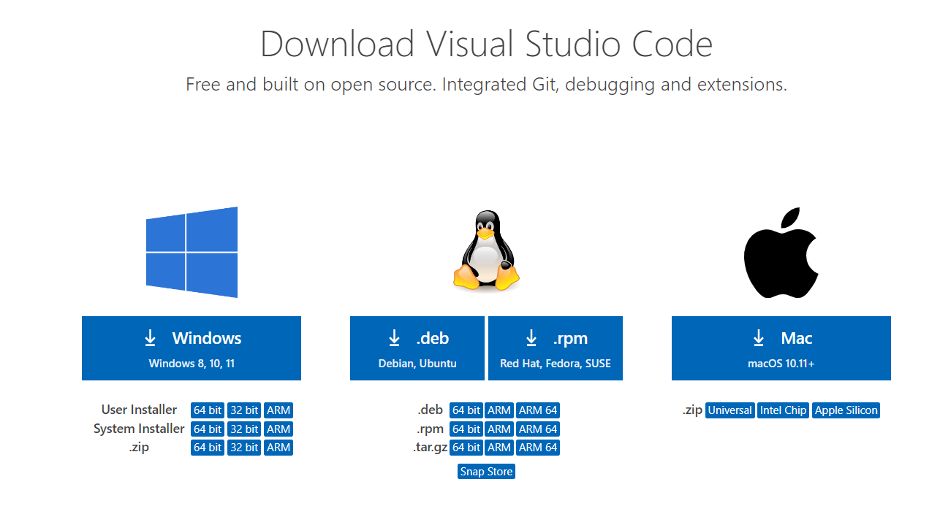
Download Visual Studio Code

The first step in starting with Salesforce development is downloading and installing the VS Code IDE. You may get the most recent version of VS Code here.
How To Setup Visual Studio Code For Salesforce Development 2

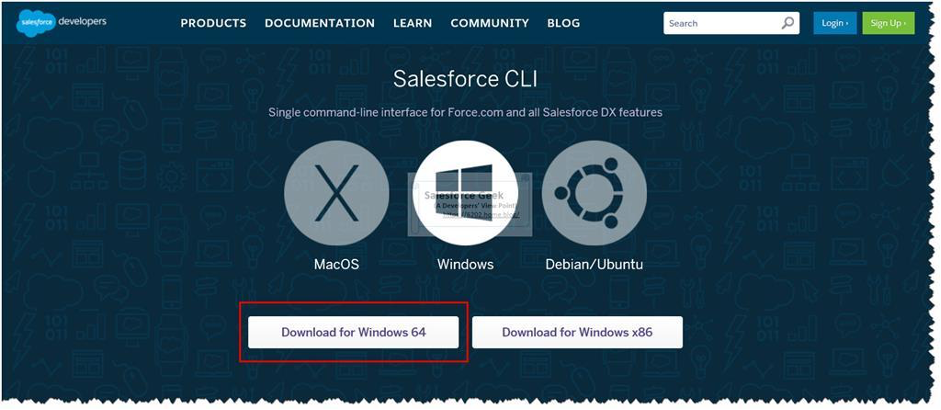
Install SFDX Command Line Interface

As previously stated, you must install the Salesforce Extension Pack in order to utilize VS Code for Salesforce development. However, you must first install the Salesforce DX Command-line Interface (SFDX CLI).

SFDX CLI is a highly strong tool that may greatly ease your development experience. You may also use it to establish automation while dealing with your organizations. Bid adieu to the Force.com IDE, and welcome to Visual Studio Code.

It can handle the following vital tasks:

  • It can consolidate and save all of the commands and tools required for Salesforce development in one location.
  • It may be used to sync your organization with the source and vice versa.
  • SFDX CLI also makes it easy to install additional packages.
  • It may be used to manage both organizations and data.
  • It can be used for testing reasons. The best part is that it is open source, which makes it extremely adaptable.
How To Setup Visual Studio Code For Salesforce Development 1 1

After that, click here to obtain the SFDX CLI for your operating system. Run the sfdx command in your terminal to see if the SFDX CLI is properly installed.

Install Salesforce Extension Pack

Salesforce has released its own extension bundle for developers. When you launch your VSCode IDE, go to the left sidebar menu and select the fourth icon for maintaining extensions. Look for Salesforce Extension Pack and select the top result.

35ed1171 3a7e 4e18 a4d7 95cb59720230

As of currently, the extension pack includes the following extensions, which will be enabled immediately when you install it:

  • Apex
  • Apex Interactive Debugger
  • Apex Replay Debugger
  • Salesforce CLI Integration
  • Aura Components
  • Visualforce
  • Lightning Web Components
  • SOQL
  • SLDS Validator

Create Project

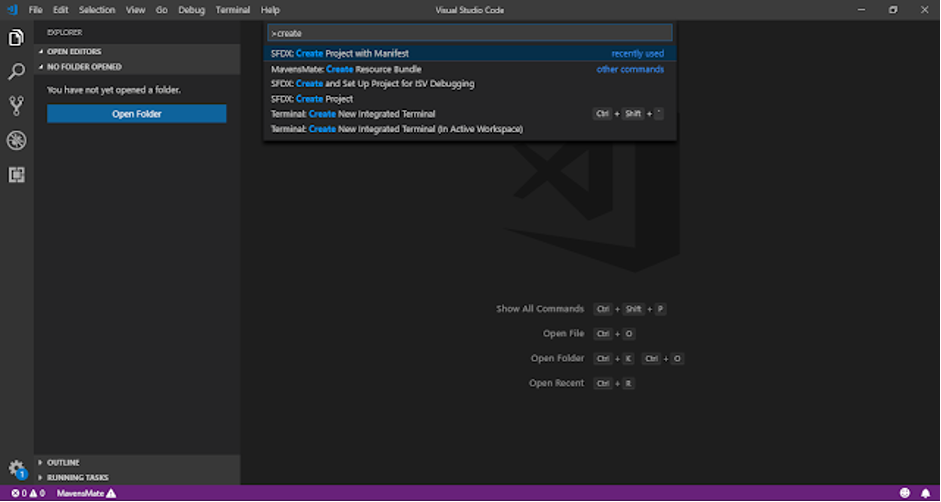
Congratulations! Your software installation is finished up to this point. It is now time to start your first VsCode project. To begin, open the Command Palette or press Ctrl + Shift + P. Then put SFDX: Create Project using Manifest into the search box.

SFDX: Make a Project Using Manifest

Then provide your project name and choose a place to store your project.

You will see an empty folder structure in VsCode until this moment. Let’s examine how we can integrate VsCode with Salesforce.

Connect to your Salesforce Organization
How To Setup Visual Studio Code For Salesforce Development 7 1

Now that our project is complete on the local PC, it is time to link VsCode to Salesforce. Open the Command Palette again, or click Ctrl + Shift + P. This time, you must input or choose “SFDX: Authorize an Organization.”

Then it will ask you to select the environment in which we need to join.

The org alias name must be provided in the final stage. It will then redirect you to your regular browser and prompt you for your org credentials. If you are requested to grant access, click Allow.

Until this moment, your Salesforce org is connected to VsCode. It is now time for development.

Retrieve Component 
How To Setup Visual Studio Code For Salesforce Development 8 1

Do you have to extract all of your Salesforce components into VsCode now?

There are two ways to accomplish this: one uses the manifest file, and the other leverages the org browser. Let’s have a look at both ways.

  • Metadata Retrieval from the Org
    • After successfully configuring your project and connecting it to your org, you will see Visual Studio Code workspace.
    • This allows you to view all of the metadata in your organization. When you hover over a metadata item, a symbol looking like a cloud with an arrow appears to the right of it. You may import the information into your project by clicking this icon.
  • Retrieving Metadata using the manifest package.xml file
    • Before we begin, an addon called “Salesforce Package.xml Generator” will greatly simplify the process of creating these package.xml files.
  • This technique is quite handy if you want to constantly retrieve from your organization into your projects. In some instances, it’s also significantly quicker than the org browser.

To use this technique to retrieve metadata, perform the following steps:

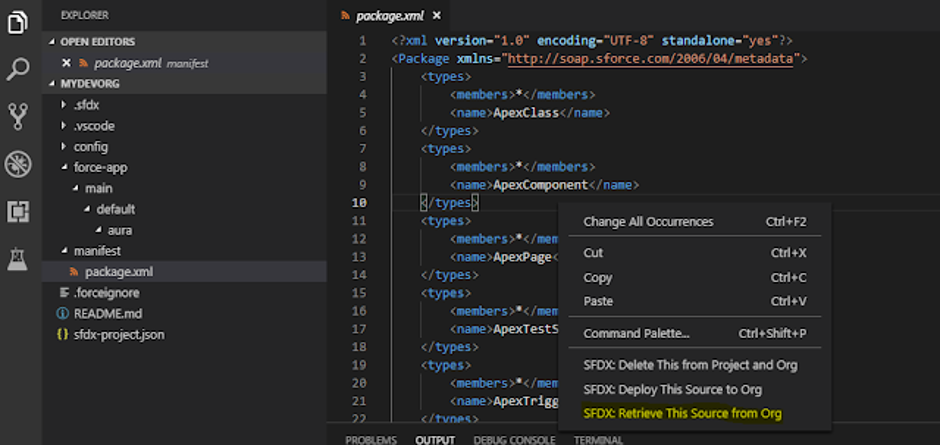
  1. You should find a “manifest” folder in your project. There needs to be a file called “package.xml” in that folder. You may either ignore it or modify the package.xml file to add additional metadata types to retrieve from your organization. In the following step, you will only retrieve data types defined in your package.xml file.
  • In the command palette, execute the command SFDX: Retrieve Source in Manifest from Org. This should import all of the metadata from your organization that you specified in your package.xml file.

Other Useful Things To Set Up

The things mentioned above are the only ones necessary to get started. However, the items listed below will make your life a lot easier.

How to Enable Auto-Complete for Object Fields

  • Run the SFDX: Refresh SObject Definitions command in the command palette to enable autocompletion on your object fields.
  • Do the following if you wish your SObject definitions to update every time you open your VSCode project automatically:
  • Go to Settings (File -> Preferences -> Settings).
  • There is a checkbox for “Enable-object-refresh-on-startup” in the extension settings under “Salesforce Apex Configuration.” When your project is loaded, this automatically updates your organization’s objects.

How to Auto-Deploy to your org to save

If you didn’t already know, it would not automatically deploy to your org whenever you save your code. You must right-click on your project’s file and pick the option to deploy the code to your organization. Follow these steps to enable auto-deployment:

  1. Open VSCode and navigate to File -> Preferences -> Settings.
  2. Select Extensions from the drop-down menu.
  3. Select the Salesforce Feature Previews extension from the list.
  4. Tick the “Push-or-deploy-on-save” box.
  5. If you utilize the auto-deploy on save function, you also need to enable the “Detect Conflicts At Sync” feature preview in settings. By activating this, you will be notified if your save contains any conflicts with other developers’ code before you deploy it to your organization.

That wraps up this tutorial. Give it a shot and let us know in the comments whether you’re able to utilize VS Code for your development activities and if you run into any problems when carrying out the above steps.

Do you want to learn how to configure Salesforce and other processes? Enroll in QuantoKnack’s Salesforce Admin course and Salesforce Developer training. We provide live, instructor-led Salesforce admin training that is designed to lead you through the learning, certification, and job search process of launching a Salesforce career.

Our industry-professional mentors guarantee that you get the required information, hands-on experience, and skill set to jumpstart your Salesforce career.

After completing our Salesforce Admin training or QA training course, you will be able to enter the job market and get significant experience as a working professional in the business.

Register now and go one step closer to your dream Salesforce career!

READ MORE
TECHAvatar of adminadmin0 Comments
Share article:TwitterFacebookLinkedin
1443 Views
177 Likes

How to Automate Your Business Processes with Salesforce

Surviving and prospering in business in today’s competitive environment is a tough challenge. Every business strives to achieve the peak of success. Making income alone is never enough; in addition to earnings, the company works hard to stay current and relevant to current trends. In today’s world, firms must carefully use their resources while receiving proper technical support to maximize their effectiveness.

Technology has revolutionized and impacted every element of our lives, and business is no different. Technology may help firms improve their processes and increase their efficiency. Business process automation can help to reduce overall operating expenses and enhance overall utilization.

CRM solutions are a critical component of corporate automation. IT’s the focus has evolved from catering to internal demands, efficiency, and cost reduction and offering new prospects for business and client management. An advanced CRM software can help you manage all of your data, KPIs, and notes in one location.

Salesforce is the world’s leading CRM platform that offer a variety of tools to help you put your business ideas into reality. There are different Salesforce products available that helps you business in providing an exceptional customer experience with Sales Cloud, improves sales productivity using Sales Cloud, conducts efficient campaigns using Marketing Cloud, and connect your customers and partners using Community Cloud. 

Since all of these solutions are available as cloud-based platforms, you can utilize them as software and also tweak them to meet your specific business requirements.

In this post, we’ll show you how to leverage Salesforce to your business processes and diverse users to make your company more productive. Salesforce can provide your company’s automation or act as a security guard. It may also be the platform that unites all parts of your business under one roof, allowing you to play 360 from the same cloud solution that powers millions of other users worldwide.

Why Your Business Needs Salesforce Automation

Improved Processes

Salesforce Automation enhances numerous business processes and assists firms in gaining a competitive advantage. Salesforce Automation capabilities include Workflow Improvement, Process Builders, Approval Process, and Flow Builder, all of which play an important role in how a business operates. The firm’s size is unimportant; all these operations are required at some level for a business to function properly.

Salesforce Automation may be more expensive, but it allows you to generate more money in the long run while enhancing both customer and staff happiness. It is especially vital if your company is medium to large since the operations are significantly more sophisticated and require automation to run smoothly. With the help of additional Salesforce Automation solutions, you can accelerate your business while keeping your customers satisfied.

Data-Based Decisions

Data is driving the world and will become increasingly more important in the future. Salesforce Automation is data-driven and operates depending on user behavior, and data gathered in the past. Salesforce Automation reduces the risks associated with every industry it uses. Salesforce Automation can help you make the most of your marketing and business process investments.

Making data-driven decisions is essential for everyone who wants to operate a successful marketing and sales department. Salesforce Automation guarantees that you can make the best decision by giving you all of the facts in one location. From then, you may do whatever seems right to you. Salesforce’s Marketing Cloud and Sales Cloud are both excellent tools, but what sets them apart is Salesforce Automation.

Improved Customer Satisfaction

Salesforce has been recognized across the world for enhancing customer retention, and it is genuinely instrumental in improving customer happiness. Salesforce Automation makes operations quicker and more precise. Compared to people, the systems are self-learning and continue improving with additional data and time. The most crucial item to enhance is the customer experience, and Salesforce has invested heavily in this area.

360 View of customers

Whether it’s lead generation, presales, or post-sales, having a clear overview of the customer’s data is vital if you want to handle things more effectively. Salesforce allows this through automation and artificial intelligence and has created capabilities directly into Marketing Cloud, Sales Cloud, and Service Cloud to obtain a comprehensive picture of the user. Using Salesforce services ensures that you are always one step ahead of the competition when it comes to offering the greatest client experience.

However, consumer 360-degree views are useful for more than just boosting customer experience. Every time, it aids in different internal processes and the development of a better strategy and knowledge of the user base. Personalization is the key to success in this competitive world, and clients expect everything to be tailored to their own needs. The only way to do so is to have a 360-degree picture of their requirements and needs, which Salesforce can provide.

Generating Relevant Leads

Salesforce provides more for marketing teams via the Marketing Cloud and goes even further with its intelligent automation. Because of its data-driven methodology, Salesforce Marketing Automation assures optimal practices in lead creation. The Marketing department will be able to use data from different sources, which was not feasible with previous systems.

Sales teams benefit from the use of Salesforce Sales Cloud as well. They may access comprehensive data that is publicly available immediately on their dashboards. Furthermore, management is simplified using Salesforce services. The marketing and sales teams may communicate in real-time. Companies will be able to create more relevant leads with ease, thanks to the clever Salesforce AI.

Salesforce Automation Tools for Your business processes 

Salesforce automation technologies significantly improve efficiency by automating administrative operations that sales reps and management must undertake manually. Join QuantoKnack’s Salesforce Admin Training In Dallas to hone your skills in Salesforce administration-related tasks. Our live, instructor-led training programs will teach you how to manage and create apps for CRM systems throughout the world, as well as how to improve company operations.

Workflow, Process Builder, Approvals Process, and Flow Builder are some of the automation tools available from Salesforce to help you automate repetitive business processes in your organization.

Each tool has its own distinct capabilities. The kind of business process dictates the automation approach to use.

Workflow Rules

Salesforce can perform things like sending an email, generating tasks, or updating fields. Workflows are one of the best ways to automate business operations in Salesforce. They allow you to establish a rule-based on specific criteria.

These activities might be either ‘Time-Dependent Actions’ that occur at a specific time or ‘Immediate Actions’ that occur immediately. In the event of Time-Dependent Action, parameters are re-evaluated prior to action, and if the parameters are determined to be erroneous, the Time-Dependent Action is not done. The following actions may be performed using the workflow:

  • Field Update
  • Email Alert
  • Send Outbound Messages
  • Create Task

Approval Process

Salesforce’s Approval Process streamlines the necessary procedures to authorize a record and decides approval at each level. It specifies what happens when a record is submitted for review, when it is approved by an approver or by all approvers, and when an approver rejects a record. 

The Approval procedure allows you to conduct actions such as Field Update, Email Alert, Create Task, and Outbound Message.

When invoked from Process Builder, a Flow, or APEX, the approval process can begin when a user submits a record for review. When a user requests permission, initial application operations occur, and the record is locked so other users cannot edit it when the approval is pending. If the request is rejected by the approver, the final rejection actions are executed, and the approval status is changed to deny.

Process Builder

Many aspects of your business processes, such as sending emails, changing information, and allocating tasks, are routine. These processes may be automatically designed using Salesforce Process Builder, which gives a graphical depiction as it is built up using its “point-and-click” capabilities. Here are some examples of how Process Builder might be useful:

  • Creating a published or written content record 
  • Appreciating teams like congratulating them on a big deal
  • Schedule follow-up tasks that are important to your department.

The associated actions are mentioned below:

  • Record modifying
    • The tool can assist you in updating several records that are somehow connected to the record that started the process. You can either manually insert records or use records from a linked record to do so.
  • Creating records
    • This action allows you to create new records and provide different field values to them.
  • Chatter posting
    • The feature allows you to post on Salesforce Chatter to share any data with any user.
  • Quick action
    • If you also have global actions or objects in Salesforce, you may utilize “Quick Action” in any record.
  • Activating the flow
    • You may activate the flow from your process to automate certain processes.
  • Invoking a different process
    • This operation will really activate another process.
  • Invoking/triggering Apex code
    • Within Salesforce, you may call or trigger Apex code that you have already created.
  • Automatically submitting the record for approval
    • Only the first record that was used to initiate the procedure can be submitted.

Salesforce Flow

Salesforce Flow is a solution that employs automation to assist businesses in creating, running, and maintaining business processes.

The most significant aspect of Salesforce Flow to remember is its capacity to improve the accuracy and efficiency of business operations. Workflows that are disjointed or inefficient might be damaging to your company’s business strategy. Furthermore, time spent on repetitive manual work such as reporting and monitoring activities might be transferred to topics requiring human judgment.

Ways to Automate Your Business Processes with Salesforce

Declarative modifications and custom programming are the two main approaches to integrating your business into Salesforce. Let’s take a look at both of them in the below section.

Declarative Customizations

Many of Salesforce’s support, sales, marketing, and engagement functionalities are available right now. These declarative capabilities, in other words, are available without the need to write a single line of code and are often set up by your organization’s Salesforce admins or other appropriate sales/service/marketing experts. The following is a rundown of some of the most prevalent declarative features:

  • Workflow rules allow you to conduct an action/value change when particular conditions are satisfied, such as when a new lead is formed.
  • Validation rules let you check your data before adding or modifying it, for example, supplying an email address before generating a lead.
  • Security and sharing allow you to select who sees what and create access privileges for everyone, such as permitting a manager to see his or her subordinates’ work and data.
  • Opportunity and related features comprise opportunity splits and revenue estimates, which aid in deploying the sales cloud. Opportunity splits allow you to divide a deal’s contribution across numerous users, while predictions allow you to anticipate incoming revenue in the quarter.
  • Campaign and related capabilities contribute to marketing cloud deployment by sending bulk marketing emails.
  • Case and associated features, such as case teams and case queues, contribute to service cloud deployment. Case teams enable a group of service representatives to collaborate on a case. Case queues allow you to allocate a case to many individuals, with the case finally going to whoever is available.

Custom Programming

Salesforce is designed at the API level. This implies that all of the exceptional capabilities may be extended and/or upgraded in ways that are exclusive to your business. We generally want Salesforce experts who can write in Apex, Visualforce, and Lightning for this. The following are the primary functionalities provided with Salesforce custom programming:

  • Visualforce pages allow you to develop VF pages to design custom forms, display PDF documents, etc. They are developed with server-side architecture in mind.
  • Apex code is utilized to drive logic in Visualforce pages and Lightning components and for data synchronizing interactions with external systems.
  • Lightning components enable you to utilize Lightning to develop a mobile-first responsive design for numerous UI elements such as forms and tables. They are quicker than Visualforce pages since they are built on client-side architecture.

Conclusion

Businesses nowadays are large and amazingly complicated; however, that doesn’t mean their processes have to be a mystery. From single-employee startups to massive organizations, the right business process automation software can help guarantee that every process goes smoothly.

The Salesforce Platform deploys cutting-edge technology where it is most required by businesses while simultaneously improving the systems that fuel corporate performance.

If you want to automate your business processes, you will need to understand Salesforce and its offering deeper. 

At QuantoKnack, we offer Salesforce certification courses that cover basics to advanced Salesforce concepts to help you qualify for various certifications while imparting real-time knowledge that will help you prepare for a full-fledged demanding career.

Get Hands-on Experience in CRM, SF Objects, Workflow Automation, Data Access & Modeling. Earn The Salesforce Admin training and Salesforce Developer training Certificate & Elevate Your Career or enhance your business. Once you complete this training program, you’ll get an opportunity to enter the job market and open up invaluable opportunities as a working professional in the industry.

Register yourself today for QuantoKnack’s Salesforce admin training Certification Program to master the concepts of Salesforce Admin while focusing on Sales & Service Cloud, Apex Programming, Salesforce Lightning, and much more.

READ MORE
TECHAvatar of adminadmin0 Comments
Share article:TwitterFacebookLinkedin
1362 Views
198 Likes

How to Create New Users in Salesforce

In this Salesforce admin article, we will learn what a user is and how to Create a New User in Salesforce.

Moreover, you can learn to successfully manage your cloud-based Salesforce apps with QuantoKnack’s Salesforce admin course. Get the fundamental information you need to get up to speed, perform well, and make the most of Salesforce. Register now for Salesforce admin training!

What exactly is a User?

Every user in Salesforce will have a user account by default. A user is someone who has access to Salesforce and can utilize the application. The user account identifies the person, and the profile settings define its capabilities.

  • Every Salesforce user account will also have a username.
  • Every user account must have an email address and a license. The Salesforce license determines the number of user licenses that we utilize.
  • Profile and Function

The company must acquire the appropriate number of licenses and allocate them to each user based on the number of users.

Important Points

  • To create the new user, you must log in with the “SYSTEM ADMINISTRATOR” account.
  • The user account’s username is UNIQUE throughout the Salesforce organization.
  • Only users with the SYSTEM ADMINISTRATION profile may establish and manage user accounts in an organization, such as assigning user licenses, resetting passwords, and giving rights to access certain data in Salesforce.
  • By choosing “Add Multiple User,” you may create “Multiple Users” at the same time, and you can add approximately ten users at a time in your Salesforce org.

Creating Users  in Salesforce Organization

Creating a new user might be difficult if you don’t know how, but after you understand the procedures, you’ll realize how simple it can be. To assist you, we have produced this simple step-by-step instruction.

Step 1

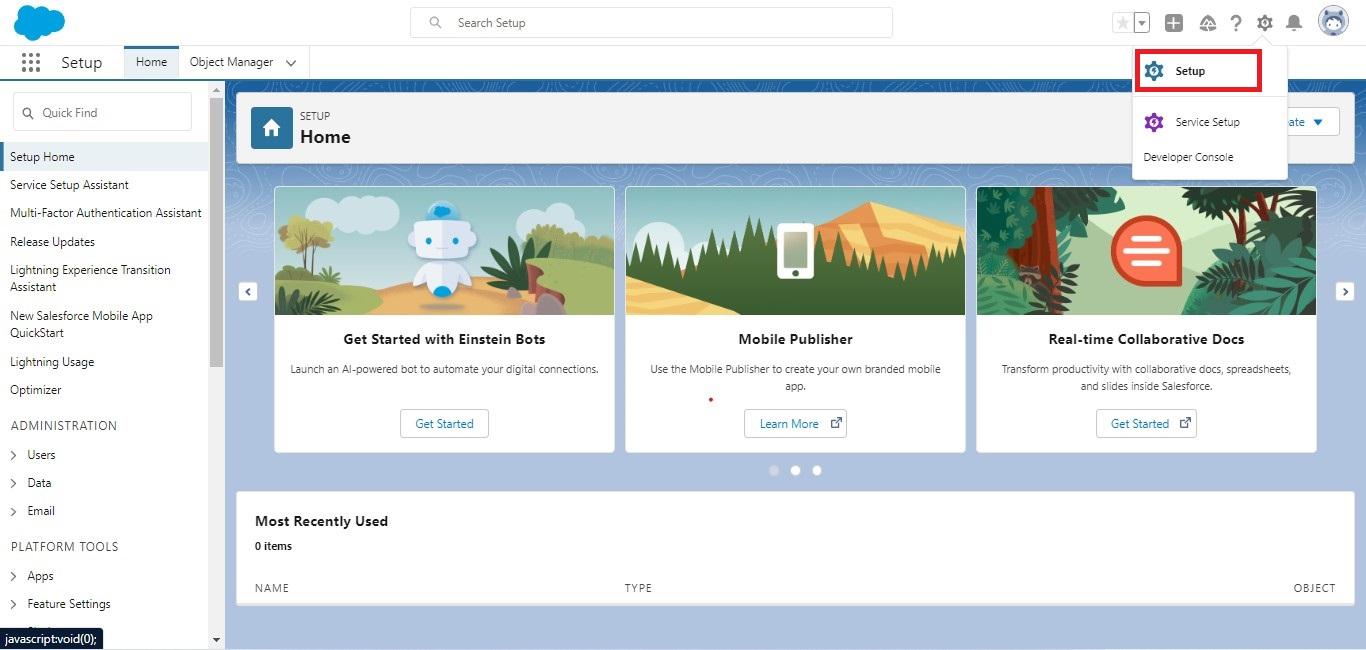
Click the gear icon and then the Setup option.

DdorgZ0bqGZMV G9W Sky5WDZH57fX0LwqenR8lu JjsbuPvTwOzYAWR7K3sIvV2ed4LxiUkesuTqwOmHynCejqzWnYWN9qD0vj6m3g6d7KwUyXXyBXafFM8eKPqVhRCsZ582GmQVvMq C7jan6Vkg

Step 2

Type “User” into the search box and then choose “User” from the bottom of the recommendation menu.

MaYYK mLDHx8TWHCeVwUTBuTYgtpFVlfy3MJyErLDJHvncEweVfGu tkz7sxr32h7kyMbVZEf4i551TwaoZRaoHCpsEZ

Step 3

On the user page, several user lists are displayed. Now click the New User button if you wish to create a new user.

aKCZLOvx800yzpKRv5xQVJID eeIT0aWOCdnz696VjhPwfn9Nnn93mmP5oXFzL9qj08Wz0avI4gybCpQ3IPcD5v2Y2jr3zTJyQ 30AKs0G3JiOM2KS3saKuF1Fz lSjsm4nrWAWIZvSbT2QDiyOGA

Step 4

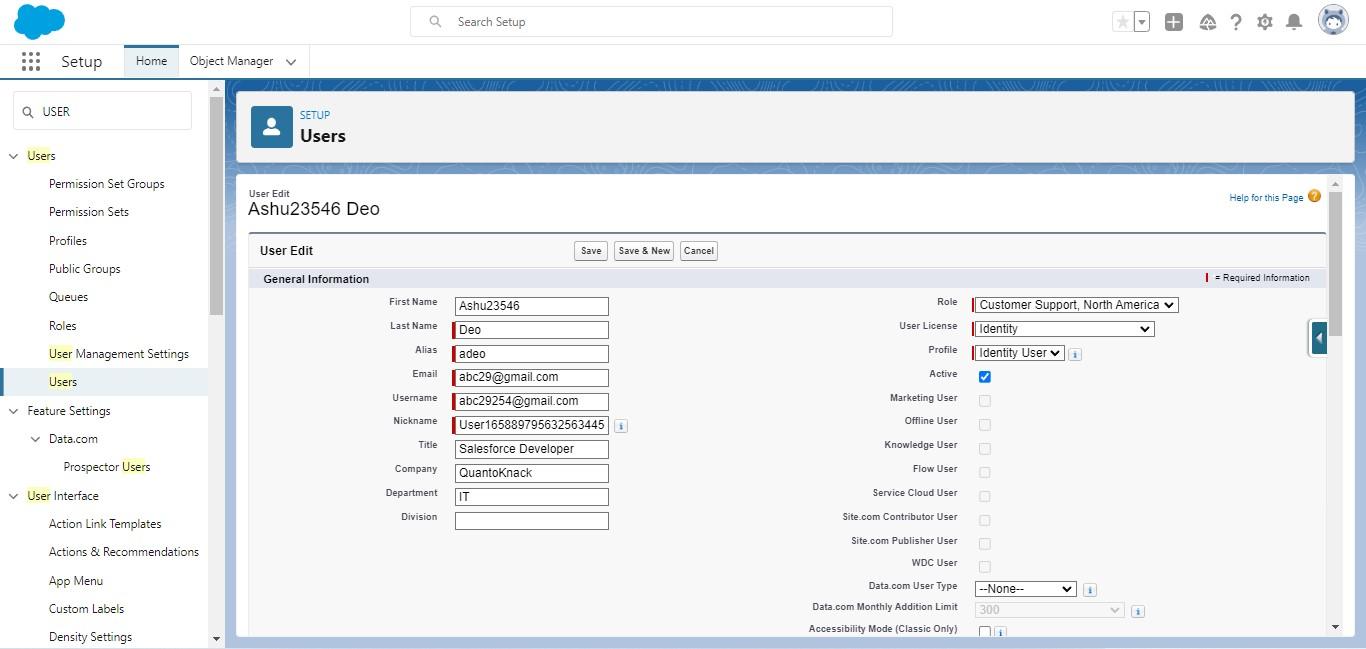
Fill in general information about users such as First Name, Last Name, Alias, Username, Email, Nickname, User License, Role, Profile, and so on.

  • Alias: It automatically takes the first letter of the first name and the first 4 letters of the last name. However, you may modify it to meet your needs.
  • Username: It must be “Unique” within the Salesforce organization. It automatically uses the Email Id you provide in the Email Field.
  • Nickname: It produces one Id for Nickname automatically. However, you can add a Nickname if necessary.
  • Role: You may assign a role to a user based on their needs.
  • License: Choose a license for the user based on their needs.
  • Profile: Choose a necessary profile for the user. 
vbY cmFnImrl4esx3I 9krflqiw6fw5EbyPYesU1iX1OrnGJ76anZmhgY0RTrsUQ0CvRXC zDYEpOZcYeTq YHg3OV944dHgBamvCDsEdqOf sQspHF8TviVFEce44z8h4EFrfa7oD11nMnEEK Cw

You may fill in other information such as Title, Department, Company, Division, Phone, Mobile, and so on. 

You may additionally enable specific checkboxes in the user window based on your requirements or to provide the user further access.

Step 5

You may also include a mailing address in your user window. Now choose the Generate Password and Notify User Immediately checkboxes.

  • Now press the “Save” button.
  • Please remember the fields with a red asterisk (*) are required. As a result, you may fill or manage as needed.

Step 6

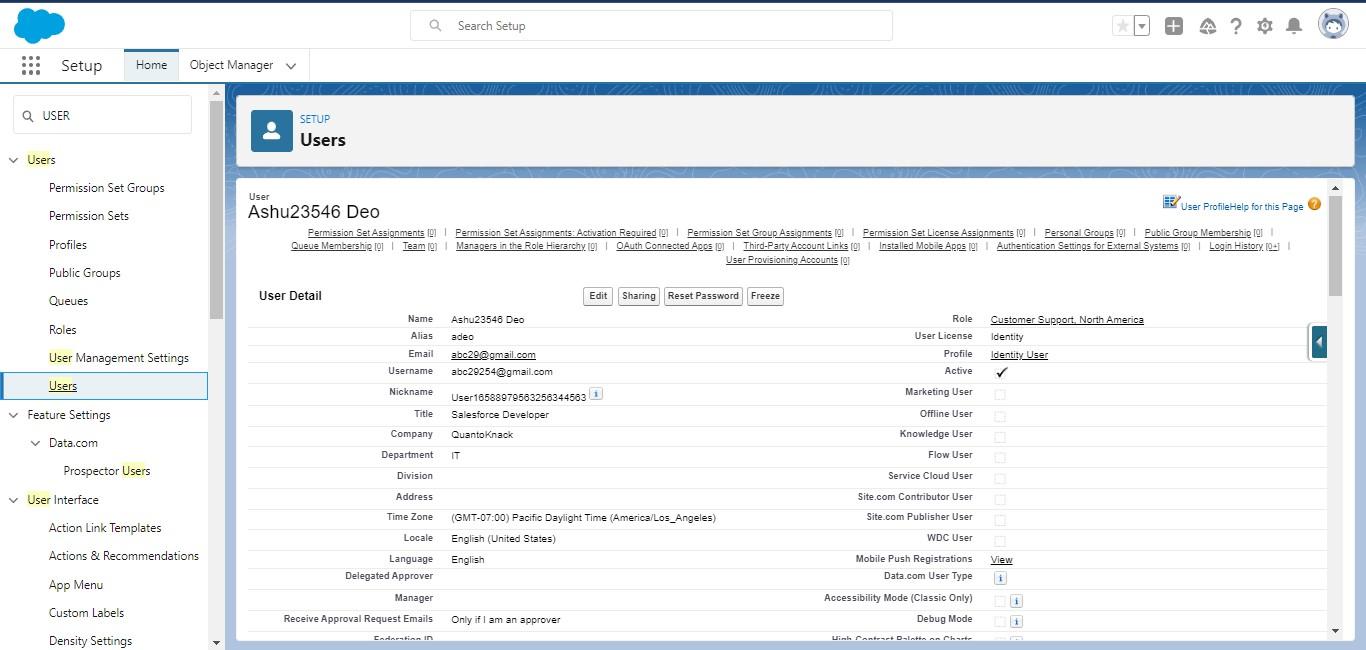
You may reset your user password by clicking on the “Reset Password” option. An email will be sent to the user email ID you gave when establishing the user, and the user can reset the password as he wishes using this email.

Your new user is now created.

If you want to learn more about similar Salesforce Admin-related functions and tasks, then register yourself for QuantoKnack’s Salesforce admin training program. 

QuantoKnack can help you become a Salesforce specialist. In this online Salesforce training course, you will learn Salesforce Administration, App Builder, and SFDC abilities. Our Salesforce admin training will prepare you to pass the Salesforce Certified Administrator (ADM 201) and Certified Platform App Builder tests (DEV 402).

Do you know Salesforce consultants are also in demand? Want to be the one? Read our comprehensive guide on “How to become a salesforce consultant.” It covers everything you need to become a Salesforce developer. 

Enroll now to get a competitive advantage that will lead to new career opportunities!

READ MORE
TECHAvatar of adminadmin0 Comments
Share article:TwitterFacebookLinkedin
1496 Views
174 Likes

How To Define Validation Rules In Salesforce

With so many changes made to Salesforce records on a regular basis by employees, it may be challenging to keep track of the quality of the input data. Salesforce uses Validation Rules to protect users from making mistakes (such as entering phone numbers in the wrong format), establishing verification boundaries, and standardizing data requirements in general.

In this article, you will learn more about:

  • What is a validation rule?
  • What are validation rules used for?
  • When to Use Validation Rules in Salesforce?
  • Cases When Validation Rules Are Skipped
  • How to define a validation rule?

If you want to get a deeper understanding of Salesforce or upskill yourself, register for QuantoKnack’s Salesforce Admin Training In Dallas program. Our live, instructor-led Salesforce certificate courses will help you enhance your knowledge and give wings to your dream job. 

What is a Validation Rule?

In Salesforce, validation rules are rules that comprise formula expressions that validate our data and return a value of “True” or “False.” These validation rules ensure that any record created or updated meets the defined business rules. If not, developers/administrators can show the appropriate error message. 

Want to do even more or learn how to become a Salesforce Administrator? Register for QuantoKnack’s Salesforce admin training program to get hands-on experience with all aspects of Salesforce.

Validation rule constitutes of:

  • Object: That’s where the rule will run field checks, such as Contact, Account, Opportunity, Custom Object, and so on.
  • Formula — a formula for assessing business rules. If the formula statement is True, a validation error is thrown; otherwise, the validation is considered successful.
  • Error message — This error message appears when a user doesn’t really meet the validation rule’s requirements.
  • Location — This allows the administrator/developer to specify where the validation error should be displayed. Standard page layouts will enable the user to display the error at the top of the page or beneath the selected field.
  • Validation rules are called whenever a record is generated or updated, whether manually or through an API.

What are Validation Rules Used for?

A validation rule’s primary purpose is to ensure that the data entered, updated, or removed by the user on a record meets the defined standards before saving it. In the event that it does not, the validation rule displays an error message with a brief explanation of what was entered incorrectly, preventing the user from saving the changes with invalid data. Such rules allow you to avoid incorrect values and unnecessary confusion.

Setting up various validation rules to evaluate data entry in one or more fields may take significant time and effort. Choose QuantoKnack’s Salesforce admin course and Salesforce developer training program to learn and ensure you have the necessary skills and knowledge.

Features of Validation Rules

Here are a few key points and characteristics of validation rules.

  • When you try to save or update a record, the validation rule will fire.
  • A rule usually includes a formula or expression that evaluates data from one or more fields. Based on the validation rule, values will be returned as True or False.
  • If a validation rule discovers an incorrect record, it will display an error message to notify you that the data you entered was incorrect in some way. The error message will appear at the top of the page or beneath the field itself.

When to Use Validation Rules in Salesforce?

When you want to ensure that users are entering correct data, you can use validation rules in Salesforce. For example, suppose you want to ensure that a user only enters numbers between 1 and 10,000 in a specific field.

  • You want to avoid having duplicate records. If you don’t wish to have two contracts with the same name or two leads with the same email address, for example.
  • You don’t want users saving records except if they meet specific criteria. 
  • You want to ensure that data is entered in a specific field before users can save a record, for instance, if you don’t want people to save an opportunity unless they provide information about what the leader wants. For example, if your company has sales targets for each region, those targets cannot be saved unless a value is entered into the target amount field for that region. Before users save records, you should ensure that data is entered in a specific format. For example, if you need phone numbers that are more than ten digits long but less than 15 digits long, you can use this method (since some phone numbers may have an area code).

Cases When Validation Rules Are Skipped

It should be noted that validation rules are not always applicable. As a result, if the verification must be performed across multiple records or on multiple objects, validation rules will not suffice (generally, Apex triggers could solve such cases).

Furthermore, validation rules are subject to constraints. Here are a few examples of when Salesforce ignores validation rules:

  • If validation rules are in place for activities and activity is formed during the lead conversion process, the lead will convert, but no task will be created.
  • Similarly, the validation rules will only be applied during lead conversion if lead conversion validation and triggers are enabled in Lead Settings.
  • Campaign hierarchies will also disregard validation rules.
  • The validation rule will not work when using the Mass Transfer tool to change the owner of multiple records. The rule, however, will continue to work if the owner is changed only on one record individually (without using the Mass Transfer).

How to define a validation rule?

Browse the specified object to create a new validation rule. For example, go to the Accounts object if you want to validate the AccountID. Navigate to the selected object’s management settings and then to “Validation Rules.” Now, select “New.” The properties of the validation rules must then be set in the following step. This includes the items listed below. If you want to learn more about “how to create a validation rule” with step-by-step instructions, then read our article here. 

  • Rule Name
    • The validation rule’s name should be unique. Salesforce permits a rule name of up to 40 characters. There must be no special characters or blank spaces.
  • Active
    • This property indicates whether or not this validation rule is enabled. If we want it to be enabled after creation, we should set this field to “Yes.” Sometimes, we would like to create a rule but don’t want to activate it immediately. Then we simply set it to no.
  • Description
    • That’ll be the validation rule’s description. This is not visible to users and is used only for internal purposes. Salesforce permits 255 characters for the validation rule description.
  • Error Condition Formula
    • This is the expression or formula that will validate the field.
  • Error Message
    • An error message will be displayed if the validation rule fails.
  • Error Location
    • This field specifies where the error message will be presented on the page. 

If you really want the error message to be displayed, choose the option field, then the specific field, just beside the field. If this field is deleted later, Salesforce will default present the error message at the top of the page.

Managing the Validation Rules

Once a validation rule is defined, there may be circumstances in which we must manage the newly created rule. We may need to update it, or it may be necessary to delete it entirely.

  • In either case, navigate to the object associated with the validation rule.
  • Navigate to the management properties page, followed by the validation rule page. This page will display all of the rules that have been created.
  • Browse to the appropriate rule and then click the edit button next to it.
  • After that, the rule fields can be edited and saved. If the validation rule is no longer needed, it can be removed from the same page.
  • If the validation rule has been created but is not active, click the edit button and set the active option to Yes. This will activate the validation rule.

Cloning a validation rule

Salesforce enables you to clone an existing validation rule and apply it to another entity or object.

  • To clone an object, navigate its management settings and the validation rules page. The rules that must be duplicated should be listed here.
  • Now, select the validation rule that will be cloned and then click “Clone.”
  • Create a new rule that is based on the existing one. The new rule can be defined similarly to how it was discussed in the previous section.
  • Enter the field values and then click “Save.” The new rule has now been successfully cloned to the old one.

Conclusion

Salesforce validation rules are critical and include formula fields, lookup filters, and record types. You can also configure page layouts and track field history. They can even be personalized and used to import data. Even members of the sales, service and operations teams will be able to do a better job if they use these validation rules to validate the data.

Salesforce validation rules allow you to ensure the accuracy of your data as it is entered.

Before saving a record to Salesforce, validation rules analyze the information that is entered into the record to ensure that it meets the standards defined by your business. This means you can avoid having users enter incorrect data into your Salesforce org in the first place.

Everyone can learn in-demand skills and succeed in the Salesforce Ecosystem.  

QuantoKnack empowers everyone to develop their Salesforce admin career and developer career. Take a Salesforce admin training on QuantoKnack from Salesforce-certified experts and learn the fundamental Salesforce skills required to launch a new Salesforce career.

READ MORE
TECHAvatar of adminadmin0 Comments
Share article:TwitterFacebookLinkedin
1363 Views
155 Likes

How To Become A Salesforce Expert?

As Salesforce continues on its incredible growth path, the demand for talent grows.  And like all professionals in the Salesforce ecosystem, Salesforce experts are in high demand. In order to stand out from your peers and boost your success, it’s helpful to know some differentiators that can help you be a great Salesforce expert.

To assist you, we’ve compiled a list of some things you can do to stand out from the crowd, become even more successful in your job, and emerge as a Salesforce expert.

Communication is Key 

While there’s no doubting that Salesforce expertise is essential for your work, there’s also a lot more to think about. Everything revolves around effective communication at its heart.

Effective communication is a must-have ability when it comes to a tech profession. You’ll need to learn about your employer’s present systems and demonstrate how alternative Salesforce techniques will assist them in the long run. 

Hires will also need to attentively listen to their bosses’ concerns and search for methods to successfully “pitch” any changes that may need to be implemented in the organization.

After all, the age of digital transformation has arrived, and Salesforce experts may be leading the march toward more contemporary, agile ways of working.

Relationship Development

Relationship building is a valuable skill that many successful Salesforce experts share. It combines networking and stakeholder management. The capacity of an expert to establish connections will be seen in how successfully they can work with new customers and maintain great relationships with those with whom they are presently working. More frequently than not, a professional’s next assignment will come from someone they previously worked with.

Take the Time to Understand Your Clients

As with any profession, it’s critical to get to know your co-workers personally and professionally. You may be involved for more than a year take s, depending on the length of the project;some time to get to know the folks you will be working with! Understanding your client and the teams you’ll be working with as a Salesforce expert will help you make better decisions about how to approach a project.

It’s also a good idea to grasp the project’s political context — who is funding it? Who is more concerned about the firm’s success? What role does your team play? For example, if the team you’re mostly dealing with is under a lot of stress, finding methods to simplify procedures and reduce burden might help you earn some brownie points.

This level of depth and understanding of your customer and “what is vital to them” is what actually distinguishes the successful Salesforce expert from the typical ones.

Active Listening

A Salesforce expert should be able to listen to the concerns and issues of their clients and stakeholders. There is, however, a distinction between hearing and actively listening. The latter includes empathy, or the capacity to put yourself in someone else’s position to comprehend their feelings better. 

Being more sensitive to your client’s issues can help you focus on activities that affect your client’s demands, whether on a day-to-day activity level or in terms of the overall project. When you can appropriately handle such points, it means you have worked on things that are important to your customer, which will increase your productivity.

Industry Knowledge

It is highly common and equally vital to have an area of expertise and understanding of how to work with Salesforce and interact with your clients. While selected Salesforce pros appear to know everything about everything, not everyone will fall into that group.

If you are the latter, it is strongly advised that you choose an industry or a subset of the industry to study and specialize in. For example, if you choose to concentrate on financial services, you may focus on insurance or general banking compliance. While you do not need to know everything about that industry, you should know enough to provide value to a project. The bulk of Salesforce professionals uses a similar strategy. It is typical to discover experts that truly specialize.

The Right Certifications

Salesforce certifications are industry-recognized. Salesforce certifications are classified according to each job role’s criteria and skill sets. Taking more than one can help you advance in your Salesforce career.

Salesforce certifications are classified into eight types:

  • Salesforce Certifications for Marketers
  • Administrator – Administrator, Advanced Administrator 
  • Developer – Commerce Cloud, Platform Developer I, Platform Developer II
  • Technical Architect
  • App Builder
  • Certifications for Implementation Experts or Consultants
  • CPQ Specialist Certification
  • Pardot Expert – Consultant, Specialist

These certificates are stand-alone qualifications based on the employment position in question. Each of them provides you with competence in the relevant field. If you want to be the ultimate Salesforce expert, you may take several tier examinations and pursue higher tier certifications. It’s an excellent way to reach the top of Salesforce specialty in the industry. It may appear daunting, but it is achievable, especially if you combine certifications to save money on Salesforce certification.

Conclusion

The path to becoming a successful Salesforce expert will be difficult. There is so much to learn that it might be challenging to know where to begin. Still, as long as you are ready to learn and improve as a professional, you will have a competitive advantage over others who aren’t as eager to learn.

Get one or more Salesforce certifications if you want to obtain a new job with an arsenal of sought-after skill sets or shift laterally to a well-paying Salesforce position for enhanced career chances. QuantoKnack makes obtaining these certifications easy by providing Salesforce training that allows you to delve deeply into Salesforce concepts. 

QuantoKnack’s Salesforce developer training and Salesforce admin course transform your ability to understand, build and deliver cutting-edge business applications using the Salesforce platform. Our instructor-led, live training and real-world projects will help you overcome any challenges.
Register yourself today!

READ MORE
TECHAvatar of adminadmin0 Comments
Share article:TwitterFacebookLinkedin
1447 Views
177 Likes

How to become a salesforce business analyst

When it comes to efficiently managing customer datasets, Salesforce has long been the most sought-after platform.

Through its various features, tools, and platforms, the Salesforce platform offers a wide range of services. When you implement the software in your business, your sales associates will breathe a sigh of relief since it significantly saves the time and work that goes into various critical business activities.

In addition to being an effective CRM platform, Salesforce has assisted countless candidates in obtaining prominent employment in the field of data science. As new and difficult technology breakthroughs occur on a regular basis and clients expect more tailored services, there have been more vacancies for Salesforce professionals in all types of enterprises. 

Whether you want to be a Salesforce Consultant, a Salesforce Developer, or a Salesforce Administrator in Dallas, you may get a position in a decent company if you excel in all relevant abilities.

Do you want to make a career out of Salesforce?

But what if you don’t want to be a part of Salesforce careers or possibilities that are too technical for you? Don’t worry. We have a fantastic title for you that is techno-functional and does not necessitate hard and fast technological aptitude or background to pursue: Salesforce Business Analyst.

Let’s begin.

What exactly are business analysts?

Business Analysts (BAs) serve as the intermediary between the customer and the implementation partner. Business Analysts must be well familiar with the project. 

They are critical at every step of the SDLC (Software Development Life Cycle), regardless of methodology. Business Analysts identify the requirements that determine the project scope and identify gaps during the Planning & Analysis stage.

Business Analysts collaborate with Solution Architects and Developers to solve requirements throughout the Design stage. During the Development stage, Business Analysts check to see whether the Developers are on the correct track and assist them with requirement clarification if necessary, as well as showcase the product to the client.

Business Analysts assist QAs and customers in testing the system during the testing stage. BAs provide the customer with training and post-implementation support during the Go-Live stage.

Business Analysts may also demo the product at the presales stage in some firms. Business Analysts unquestionably wear several hats during the project life cycle.

What does a Salesforce Business Analyst do?

Here’s a typical job description of a salesforce Business Analyst:

  1. Consult with stakeholders about various parts of the project.
  2. Save research documentation based on stakeholder learnings.
  3. Analyze and review needs before implementing solutions
  4. Evaluate the proposed solutions

Salesforce Business Analysts connect with personnel from various departments and clients to pass on necessary information. They collect critical input from stakeholders and use it to improve company operations. They guarantee that business automation and data management run smoothly and efficiently.

Salesforce Business Analyst Salary

COUNTRYEXPERIENCEPERMANENTFREELANCE
USAJunior$105,100$80 per hour
USAMid$120,900$105 per hour
USASenior$137,000$130 per hour

Why should you become a Salesforce business analyst?

You are in a unique position as a Salesforce business analyst. Within each area, you may have an impact on a company’s technical and operational progress. Knowing all of your options might help you make an educated selection when you begin your career.

Several career entry points

If you have prior expertise in a variety of areas, you may be able to move to become a Salesforce business analyst quickly. For example, you may already have strong IT experience and wish to work in business administration.

Alternatively, you may be a business analyst who wants to learn more about Salesforce technology. Other areas of competence might help you become a business analyst specializing in Salesforce CRM. 

These include, among other things, sales management, company management, organizational leadership, and commerce. Salesforce business analyst training provides us with several professional opportunities.

Utilize cutting-edge technologies

Salesforce business analysts use cutting-edge technology and tools to evaluate processes, provide reports, and create solutions that are tailored to a company’s operations. You will most likely work with Microsoft PowerPoint, Google Analytics, Tableau, and SQL in addition to learning about Salesforce CRM systems. You can also update existing outdated network systems to the most recent technologies throughout a company’s departments.

Job security

Companies frequently check their existing ranks for a potential internal candidate, someone who is eager to become a business analyst and learn about Salesforce technology. This is an excellent chance for people who desire to progress their careers while remaining with the same firm.

If you decide to change jobs, you should be aware that business and management analysts are in great demand across a wide range of sectors. As per the US Bureau of Labor Statistics, job growth will be 11 percent from 2019 to 2029, typically faster than the average for all occupations (BLS). Furthermore, many businesses offer continual on-the-job training through boot camps and other continuing education forms to help their employees improve their present abilities.

Team collaboration

Business analysts are employed at all levels of a business. They can be found in a variety of divisions within the organization, including sales, accounting, information technology, and operations. 

Salesforce business analysts may operate as part of a team on a single major project or numerous smaller projects to accomplish the necessary modifications. They will also interact with various stakeholders about the company’s current capabilities and discussed about the application the customer wants to build in order to improve their customer interactions.

Top 5 Skills Required for Success as a Salesforce Business Analyst

If you love addressing issues with practical solutions, using data as a foundation for generating insights, and thriving on logic, then learning how to become a Salesforce Business Analyst for the world’s #1 CRM is for you! Stick to the following skillset to jumpstart your profession with impulsive growth.

Ability to Document

As a Salesforce Business Analyst, you must be able to manage functional and technical documents effectively. You will very probably have to deal with simple to extremely complicated data in enormous amounts. Here is the list of documents needed to be prepared by Business Analysts.

  • Business analysis plan
  • Business requirement document
  • Project vision document
  • System requirement specification (SRS)
  • Functional requirement specification (FRS)
  • Wireframes 
  • Mock-ups
  • Change request document

Understanding of Business Processes

As a Business Analyst, you will be responsible for a wide range of responsibilities in a number of industries, each with its unique set of business procedures. You must understand the client’s process, problem areas, and goals. 

Ascertain that you provide solutions that the customer values and that are long-lasting. You must comprehend each phase of the business process, from obtaining project requirements/resources to assessing and confirming the final result. This is one of the most critical abilities for working successfully as a Salesforce Business Analyst.

Analytical Capabilities

In this role, you must think rationally about the customer’s wants and properly investigate them. So, to begin your Salesforce position and advance your career in this sector, you must have excellent analytical skills and the capacity to translate them into meaningful development.

Soft Skills

  • Active Listening: You must be able to pay close attention to every detail. If you can pay attention to every detail, you can quickly identify the source of the problem. You can bargain well if you grasp the issues and think strategically.
  • Collaboration skills: They are required for Salesforce efforts. It is critical to be able to collaborate with others and plan activities with the entire team. Communication Skills: You must be able to work well with others and communicate well with teams and stakeholders. You must also be able to interact and persuade stakeholders in any situation. As a result, you will be able to maintain strong and effective working connections with stakeholders.
  • Problem Solving Skills: This role demands great problem-solving abilities since it allows you to address all of your concerns swiftly. Problem-solving talents entail quickly identifying the underlying issue and implementing a solution.
  • Time management: It refers to your capacity to manage your time properly, be productive, and fulfill all of your daily tasks. To stay in this industry, you must prioritize duties, take the initiative, be self-directed to meet deadlines, be self-motivated, and work confidently.

How to Become a Salesforce Business Analyst?

You can begin your Salesforce Business Analyst career in just five easy steps:

  • Conduct thorough research on the Salesforce Business Analyst career path regarding how to proceed, future scope, comparison with other work possibilities, practicability, compensation package, degree of interest, and other factors.
  • Attend the Salesforce career counseling session. Discuss with an expert family member or a friend to help you navigate this profile. If you don’t have someone with this level of expertise, come to QuantoKnack, where our specialists can assist you in navigating the Salesforce Business Analyst Career path and upskilling yourself with our Salesforce developer training and Salesforce admin course.
  • Attend QuantoKnack’s comprehensive Master Salesforce Training, which is guided by real-life Salesforce specialists who educate you about Salesforce CRM end-to-end through real-case studies and tasks.
  • Win the Salesforce Certification wars. Because there is no specific Salesforce Business Analyst certification, you may complete the course and then go on to pass and retain your Salesforce Admin course and Salesforce Consultant certifications.
  • Connect with Salesforce Communities and Business Analysis Associations, connect with actual Salesforce specialists on Linkedin, and begin your career path with internships, employment, or industry projects.

Make new career steps that are in line with your ambitions.

Business analyst careers for Salesforce-trained persons are expanding quickly across the world. Companies are looking for new methods to provide better services to their consumers while also offering software and hardware solutions that allow their personnel to retain high productivity levels as technology and big data become more extensively employed. Salesforce Business Analyst is one of the best bargains you can get because Salesforce leads the CMS industry with a 20% share and expects to create 4.2 million jobs inside its ecosystem by 2024. 

Because there are so many methods to become a Salesforce business analyst, you may choose a learning opportunity that allows you to choose the career path that best matches your lifestyle.

We at QuantoKnack assist you in launching an excellent career in the cloud. We’re here to help you gain the skills and information you need to pursue your career goals.

Join QuantoKnack’s Salesforce Business Analyst training and benefit from our expert training course. Once you’ve completed training, you’ll become a certified Salesforce Business Analyst, ready to begin your new career with one of our esteemed clients.

Register yourself today and start forging your path to a higher salary and better career opportunities!

READ MORE
TECHAvatar of adminadmin0 Comments
Share article:TwitterFacebookLinkedin
1679 Views
172 Likes

How to Become A Salesforce Developer In 2024

Salesforce.com, Inc. became popular as a CRM market leader for the sixth straight year in 2019. Salesforce CRM is already used by over 150,000 enterprises globally, including well-known brands like Sony, Financial Times, Toyota, and others. As the use of Salesforce CRM increases, Salesforce expects to create over 3.3 million job opportunities, including roles for developers, by 2024.

According to the reports, the average yearly package of Salesforce developers is approximately 0.5 million, while working with top recruiters can result in an annual package of 1 million. 

If you want to be a successful Salesforce developer, this article will help you identify the best path to success. You will be given a brief overview of the field, the necessary skills, and best practices to identify the opportunities.

Who is a Salesforce Developer?

Salesforce Developers, also known as SDFC Developers, strive to revolutionize every project they work on with their professional development expertise. Salesforce engineers are required to have certain built-in abilities, and they can further their education through various certifications.

The task force is in great demand in a variety of industrial categories, including healthcare, financial services, hospitals, information technology, and others. These programmers work on large projects like Salesforce customization, designing bespoke Salesforce apps, and configuration. They constantly work on the Salesforce platform, and they have a variety of jobs and responsibilities.

Job duties of Salesforce developers

Salesforce functionality may be tailored to specific business requirements in two ways: configuration and customization. Salesforce customization is primarily the responsibility of developers, although they may also handle configuration.

CRM functionality is customized via the user interface during the Salesforce setting, with no code required. This allows you to construct tables, objects, and fields and form relationships between them, and specify rules for automating linear work processes. Businesses often use a Salesforce administrator for configuration.

Salesforce customization is required when the built-in point-and-click features in Salesforce are insufficient to automate certain business processes. Examples of Salesforce customization include: 

  • Automating complicated non-linear business processes.
  • Connecting Salesforce to other systems (ERP, company website, social media, etc.).
  • Designing unique reports and dashboards.
  • Integrating Einstein AI capabilities with CRM, etc.

Salesforce developers in Dallas create bespoke apps for Salesforce in addition to customization and configuration (IT product businesses can upload such applications to Salesforce’s AppExchange marketplace).

Salesforce Developer Requirements

Salesforce Developer job descriptions are now looking for talents found in the same areas where developers and administrators have shown their proficiency. First and foremost, Salesforce Developer soft skills are necessary for candidates to enter the Salesforce field. If you want to compete, you must demonstrate proficiency in the following soft skills:

  • Problem-solving: Because a developer is responsible for overseeing all stages of software development, they must be well-versed in problem-solving techniques.
  • Communication: You must be able to help your clients and team members understand what you are trying to say.
  • Analytical mindset: You must continually evaluate and comprehend the client’s brief to build software that meets their requirements.
  • Solution-focused: Your primary goal must be to solve all of the client’s and your team’s concerns.
  • Project management: You must manage projects and ensure that they are completed on schedule. This includes quality assurance and client feedback.

These experts should be knowledgeable and experienced in the following technological skills:

  • Web services: A Salesforce Developer must be able to design web services using technologies such as Apex.
  • End-to-end Salesforce ideas: A Salesforce Developer must be well-versed in all Salesforce concepts.
  • SOQL/SQL: Salesforce Developers must be well-versed in Salesforce Object Query Language (SOQL) and Structured Query Language (SQL) (SQL).
  • JQuery: Salesforce Developers must have a basic grasp of jQuery in order to navigate tools like visualforce and the Salesforce Lightning component.
  • JavaScript: Salesforce Developers rely heavily on JavaScript.

Reasons why you could like Salesforce development 

The Lightning Platform has several ready-made development components, which dramatically simplify a developer’s task.

  • You like delving into a customer’s problems.
    • Salesforce development necessitates investigating a customer’s business operations. 
    • Furthermore, knowing a customer’s business will be part of your work responsibilities and affect your career advancement.
  • You are interested in both back-end and front-end development.
    • Salesforce app developers provide user interfaces as well as work on the server-side.

Salesforce Developer Salary and Job Outlook

Salesforce developers often have a background in software engineering. According to the US Bureau of Labor Statistics, the median compensation for entry-level software engineers, quality assurance analysts, and testers in 2020 will be $110,140. Between 2020 and 2030, the field is predicted to create 409,500 jobs, representing a 22% increase.

The average yearly income for Salesforce developers, according to ZipRecruiter, is $115,403. According to ZipRecruiter, the three most profitable places for Salesforce developer jobs are New York City, Boston, and Silicon Valley.

Top 4 Reasons to Become a Salesforce Developer in 2024

Salesforce engineers get high incomes due to their great demand.

There are various reasons why working as a Salesforce developer is a great choice, and we’ve included our favourites below:

  • You get to work with a creative platform. Salesforce is a very engaging system. Optimizing user interfaces to improve user experience may be both enjoyable and demanding.
  • You have a direct impact on economic progress. You enable business and promote economic activity in your country by producing enterprise software solutions.
  • It is the most profitable occupation. Salesforce engineers make high pay because cloud specialists are in high demand in the employment market.
  • You will be exposed to cutting-edge technologies. The Salesforce system is continually being improved, as is the technology needed to sustain it.

Types of Salesforce Developer Careers

Salesforce professionals can choose from a variety of career paths. Aside from Salesforce development, you can pursue any of the other vocations listed below.

Salesforce Architect

These individuals analyze and manage various design elements of Salesforce apps. They create Salesforce systems and ensure that features scale smoothly. They are also in charge of Salesforce cloud systems and servers.

Salesforce Administrator 

Salesforce Administrators educate users on Salesforce basics and produce reports. One of their responsibilities is to automate complex company procedures.

Salesforce Consultant

Salesforce consultants collaborate with clients to ensure that their needs are satisfied. In addition, the Salesforce consultant helps the operations teams on how to improve the customer experience and address defects.

Benefits of Becoming a Salesforce Developer in the Digital World 

  • Maintain Contact with the Technical World
    • We live in a digital world dominated by developing IoT, AI, and machine learning technologies. As a Salesforce developer, you will work with a variety of programming languages that are utilized in various technologies. This allows you to introduce yourself to the technological world and, as a result, implement sophisticated solutions in the projects you work on.
  • High-end Packages
    • Salesforce developers are among the most in-demand experts in the world and among the highest-paid IT professionals. The faster you expand, the better your pay scale and annual revenue.
  • Multiple Career Paths
    • Salesforce developers can pursue a variety of career paths. They can work as a freelancer in addition to their full-time employment. They can also work as a full-time freelancer. When you have extensive knowledge in this field, you may even become a salesforce development trainer.
  • Good Recognition 
    • Along with benefits, most people desire positive social recognition. A job as a Salesforce developer will help you achieve it. As a result, 80 percent of people nowadays aspire to work as a salesforce developer.
  • Rapid Growth
    • Not every corporate position can promise rapid advancement. Many corporate employees are locked in the same organization without advancement, yet this is not the case for many salesforce developers. As a result, those individuals are looking for a job as a salesforce developers in order to keep up with the latest technology. They mostly prefer online classes to learn it.

How to become a Salesforce Developer 

From Salesforce Developers to Administrators, there are various career options accessible to ambitious IT employees who want to be in demand and, more crucially, who want to be compensated for their hard-to-find skills. But, suppose you want to learn how to become a Salesforce Developer; how do you acquire such knowledge from such a constrained starting point?

Let’s take a look at how to become a Salesforce developer in 2024.

Be an Effective Salesforce Administrator

Consolidate your Salesforce Admin knowledge! Devote three months to studying for and passing the five certifications listed below.

  • Salesforce Certified Administrator 
  • Salesforce Certified App Builder 
  • Sales Cloud Consultant
  • Salesforce Certified Advanced Administrator 

You may find a plethora of materials and testimonies on YouTube and Google.

Make Salesforce Personal → Run Your life on Salesforce

Navigating and configuring your Salesforce org should become as natural and simple as navigating and modifying the settings on your iPhone. Use Salesforce for your personal requirements to become acquainted with it. Is there anything unique you can do with Salesforce?

First, you should be familiar with Salesforce’s programming languages, Apex and JavaForce, before moving to UI scripting languages VisualForce and CSS. After that, businesses seeking someone to occupy a desk without worrying about settling in time would always prefer someone with platform experience.

Join Your Local Salesforce Developer Community & Join QuantoKnack’s Training Programs

You could do it alone by utilizing Salesforce’s fantastic training tool, Trailhead, to earn badges and invest in industry-recognized certifications, which are becoming a must for everyone working on the stack. Alternatively, you may self-learn by utilizing various online resources and seeking a job from an employer who will ignore your lack of qualifications and experience.

One way is to enroll in QuantoKnack’s Salesforce developer training, which will take you from Salesforce newbie to fully qualified with all the certifications, skills, and real-world Salesforce experience you need to become a really appealing candidate. Our industry experts will work with you one-on-one to ensure you are properly prepared for your certification tests.

Pass the Platform Developer (PDI) Certification

Passing the Platform Developer Certification is critical because it will help you make up for any gaps in your Salesforce Development expertise. Although part of the test content is out of date (since it mostly concentrates on Visualforce), you should still pass this Certification – additionally, it will indicate your eagerness to learn.

Pass the Scrum Master Certification

When you start a project, you should be familiar with terms like backlog, sprint, and stand-up meetings. Scrum.org certification may be obtained in as little as two days of study. In addition, the test is an open book. This qualification should look well on your CV.

Apply to Jobs & Track your Mistakes

Many individuals may be depressed after repeatedly failing to ace salesforce interviews. The goal is to learn from your mistakes and glean useful information before moving on to your next interview. The goal is to discover the gaps and then maximize your interview performance. 

If you’ve already created a Salesforce track record for your job hunt, you may utilize it to track your performance, top interview questions, and other useful information.

Unlike other types of interviews, coding interviews are objective, allowing you to discover specific areas for development and utilize Google, Trailhead, or other relevant platforms to build strengths and enhance your performance in the next interview.

What’s The Future of Salesforce?

According to research, 1.9 million new jobs will be generated in the Salesforce ecosystem by 2020. Such forecasts predicted exciting developments, such as increased Salesforce adoption by smaller firms, increased influence on field service and the IoT, and simplifying the app to attract a larger range of users.

If such optimistic forecasts are correct, it is reasonable to infer that Salesforce’s popularity will rise and extend into expanded SMB markets. With more demand comes an increased need for developers; this looks to be a viable career route to choose.

FAQs

Is it Possible to Work as a Salesforce Developer Without a Degree?

You certainly can. You can start a career in technology if you have high school graduation and are willing to take certification examinations. Salesforce programming is a contemporary and in-demand job that may be learned without a college diploma.

Can a Salesforce Development Certification Help Me Get a Good Job?

You absolutely can. According to ZipRecruiter statistics, the average income for entry-level Salesforce developers is $85,069. This attractive remuneration is only one of the benefits of obtaining a Salesforce developer certification. It’s never been easier to achieve your job goals.

Is It Difficult to Become a Salesforce Developer?

No, it isn’t. The learning process is quite enjoyable. The training atmosphere is incredibly dynamic, so learning the technical skills essential for success does not feel overwhelming. You will work with other software development students to design custom cloud-based applications.

What types of programming languages will you use as a Salesforce Developer?

Apex, similar to Java, is a particular Salesforce programming language that can be used to program the platform and VisualForce, like HTML. VisualForce is a markup language for customizing Salesforce pages.

Lightning web components are contemporary user interface components that are modular and developed using HTML, CSS, and JavaScript. They are a functional substitute for VisualForce. Although VisualForce is still used in many older Salesforce deployments.

Conclusion

The Salesforce Development & Customization Services taskforce is very important in the world of Salesforce Development & Customization Services. There is an increasing rush of newcomers to acquire the expertise that Salesforce developers should possess, demonstrating its popularity and need. The sky is the ultimate limit for Salesforce CRM, and the task force is the driving force behind its support.

If you want to become a certified Salesforce Developer, register yourself today for QuantoKnack’s Salesforce developer training and Salesforce admin course. 

Let QuantoKnack Training help you polish your development skills to get your first job soon as a Salesforce Developer! 

READ MORE
TECHAvatar of adminadmin3 Comments
Share article:TwitterFacebookLinkedin
2123 Views
199 Likes

How to Become a Salesforce Consultant

“By 2024, Salesforce and its ecosystem will generate 4.2 million new employment globally.”

This is a significant number, and it is equivalent to the combined GDP of Belgium and Thailand or the population of New Zealand. Salesforce has a greater global influence than technology.

Salesforce has built up its platform and updated and enhanced its products and services over the last few years. This surely contributes to its rapid expansion. More and more businesses are turning to solutions like Salesforce to help them manage customer relationships more efficiently. However, not all business owners are tech-savvy. That’s where the Salesforce consultant comes in.

Did you know that Salesforce consultants earn more than 50$ per hour on average?

A Salesforce Consultant is a trusted adviser who uses technological solutions to solve complicated business challenges and offers the best of the Salesforce platform to the customer.

When you think of starting a career in Salesforce, it brings a lot of questions, fears, and doubts. Especially in a job profile such as Salesforce Consultant since it’s quite new but is here to stay. 

Do you want to learn how to become a salesforce consultant? In this blog, we will help you understand everything about the Salesforce Consultant role and guide you on how to start your journey. 

Who is a Salesforce Consultant?

A Salesforce consultant is an expert who designs, maintains, and implements databases and connects commercial organizations with their respective clientele. They are in charge of improving and sustaining business-client relations. 

The person achieves this through strategic Salesforce Implementation and efficient management of various functions that influence work productivity and customer relations.

What does a Salesforce Consultant do?

A Salesforce Consultant typically wears multiple hats. The following are some of the responsibilities of a Salesforce Consultant:

  • Managing the Client Relationship
  • Mapping out Business Processes
  • Creating and Managing Project Plans
  • Configuring and customizing the app on the force.com platform.
  • Gathering Functional (Business) Requirements 
  • Brainstorming Technical Requirements
  • Technical Product Configuration
  • Unit Testing and Training

Salesforce consultants assist organizations in making the most of their Salesforce platform. Knowledge of both the platform and business processes and exceptional communication skills make them a significant addition to any organization, which is why they are highly compensated with a competitive wage.

Why choose to be a Salesforce Consultant?

  • Ample Job Opportunities:
    • Nearly 37,000 new jobs are posted on average. 
  • In-demand skill:
    • More than 150,000+ customers, ranging from small businesses to Fortune 500 companies, are using the Salesforce platform to expand their business.
  • Lucrative Salary:
    • Earn an annual average ranging from $80,000 to $150,000+
  • Always on the Move:
    • Salesforce continues incorporating changes and also evolving so that you are never locked with a single subject or one monotonous work/task.

Who can Become a Salesforce Consultant? 

If you’re interested in applying for the Salesforce Consultant examination, you need to know about various Salesforce concepts and how the platform functions. 

An ideal Salesforce admin training and Salesforce developer training provider efficiently offer all this knowledge to the candidates preparing for this Salesforce examination. It helps the candidate in formally preparing for and taking the certification exam. 

The skills required differ depending on the duties and functions you are willing to take on. 

In general, clients prefer to hire Salesforce Consultants that have a rich history in the functional and technical knowledge of the salesforce platform. If you wish to become a Salesforce Consultant or take Salesforce Admin Training in Dallas, the first thing you should think about is the credentials and experience necessary.

One of the most valuable qualities here might be extensive business expertise.

The second most significant requirement is understanding the Salesforce platform along with the relevant certifications like Salesforce Admin, Salesforce Developer etc. Additionally, you should add a Salesforce Consultant certification to your CV or resume. The more experience you have with Salesforce, the more likely you are to get hired for higher-paying positions. 

Top Salesforce Consultant Skills Recruiters Actively Looking for

Certain skills set you apart from the crowd, and they are the ones that recruiters are actively looking for while hiring a Salesforce Consultant. 

The following are the technical and soft skills for a Salesforce Consultant to get a better salary package and to climb high in your career:

Technical skills that indeed make your CV stand out:

  • Salesforce platform knowledge
  • Sales, Service, or Marketing cloud certifications
  • Technical Solutions 
  • Apex Programming, Trigger, LWC, Knowledge 
  • Technical Support

Brush up on these soft skills and watch your career skyrocket like never before:

  • Communication
  • Teamwork/Collaboration
  • Presentation Skills
  • Writing
  • Problem Solving

5 Best Strategies for Becoming a Salesforce Consultant

The following are the five best strategies to help you become Salesforce Consultant:

Get a Rich Experience

To flourish in their profession, every technology star should have an in-depth understanding of their field. Salesforce consultants must have extensive knowledge of customer relationship management solutions.

To land a job as a Salesforce consultant, you should be able to demonstrate to your prospective employer that you understand how to use cutting-edge technology to their benefit. Salesforce offers many features and tools, and a consultant must be able to manage them all, from the Service Cloud to the Marketing Cloud, in order to support/achieve company goals.  

Outstanding Salesforce consultants also have project management experience. They understand what it takes to unite a team behind the same purpose and expedite the adoption of innovative technologies. 

Make sure you have experience in: 

  • Every Salesforce Platform (Marketing, Service, and Sales)  
  • Integration and configuration of CRM tools
  • Leading diverse teams within a business 

Obtain Your Salesforce Consulting Certifications

Salesforce’s breadth as a CRM platform merely means that consultants have more than one path to take. Salesforce has six distinct certifications that consultants may use to demonstrate their expertise in customer relationship management. The following are the possible certifications: 

  • Salesforce Certified Marketing Cloud Consultant
    • This certification helps you demonstrate your ability to implement and configure comprehensive cloud-based marketing tools for email and other campaigns.  
  • Salesforce Certified Sales Cloud Consultant
    • This certification provides you with the knowledge and skills required to develop and deploy cloud solutions, including interface and application design. You will also learn how to handle statistics for tracking Salesforce performance.
  • Salesforce Certified Service Cloud Consultant
    • This certification is designed for cloud contact center support professionals and provides an overview of metric and analytics tracking.
  • Salesforce Certified Pardot Consultant
    • This certification is intended for consultants who deal with the Pardot suite of solutions that are linked to the Salesforce CRM. You will learn how to implement and design Pardot solutions.  
  • Salesforce Experience Cloud Consultant
    • You may demonstrate to employers that you can install Salesforce Communities apps and handle difficulties for teams by earning this certification.  
  • Salesforce Certified Field Service Lightning Consultant
    • This certification showcases your ability to design and manage apps/solutions for customers.  

QuantoKnack offers a live, instructor-led Salesforce admin course and Salesforce developer training program, which can give wings to your Salesforce career. 

Improve Your Analytical and Listening Skills

Salesforce consultants should be well-adapted in listening and analytics. The knowledge acquired from workshops and meetings is used to inform the results of your work as a consultant. This implies that consultants must be able to absorb concepts as well as read between the lines.

While embarking on your journey of how to become a Salesforce consultant, focus on looking for opportunities to build your analytical and judgment skills. Demonstrating problem-solving expertise will help you both in the everyday business environment and any competency-based interviews. 

Exceptional listening will help you become a valuable part of any business team. Furthermore, understanding how to respond to the demands and expectations of others inside a business guarantees that the group will completely embrace any solutions you implement. 

You must have an excellent: 

  • Listening & communication skills
  • Problem-solving and Analytical abilities
  • Ability to design complex business solutions that properly leverage the Salesforce platform.  

Keep Learning

As the Salesforce ecosystem evolves, a Salesforce consultant should aim for constant learning.  

Salesforce certifications are available in a broad category, including consulting. The more training you receive, the easier it will be to satisfy the demands of a wide range of clients and enterprises.  

A solid commitment to continuous learning additionally includes networking with other industry experts within the Salesforce Ohana community. There are countless forums and events designed to help professionals on the path to a new Salesforce career.  

Improve/Enhance Your Communication Intelligence

A Salesforce consultant must have a high level of education and experience. However, it is also necessary to have the necessary soft skills. 

Salesforce consultants must be able to analyze the needs of the business carefully, then recommend the teams that everyone can understand. As a Salesforce consultant, you must be able to convert a CRM system’s sophisticated jargon into something that workers and departments can immediately understand.  

Make sure you know how to: 

  • Feel comfortable being a part of a team and also leading teams towards stronger Salesforce implementations.
  • Address and lead complex business solution-related discussions with technical architects.  
  • Share functional and technical expertise with other teams.  

Conclusion

Salesforce consultant is an extremely rewarding profession that promises healthy career growth, stability, and an excellent pay scale. Holding a primary role in any organization, a Salesforce consultant enjoys a leadership reputation, helping him build a social reputation and lifestyle perks.

If you’re looking for a reliable and trusted Salesforce Certification training institute, you have come to the right place. 

Enroll in the live, Instructor-led training program by QuantoKnack Training and learn the Salesforce platform–from the basic concepts to solving and building complex business solutions. We offer online training so that you can choose what suits you best. 
Register yourself today!

READ MORE
TECHAvatar of adminadmin0 Comments
Share article:TwitterFacebookLinkedin
1901 Views
163 Likes

How to Become a Salesforce Partner

Salesforce was launched in 2000 with a unique concept of Software-as-a-service. It had also established itself as an innovator way back when the business became synonymous with the ‘No Software’ logo.

Today Salesforce revenues are $20 billion annually, and it has been growing about 30% every year. In 2018, Salesforce acquired Mulesoft for roughly $7 billion, and in 2019 Tableau for $16 billion.

Instead of a classic resell model, Salesforce has embraced an ‘ecosystem’ approach. This means that Salesforce has consistently developed an ecosystem of relationships with companies. 

Salesforce partner program includes four major categories:

  • Consulting partners (System Integrators) & Agencies:
    • Offering strategic business consulting, solution integration, system design, and product implementation. 
    • Build software applications and integrate them into Salesforce, Offer Salesforce services.
    • Contribute to business growth and boost efficiency by leveraging their experiences, leading personalized practices, and using innovative tools.
  • AppExchange partners:
    • ISV (Independent Software Vendors) who design and market software solutions built on or integrated with the Salesforce Platform.
  • Resellers Partners:
    • Sell Salesforce licenses, however, are not necessarily involved in the implementation.
  • Managed Services Provider (MSP)
    • Offers ongoing, recurring, and post-implementation services. Only consulting partners can apply for this category.

Are you interested in learning how to become a Salesforce partner? If yes, then you are at the right place. In this article, we will cover everything you need to know to become a Salesforce partner. 

What is a Salesforce Partner?

A Salesforce partner is a consulting business that Salesforce authorizes for building custom solutions, project implementations, and integrations services. 

It comprises industry-leading professionals trained to provide expert advice, guidance, actionable solutions, and unique expertise for all sorts of Salesforce products, industries, and system integrations.

Why should you become a Salesforce Partner?

Salesforce is sought after by millions of businesses, making it the world’s most popular CRM enterprise. There are more than 1843 Salesforce Consulting Companies worldwide, and the Salesforce platform is used by over 150,000 organizations.

Salesforce also reported its highest-ever revenue of $21.25 billion, indicating that demand for its secure, scalable cloud platform has skyrocketed. Salesforce even said that their partners lead 70% of customer implementations and that 86 percent of their customers use the latter’s apps and solutions.

How much does it actually cost to become a Salesforce Partner?

Consulting firms are required to pay an annual consulting partner program fee. The sum is determined by the previous year’s final tier evaluation. Typically, the consulting partner program year extends from March 1 through February 28 of the following year.

How much do Salesforce Partners Earn?

It is said that opting for a Salesforce career is pretty lucrative. You can start your own business. 

As per Cloud Mastery, the following is what a Salesforce partner earns and charges per hour:

  • Salesforce Training – $ 1K – $ 1.5K per day
  • Salesforce Consulting – $ 125 – $ 200 per hour
  • Salesforce Development – $200 – $ 250 per hour
  • Salesforce Data Management – $200 – $250 per hour
  • Salesforce Integrations – $ 125 – $ 150 per hour

Indeed, the amount you charge will still depend on your expertise level and how comprehensive your services are.

How to become a Salesforce consulting partner?

To become a Salesforce consulting partner, applicants must undergo a rigorous vetting procedure. This demands a significant effort in terms of investment, training, certifications, etc. To be accepted as certified partners, they must satisfy all standards and give all relevant information.

Follow these steps:

Step: 1 Agree and accept the policies of the SPPA (Salesforce partner community).

Step 2: Apply to become a member of the Salesforce Partner Community

Step 3: SF sends a welcome email outlining the preliminary prerequisites for joining the program.

Step 4: Prove compliance with the minimum requirements within a maximum period of 30 days after receiving the welcome email

Step 5: Salesforce evaluates the application and, if it is correct, grants the entity the status of “provisional partner and sends an additional email outlining the requirements for its inclusion in the program on a non-provisional basis (certifications, fee payments, etc.) 

Step 6: Present proof of compliance with the inclusion requirements.

Step 7: If the Provisional Partner complies with what is established, it is officially accepted to the program and assigned the “Base” level. 

What are the levels that Salesforce partners can achieve?

The Salesforce Consulting Partner Program has four basic levels, and partners are rated based on these levels based on points as follows: 

  • BASE Partners (up to 249 points), 
  • CREST Partners (More than 250 points), 
  • RIDGE Partners (More than 500 points), 
  • SUMMIT Partners (750 points). 

A partner should have at least two Certified Salesforce Consultants and pay a program fee of around $1000 for the Base level to join this partner program.

Partner program points are earned depending upon the following three categories:

CUSTOMER SUCCESS

In this category, you may earn up to 350 points. The points are awarded depending on the partner’s NAVIGATOR level and Customer Satisfaction Scores. The Navigator level of the partner corresponds to their topic expertise: Expert, Level 1, or Level 2.

INNOVATION

In this category, you can earn upto 350 points. The points are awarded depending upon the number of Certified Salesforce developers,  Salesforce Consultants, and Salesforce Architects that the partner has.

ENGAGEMENT

A maximum of 300 points are available in this category. The points are awarded based on the partner’s Annual Contract Value (ACV). This measure is known as COSELL ACV. Revenue might come from new clients or new projects with existing ones.

Salesforce is steadily increasing the weight of program points accessible from Customer Success criteria (CSAT and Navigator) while decreasing the weight of program points available from Cosell ACV. This basically indicates that they are focusing more on customer experience and less on revenue from partners.

Salesforce provides a thorough partner enablement plan as well as a large content repository called Trailhead.

What are the advantages offered by Salesforce Partner Program?

Salesforce delivers all of the resources, training, and tools needed for partners to gain expertise in certain business operations, product areas, and sectors in order to serve their customers better and improve their practices.

The consulting partner program provides the following advantages:

  • Design and development:
    • Access to forums where you can get an opportunity to interact with partners from all over the world and share your valuable experiences.
    • Marketing Cloud trial partners to design and analyze the tool’s capabilities.
    • Subscription to the consultancy Partner Insights Newsletter
    • Licenses for Lightning CRM Enterprise Edition and the myTrailhead site.
    • The Pardot Plus Edition
  • Sell ​​and market.
    • Participation in the AppExchange Marketing Program (AMP).
    • Partners will get a referral bonus when a recommended lead is provided through the partner community.
  • Service and support.
    • 24-hour technical support, thanks to the Partner Premier Success.
    • Credentials vouchers to cover the cost of Trailhead-listed certification exams.

Start Your Salesforce Consulting Partner Company with these Six Tips

Starting your Salesforce Consulting company is not an easy task. However, there are a few things that you can do to ensure your company is on the right track:

  • Find Your Own Niche In The Market
    • Salesforce provides a variety of solutions such as Marketing Cloud, Sales Cloud, Service Cloud, and Commerce Cloud. You may choose the market you wish to serve with their wide selection of cloud-based products. Once you’ve determined your target audience, plan your strategy and interact with them. This will aid you in clearly defining your future services/activities/efforts and allow you to provide greater value to your clients.
  • Streamline All Your Business Processes
    • Streamline all your processes and ensure everything is in harmony. You can hire the top professionals to handle all the services you offer to your customers.
  • Maintain Healthy Relationships
    • Constantly engage and maintain healthy relationships with your clients and employees. Your clients will stay with you in the long run and may even suggest you to someone they know. 
    • Another element that can help you stand out from other Salesforce Partners is business empathy or the ability to deliver solutions that suit the client’s vision and concepts.
  • Have Flexibility In Structure
    • Create a flexible business structure that allows for future growth. The nature of the Salesforce Partner company is constantly changing, and you will need to take extra steps to adapt to all the Salesforce’s technological advancements.
  • Be Inventive and Adaptive
    • There will always be competition, so make sure you stand out from the crowd. Because clients’ demands vary quickly, you must be more creative in your approach and consider out-of-the-box business solutions by leveraging technology to meet their needs. Creating fresh approaches will assist you in attracting more consumers.
  • Build a Team of Salesforce Professionals
    • Hiring the right Salesforce professionals who can contribute to your business goals is crucial and challenging. This would aid in determining who will work and which Salesforce solution would be prioritized. 

Who is the professional you need to hire for your Salesforce Consulting Partner Company?

The following is the list of professionals/experts that are mandatory for a Salesforce Partner:

  • Salesforce Administrator
    • This individual will manage specific Salesforce requirements of your clients. Register for QuantoKnack’s Salesforce admin course and learn everything about Salesforce admin roles & responsibilities. 
  • Salesforce Developer
    • The Salesforce developer will develop customized and improved applications for your clients. Check out the live, instructor-led Salesforce developer training program and hone your abilities in Salesforce development.  
  • Salesforce Business Analyst
    • This individual will help your clients with Salesforce platform or tool deployment challenges.
  • Salesforce Architect
    • This individual will be your reliable digital advisor and team leader. They always imagine the bigger picture and design systems to address the business challenges.

Conclusion

Opportunities in the Salesforce ecosystem are rapidly expanding. If you want to support millions of businesses that use Salesforce efficiently, now is the right time to take the leap and become a Salesforce Partner.

If you become a Salesforce partner, Salesforce will welcome you to a community. 

Get the hands-on Salesforce training offered by QuantoKnack Training. We offer live, instructor-led Salesforce admin training and Salesforce developer training program to upskill everyone who wants to fulfill their dream of working in the Salesforce ecosystem. 

Register yourself today!

READ MORE
TECHAvatar of adminadmin0 Comments
Share article:TwitterFacebookLinkedin
1538 Views
150 Likes

How To Call A Method In Java

LinkedIn Banner IT Consultant 2
How To Call A Method In Java 12

Java is an object-oriented language and hence requires its methods to be defined in a class. Once a method is defined in a class, it can be called in the main or other methods. There are additionally some built-in methods defined in Java libraries. Call any built-in or self-defined methods utilizing the syntax described in this article.

In this article, we will help you understand how to call a method in Java.

What is a Method?

In Java, a method is like a block of code that performs a particular function and runs only when it is explicitly called. Methods are further commonly known as functions. Each method has its own name. One can pass data into a method using parameters. Moreover, a method has a return type defining the type of data it returns.

According to the convention, the method’s name must be written in lowerCamelCase, where the first letter will always be small. Further, a method needs to have a proper name, specially a verb referring to what it does for example, printContactList(),  add(), updateInfo() etc. Every time a program gets a method call, the program execution branches out to the method’s body.

The body’s code runs, and the method returns to the previous code from which it was called and followed by the next line. A method will return to the code that invoked it at the time when:

  • It finished all the code in the method and reached its end.
  • It throws an exception.
  • It reaches a return statement.

Why are Methods used?

Methods are utilized as they allow code to be reused without rewriting it repeatedly. Methods are timesavers and help you keep the code in an organized and readable manner. It makes the code more understandable to multiple coders. It also helps in modularizing the program.

Just in case methods are not used, the program can become extremely lengthy and difficult to test, debug or maintain the code.

Actually, modular fashion allows many programmers to work independently on separate concepts, which can be collected later to create the entire project. The utilization of methods will be our first step in the direction of modular programming.

How to call a method in Java

This section includes everything you want to know about calling a method in java. Opting for instructor-led Java certified training course offered by QuantoKnack can also help you learn everything about Java in the most efficient manner.

Understanding what a method is.

A method is like a series of statements that create a particular function. Once a method is defined, it can be called at different parts of the code to execute the function. This is a useful way to reuse the same code repeatedly. The below-listed is an example of a simple method.

  public static void methodName() {

  System.out.println(“This is a method”);

}

Declare the class access for the method.

When you define a method in Java, you will have to declare what classes can access that method.

In the above-listed example, the access is defined as “Public.” There are basically three access modifiers you can declare a method:

  • Public: Defining the access modifier as “public” before the method name enables the method to be called from any part of your code.
  • Protected: The “protected” access modifier only permits the method to be called within its class and subclasses.
  • Private: Once a method is declared as private, then the method can only be called inside the class. Only those classes placed in the same package can call the method. This is known as the default or package-private.

Public class MyClass {

  Static void myMethod () {

       // code to be executed

  }

}

Declare the class to which the method belongs.

In our above example, the second keyword, “static,” means that the method belongs to the class and not an instance of the class (object). Static methods should be called utilizing the class name: “ExampleClass.methodExample()”.

If the keyword “static” was not utilized, then the method can be invoked only through an object. For example, if the class was named “ExampleObject” and it had a constructor for making objects, then we can try making another object such as “ExampleObject obj = new ExampleObject();,” and call the method using the below: “obj.methodExample();”.

Package com.test.testing;

Class ExampleClass{

     Static int j = 0;

     Static void methodExample() {

           J++;

           System.out.printIn(“The value of static variable/object j is ” +  j);

   }

}

Class TestStatic{

        Public static void main(String[] args) {

                ExampleClass.methodExample();

      }

}

How to declare the return value

The return value is the name of the value returned by the method. In the above example, the word “void” simply means that the method does not return anything.

If you like a method to return some value, then only replace the word “void<” with the object’s data type. Primitive types consist of int, double, float, and many more. Then you need to add “return” + an object of that type nearly at the end of the method’s code.

When you call a method that returns something, you can use what it returns. For instance, if a method called “someMethod()” returns an integer, then you can use an integer to what it returns using the code:

“int a = someMethod();”

Public class MyClass {

    Static void myMethod() {

      //code to be executed

  }

}

Declare the method name

Once you’ve declared the classes that can access that method, the return value, and the class it belongs to, you should give the method a name so that it can be called. Just type the method name followed by an open and closed parenthesis to give the method a name.

The above examples include, “methodName()” and “someMethod()”. Then, you need to input all the method statements inside opened and closed curly brackets “{}.”

Public class className {

   Public static void methodName() {

   System.out.printIn (“This is a metho”);

}

 Public static void main(String[] args)  {

      methodName();

  }

}

How to Call the method

In order to call a method, you need to type the method name accompanied by open and closed parentheses on the line you want to implement the method. Ensure you just call a method within a class that has access to it. Below is an example of a method that is declared and then called within the class:

public class className {

  public static void methodName(){

  System.out.println(“This is a method”);

}

 public static void main(String[] args) {

    methodName();

  }

}

Add a parameter to a method (if required).

Many methods need a parameter such as an integer (a number) or a reference type such as the name of an object. A method that demands an integer parameter of an integer will look like “someMethod(int a)” or similar.

A method that uses a reference type would look like “someMethod(Object obj)” or similar. If a method requires a parameter, you simply type the parameter between the open and closed parenthesis after the method name.

Public Class MyClass  {

  Static void myMethod(String fname) {

     System.out.printIn (fname + “Good Student”);

 }

Calling a method with a parameter

When calling a method that demands a parameter, you will need to add the parameter in the parentheses just after the method name. For instance: “someMethod(n)” or “someMethod(5)” where “n” is an integer.

Just in case the method requires a reference object, simply enter the object’s name in the open and closed parenthesis. For example, “someMethod(4, thing)”.

Public Class MyClass  {

  Static void myMethod(String fname) {

     System.out.printIn (fname + “Good Student”);

 }

Public static void main(String[] args)  {

   myMethod(“Jane”);

   myMethod(“Amy”);

   myMethod(“Sanjay”);

}

}

How to Add multiple parameters to a method

Methods can additionally have multiple parameters, ideally separated by commas. In the below-listed example, a method is created to add two integers together and return the sum as the return method.

At the time when the method is called, the two integers are given as parameters that will be added together. When the program is running, you will get an output that states, “The sum of A & B is 50”.:

public class myClass {

            public static void sum(int a, int b){

                          int C = a + b;

                          system.out.println(“The sum of A & B is “+ C);

            }

             public static void main(String[] args) {

          sum(20, 30);

             }

}

Conclusion

By now, you must be familiar with methods in Java and how to call them. You can try calling different user-defined, static, or abstract methods with different parameters and return types as a challenge. It will further help you polish your knowledge of methods in Java.

To gain more confidence in your learning, you can register for QuantoKnack’s Java online training course.  

Good luck and happy learning!

READ MORE
  • 1
  • …
  • 6
  • 7
  • 8
  • 9
  • 10
Recent Posts
  • How Salesforce Data Integration Tools Simplify Real-Time Business Connectivity
    In a nutshell, businesses collect operational data to perform...
  • Design, Build, and Optimize Agents with Agentforce 360 Innovations
    In this fast-moving digital world, businesses also want smarter...
  • Salesforce Built-In Payment Processing: How to Handle Everything End-to-End
    In the current digital economy, where online payments have...
  • Explore Top Salesforce Integration Challenges and Ways to Fix Them
    Integrating any system can be a difficult task, as an...
  • Protecting Sensitive Data: A Complete Guide to Encryption in Salesforce
    In the current digital economy, data can easily rank at the top...
logotype

We cater to individuals and corporates and provide IT training and certification programs.

44679 Endicott Drive Suit 300 #1046 Ashburn, VA 20147 United States

Phone: +1-571 989 9489

Email: atul.deo@quantoknack.com

Useful links

About Us

Contact Us

Blog

Courses

  • Live Salesforce Admin Training
  • Business Analyst
  • QA Testing Course
  • Advance JAVA Training
  • SQL Server Training
  • Live Salesforce Developer Training Certification Course
  • Digital Marketing
  • Oracle DBA Training

Subscribe

    Instagram Pinterest Linkedin
    Facebook
    Logo star

     2024 Quantoknack. All Rights Reserved